
TL;DR
- Use 1.60 sensitivity with Dynamic response curve for precision aiming
- Configure deadzones at 0/99 (left) and 3/99 (right) for optimal stick response
- Disable most movement assists except Tactical Sprint for better control
- Set FOV to 105 with Affected ADS and Wide weapon view for maximum awareness
- Practice Wall Jump mechanics with manual activation for advanced movement plays
Call of Duty Black Ops 7 introduces groundbreaking movement systems that demand controller reconfiguration for competitive success. The revolutionary Wall Jump mechanic represents Treyarch’s most significant movement innovation, enabling devastating flanking maneuvers and vertical combat advantages. To fully leverage this tactical tool, players must harmonize their FOV preferences with precisely calibrated sensitivity settings. This comprehensive guide delivers battle-tested configurations refined through extensive multiplayer testing across various game modes.
Our controller recommendations combine professional esports insights with practical accessibility considerations. While individual sensitivity preferences vary, the behavioral settings and assist configurations provided will elevate performance regardless of playstyle. Understanding these settings’ impact on your gameplay is crucial for dominating Black Ops 7 lobbies.
Best Black Ops 7 Input & Sensitivity Settings
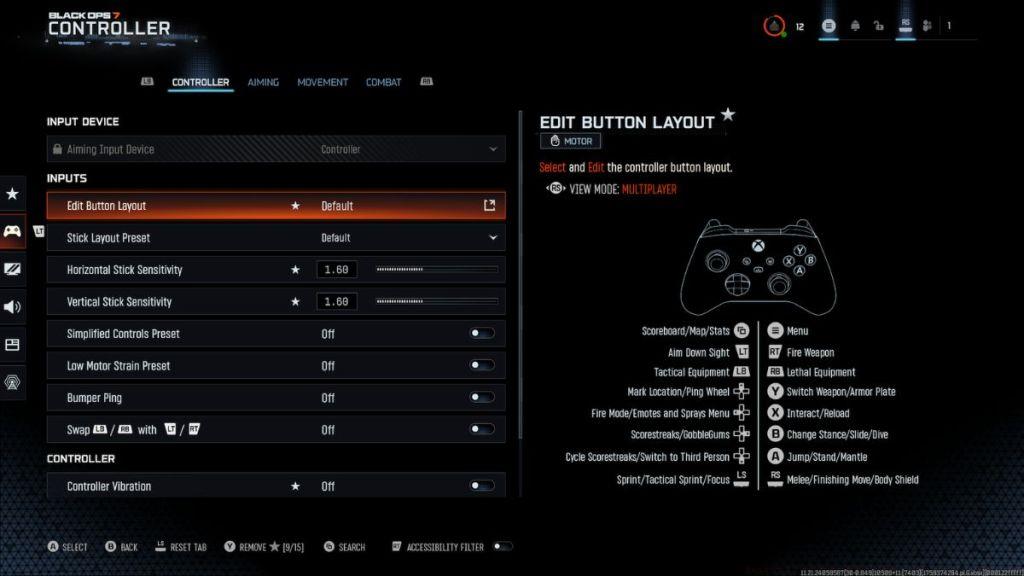
- Aiming Input Device: Controller
- Stick Layout Preset: Standard
- Horizontal Stick Sensitivity: 1.60
- Vertical Stick Sensitivity: 1.60
- Simplified Controls Preset: Off
- Low Motor Strain Preset: Off
- Bumper Ping: Off
- Swap L1/R1 or LB/RB with L2/R2 or LT/RT: Off
- Controller Vibration: Off
- Trigger Effect: Off
The 1.60 sensitivity setting provides exceptional balance between target acquisition speed and precision control. Disabling controller vibration eliminates distracting feedback during critical aiming moments, while turning off trigger effects ensures consistent input response. For players transitioning from previous Call of Duty titles, this configuration maintains muscle memory while accommodating Black Ops 7’s unique mechanics.
Best Black Ops 7 Deadzone Settings
- Left Stick Min: 0
- Left Stick Max: 99
- Right Stick Min: 3
- Right Stick Max: 99
- Left Trigger: 0
- Right Trigger: 0
Deadzone configuration critically impacts stick responsiveness. The right stick minimum deadzone of 3 prevents accidental aim drift without sacrificing precision. Left stick at 0 ensures immediate movement response, essential for the game’s fast-paced combat.
Best Black Ops 7 Aiming Settings
- Look Inversion: Standard
- Advanced Aiming Settings
- ADS Sensitivity Transition Timing: Gradual
- 3rd Person ADS Correction Type: Assist
- Aim Response Curve Type: Dynamic
- Target Aim Assist: On
Dynamic response curve delivers the ideal balance between linear precision and exponential acceleration for target tracking. Gradual ADS transition timing provides smoother scope engagement, reducing disorientation during rapid sight picture changes.
Best Movement Settings
- Sprint Assist: Tactical Sprint Assist
- Mantle Assist: Off
- Crouch Assist: Off
- Corner Slice: Off
- Wall Jump Assist: Off
- Active Roll Assist: Off
- Slide/Dive Behavior: Tap to Slide
- Automatic Airbone Mantle: On
- Sprint Restore: On
- Slide Maintains Sprint: On
- Wingsuit Activation: Manual
- Wall Jump Activation: Press
- Slide/Active Roll Behaviour: Tap to Slide
Movement configuration prioritizes player agency over automated assists. Disabling Wall Jump Assist ensures precise control over this game-changing mechanic, allowing advanced players to execute complex movement sequences. Tactical Sprint Assist provides slight directional correction during high-speed maneuvers without compromising intentional movement.
Pro Tip: Manual Wingsuit activation prevents accidental deployment during combat, while Tap to Slide behavior enables rapid evasion without dedicated button holds. These settings create a movement system that rewards skill expression through deliberate input execution.
Best FOV Setting for Call of Duty Black Ops 7
Field of View (FOV) determines your peripheral vision capacity within the game world. Elevated FOV settings create a wider perspective, revealing flanking threats and environmental context that narrower views conceal. However, extremely high FOV values can introduce visual distortion and make distant targets appear smaller.
Conversely, reduced FOV settings concentrate visual focus on immediate engagements, potentially improving close-quarters target acquisition at the expense of situational awareness. The optimal setting balances these competing priorities based on playstyle and display characteristics.
- Field of View: 105
- ADS Field of View: Affected
- Weapon Field of View: Wide
- 3rd Person Field of View: 100
- Vehicle Field of View: Default
The 105 FOV recommendation maximizes peripheral intelligence while maintaining target visibility. Affected ADS setting maintains FOV consistency during aiming, while Wide weapon view provides better visual context during ADS. For comprehensive gameplay optimization, consult our Complete Guide for advanced tactical configurations.
Advanced Optimization Strategies: Gradually increase sensitivity by 0.10 increments once comfortable with 1.60. Monitor your accuracy statistics in combat records to validate improvements. Consider adjusting deadzones if experiencing stick drift or unresponsive inputs.
Common Configuration Errors: Many players mistakenly enable multiple movement assists, creating unpredictable character behavior during intense firefights. Another frequent mistake involves setting FOV beyond 110, which severely compromises mid-to-long range engagement effectiveness.
Practice Regimen: Dedicate 15-20 minutes in private matches practicing Wall Jump trajectories before competitive sessions. This muscle memory development separates elite players from average performers. For weapon-specific optimizations, explore our Weapons Unlock guide for optimal loadout configurations.
Remember that these settings serve as foundational recommendations. Individual adaptation based on playstyle, controller model, and display size will further refine performance. Like proper Class Guide selection, controller configuration requires personal refinement through consistent practice and performance analysis.
Action Checklist
- Configure sensitivity to 1.60 horizontal/vertical with Dynamic response curve
- Set deadzones to 0/99 (left) and 3/99 (right) for optimal stick response
- Disable all vibration, trigger effects, and non-essential movement assists
- Adjust FOV to 105 with Affected ADS and Wide weapon view settings
- Practice Wall Jump mechanics in private matches for 15-20 minutes
- Gradually adjust sensitivity in 0.10 increments based on performance metrics
No reproduction without permission:Tsp Game Club » Best Call of Duty Black Ops 7 Controller Settings Master Black Ops 7 controller settings and FOV optimization for competitive multiplayer dominance