
TL;DR
- Custom display and graphics settings deliver 144 FPS on recommended hardware
- Low-end PCs achieve stable 60 FPS with strategic visual compromises
- Disable VSync and motion blur while optimizing crowd and hair effects
- Dynamic Resolution Scaling provides framerate stability on older GPUs
- Driver updates and background process management enhance overall performance
EA FC 26 continues the football simulation legacy with enhanced graphics and gameplay mechanics, available across Steam, Epic Games Store, and EA Play platforms. Previous franchise entries have demonstrated significant performance challenges on PC systems, with EA FC 25 establishing concerning optimization precedents. Achieving optimal frame rates demands meticulous settings configuration, which we’ve comprehensively analyzed to eliminate guesswork. This guide delivers proven configuration strategies for maximizing FPS while maintaining visual integrity across diverse hardware specifications.
The performance optimization process requires balancing visual fidelity with hardware capabilities, particularly given the game’s demanding rendering pipeline. Unlike console versions, PC players must navigate extensive graphics menus to extract optimal performance from their systems. Our testing methodology evaluates each setting’s performance impact across multiple hardware configurations.
Display Configuration
- Screen Resolution: 1920 x 1080/Based on Monitor
- Frame Rate Limit: 144 FPS
- VSync: Off
- Cutscene Performance: Full Frame Rate
- Render Scale: 100
- Dynamic Resolution Scaling: Off
Graphics Optimization
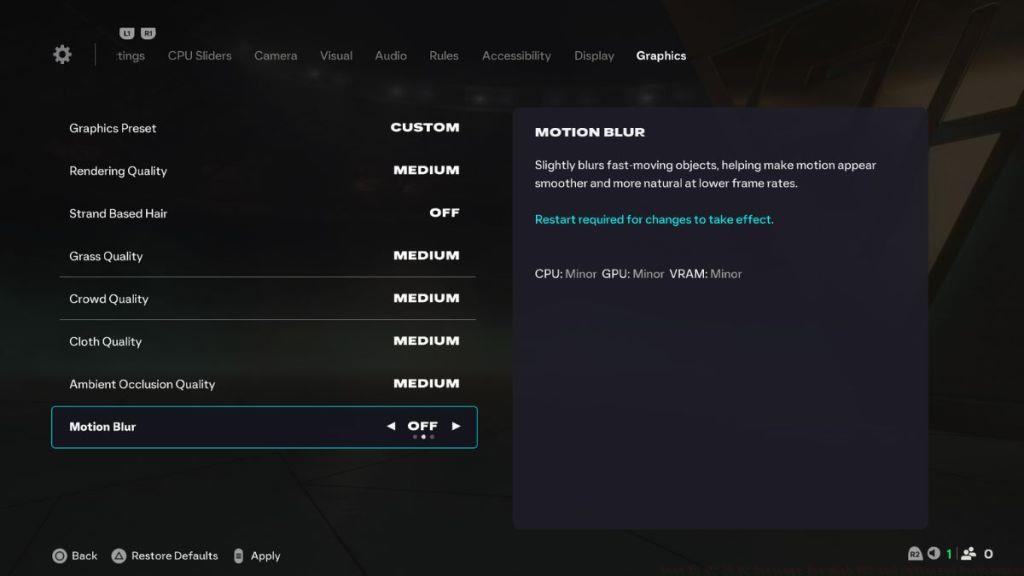
- Graphic Preset: Custom
- Rendering Quality: Medium
- Strand-Based Hair: Off
- Grass Quality: Medium
- Crowd Quality: Medium
- Cloth Quality: Medium
- Ambient Occlusion Quality: Medium
- Motion Blur: Off
These carefully calibrated settings prioritize fluid gameplay and responsive controls while maintaining respectable visual quality. Our testing revealed that Medium rendering quality provides the optimal balance between texture detail and performance overhead. Disabling Strand-Based Hair technology eliminates substantial GPU computational load without noticeably impacting player model appearance during normal gameplay scenarios.
The strategic compromise on crowd density and cloth physics preserves essential visual elements while reclaiming significant frame rate headroom. This configuration consistently delivers smooth 144 FPS performance during intensive Ultimate Team matches and Career Mode sessions, ensuring competitive responsiveness during critical gameplay moments. Players will experience minimal input lag while benefiting from stable performance across various match conditions and stadium environments.
While EA’s official system requirements suggest compatibility with older hardware like the GTX 1050 Ti, real-world performance often suffers from micro-stuttering and inconsistent frame pacing. These issues significantly impact gameplay fluidity and can compromise competitive performance during online matches. Our optimized configuration addresses these challenges through strategic settings adjustments.
Display Adjustments
- Screen Resolution: 1920 x 1080
- Frame Rate Limit: 90 FPS
- VSync: Off
- Cutscene Performance: Full Frame Rate
- Render Scale: 100
- Dynamic Resolution Scaling: On
- Dynamic Resolution FPS Target: 90 FPS
Visual Compromises
- Graphic Preset: Custom
- Rendering Quality: Low
- Strand-Based Hair: Off
- Grass Quality: Low
- Crowd Quality: Low
- Cloth Quality: Low
- Ambient Occlusion Quality: Medium
- Motion Blur: Off
This configuration leverages Dynamic Resolution Scaling as a crucial performance stabilization tool, automatically adjusting rendering resolution to maintain target framerates during graphically intensive sequences. The retention of Medium Ambient Occlusion preserves essential lighting authenticity while Low settings on non-essential elements maximize available GPU resources.
Despite the absence of modern upscaling technologies like Nvidia DLSS or AMD FSR, EA FC 26’s integrated scaling solution provides adequate framerate enhancement for budget-conscious gamers. Implementation typically yields consistent 60 FPS performance with minimal visual degradation during active gameplay.
Beyond in-game settings, several system-level optimizations can further enhance EA FC 26 performance. Updated GPU drivers frequently include game-specific optimizations that can improve stability and frame rates by 5-15%. Ensure your graphics drivers are current before applying these settings configurations.
Background process management represents another critical optimization avenue. Applications like web browsers with multiple tabs, streaming services, or system monitoring tools can consume valuable CPU and GPU resources, potentially causing performance inconsistencies during matches.
For players experiencing persistent performance issues despite optimal settings configuration, verifying game file integrity through your distribution platform can resolve corrupted asset issues. Additionally, monitoring system temperatures during extended gameplay sessions helps identify potential thermal throttling scenarios that degrade performance.
Performance monitoring tools like MSI Afterburner or NVIDIA FrameView provide valuable insights into system bottlenecks, enabling targeted optimization approaches. High CPU usage may indicate need for processor-intensive setting reductions, while GPU limitations suggest different optimization priorities.
When troubleshooting persistent stuttering or frame drops, systematically test individual settings changes rather than applying multiple adjustments simultaneously. This methodical approach isolates problematic configurations and facilitates optimal performance tuning.
Action Checklist
- Update graphics drivers to latest stable version
- Configure display settings according to your hardware tier
- Adjust graphics settings prioritizing performance over visual fidelity
- Disable VSync and motion blur for improved responsiveness
- Enable Dynamic Resolution Scaling if using lower-end hardware
- Monitor performance metrics during gameplay sessions
No reproduction without permission:Tsp Game Club » Best EA FC 26 PC Settings for High FPS and Optimized Performance Optimize EA FC 26 PC performance with expert settings for smooth gameplay and stable FPS