
TL;DR
- Use native resolution with 100% scaling for optimal visual clarity without performance penalty
- Enable Screen Space Reflections and set Effects Quality to Ultra for maximum visual impact
- Lower View Distance Quality first when optimizing for low-end systems to maintain framerate
- Disable unnecessary background applications and update GPU drivers for consistent performance
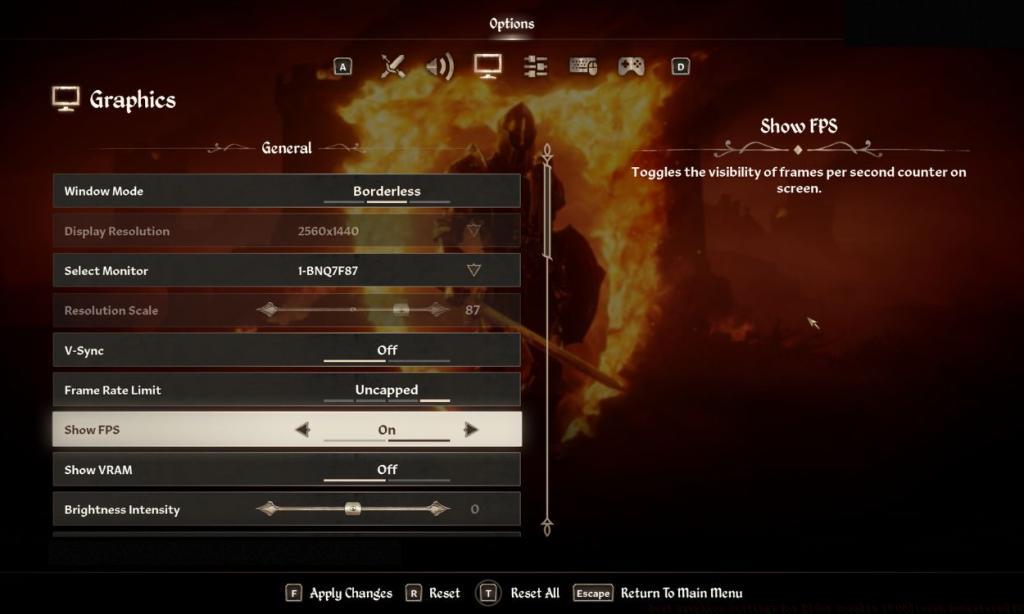
- Monitor VRAM usage to prevent stuttering and adjust settings accordingly
The Elder Scrolls IV: Oblivion Remastered represents a monumental visual transformation of the classic 2006 RPG, leveraging Unreal Engine 5’s cutting-edge rendering capabilities. This comprehensive remaster introduces entirely new asset libraries, enhanced character models, and completely rebuilt environmental textures that dramatically surpass the original’s visual fidelity. However, similar to many recent UE5 titles, achieving stable performance on PC platforms presents significant challenges that can disrupt your immersion in Cyrodiil’s breathtaking landscapes. Many players encounter frustrating frame rate drops and micro-stuttering, particularly during intensive combat sequences or when exploring dense urban areas. Our detailed optimization guide provides proven configuration strategies to eliminate these performance issues while preserving the game’s stunning graphical enhancements.
Understanding the technical demands of modern game engines is crucial for optimal performance tuning. Unreal Engine 5’s Nanite virtualized geometry and Lumen global illumination systems, while visually spectacular, impose substantial computational loads that require careful balancing between visual quality and hardware capabilities. This guide addresses both mainstream and budget system configurations to ensure every player can enjoy a smooth gaming experience.
For gaming systems meeting or exceeding Oblivion Remastered’s recommended specifications, these carefully calibrated settings deliver the perfect equilibrium between breathtaking visual quality and consistently high frame rates:
- Display Resolution: Native monitor resolution ensures maximum sharpness without unnecessary upscaling artifacts
- Resolution Scale: Maintain at 100% to preserve native rendering quality while avoiding performance degradation
- Frame Rate Limit: Uncapped allows your hardware to deliver maximum performance, though consider enabling V-Sync if screen tearing occurs
- Field of View First Person/Third Person: Adjust according to personal comfort, but note that wider FOV values marginally increase rendering load
- Screen Space Reflections: Enabled significantly enhances water and metallic surface realism with moderate performance impact
- Quality Level: Custom configuration provides granular control over individual settings for precise optimization
- View Distance Quality: High setting maintains distant object visibility while balancing GPU memory utilization
- Effects Quality: Ultra ensures spell effects, particle systems, and environmental interactions render at their highest possible quality
These settings prioritize visual elements that most significantly impact perceived graphical quality while minimizing unnecessary performance overhead. Screen Space Reflections, while computationally expensive, contribute substantially to environmental immersion, particularly in Oblivion’s numerous water-rich regions and dungeon environments with reflective surfaces. The Custom Quality Level selection is particularly important as it enables fine-tuned adjustments that can resolve specific performance bottlenecks unique to your hardware configuration.
For players seeking comprehensive gaming optimization knowledge, our Complete Guide to performance tuning provides additional cross-platform configuration strategies that complement these Oblivion-specific recommendations.
Gamers operating hardware below Oblivion Remastered’s recommended specifications require strategic compromises to achieve playable frame rates. The most effective approach involves identifying settings with the highest performance cost relative to their visual benefit and systematically adjusting them based on your specific performance targets.
Priority Adjustments for Maximum Performance Gains:
- View Distance Quality: Reduce to Medium – this significantly decreases GPU and CPU load with minimal impact on gameplay experience
- Screen Space Reflections: Disable – while visually impressive, this feature carries substantial rendering overhead
- Effects Quality: Lower to High – maintains visual fidelity while improving performance during spell-heavy encounters
- Resolution Scale: Consider 90-95% – provides noticeable performance improvement with minimal perceived quality reduction
- Shadow Quality: Set to Medium – shadows represent one of the most computationally expensive rendering features
- Texture Quality: Adjust based on available VRAM – insufficient video memory causes severe stuttering
Low-end optimization requires understanding the relationship between different graphical settings and their cumulative performance impact. A common mistake involves reducing multiple settings marginally rather than making strategic, targeted adjustments to the most performance-intensive options. By focusing on View Distance and Reflections first, most systems can achieve 60+ FPS without sacrificing core visual quality. Monitoring VRAM usage through utilities like GPU-Z ensures you don’t exceed available memory, which causes the most severe performance degradation through texture streaming issues.
These optimization principles apply broadly across modern gaming titles. For additional performance tuning strategies specific to different game genres, explore our Weapons Unlock guide which includes performance considerations for various gameplay scenarios.
Beyond in-game settings, several system-level optimizations can dramatically improve Oblivion Remastered’s performance consistency. Begin by ensuring your GPU drivers are updated to the latest stable version, as game-ready drivers often include specific optimizations for new releases. For NVIDIA users, the GeForce Experience optimization utility provides automated setting configurations based on your specific hardware.
System-Level Optimization Checklist:
- Close background applications, particularly web browsers and streaming software, to free up CPU and memory resources
- Enable Game Mode in Windows settings to prioritize system resources for gaming applications
- Monitor thermals using HWInfo or similar utilities – thermal throttling significantly impacts sustained performance
- Consider using specialized gaming optimization software that can manage system resources more effectively during gameplay sessions
For systems with adequate RAM (16GB+), increasing the game’s process priority through Task Manager can minimize background interference. Additionally, disabling fullscreen optimizations in the game’s executable properties may resolve specific fullscreen performance issues on Windows 10 and 11 systems.
Understanding how different hardware components impact gaming performance is essential for effective optimization. Our Class Guide provides insights into how system configuration affects gameplay across various titles, complementing the technical knowledge gained through Oblivion Remastered optimization.
Advanced users should experiment with driver-level settings such as NVIDIA Control Panel or AMD Adrenalin optimizations. These can provide additional performance gains beyond what’s achievable through in-game options alone, particularly for systems operating at the threshold of recommended specifications.
Action Checklist
- Set display resolution to native and resolution scale to 100% for optimal clarity
- Configure Screen Space Reflections and Effects Quality based on your performance targets
- Adjust View Distance Quality first when optimizing for low-end systems
- Update GPU drivers and close background applications before launching the game
- Monitor VRAM usage and thermals to identify potential performance bottlenecks
No reproduction without permission:Tsp Game Club » Best Graphics Settings for Elder Scrolls IV Oblivion Remastered PC Optimize Oblivion Remastered performance with expert PC settings for smooth gameplay and stunning visuals