
TL;DR
- Master Volume at 80% with Effects at 100% maximizes critical combat audio cues
- Disable music volumes (0%) to eliminate distractions from footsteps and enemy movements
- PS5 Audio Focus provides console-specific enhancement for superior spatial awareness
- Enhanced Headphone Mode should remain off for most competitive audio setups
- Regular audio testing in different Warzone environments ensures optimal performance
Audio precision in Warzone transforms gameplay from reactive to proactive, giving you the tactical edge needed for victory. Unlike visual cues that have limited range, sound provides 360-degree situational awareness that alerts you to threats beyond your field of view. Critical audio indicators include enemy footsteps, weapon reloads, parachute deployments, and the distinctive self-revive sound cue that can mean the difference between winning and losing a gunfight.
Many players underestimate how audio settings affect their performance until they experience the dramatic improvement of properly configured sound. The common complaint about Warzone’s audio being inconsistent often stems from suboptimal default settings rather than game engine limitations. Professional players consistently emphasize that audio configuration deserves as much attention as sensitivity settings and controller layout optimization.
Different audio setups require tailored approaches—stereo headphones benefit from different configurations than surround sound systems or gaming speakers. Understanding these nuances helps you extract maximum performance from your specific hardware setup. For comprehensive gaming optimization, our Battlefield 6 Complete Guide offers additional competitive settings strategies.
Navigating to Warzone’s audio configuration requires just a few simple steps, but knowing the quickest path saves valuable pre-game preparation time. Begin by launching Call of Duty: Warzone and accessing the main menu interface where settings adjustments are made.
Once inside the audio settings panel, you’ll discover multiple categories that can be fine-tuned to match your auditory preferences and hardware capabilities. The interface is intuitively designed, allowing both new and experienced players to make precise adjustments efficiently.
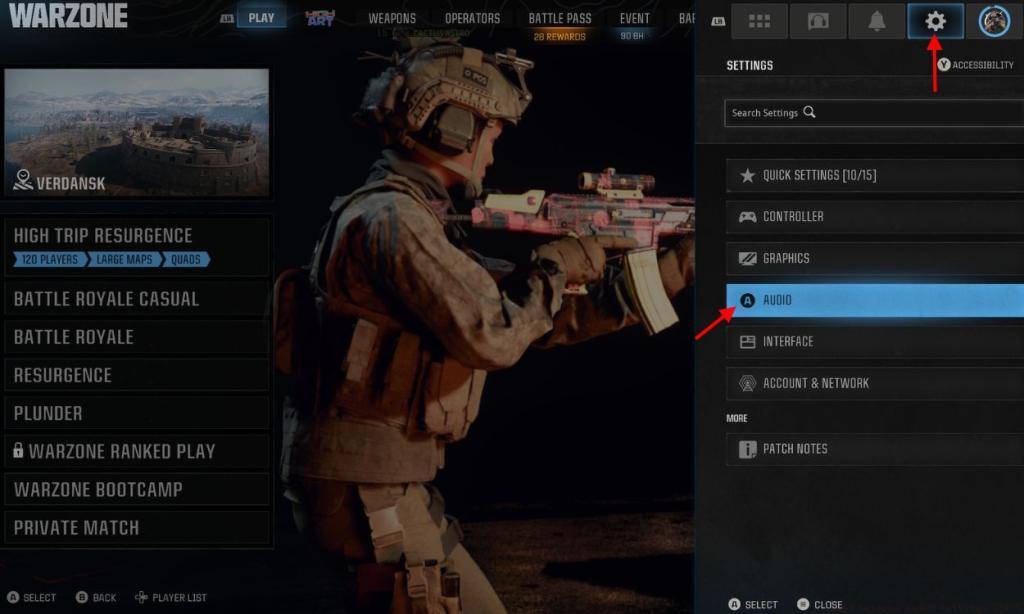
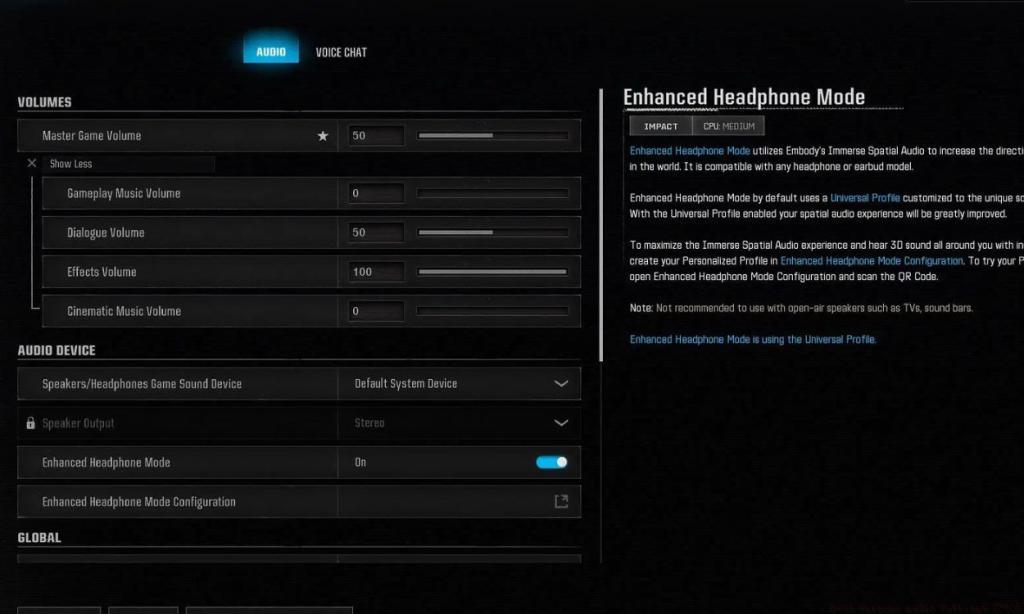
The following audio configuration prioritizes critical gameplay sounds while minimizing distracting elements that don’t contribute to situational awareness. These settings have been tested across multiple audio setups and represent the consensus among top-ranked Warzone competitors for maximizing auditory intelligence.
- Gameplay Music Volume: 0
- Dialogue Volume: 50
- Effects Volume: 100
- Cinematic Music Volume: 0
This configuration strategy emphasizes weapon effects, footsteps, and environmental interactions while eliminating musical elements that can mask subtle audio cues. The 80% master volume provides sufficient headroom to hear quiet sounds without distortion at peak volumes. Setting effects to 100% ensures that critical combat audio like enemy movements and equipment usage remains clearly audible during intense firefights.
Dialogue volume at 50% maintains clear team communication and in-game character callouts without overwhelming more important sound indicators. For players seeking additional loadout optimization, our BF6 Weapons Unlock Guide covers audio considerations for different firearm categories.
A common mistake is maxing out master volume, which often causes audio compression and distortion that actually reduces your ability to pinpoint enemy locations. The balanced approach recommended here preserves audio clarity across Warzone’s diverse acoustic environments.
PlayStation 5 owners have access to a platform-specific audio feature called Audio Focus that can significantly enhance Warzone’s spatial sound capabilities. This proprietary technology optimizes audio processing specifically for competitive gaming scenarios where directional accuracy matters most.
To activate Audio Focus on your PS5, begin from the console’s main system settings menu rather than within the game itself. This external configuration works in tandem with Warzone’s internal audio settings to provide superior directional awareness.
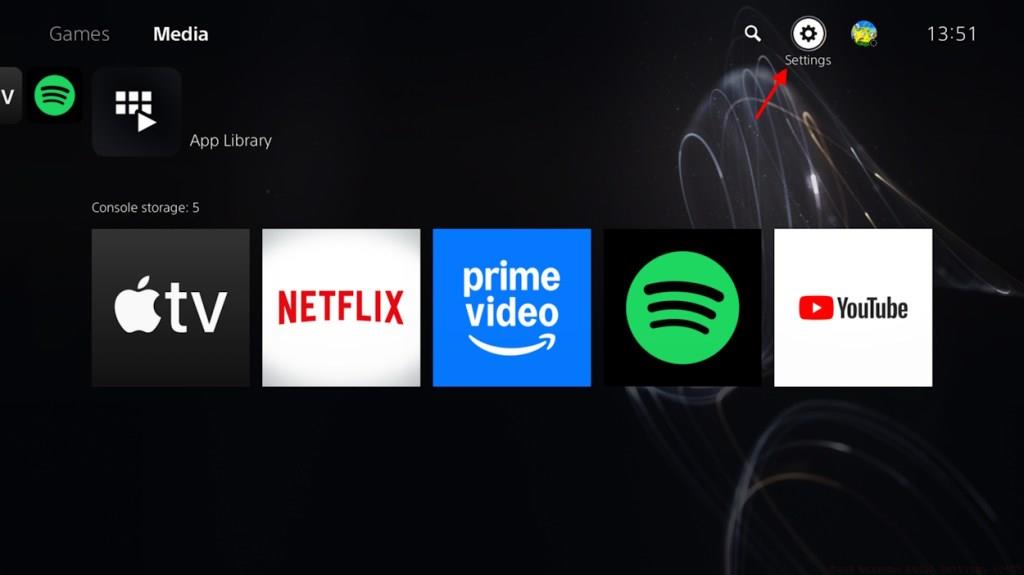
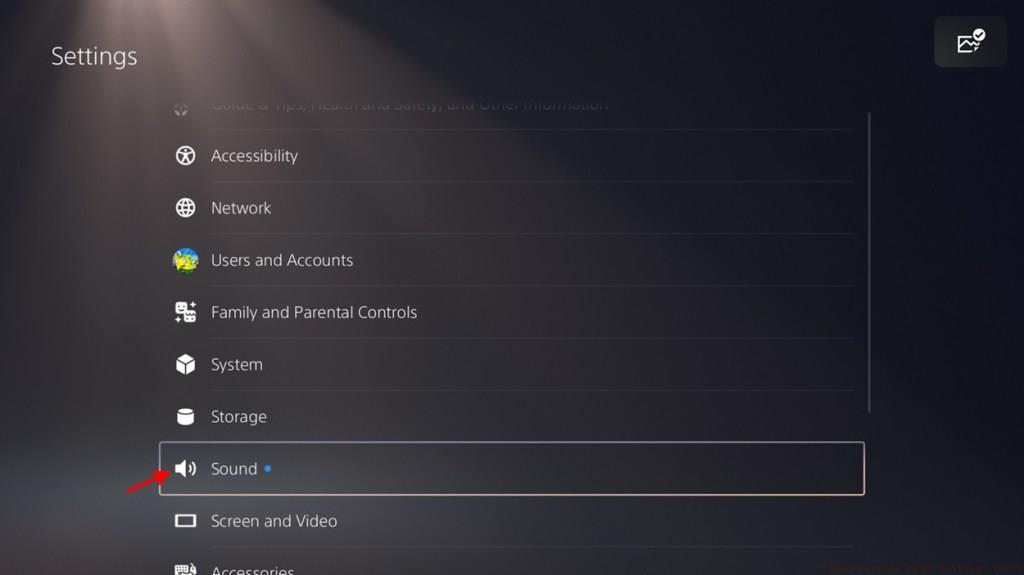
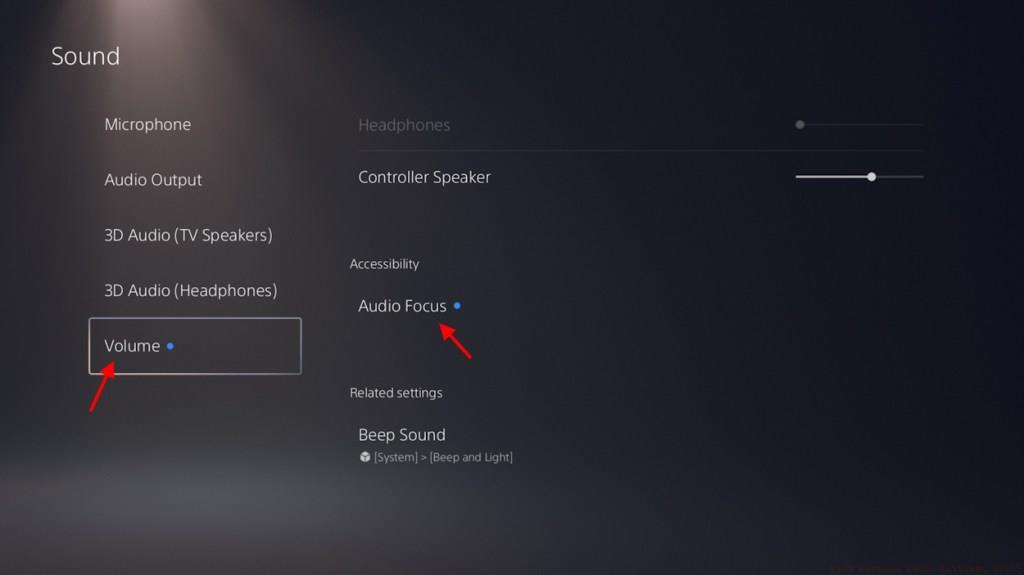
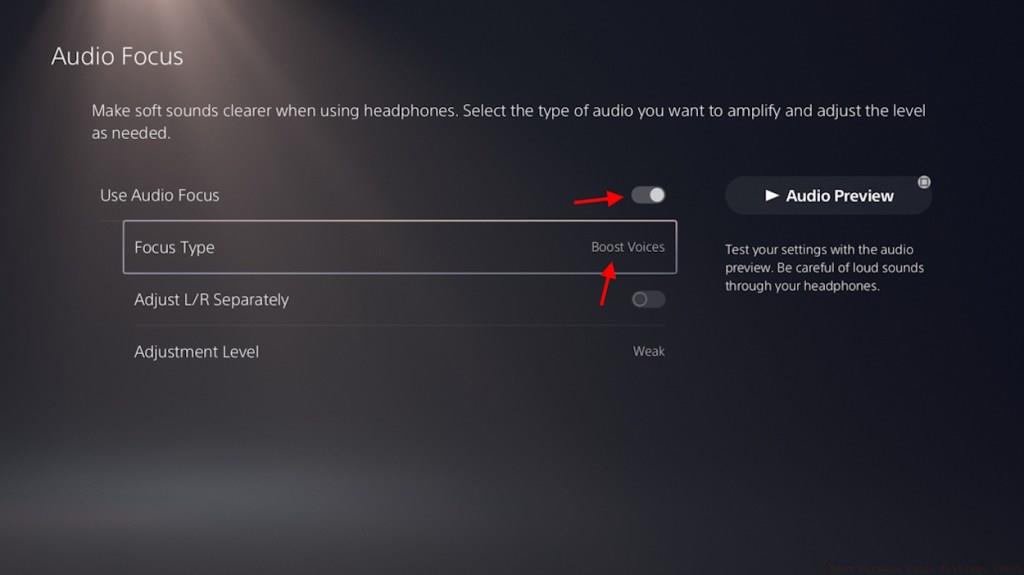
When properly configured, Audio Focus emphasizes mid-range frequencies where most combat sounds occur, providing clearer differentiation between foreground action and background ambiance. This PlayStation-exclusive feature represents one of the most significant console audio advantages available to Warzone players today.
Note that Audio Focus functions independently from Warzone’s internal Enhanced Headphone Mode, and using both simultaneously can create conflicting audio processing that degrades performance. For comprehensive class-based audio strategies, consult our BF6 Class Selection Guide for role-specific sound optimization techniques.
Beyond basic configuration, advanced audio techniques can further enhance your Warzone performance. Periodically test your settings in different environments—urban areas like Downtown require different audio attention than open spaces like Fields or quarry locations.
Different headphone models respond uniquely to Warzone’s audio engine. Open-back headphones typically provide superior soundstage and directional accuracy, while closed-back models offer better noise isolation for loud environments. Understanding your equipment’s characteristics helps fine-tune settings for optimal results.
Common audio issues include intermittent footstep detection, directional confusion, and volume spikes during explosions. These can often be resolved by ensuring your audio drivers are updated, checking for HDMI audio conflicts, and verifying that Windows Sonic or Dolby Atmos settings align with your Warzone configuration.
For competitive players, developing “audio literacy”—the ability to interpret subtle sound cues quickly—is as important as mechanical skill. Practice identifying specific sounds: the distinct audio signature of a sniper rifle bolt versus an assault rifle reload, or differentiating between enemy and friendly footstep patterns based on audio characteristics.
Remember that audio settings should complement your playstyle. Aggressive players might prioritize different sounds than tactical position-holders. Regular refinement based on your evolving gameplay approach ensures continuous audio optimization.
Action Checklist
- Navigate to Audio Settings via the settings cogwheel
- Configure Master Volume 80%, Effects 100%, Music volumes 0%
- Test settings in different Warzone environments (urban/rural)
- PS5 users: Enable Audio Focus in system settings
- Fine-tune based on headphone type and playstyle
No reproduction without permission:Tsp Game Club » Best Warzone Audio Settings (2025) Master Warzone audio settings to gain competitive advantage with enhanced footstep detection and spatial awareness