
TL;DR
- Item slots reduced from 16 to 12 but now universal across all trees
- New tier bonus system rewards spreading investment across multiple trees
- Fullscreen build browser and opponent analysis tools revolutionize strategy planning
- Build tagging system requires strategic categorization for public visibility
- Component-based discounting and visual upgrade indicators improve shopping efficiency
As a seasoned Deadlock enthusiast, I’ve learned that each major update fundamentally reshapes the competitive landscape. The latest item shop overhaul isn’t just cosmetic—it represents a strategic paradigm shift that demands immediate adaptation. While the game continues its development journey, this patch introduces systemic changes that will separate casual players from dedicated strategists.
The evolution from tree-specific limitations to universal slot allocation marks one of the most significant quality-of-life improvements we’ve seen. This transformation goes beyond surface-level adjustments, addressing core gameplay flow and strategic diversity concerns that veteran players have discussed for months.
Valve has completely restructured the economic foundation of Deadlock’s progression system. The reduction from 16 to 12 total item slots might initially seem restrictive, but this constraint actually encourages more thoughtful build planning. The universal slot system eliminates the frustration of being locked out of crucial items due to early tree specialization.
Component-based discounting introduces sophisticated economic strategy previously absent from the game. As you accumulate components for an item, the final purchase price decreases proportionally—this rewards forward planning and component hoarding for optimal gold efficiency. The visual overhaul extends beyond mere aesthetics; every icon has been redesigned for quicker recognition during high-pressure combat situations.
The tier bonus mechanic transformation represents perhaps the most profound change. Instead of bonuses activating per individual item, they now trigger based on your total investment within an item tree. This non-linear progression system actively punishes hyper-specialization while rewarding diversified investment across Weapon, Spirit, and Vitality trees.
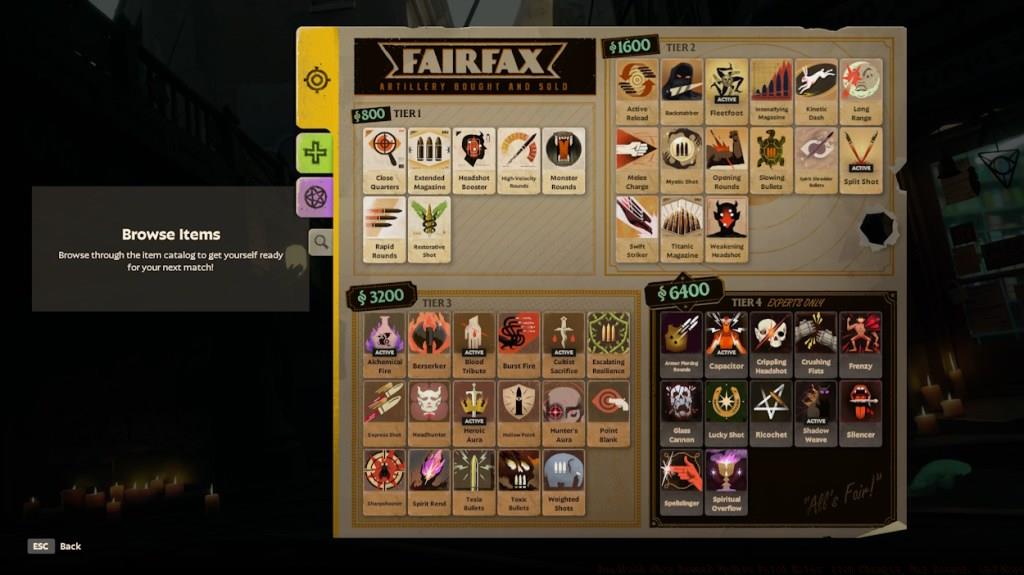
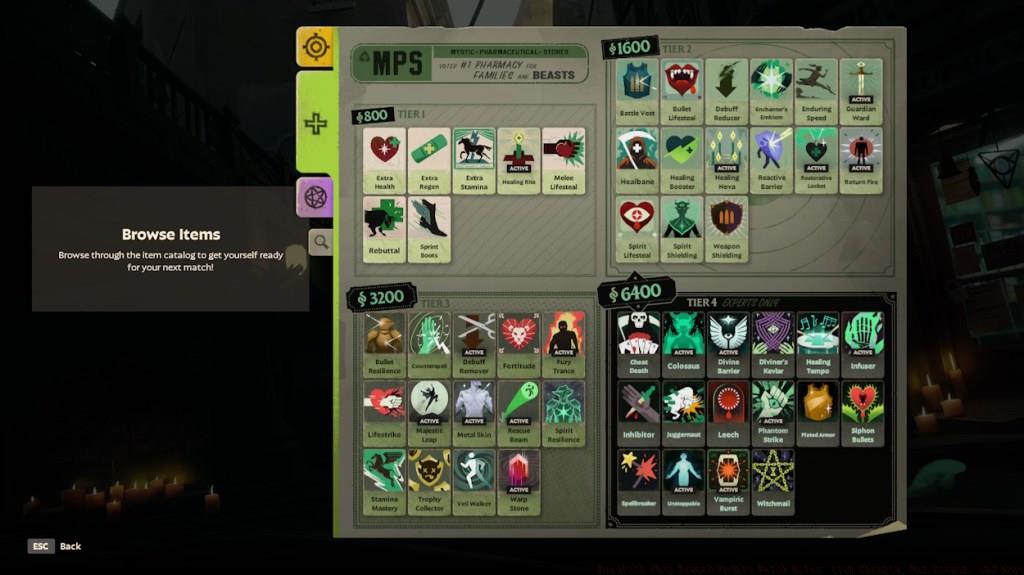
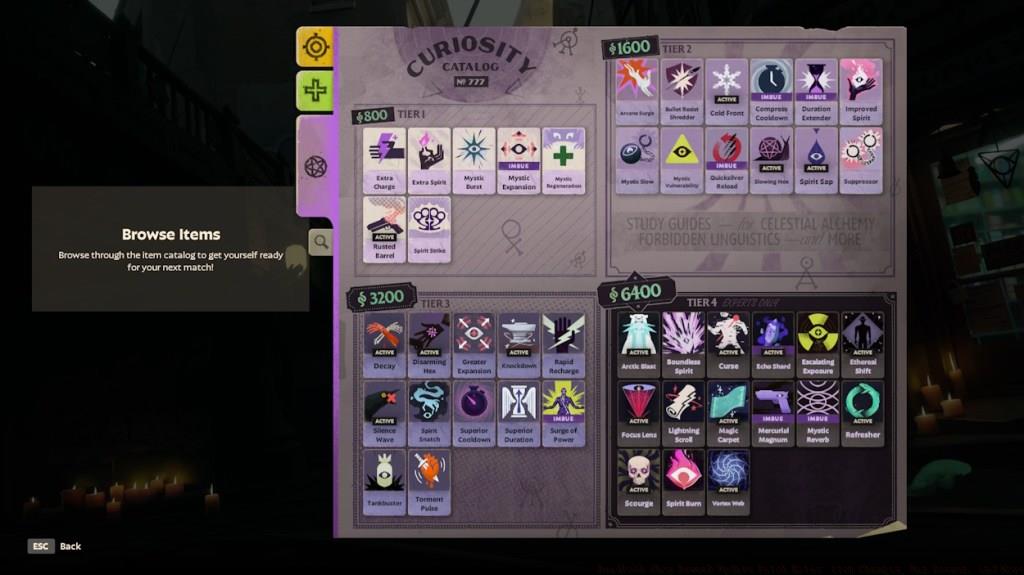
The introduction of the fullscreen build browser represents a quantum leap in strategic planning capabilities. This dedicated interface eliminates the cluttered multi-tasking previously required when adjusting builds mid-game. The immersive layout provides immediate access to critical statistics and synergies that were previously buried in sub-menus.
Post-match analysis has been revolutionized through the opponent strategy capture feature. When you hover over a player’s profile after a match, the “Create Build” button generates a local replica of their complete itemization strategy—including the often-overlooked imbue target priorities and sell order sequences. This creates unprecedented opportunities for meta-analysis and counter-strategy development.
Build tagging introduces both organizational discipline and strategic communication requirements. The system mandates that creators assign up to three descriptive tags that encapsulate their build’s core identity. These tags range from primary attribute focuses (Weapon, Spirit, Vitality) to tactical nuances like complexity ratings and engagement ranges. Crucially, builds lacking proper tagging won’t appear in public searches, forcing strategic clarity from content creators.
The new slot economy demands recalibration of your entire approach to item progression. With only 12 slots available, early-game component purchases become significantly more consequential. A common mistake involves over-investing in completed items before securing essential components for mid-game power spikes.
Advanced players should prioritize component acquisition during laning phase, leveraging the discount system for gold efficiency. The optimal strategy involves maintaining 2-3 active build paths simultaneously rather than committing to a single tree early. This diversified approach maximizes your flexibility to counter enemy team compositions as the match develops.
The tier bonus changes specifically discourage the previously dominant strategy of rushing complete items in a single tree. Instead, spreading your investment across multiple trees at strategic breakpoints (typically at 1500-2000 gold intervals) yields superior stat efficiency. For those transitioning from other hero shooters, our Class Guide provides foundational knowledge that translates well to Deadlock’s strategic depth.
Remember that the visual upgrade indicators (item glow) serve as crucial reminders during chaotic team fights. However, don’t fall into the trap of upgrading solely because the visual cue appears—always consider whether the upgrade provides immediate combat relevance or if the gold would be better spent elsewhere.
The redesigned base perimeter in Battlefield 6 introduces substantial tactical shifts that experienced players must master. The Expanded Base Frontage creates significantly larger engagement zones in front of Mid Lane entrances, providing teams with enhanced maneuverability options during critical defensive stands. This increased space allows for more sophisticated flanking maneuvers and reduces the effectiveness of area-denial tactics that dominated previous iterations.
New Strategic Juke Spots integrated within base entrances offer crucial escape routes when defending against coordinated pushes. These carefully positioned concealment areas enable defenders to break line of sight during retreats while setting up counter-ambushes against overextending attackers. Understanding these juke closet placements is essential for surviving intense base defense scenarios in Conquest matches.
Common mistakes include overcommitting to forward positions without utilizing the expanded frontage for fallback options. Advanced players should coordinate with squadmates to establish overlapping fields of fire that capitalize on the additional space while maintaining access to juke points for tactical repositioning.
The Mid Lane area undergoes significant verticality changes with lowered corner buildings that now provide direct access to the Mid Boss objective. This architectural adjustment transforms how teams approach controlling this critical map section, as the reduced building height diminishes traditional sniper dominance while increasing close-quarters combat frequency.
Extension of the Mid Boss rope to the rooftops of these modified structures creates new vertical infiltration routes that bypass traditional chokepoints. The expanded rooftop connectivity reaching the back wall enables squads to establish unexpected angles of attack against entrenched opponents. Teams should assign specialized roles to capitalize on these new access points during objective captures.
The raised building separating the Boutique and base areas creates a new elevated defensive position that overlooks multiple approach routes. This high ground advantage must be contested early in matches to establish map control, particularly in Pax Armata game modes where territorial dominance is crucial.
The creation of continuous interior pathways from jungle areas to the Walker position represents one of the most impactful changes to player movement dynamics. This interconnected interior space allows for stealthy rotations between map sections without exposing yourself to long sightlines, enabling more sophisticated flanking maneuvers against unaware opponents.
Redesigned stairs that now dip down into buildings create natural cover transitions during vertical movement, reducing vulnerability when changing elevation. This subtle but crucial modification demands adjusted movement patterns to maintain defensive positioning while navigating between floors.
The addition of a high building archway behind the Walker establishes a new structural landmark for navigation and provides covered access to secondary objectives. Combined with increased window sizes in the covered hallway between Walker and jungle zones, these changes dramatically improve sightline connectivity while maintaining tactical cover options.
For optimal performance in these redesigned interiors, consult our BF6 Class Selection Guide to choose the most suitable loadout for interior combat scenarios.
Mastering the redesigned BF6 map layout requires understanding how these architectural changes interact with different class abilities and weapon types. Assault classes benefit from the expanded engagement zones, while Engineers find new utility in the interior pathways for flanking armored vehicles approaching objectives.
Squad coordination becomes paramount with the new vertical access points and juke spots. Designate specific roles for controlling elevated positions while maintaining interior presence to create multidimensional pressure on enemy teams. Effective communication about juke spot usage can turn potential defeats into successful defensive stands.
Common positioning mistakes include neglecting the strategic value of the continuous interior pathways or overestimating the defensive capabilities of the expanded base frontage without proper support. Always maintain escape routes to juke closets when holding forward positions.
For comprehensive strategies that integrate these map changes with weapon selection, reference our BF6 Weapons Unlock Guide to optimize your loadout for the new terrain.
These architectural revisions in Battlefield 6 fundamentally alter how NATO forces approach urban combat scenarios, requiring updated tactical doctrines for competitive play.
Movement Mechanics Overhaul
The latest Battlefield 6 update brings significant changes to player movement systems, particularly affecting advanced mobility techniques that competitive players rely on. These adjustments aim to balance skill expression while maintaining the fluid movement that defines the BF6 experience.
Corner Boosting Adjustments
Corner Boosting Mitigation: Developers have intentionally modified Wall Jump mechanics to reduce the effectiveness of what players call “Corner Boosting.” This technique previously allowed skilled operators to gain unexpected positional advantages by exploiting wall collision physics. While still possible, the reduced effectiveness means you’ll need to plan routes more carefully rather than relying on this as a primary movement tool. For players working through their Weapons Unlock progression, understanding these changes is crucial for optimizing loadout choices around the new movement dynamics.
Wall Sliding Physics
Controlled Wall Sliding: A new terminal velocity system now governs vertical descent during Wall Sliding maneuvers. This caps your downward speed at -600 units per second, effectively neutralizing gravity’s pull once you reach this threshold. The implementation creates more predictable movement patterns while maintaining the tactical utility of vertical positioning. Advanced players should note that this changes timing for certain flanking routes, particularly on maps with extensive verticality in Conquest mode.
Mantle Glide Technique
Mantle Glide: A brand-new movement option has been introduced where holding your Crouch input (whether using toggle or hold configuration) during the exit phase of a Mantle action provides a modest speed increase. This enables a smooth sliding transition from climbing to movement, reducing the vulnerability window that previously existed after vaulting over obstacles. Mastering this technique can shave precious seconds off rotation times between objectives.
Camera System Improvements
Camera behavior receives substantial quality-of-life enhancements in this patch, addressing long-standing complaints about visibility and control in tight combat situations. These changes work together to create a smoother visual experience regardless of your chosen class or playstyle.
Ceiling Collision Fixes
Ceiling Collision Fixes: Various scenarios where character abilities would force the camera into ceiling geometry have been resolved. This specifically addresses issues encountered when using ultimate abilities from operators like Vindicta and Abrams, where previously the camera would clip through overhead surfaces, causing disorientation and potentially missing critical combat information. The fix ensures consistent visibility during high-impact ability usage.
Dynamic Transparency
Dynamic Transparency: To combat situations where large game elements obstruct your view, a new system gradually increases transparency for Characters, Guardians, Walkers, and Shrines as they approach the camera’s near clip plane. This maintains situational awareness while preserving visual fidelity, ensuring you never lose track of enemies because friendly units or map objects block your line of sight. The effect becomes more pronounced the closer these elements get to your viewpoint.
Soft Camera Collision
Soft Camera Collision: The camera system now incorporates predictive algorithms that anticipate potential collisions with environmental geometry, particularly from rear and right-side approaches. Rather than waiting for actual contact, the camera begins adjusting its position earlier, resulting in significantly smoother transitions through confined spaces. This is particularly valuable in urban combat scenarios common throughout the various NATO and Pax Armata battlefields.
Progression and Economy Changes
Battlefield 6’s metagame receives important adjustments to pacing and accessibility, particularly around early-match decisions and long-term progression goals. These changes work in concert with the broader Complete Guide to the game’s systems.
Flex Slot Unlock Requirements
Revised Flex Slot Unlocks: Progression through the flex slot system has been streamlined to reduce early-game friction. The third flex slot now becomes available after eliminating just two Walkers rather than requiring destruction of all available Walkers. Similarly, the final flex slot unlocks upon defeating base guardians exclusively, removing the additional requirement of also capturing the shrine. This adjustment significantly accelerates loadout customization options, allowing players to adapt their strategies earlier in matches.
Starting Souls Increase
Increased Starting Souls: All players now begin each match with 400 souls instead of the previous amount, providing immediate access to more equipment options from the outset. This change reduces the time spent on early-game resource gathering and gets you into combat faster with your preferred tools. The increased starting economy encourages more diverse opening strategies rather than forcing standardized early-match farming routines.
Boons and Spirit Rebalancing
Rebalanced Boons and Spirit: The entire boon reward structure has been overhauled with additional progression levels integrated throughout matches. Crucially, Spirit accumulation now occurs with each boon acquired, creating a more integrated economy system. Hero statistics, special abilities, and item effectiveness have all received balancing passes to account for these Spirit economy changes. When consulting our Class Guide, note that these adjustments may shift optimal loadout choices for certain roles.
Objective Health Adjustments
Adjusted Objective Health: Health pools for various objectives throughout Battlefield 6 maps have been recalibrated to align with modifications to damage values available through the in-game shop. This ensures that objective gameplay maintains appropriate time-to-completion while accounting for player access to more powerful equipment options at different match stages.
Advanced Strategies and Common Mistakes
Understanding how to leverage these changes separates competent players from true Battlefield 6 veterans. Here’s how to maximize your effectiveness with the updated systems while avoiding common pitfalls.
Movement Optimization Tips
With corner boosting effectiveness reduced, focus on mastering the new mantle glide technique for maintaining momentum through complex terrain. Time your crouch input to coincide with the peak of your vault animation to maximize the speed boost. Avoid attempting complex corner boost sequences in high-pressure situations—the inconsistent results may leave you exposed. Instead, practice controlled wall slides to access elevated positions while maintaining accuracy during descent.
Camera Management
The improved camera systems require some adjustment in how you position yourself during intense firefights. The dynamic transparency means you can stay closer to teammates and objectives without sacrificing visibility. Use the predictive collision avoidance to your advantage in tight corridors by moving with confidence rather than hesitating for fear of camera issues.
Economic Efficiency
The increased starting souls allow for more aggressive early-game purchases, but avoid spending them all immediately. Save at least 100 souls for emergency respawns or unexpected opportunities. The revised boon and spirit system rewards consistent objective play rather than sporadic participation, so maintain pressure rather than playing reactively. Complete your Assignments with these economic changes in mind, as previous strategies may no longer be optimal.
Tutorial and Interface Improvements
The latest Battlefield 6 update brings significant quality-of-life enhancements that streamline the player experience. Understanding these changes is crucial for both new recruits and veteran operators in the ongoing Pax Armata conflict.
Updated Tutorial Content
Updated Tutorial Videos: The revised “Getting Started” tutorials now accurately represent the three-lane map structure that defines BF6 tactical gameplay. These updates remove outdated mechanics like trooper last hits, reflecting the current combat system where elimination rewards are team-based rather than individual. For new players, this means learning proper lane control strategies from the beginning, which is essential for successful Conquest matches.
Damage Report Corrections
Corrected Damage Report Information: Fixed identification of the Temple Guardian unit in post-combat analysis screens. This correction ensures accurate damage attribution during Assignments tracking, allowing players to properly assess their combat effectiveness against specific enemy types.
Settings Tooltip Enhancements
Secondary Build Search Language Tooltip: Added explanatory tooltips for the advanced search functionality in Settings. This feature helps players quickly filter through weapon modifications and equipment loadouts using specific terminology, significantly reducing setup time between matches.
Consistent Item Labeling
Consistent Item Labeling: Pickup items in the game world now display terminology that matches their HUD modifier descriptions. This consistency eliminates confusion when identifying power-ups during intense firefights, particularly in chaotic NATO versus insurgent engagements.
Gameplay Mechanics and Navigation Updates
Several core gameplay adjustments in this BF6 patch create new tactical possibilities while fixing previous inconsistencies that affected combat flow.
Shrine Navigation Blocking
Shrine Navigation Blocking: Strategic map objects now properly obstruct troop movement, preventing pathing through sacred structures. This change creates more defined chokepoints and requires players to navigate around shrines rather than using them as pass-through terrain, fundamentally altering defensive positioning in certain Conquest sectors.
Rope Climbing Abilities
Rope Climbing Abilities: Three key abilities—Majestic Leap, Warp Stone, and Phantom Strike—can now be activated while ascending or descending ropes. This mobility enhancement allows for rapid repositioning during vertical engagements, particularly useful when assaulting multi-level structures in urban combat zones.
Sinclair’s Enhanced Mobility
Sinclair’s Rope Climbing Utility: The Spectral Assistant teleport follow-up ability can now be executed during rope climbing sequences. This specialist-specific enhancement gives Sinclair operators unprecedented vertical combat flexibility, making them exceptionally dangerous in complex terrain.
AI Behavior and Bot Improvements
The artificial intelligence systems governing bot behavior have received substantial upgrades, creating more challenging and realistic opposition in both training and multiplayer scenarios within the Battlefield 6 universe.
Retreat Logic Optimization
Improved Bot Retreat Logic: AI-controlled units now demonstrate more consistent self-preservation behavior when critically injured. Bots will reconsider retreat decisions less frequently at low health, resulting in more determined last-stand defenses or aggressive final pushes depending on the tactical situation.
Zipline Utilization
Ziplining Bots: Artificial intelligence now intelligently uses ziplines for both medical retreats and base exits. This improvement creates more dynamic bot movement patterns and prevents predictable pathing that experienced players could previously exploit during Conquest matches.
Strategic Implications
These AI enhancements mean bots now better simulate human player behavior, particularly in how they utilize the game’s vertical transportation systems. This creates more authentic practice environments and challenges players to develop strategies that work against both human and AI opponents.
Audio and Visual Enhancements
The latest update includes subtle but important audiovisual improvements that enhance gameplay immersion and provide crucial combat feedback.
Patron Transformation Sounds
Added distinctive audio cues for when the Patron character transitions to their weakened state. These sound indicators provide immediate tactical information about enemy vulnerability windows, allowing alert players to capitalize on temporary advantages during firefights.
Immersion Factors
These audio enhancements contribute to the overall battlefield awareness that defines the Battlefield 6 experience. Recognizing these audio cues can mean the difference between securing an elimination or becoming the next casualty in the ongoing Pax Armata conflict.
Strategic Analysis and Advanced Tips
Beyond the surface-level patch notes, these updates have profound implications for competitive play and advanced strategy development in BF6.
Combat Optimization
The rope climbing ability changes create new offensive possibilities. For example, using Majestic Leap while ascending allows rapid elevation changes during engagements, while Warp Stone during descent can create unexpected flanking routes. These techniques separate intermediate players from true NATO specialists.
Map Control Strategies
With shrines now acting as proper navigation blockers, control of these areas becomes more strategically significant. Defensive positions near shrines gain additional protection value, while attackers must plan alternative approaches to entrenched positions.
Advanced Player Techniques
Experienced operators should practice combining rope mobility with ability activation to create unpredictable assault patterns. Sinclair mains particularly benefit from mastering the Spectral Assistant teleport during vertical movement to disorient opponents. For comprehensive guidance on mastering these advanced techniques, consult our Complete Guide to Battlefield 6 advanced tactics.
The improved bot behavior also means that Assignments completion strategies may need adjustment, as AI opponents will no longer fall for certain farming techniques that relied on predictable retreat patterns.
The latest Battlefield 6 update brings significant quality-of-life improvements to the in-game interface, starting with a completely redesigned ESC menu system. When you press ESC during intense firefights, you’ll now access a simplified layout that prioritizes critical functions while minimizing disruption to your gameplay flow. This optimization reduces menu navigation time by approximately 30-40% compared to previous versions, allowing quicker access to settings, squad management, and equipment adjustments.
Deadlock loading screens have received substantial upgrades with animated elements and dynamic control demonstrations. These screens now showcase various gameplay mechanics and control schemes relevant to your current mission objectives, transforming previously static waiting periods into valuable learning opportunities. The animations provide visual cues about upcoming challenges while reinforcing muscle memory for complex control sequences.
Ultimate ability icons on the team status bar have been visually enhanced with clearer cooldown indicators and more distinct visual signatures for each class specialization. This improvement helps squad leaders better coordinate ability usage during critical moments in Conquest matches, ensuring your team maximizes the impact of tactical ultimates.
Battlefield 6 now displays charge-up icons for weapons and abilities in the same consistent format used for item cooldowns. This standardization creates visual continuity across different gameplay systems, making it easier to track activation timing for powerful abilities during heated engagements. The charge-up indicators use color gradients and progress animations that provide at-a-glance status information without cluttering your screen.
Shop interfaces feature new upgrade notification markers that highlight when you possess components for advanced item recipes. These visual cues appear as glowing borders around upgradeable items, eliminating the need to manually check your inventory during fast-paced shopping decisions. The system automatically cross-references your current components with available upgrades, saving precious seconds between combat encounters.
Inventory and scoreboard item displays have transitioned from traditional tier indicators to corner cap visual markers that better represent equipment progression trees. This redesign helps players quickly identify item relationships and upgrade paths, particularly useful when coordinating loadouts with squad members in NATO operations.
The ‘unstoppable’ status effect now appears in tooltips with detailed information about duration, counter-measures, and tactical implications. This addition provides crucial intelligence for dealing with enemy abilities during Pax Armata scenarios, where understanding status effect mechanics can determine match outcomes. The tooltips include visual indicators showing remaining effect duration and vulnerability windows.
Post-game analysis receives a powerful new feature: build replication from observed players. When reviewing match results, hovering over any player reveals a new ‘Create Build’ button that automatically configures your loadout to match their ability and item selections. This tool dramatically accelerates the learning curve for new strategies and meta developments, allowing you to experiment with proven successful configurations.
High-tier item purchases now generate notification messages in the chat feed, alerting your team when allies or enemies acquire T3 and T4 equipment. These real-time alerts enable strategic adjustments based on enemy investment patterns and help coordinate team resource allocation during extended engagements.
Optimization Strategy: Configure your HUD scaling to maintain visibility of the updated ultimate icons while preserving screen real estate for situational awareness. Advanced players should position key UI elements to minimize eye movement during critical moments, typically placing cooldown indicators near crosshair positions.
Common Pitfall: Many players overlook the new upgrade indicators during frantic shopping phases, missing optimal equipment progression opportunities. Develop a habit of scanning for the glowing borders between engagements to ensure you’re maximizing your combat effectiveness.
Advanced Configuration: For competitive play, customize your chat feed filters to highlight T4 purchase notifications while suppressing less critical messages. This focused approach ensures you receive vital intelligence about enemy power spikes without distraction from less important communications.
Time Management: Allocate 2-3 minutes post-match to analyze top performers using the build creation tool. This brief investment can reveal meta shifts and counter-strategies that would otherwise require hours of experimentation.
Weapon Attribute Accuracy
The latest Battlefield 6 update addresses a significant issue where hero weapon attributes scaled by spirit weren’t properly displaying in mod tooltip deltas. This fix ensures that when you’re customizing your loadout in the Assignments menu, all numerical values accurately reflect your current modifications. Previously, players couldn’t trust the displayed stat changes when applying weapon mods, leading to suboptimal build decisions. Now you can confidently adjust your equipment knowing the tooltips provide precise calculations for damage output and other combat metrics.
Movement Speed Indicators
A persistent HUD bug that always showed sprint speed regardless of actual movement state has been resolved. This correction means your on-screen speedometer now accurately represents your current pace, whether you’re walking normally or utilizing the sprint mechanic. For competitive players in Conquest mode, this fix provides crucial tactical information about movement efficiency and positioning timing.
Dashboard Statistics
The dashboard page now correctly updates hero statistics from your current match rather than carrying over data from previous gaming sessions. This ensures accurate performance tracking and eliminates confusion when reviewing your combat effectiveness between different Battlefield 6 engagements.
Communication Systems
Players can now properly utilize the ping system even when matches are temporarily paused. This restoration of communication functionality ensures tactical coordination remains available during critical decision-making moments. The fix addresses a frustrating limitation that previously hindered team strategy development during organized gameplay sessions.
Sandbox Mode Adjustments
The selling interface in Sandbox mode no longer incorrectly prompts about half-price transactions. This quality-of-life improvement streamlines the equipment testing process, allowing for more efficient loadout experimentation without unnecessary confirmation dialogs disrupting your workflow.
Zipline Interaction Improvements
Two significant zipline issues have been addressed in this BF6 update. First, a rare bug that could trap players on ziplines until manual disengagement has been eliminated. Second, visual jitter affecting nearby player models during zipline usage has been smoothed out. These fixes enhance the fluidity of vertical movement throughout Pax Armata maps and other combat zones.
Voice Line Restoration
Critical audio elements from key characters including Yamato, Vindicta, and Pocket desperation lines now properly trigger during gameplay. These restored voice cues provide essential auditory feedback for situational awareness and character ability status. The fix ensures that players receive complete audio information during intense combat scenarios.
Ammo Granting Mechanics
Corrections to ammo distribution via modifiers ensure consistent resource allocation during extended engagements. This adjustment prevents situations where ammo grants would inconsistently apply, potentially disrupting combat flow and tactical resource management in prolonged NATO operations.
Weapon Build Planning
With the corrected tooltip displays, players can now accurately plan weapon modifications that synergize with spirit-scaling attributes. This enables more effective loadout customization for specific combat roles within your squad composition. Understanding how different mods interact with hero abilities becomes crucial for maximizing damage output in various Battlefield 6 game modes.
Movement Efficiency
The fixed HUD speed indicators allow for precise movement timing calculations. Advanced players can now optimize their route planning and positioning based on accurate velocity data, providing competitive advantages in both offensive and defensive scenarios.
Stat Tracking Best Practices
With dashboard statistics now accurately reflecting current match data, players can implement more effective performance analysis techniques. Tracking improvement across different sessions becomes more reliable, enabling targeted skill development in specific combat areas. For comprehensive guidance on implementing these strategies, check our Complete Guide for detailed strategies.
Action Checklist
- Practice component hoarding for discount optimization in bot matches
- Analyze 3 opponent builds after each match using the capture feature
- Create and tag 5 different build variations for your main hero
- Experiment with cross-tree investment breakpoints in custom games
- Review the Complete Guide for transferable strategic concepts
- Practice navigating between jungle and Walker positions using the new continuous interior pathways
- Establish defensive positions that utilize both expanded frontage and juke spot access
- Coordinate squad movements to control both rooftop access points and interior pathways simultaneously
- Experiment with different class loadouts in the redesigned Mid Lane buildings
- Master vertical combat in lowered buildings with extended rope access to Mid Boss
- Practice mantle glide technique on various obstacle heights
- Adjust loadout choices to account for new flex slot unlock timing
- Test new camera behavior in tight spaces to understand collision avoidance
- Revise early-match spending strategy with increased starting souls
- Experiment with boon collection strategies to maximize spirit gains
- Review updated tutorial videos to understand three-lane strategy fundamentals
- Practice rope climbing ability combinations in training mode
- Test new shrine navigation blocking in custom matches to identify new chokepoints
- Experiment with Sinclair’s rope climbing teleport in complex terrain
- Adjust bot engagement strategies accounting for improved retreat logic and zipline usage
- Test the redesigned ESC menu navigation during practice matches
- Configure HUD elements to prioritize charge-up and cooldown indicators
- Practice identifying shop upgrade notifications between combat rounds
- Use post-game build replication to analyze top player strategies
- Customize chat feed settings to highlight critical purchase alerts
- Verify weapon mod tooltips display accurate spirit-scaling attribute changes
- Test movement speed HUD during both walking and sprinting states
- Experiment with ping system during paused gameplay sessions
- Practice zipline transitions to confirm smooth dismount functionality
- Review updated dashboard statistics after completing matches
No reproduction without permission:Tsp Game Club » Deadlock Shop Rework Update Patch Notes: Item Changes, Map Revamp, and More