
TL;DR
- Fast camera speed and disabled target lock provide combat advantage for experienced players
- PS5 Pro’s Ray Tracing Pro mode delivers optimal visual quality at 60 FPS performance
- Custom difficulty allows precise tuning of enemy aggression and stealth mechanics
- Enhanced wind visibility dramatically improves navigation efficiency in open world
- Expert HUD removes clutter but requires game familiarity for best results
Your camera configuration directly determines combat responsiveness and environmental navigation fluidity in Ghost of Yotei’s expansive world.
Camera Speed Configuration
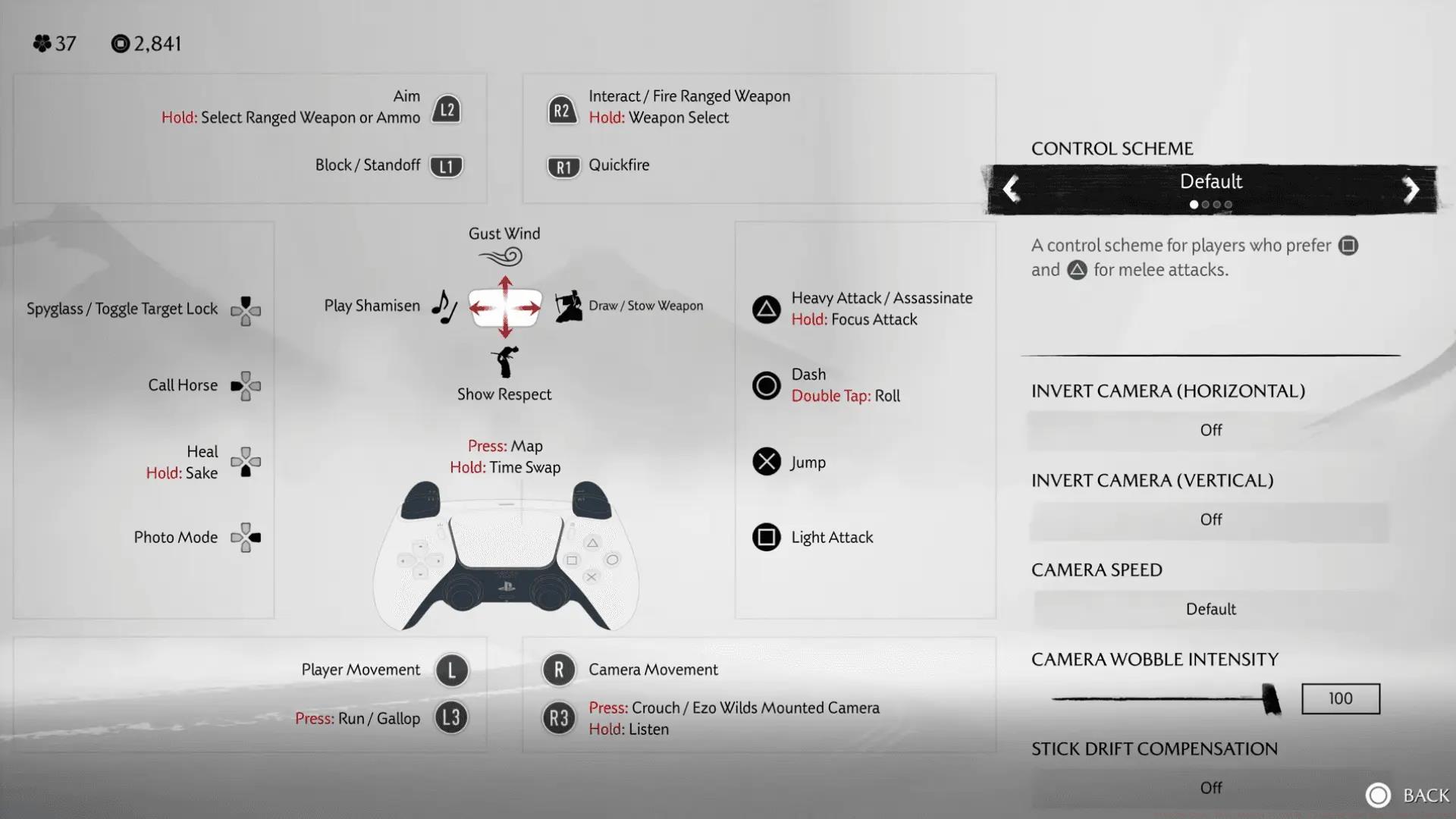
Camera sensitivity significantly influences your reaction capabilities during intense sword clashes. Here’s how each setting impacts gameplay:
Most combat-focused players benefit from maximum camera speed. When facing multiple opponents simultaneously, that instantaneous camera adjustment capability often determines successful parry execution versus taking critical damage.
Ghost of Yotei: Camera Speed Impact Analysis
pro tip
High camera velocity requires adaptation if accustomed to slower settings, but the tactical combat benefits justify the adjustment period.
Camera Wobble and Motion Control
Camera oscillation intensity enhances cinematic presentation but may induce motion discomfort for certain players. Reduce this setting completely for absolute visual stability, or maintain moderate levels for immersion without adverse effects.
The controller drift compensation feature revolutionizes gameplay for controllers experiencing unintended movement. Activate this option to minimize camera drift during controller neutral positioning.
Advanced Control Techniques
Mastering camera control involves understanding acceleration curves and dead zone adjustments. Many professional players utilize gradual acceleration with minimal dead zones for precise camera manipulation during complex combat sequences. Experiment with these sub-settings to find your optimal balance between speed and precision control.
Ghost of Yotei provides unprecedented challenge customization through its comprehensive difficulty system.
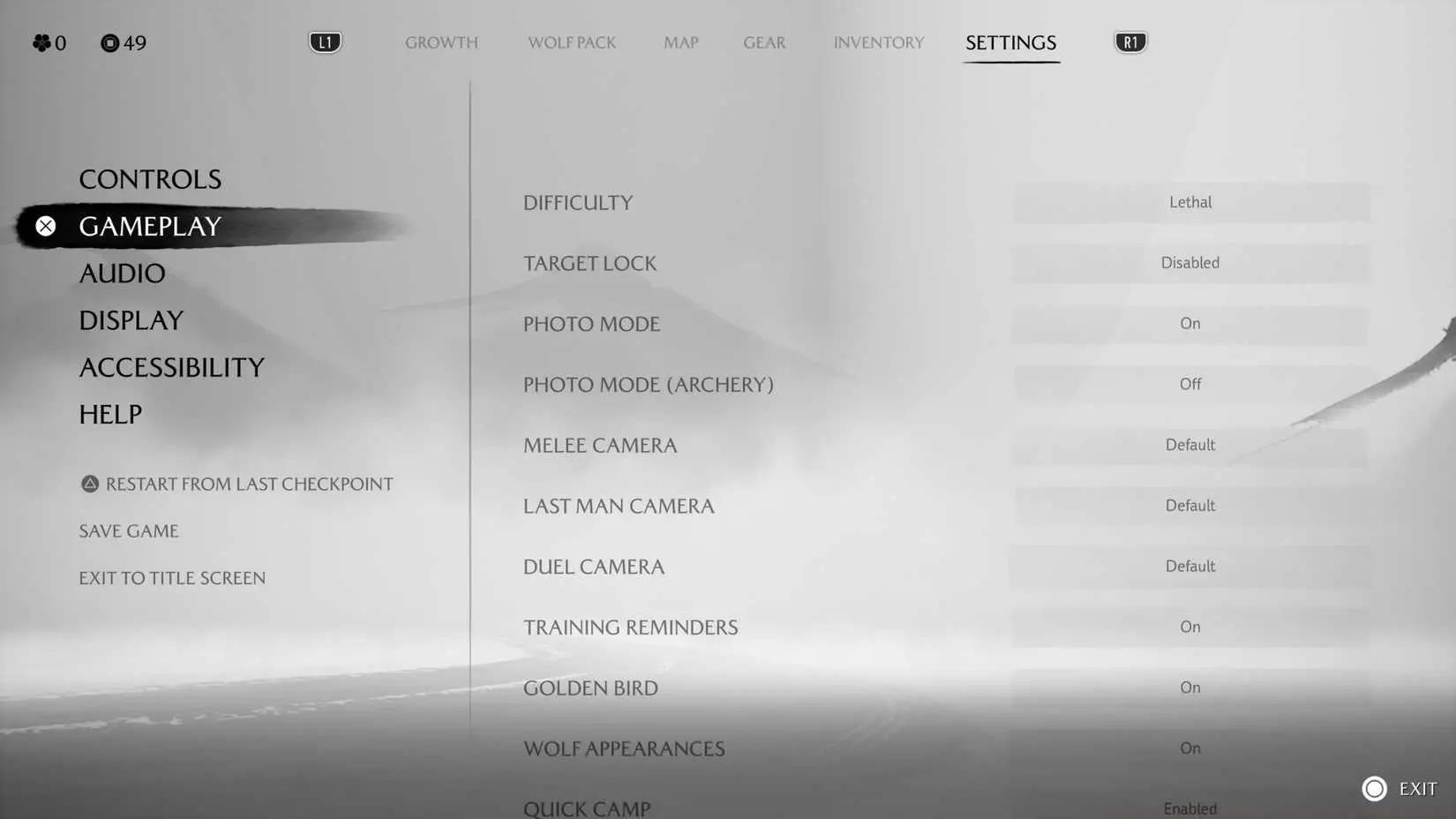
Difficulty Modes Breakdown
- Casual/Easy: Minimal opposition, ideal for narrative immersion
- Medium: Developer-curated experience with balanced engagement
- Hard: Elevated enemy intensity and damage output
- Lethal: Ultimate challenge demanding flawless timing execution
- Custom: Granular parameter adjustment capabilities
The Custom difficulty configuration warrants particular examination. You can independently modify:
- Opponent aggression intensity levels
- Parry and block timing windows
- Enemy damage multipliers
- Stealth detection thresholds
- Character ability effectiveness
strategic insight
Custom difficulty enables creating demanding combat scenarios while maintaining accessible stealth mechanics, or the reverse configuration based on preference.
Target Lock Considerations
Target acquisition remains divisive within the Ghost community. While available, the mechanism can feel constraining during dynamic combat engagements. Most veteran operators prefer deactivation to preserve the franchise’s characteristic fluid combat methodology.
If you activate target locking, the automatic target transition feature seamlessly shifts focus to new threats when current targets are eliminated.
Combat Strategy Insights
Understanding enemy attack patterns becomes crucial at higher difficulty levels. Enemies on Hard and Lethal modes employ feints and combination attacks that require predictive parrying rather than reactive responses. Practice identifying attack telegraphs – most enemies have distinctive wind-up animations that signal their attack type and timing.
Your visual presentation mode selection depends entirely on your PlayStation hardware and personal priorities.
PS5 Standard Options
Standard PS5 configurations typically include Performance mode (60 FPS target), Quality mode (enhanced resolution and effects), and Ray Tracing mode (reflection and lighting enhancements). Each presents distinct trade-offs between visual fidelity and smoothness.
PS5 Pro Advantages
PS5 Pro enthusiasts gain access to Ray Tracing Pro configuration, delivering ray-traced illumination at 60 FPS with intermediate resolution scaling. This effectively merges the superior aspects of Performance and Ray Tracing modes into a unified experience.

Recommendation: PS5 Pro users should prioritize Ray Tracing Pro for the optimal balance of visual quality and smooth performance.
Performance vs Visual Quality Analysis
For competitive gameplay, prioritize frame rate consistency above all else. The 60 FPS target in Performance mode provides tangible reaction advantages during precise parry timing and rapid camera movements. However, for exploration and photography-focused playthroughs, Quality mode’s enhanced texture filtering and shadow quality significantly improve visual immersion. The Performance mode typically maintains 1440p-1800p resolution while Quality mode targets 4K with more aggressive reconstruction techniques.
Motion Blur and Visual Clarity
Motion smoothing divides the player base distinctly. Disable this setting completely if you prefer sharp imagery during rapid movement. Maintain activation if you appreciate the cinematic sensation during combat sequences.
HUD Optimization
Ghost of Yotei’s interface customization features enable tailoring the display to your preferences:
- Enemy status indicators: Toggle stagger meters on/off
- Minimalist HUD: Reduces display components for immersion
- Mask visibility in cutscenes: Preserves Atsu’s anonymity if desired
The Minimalist HUD configuration eliminates numerous assistance indicators, making it perfect for seasoned players seeking maximum immersion but potentially challenging for novices.
Character Aesthetic Options
You can personalize back equipment visibility during gameplay:
- No visible equipment (streamlined appearance)
- Shamisen (traditional musical instrument)
- Most recently utilized weapon
- Most recent melee weapon exclusively
This purely cosmetic selection allows maintaining your preferred visual aesthetic throughout the journey.
Interface Strategy
Progressive HUD customization represents an advanced technique where players gradually disable interface elements as they master game mechanics. Start with full HUD enabled, then systematically remove elements like enemy health bars once you can reliably judge enemy status through visual cues. This approach provides a smooth transition to the immersive Minimalist HUD while maintaining gameplay functionality.
Enhanced Wind Visibility
The improved wind visualization setting substantially enhances navigation clarity. Standard wind effects can be subtle and difficult to track, particularly under specific lighting conditions. With this enhancement active, wind directional cues become unmistakably clear.
Wind-guided camera functionality extends this further by automatically orienting your viewpoint toward your objective when activating wind navigation. This capability proves invaluable during disorientation or unfamiliar territory exploration.
Combat Accessibility
Combat indicator enhancement enlarges attack notification sizes, making parry timing more approachable. This adjustment assists players with visual challenges or those struggling with default indicator dimensions.
Streamlined bamboo cutting reduces the complexity of rapid input sequences during bamboo stand trials. While this diminishes some challenge, it guarantees these sequences remain accessible to players with varying motor capabilities.
Aiming and Input Assistance
Targeting assistance provides aim support for projectile weapons and tools. While this reduces difficulty, it can be crucial for players experiencing difficulties with precise targeting using controller analog sticks.
Simplified rapid input requirements affects various mini-games and interaction sequences throughout the experience, making them more accessible without eliminating core gameplay engagement.
Navigation Efficiency
Mastering wind navigation involves understanding the subtle color coding of wind streams. Golden wind typically indicates primary story objectives, while silver wind often leads to side content and collectibles. During nighttime or storm conditions, enable enhanced wind visibility to maintain navigation accuracy when visual cues become less distinct.
Based on extensive testing and community feedback, these configurations deliver optimal experiences:
For Competitive Players:
- Camera Speed: Maximum
- Difficulty: Hard or Custom (elevated aggression, standard timing)
- Graphics: Performance (PS5) or Ray Tracing Pro (PS5 Pro)
- Target Lock: Disabled
- Enhanced Wind Visibility: Enabled
- Motion Blur: Disabled
For Cinematic Experience:
- Camera Speed: Standard
- Difficulty: Medium
- Graphics: Quality (PS5) or Ray Tracing Pro (PS5 Pro)
- Camera Wobble: Moderate
- Minimalist HUD: Enabled (after system mastery)
- Motion Blur: Enabled
For Accessibility Focus:
- Enhanced Wind Visibility: Enabled
- Combat Indicator Enhancement: Enabled
- Simplified sequences: Activated as required
- Subtitle Backgrounds: Enabled
- Targeting Assistance: Moderate
Hybrid Configurations:
- Many players create hybrid setups that blend competitive combat settings with cinematic exploration preferences. Consider using Custom difficulty with aggressive combat but accessible navigation, or combine Performance graphics with enabled motion blur for specific scenarios. Your ideal Ghost of Yotei configuration begins with these fundamental settings. Experiment with various combinations to discover what feels most intuitive for your approach, and don’t hesitate to modify settings as you grow more proficient with the game’s systems. The strength of these comprehensive options resides in their adaptability – you can continually refine your experience as your capabilities evolve.
For additional Ghost of Yotei expertise, explore our Complete Guide to advanced combat techniques.
Action Checklist
- Configure camera speed to Fast and disable target lock for competitive advantage
- Enable enhanced wind visibility and wind gust camera for improved navigation
- Select Ray Tracing Pro mode on PS5 Pro or Performance mode on standard PS5
- Experiment with Custom difficulty to fine-tune enemy aggression and stealth detection
- Gradually transition to Minimalist HUD by disabling one interface element at a time
- Adjust combat accessibility settings based on personal needs and skill progression
No reproduction without permission:Tsp Game Club » Ghost of Yotei Guide: Best Settings for Peak Performance Master Ghost of Yotei's settings for optimal combat, graphics, and accessibility with expert configuration tips