
Master Donkey Kong Bananza’s photo mode with expert controls, creative techniques, and pro photography tips
Introduction to Photo Mode Features
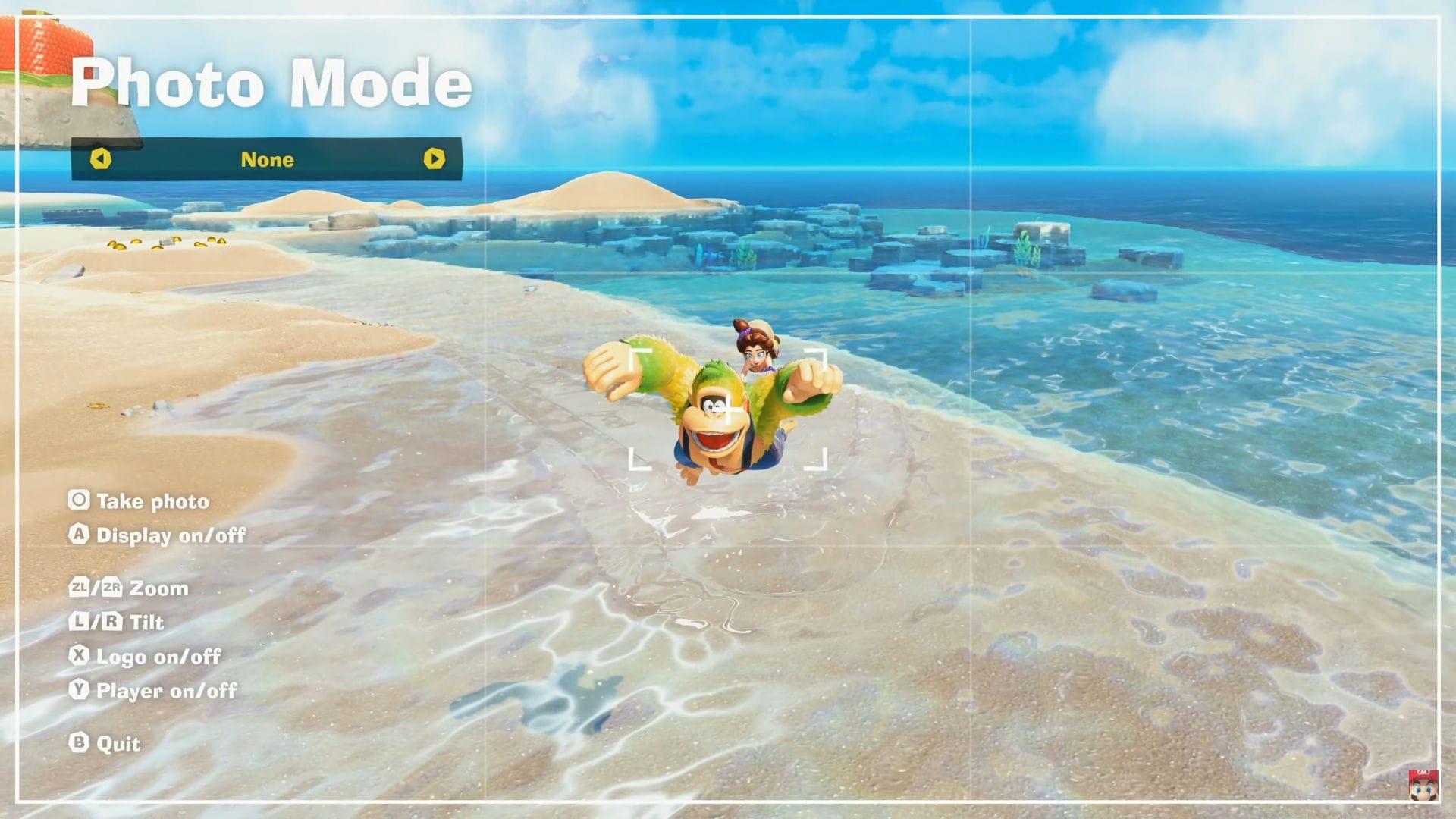
The photo mode in Donkey Kong Bananza represents Nintendo’s commitment to player creativity, allowing you to freeze-frame the most exhilarating platforming moments with professional-grade control. While it didn’t headline the June 18, 2025, Direct presentation, this feature delivers surprising depth for gamers who want to document their vine-swinging exploits and barrel-blasting adventures.
Beyond simple screenshot functionality, the system provides comprehensive camera manipulation tools that transform chaotic action sequences into carefully composed visual masterpieces. You can capture Donkey Kong’s triumphant roars, Diddy Kong’s mid-air acrobatics, or the entire Kong family’s synchronized movements with cinematic precision.
Complete Control Breakdown
Mastering the Nintendo Switch 2’s photo mode interface requires understanding each control’s specific function and creative potential:
Advanced Photography Strategies
Elevate your in-game photography beyond basic controls with these professional techniques:
Timing is Everything: The most spectacular shots occur during specific gameplay moments. Time your photo mode activation during barrel blast sequences, vine swing transitions, or boss battle climaxes. Donkey Kong’s exaggerated animations during these moments create incredibly dynamic frames that tell compelling stories.
Environmental Storytelling: Use the lush jungle backgrounds, ancient temple ruins, and enemy-packed environments to add context to your shots. Position characters against visually interesting backdrops that complement their actions and expressions. The game’s vibrant color palette provides natural contrast that makes your subjects pop.
Expression Capture: Donkey Kong Bananza characters display rich facial animations. Zoom in during moments of surprise, determination, or comedy to capture the personality that makes the franchise beloved. These close-ups often become the most shareable content across social platforms.
Common Mistakes and Solutions
Even experienced players encounter challenges when mastering Donkey Kong Bananza’s photo mode. Here’s how to avoid frequent pitfalls:
Rushed Composition: Many players activate photo mode too late, missing the perfect moment. Solution: Anticipate action sequences and enter photo mode slightly before peak moments. The game’s pause functionality allows you to fine-tune your shot without time pressure.
Cluttered Framing: Overly busy backgrounds can distract from your main subject. Use the zoom function to isolate characters or find cleaner angles that emphasize your intended focus. The tilt controls can help you reposition elements for better visual hierarchy.
Ignoring Lighting: The game’s dynamic lighting affects shot quality. Position characters to face light sources rather than having them backlit, which creates silhouette effects that may not be desirable. Time your shots during well-lit segments of levels for optimal clarity.
Forgetting UI Management: Leaving interface elements visible creates amateur-looking captures. Develop the habit of toggling the UI off immediately after entering photo mode for cleaner, more professional results.
No reproduction without permission:Tsp Game Club » How photo mode works in Donkey Kong Bananza Master Donkey Kong Bananza's photo mode with expert controls, creative techniques, and pro photography tips