
TL;DR
- Tick speed controls game loop timing at 50ms intervals, affecting world updates and mechanics
- Default random tick speed is 3 for Java Edition, 1 for Bedrock – both adjustable via commands
- Increasing tick speed accelerates plant growth, fire spread, and environmental processes
- Optimal settings balance farming efficiency with server performance and stability
- Proper command implementation requires cheats enabled and understanding of side effects
Minecraft’s exploration-focused gameplay often tests player patience due to its deliberate timing systems and cyclical update patterns. These inherent mechanics transform many automated farming setups into exercises in waiting rather than efficient resource generation systems. The solution lies in mastering tick speed manipulation – a fundamental control that governs virtually all Minecraft operations when properly configured.
Before diving into technical adjustments, we’ll establish foundational knowledge about tick mechanics and their operational boundaries. Experienced players can reference our quick navigation guide to skip directly to implementation details.
The concept of tick speed defines the duration required for Minecraft’s core game loop to complete one full cycle. Under standard conditions, each individual tick persists for exactly 50 milliseconds (0.05 seconds) before the next iteration begins. During these brief intervals, numerous critical game functions execute sequentially:
- World border parameters receive updates and enforcement
- Weather patterns, sleep mechanics, and daylight cycles progress
- Game events and triggered actions process through the queue
- Automatic world saving occurs every 6000 ticks (approximately 5 minutes)
As Minecraft refreshes its subchunk segments (16×16×16 block areas), it selectively updates random blocks while simultaneously processing entity behaviors and world mechanics within the same tick cycle. This selective block updating mechanism constitutes what players recognize as random tick speed.
The baseline random tick speed defaults to 3 in Minecraft Java Edition compared to just 1 in Bedrock Edition variants. These values become adjustable through specific game commands, with modifications producing direct impacts on these Minecraft systems:
- Fire propagation patterns and extinguishing behavior
- Crop growth rates and agricultural development
- Ice formation and melting dynamics
- Leaf decay progression and natural block deterioration
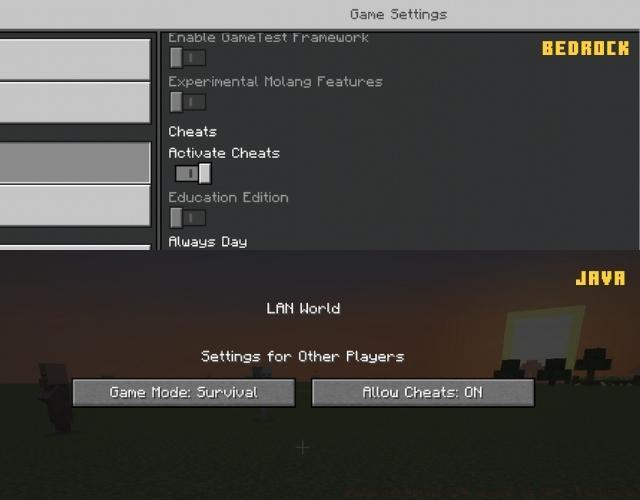
Implementing tick speed adjustments requires precise command syntax understanding and proper execution methodology. The primary command structure follows this pattern: /gamerule randomTickSpeed [value] where the value parameter accepts integers typically ranging from 0 to 100, though some server implementations permit higher values.
For Java Edition practitioners, begin by activating cheats if not already enabled during world creation. Access the chat interface (T key by default) and input /gamerule randomTickSpeed 6 to double the standard rate. Bedrock Edition users follow identical syntax but should note their baseline begins at 1, making /gamerule randomTickSpeed 2 achieve similar proportional increases.
Advanced implementations might involve conditional command blocks that adjust tick speed based on in-game conditions. For example, creating a daylight sensor-triggered system that increases growth rates during daytime hours while maintaining standard speeds at night. This approach balances performance with targeted efficiency gains.
Performance considerations become crucial at elevated tick speeds. Values exceeding 20 may cause noticeable frame rate drops on lower-end systems, while settings above 50 can generate server lag in multiplayer environments. Always test incremental adjustments and monitor system performance using F3 debug screen metrics.
Strategic tick speed applications include:
- Accelerated Farming: Set values between 10-15 for rapid crop growth without excessive resource consumption
- Terrain Transformation: Temporary boosts to 20+ speed up natural processes like forest regeneration
- Performance Mode: Reduce to 1-2 for maximum server stability during building projects
Remember that these adjustments affect all random tick processes simultaneously. While your wheat farm accelerates, so does fire spread and ice melting – plan accordingly to avoid unintended consequences. For comprehensive game optimization strategies, consult our Complete Guide to systematic performance enhancement.
Mastering tick speed manipulation extends beyond simple command execution into strategic implementation that maximizes benefits while minimizing drawbacks. Expert players develop nuanced approaches tailored to specific gameplay objectives and technical constraints.
For agricultural optimization, consider implementing zone-specific tick rates using command blocks positioned near farming areas. This localized approach accelerates growth in designated regions while maintaining standard speeds elsewhere, preventing overall performance degradation. Combine this with efficient Weapons Unlock strategies for comprehensive resource management.
Common configuration errors include:
- Over-acceleration: Setting values above 30 often causes more problems than benefits
- Inconsistent Application: Forgetting to reapply settings after world reloads
- Platform Confusion: Applying Java Edition values to Bedrock worlds or vice versa
- Performance Neglect: Failing to monitor frame rates and server response times
Server administrators should establish tick speed policies based on hardware capabilities and player count. Small private servers typically handle values up to 15 comfortably, while large public installations may need to cap at 8-10 to maintain stability. Always communicate changes to community members and be prepared to revert adjustments if issues arise.
For specialized applications like rapid tree farming or automated concrete production, temporary tick speed boosts during active sessions provide targeted benefits without permanent performance impacts. Combine these techniques with strategic Class Guide principles for optimized character development alongside world management.
Remember that tick speed represents one component of comprehensive game optimization. Balance these adjustments with render distance settings, entity processing limits, and chunk loading configurations for holistic performance enhancement. The most successful implementations combine technical knowledge with practical gameplay experience.
Action Checklist
- Enable cheats in world settings or during creation
- Determine your edition (Java default: 3, Bedrock default: 1)
- Input /gamerule randomTickSpeed [value] via chat (T key)
- Test performance impact using F3 debug screen metrics
- Implement localized command blocks for specific areas
- Establish server-wide policies for multiplayer environments
No reproduction without permission:Tsp Game Club » How to Change Tick Speed in Minecraft (2022) Master Minecraft tick speed mechanics to optimize farming, growth rates, and game performance with expert commands