
TL;DR
- Valorant Mobile requires specific regional workarounds for global installation
- Android users need Popcorn app while iOS requires China App Store access
- Verified Chinese social accounts (WeChat/QQ) are mandatory for login
- VPN becomes essential during gameplay and large resource downloads
- Proper storage management (4GB+) prevents installation failures
Riot Games has strategically launched Valorant Mobile exclusively in China, creating significant regional barriers for international players. Despite these geographical limitations, determined gamers worldwide can successfully access the game through specific technical workarounds. The China-first release strategy reflects Riot’s market prioritization, but doesn’t permanently exclude global enthusiasts.
While the initial download and installation process doesn’t mandate VPN usage, maintaining one readily available becomes crucial for actual gameplay sessions. The game’s substantial resource downloads—exceeding 4 gigabytes—frequently encounter interruptions that VPN connectivity effectively resolves. Ensure your device has adequate storage capacity before proceeding with installation.
Platform-specific approaches are necessary: Android devices utilize third-party app distribution platforms, while iOS requires fundamental Apple ID configuration changes. Both methods demand careful execution to avoid account complications or installation failures.
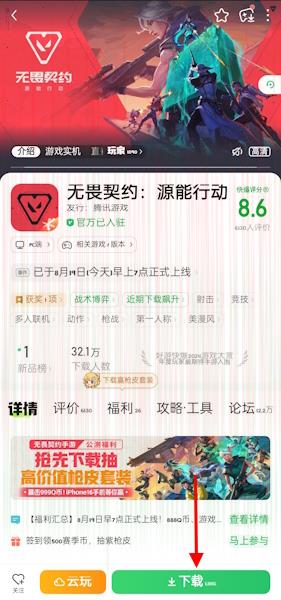
Android users face a multi-step installation process beginning with the Popcorn application download. This third-party platform serves as the gateway to Valorant Mobile’s APK file, bypassing traditional Google Play Store restrictions. The Popcorn app, developed by 3839 Technology, functions as an alternative app marketplace specifically catering to Chinese mobile gaming content.
Follow this structured approach for successful Android installation:
- Acquire the Popcorn application from verified sources—avoid unverified downloads to prevent malware risks
- After installing the Popcorn platform, navigate directly to the Valorant Mobile dedicated page within the app
- Locate and activate the prominent green download button positioned at the screen’s bottom section
- Monitor the APK download progress and grant necessary installation permissions when prompted
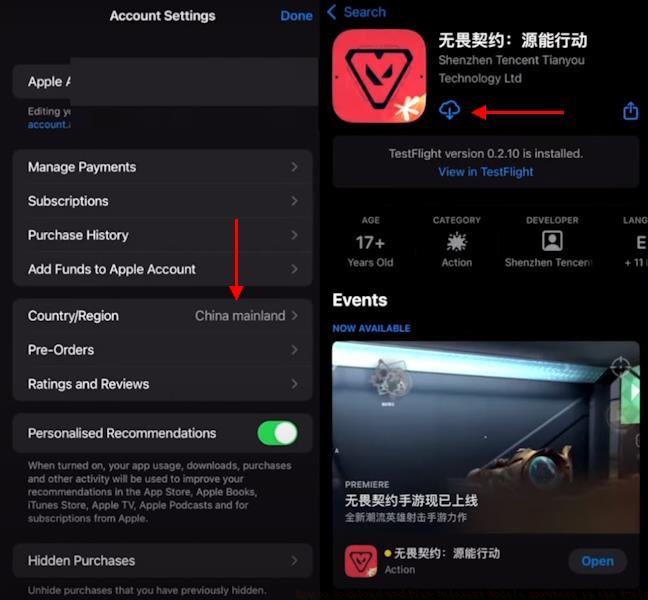
Post-download, your device may require authorization for installations from unknown sources. Enable this setting temporarily during installation, but consider reverting it afterward for security purposes. The complete installation process typically consumes 15-25 minutes depending on your internet connection speed.
Apple’s ecosystem presents different challenges for Valorant Mobile access, requiring formal App Store region modification. This process involves temporarily changing your Apple ID’s associated country to China, which enables visibility and download capability for region-exclusive applications.
Critical preparation steps include:
- Ensure your Apple ID balance is zero—outstanding credits prevent region changes
- Have valid payment method information available, though free app downloads don’t necessarily require payment details
- Backup important data before proceeding, as region changes might affect other app functionalities
The region modification occurs through your Apple ID settings, where you select China as your new country/region. After completing this transition, the App Store will display Chinese content, including Valorant Mobile. Download the game directly through the transformed store interface.
Many users encounter verification hurdles during this process. Having a Chinese phone number for verification, while not always mandatory, significantly streamlines the procedure. After successful download, you can revert your Apple ID to its original region, though this may affect future game updates.
Valorant Mobile’s authentication system mandates verified Chinese social media accounts, primarily WeChat or QQ. These platforms implement rigorous verification processes that international users must navigate carefully. Account creation typically requires Chinese phone number verification, presenting the most significant barrier for global players.
Successful login depends on proper account preparation:
- WeChat accounts demand mobile number verification and occasional additional identity confirmation
- QQ accounts may require extended verification periods for international numbers
- Both platforms increasingly implement security measures that can temporarily lock non-Chinese accounts
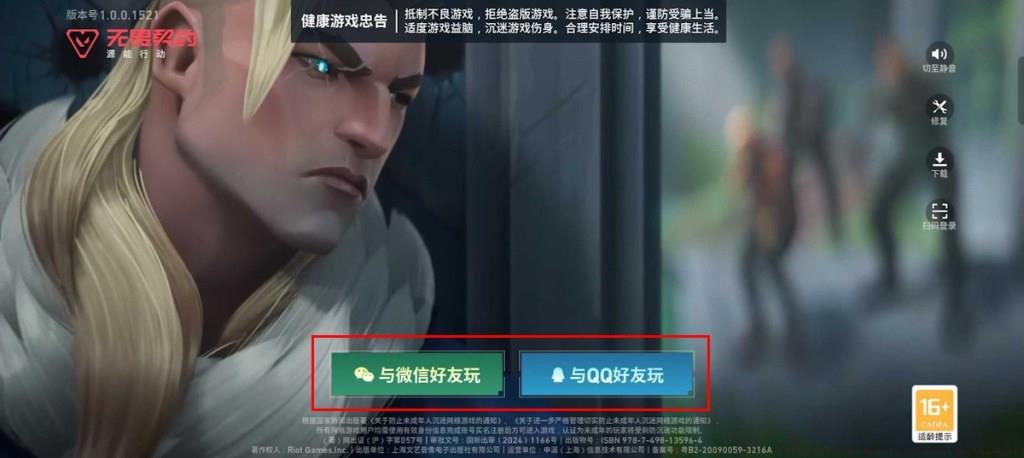
International players should anticipate potential verification delays and prepare accordingly. Having multiple verification options available—such as different phone numbers or backup authentication methods—can prevent frustrating login obstacles. The Class Guide demonstrates similar authentication importance in other gaming platforms.
Once successfully logged in, your social account becomes permanently linked to your Valorant Mobile progress. Consider creating dedicated gaming accounts rather than using personal social media profiles for privacy and security purposes.
While initial downloads might proceed without VPN assistance, consistent gameplay demands reliable virtual private network connectivity. Valorant Mobile’s servers perform region validation during matchmaking and in-game sessions, requiring Chinese IP addresses for uninterrupted access.
Optimize your VPN configuration for gaming performance:
- Select VPN servers located in major Chinese cities like Shanghai or Beijing for optimal latency
- Configure split-tunneling to route only Valorant Mobile traffic through the VPN, preserving bandwidth for other applications
- Monitor connection stability during extended sessions—VPN drops can cause disconnections or progress loss
The game’s substantial resource downloads frequently stall without VPN protection. When encountering download interruptions, switching to a different Chinese server typically resolves the issue. The Complete Guide to similar games emphasizes network optimization importance.
Performance considerations extend beyond connectivity. Valorant Mobile’s 4GB+ installation demands careful storage management. Regularly clear cache files and temporary data to maintain performance, similar to strategies discussed in our Weapons Unlock guide for optimal gaming experiences.
International players should anticipate occasional server maintenance periods that may affect accessibility. These typically occur during Chinese peak hours and can temporarily disrupt gameplay even with proper VPN configuration.
Action Checklist
- Verify device storage capacity (minimum 6GB free space recommended)
- Download platform-specific installer (Popcorn for Android, prepare Apple ID for iOS)
- Configure Chinese social account (WeChat/QQ) with verification
- Install Valorant Mobile following platform-specific instructions
- Set up reliable VPN with Chinese servers for gameplay
- Test connection stability and adjust VPN settings for optimal performance
No reproduction without permission:Tsp Game Club » How to Download and Play Valorant Mobile Anywhere in the World Complete guide to download and play Valorant Mobile globally with essential setup tips and troubleshooting