
TL;DR
- Custom seeds provide instant village access with verified coordinates
- Seed analyzers like Chunkbase reveal villages in existing worlds without cheating
- Creative mode flight enables rapid exploration across large territories
- The locate command offers precise coordinates but requires cheat activation
- Strategic biome targeting increases village discovery probability significantly
Minecraft villages represent critical survival hubs that provide immediate access to essential resources and trading opportunities. These structured settlements offer ready-made shelter, abundant food supplies through farming plots, and access to specialized villagers who provide unique trades. Understanding how to consistently locate villages can dramatically accelerate your progression, especially during early-game survival scenarios where resources are scarce.
The strategic value of villages extends beyond basic survival needs. Each village contains job site blocks that generate villagers with specific professions, enabling access to rare items through emerald trading. Different village types across biomes offer varied architectural styles and resource distributions, making some more valuable than others depending on your current objectives.

Our comprehensive guide covers four distinct approaches to village discovery, each with unique advantages for different playstyles. Whether you prefer legitimate exploration, technical tools, or creative solutions, you’ll find methods that work across both Bedrock and Java editions, including the latest Minecraft updates that have enhanced village generation algorithms.
World seeds function as the genetic code for Minecraft’s terrain generation, determining everything from biome distribution to structure placement. By utilizing pre-verified village seeds, you can guarantee spawning near or within villages, eliminating the random exploration typically required. This method proves particularly valuable for speedrunners, content creators, or players seeking specific village types.
Quality village seeds are extensively documented across gaming communities, with detailed coordinates for multiple villages within the same world. When selecting seeds, prioritize those verified for your specific game version, as terrain generation changes between updates can alter village locations. Seeds tagged for 1.18+ versions typically feature enhanced village designs with more logical layouts and improved integration with surrounding terrain.

Implementing custom seeds requires precise execution:
1. Initiate Minecraft and select the “Create New World” option from the main menu. This universal interface element appears consistently across all platform versions.
2. Navigate to “More World Options” located in the screen’s bottom-right quadrant. This reveals advanced world configuration settings beyond the basic difficulty and game mode selections.
3. Input the exact seed code into the designated text field, ensuring no additional spaces or characters are introduced. Complete the process by selecting “Create New World” to generate your village-guaranteed environment.
Successful implementation instantly places you within or near your target village, provided the seed remains compatible with your game version. Always cross-reference seed documentation for specific coordinates and additional waypoints.
For players invested in existing survival worlds, seed analyzer tools provide a legitimate alternative to starting fresh. Platforms like Chunkbase utilize Minecraft’s deterministic generation algorithms to reveal all village locations within your world without activating cheats or compromising achievement eligibility. This approach maintains world integrity while providing strategic navigation advantages.
The process begins with retrieving your world’s seed code, which can be accomplished through several methods. In Java Edition, access the world selection screen, highlight your target world, and click the edit button to reveal the seed value. Bedrock Edition users can locate this information through the world settings menu under the game options section. Recording this alphanumeric code accurately is crucial for proper analyzer functionality.

Chunkbase’s village finder module requires inputting your seed code and selecting the correct game version and edition combination. The tool then generates an interactive map displaying all village coordinates within render distance limits. These coordinates enable targeted exploration rather than random wandering, significantly reducing discovery time. The platform also filters villages by biome type, allowing you to prioritize specific architectural styles or resource availability.

Practical implementation involves navigating toward the revealed coordinates while preparing for potential terrain obstacles. Mountain ranges, oceans, or dense forests may require alternative routes or additional preparation. Always carry adequate supplies for the journey, as village coordinates may be thousands of blocks from your starting position in established worlds.
Creative mode offers unparalleled mobility for village discovery through unrestricted flight capabilities. This method bypasses terrain obstacles and provides panoramic visibility across large areas, making it ideal for comprehensive world mapping. While this approach disables achievements in survival worlds, it serves as an efficient reconnaissance tool for planning survival routes or content creation.
Flight mechanics in creative mode allow sustained aerial movement at significantly faster speeds than ground travel. Maintain moderate altitudes to balance visibility with structural recognition—too high and village details become indistinct, too low and your coverage area diminishes substantially. Systematic grid-based exploration patterns ensure complete territorial coverage without redundant searching.

Strategic scouting prioritizes biomes with higher village generation probabilities. Plains, deserts, and savannas typically feature more frequent village spawns compared to dense forests or mountainous regions. Target areas near water sources and flat terrain, as village generation algorithms favor these accessible locations. Nighttime exploration proves particularly effective, as village torch lighting creates visible beacons across dark landscapes.
Upon village discovery, record precise coordinates for future survival mode navigation. Creative mode also allows temporary base establishment with waypoint markers, providing reliable navigation references. This method typically reduces discovery time by 60-80% compared to conventional survival exploration, though it requires subsequent travel in your primary game mode.
Minecraft’s integrated locate command provides instant village coordinates through the game’s chat interface, offering the most direct discovery method available. This approach requires cheat activation but delivers immediate results for players prioritizing efficiency over achievement progression. The command works identically across both Bedrock and Java editions with consistent syntax.
Activating cheats represents the preliminary requirement for command functionality. During world creation, enable the “Allow Cheats” option in world settings. For existing worlds, access the pause menu and open settings to activate this option, though this may disable achievements permanently for that world. Consider creating backup saves before activation to preserve achievement eligibility in your primary world.
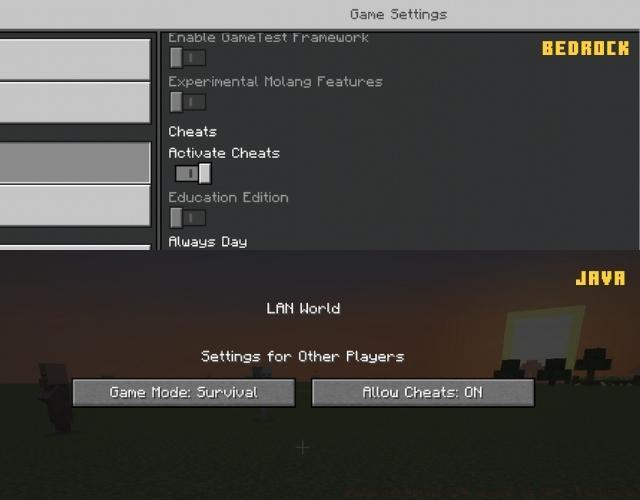
The locate command structure follows consistent patterns: /locate structure minecraft:village for Java Edition or /locate village for Bedrock Edition. Execution returns coordinates for the nearest village relative to your current position, enabling immediate navigation. The system prioritizes the closest instance regardless of biome or size, so multiple executions may be necessary to find specific village types.

Teleportation provides instant village access when combined with coordinate data. Using the /tp command followed by the revealed coordinates transports you directly to the village outskirts. Exercise caution with direct teleportation, as arrival coordinates may place you in hazardous positions or inaccessible terrain. Always prepare adequate equipment before teleporting to unknown locations.

Seasoned Minecraft players develop sophisticated village location prediction skills through biome analysis and terrain assessment. Villages generate more frequently in specific biomes, with plains villages appearing approximately 70% more often than their forest counterparts. Understanding these generation patterns enables targeted exploration that maximizes discovery efficiency in survival mode.
Elevation tactics significantly impact visibility and discovery rates. Ascending tall hills, mountains, or constructing temporary observation towers expands your visible range dramatically. Each additional block of elevation increases your visible radius, with 50-block elevations typically revealing villages within 150-block radii. Carry building materials for improvised observation platforms during exploration journeys.
Common discovery pitfalls include insufficient supplies, inadequate lighting for nighttime exploration, and underestimating travel distances. Always carry at least 3 days of food supplies, weaponry for hostile mob defense, and building materials for emergency shelter. Torches serve dual purposes for visibility and marking explored territories to prevent redundant searching.
For players seeking comprehensive battlefield preparation, our Complete Guide covers advanced strategic planning similar to village discovery methodologies. Those interested in equipment optimization should consult our Weapons Unlock guide for systematic acquisition strategies. Additionally, our Class Guide provides specialized role selection advice that parallels villager profession optimization in Minecraft.
Time investment varies significantly between methods, with command-based discovery requiring mere minutes versus potential hours for survival exploration. Evaluate your current priorities, achievement goals, and available resources when selecting your preferred village discovery approach.
Action Checklist
- Determine your preferred discovery method based on game mode and achievement goals
- Gather necessary resources: food, weapons, building materials, and coordinates
- Execute your chosen method with attention to version compatibility and syntax accuracy
- Record village coordinates and establish navigation waypoints for future visits
- Secure the village perimeter with lighting and basic defenses before exploration
No reproduction without permission:Tsp Game Club » How to Find a Village in Minecraft (2022) Master village discovery in Minecraft with 4 proven methods, expert strategies, and time-saving techniques