
TL;DR
- Watch any Fortnite category stream for 90 minutes total between August 7-11, 2025 to earn three exclusive cosmetics
- Link your Epic Games and Twitch accounts before starting to ensure reward delivery
- Progress unlocks progressively: 30 minutes for Wrap, 60 minutes for Back Bling, 90 minutes for Pickaxe
- Monitor progress via Twitch Drops inventory and claim rewards promptly after unlocking
- Use multiple devices and background viewing to maximize efficiency during the limited-time event
Fortnite Chapter 6 Season 4 introduces an electrifying Power Rangers-inspired theme that transforms the battlefield with vibrant aesthetics and dynamic gameplay elements. This season’s Twitch Drops campaign, dubbed ‘Shock ‘N Awesome,’ provides players with an exceptional opportunity to enhance their cosmetic collection without spending V-Bucks. These limited-time rewards serve as both visual upgrades and status symbols within the Fortnite community.
The strategic timing of this event during the season’s opening weekend creates excitement while rewarding early adopters. Unlike traditional battle pass progression, Twitch Drops offer immediate cosmetic benefits that complement your existing arsenal. Understanding the mechanics behind these drops will help you maximize your rewards while avoiding common pitfalls that prevent successful claim completion.
Season 4’s chaotic battlefield environment, featuring insect swarms and explosive missile launchers, provides the perfect backdrop for these flashy cosmetic enhancements. The Twitch Drops system represents a collaboration between Epic Games and content creators that benefits both streamers and viewers alike. For comprehensive strategies on mastering Fortnite’s evolving gameplay, explore our Complete Guide to advanced tactics.
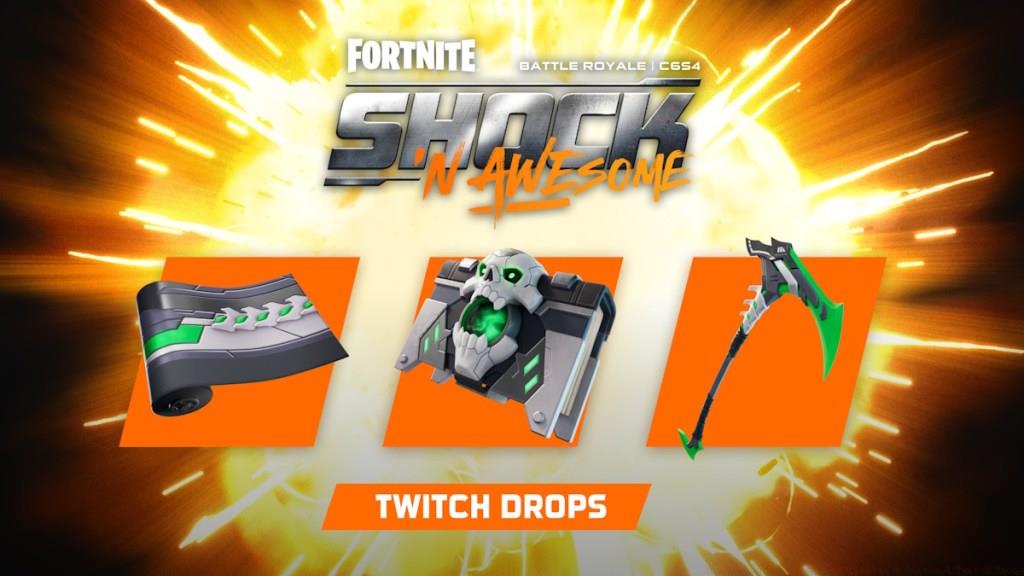
The Shock ‘N Awesome Twitch Drops feature three distinct cosmetic items that progressively unlock based on your cumulative viewing time. Each reward enhances your character’s visual presentation while maintaining the season’s Power Rangers aesthetic consistency. The tiered progression system ensures that even casual viewers can obtain at least one cosmetic enhancement.
Metal Menace Wrap: Unlocks after 30 minutes of viewing – This weapon wrap applies a sleek metallic finish with circuit-like patterns that gleam under in-game lighting conditions, creating impressive visual effects during combat scenarios.
Tome of Skulls Back Bling: Requires 60 minutes total watch time – This mystical artifact rests on your character’s back, featuring animated glowing effects and intricate detailing that complements darker outfit combinations.
Energized Axe Pickaxe: Complete your collection at 90 minutes – This energy-charged harvesting tool emits subtle particle effects with each swing, making it both functional and visually distinctive during gameplay.
Pro tip: The viewing timer continues counting even when streams are muted or minimized, allowing you to accumulate progress while multitasking. However, ensure the stream remains active and hasn’t encountered connectivity issues that might pause progress tracking. For additional weapon customization options, check out our Weapons Unlock Guide for specialized loadout strategies.
Securing your Twitch Drops requires establishing a verified connection between your Epic Games account and Twitch profile. This crucial step ensures the reward system properly attributes your viewing progress and delivers cosmetics to your inventory. The linking process involves straightforward authentication but demands attention to detail to avoid common authorization errors.
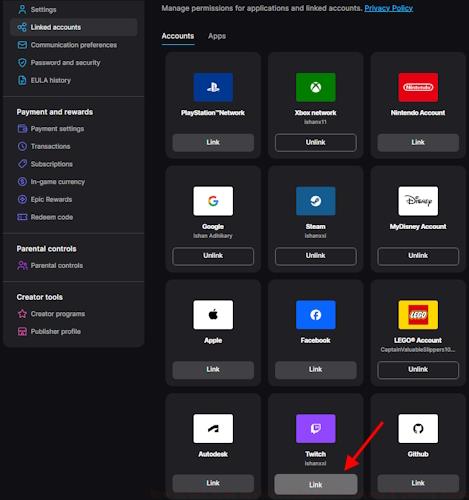
Begin by visiting the Epic Games website and navigating to the ‘Connected Accounts’ section within your profile settings. Select Twitch from the available platform options and follow the prompted authorization workflow. The system will redirect you to Twitch for login verification before returning to confirm successful connection establishment.
Critical verification step: After completing the linking process, return to your Epic Games account page and confirm Twitch appears as a connected service. Many players overlook this verification, resulting in unwatch time despite active viewing sessions.
Advanced users should consider that account links occasionally expire during platform updates or security changes. Periodically reconfirm your connection status before major gaming events to prevent unexpected disconnections. For optimal class configurations that complement these cosmetics, our Class Guide provides specialized loadout recommendations.
Maximizing your Twitch Drops efficiency requires strategic approach beyond basic viewing. Seasoned players employ multiple techniques to ensure reward acquisition while minimizing active engagement requirements during the limited availability window.
Stream selection strategy: While any Fortnite-categorized stream qualifies, prioritize channels with stable connectivity and consistent broadcast quality. Larger streamers typically maintain more reliable infrastructure, reducing the risk of interruptions that could pause your progress tracking.
Common pitfall: Many viewers mistakenly believe they must watch consecutive minutes on a single channel. The system actually accumulates total viewing time across multiple streams, allowing you to switch between creators without resetting your progress counter.
Progress monitoring: Regularly check your Twitch Drops inventory page to confirm timer advancement. If progress appears stalled, refresh the stream or try an alternative broadcaster. Technical issues sometimes cause tracking delays that resolve with simple troubleshooting steps.
Reward delivery timeline: While most players receive cosmetics within minutes of claiming, occasional system delays can extend delivery up to 24 hours. Avoid submitting duplicate claims during this period, as this may create fulfillment complications. If items haven’t appeared after 48 hours, contact Epic Games support with your account details and viewing verification.
Mobile optimization: Utilize Twitch’s mobile application to continue progress accumulation while away from your primary device. The background play feature (available to Twitch Turbo subscribers) enables uninterrupted progression during commutes or other activities.
Action Checklist
- Verify Epic Games and Twitch account connection status
- Identify 2-3 reliable Fortnite category streams for rotation
- Begin cumulative viewing, utilizing mute/minimize features as needed
- Monitor progress via Twitch Drops inventory every 30 minutes
- Claim each reward immediately upon unlocking in your inventory
- Log into Fortnite and verify cosmetic delivery in your locker
No reproduction without permission:Tsp Game Club » How to Get Free Fortnite Chapter 6 Season 4 Twitch Drops Complete guide to unlocking free Fortnite Chapter 6 Season 4 Twitch Drops with expert strategies and troubleshooting tips