
TL;DR
- Valorant’s gifting system requires specific account requirements and only works with featured store items
- Gifting involves navigating to the store, selecting featured bundles, and choosing friends from your list
- Recipients can accept or reject gifts, with VP refunds available for declined items
- Strategic timing and friend list management significantly enhance your gifting experience
- Understanding common mistakes prevents wasted Valorant Points and ensures successful transactions
Riot Games revolutionized player interactions in Valorant by implementing the comprehensive gifting mechanism through patch 10.08, fundamentally transforming how players share cosmetic items. This system eliminates the previous cumbersome method of manually dropping weapons each round, providing a streamlined approach to gifting premium skins. However, several critical factors demand your attention before initiating any gift transactions. The gifting functionality operates with specific constraints that differ significantly from simple purchase workflows.
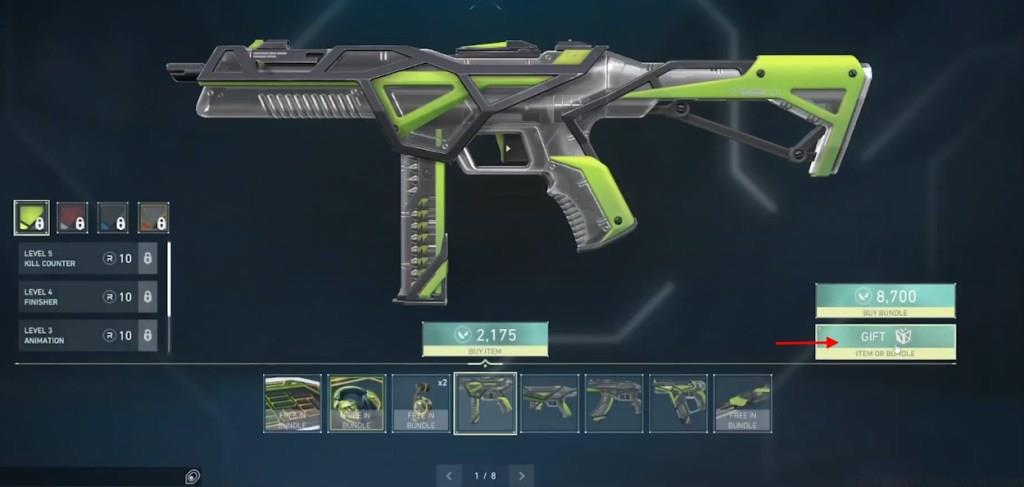
Valorant’s gifting framework exclusively supports featured store skins available in the current rotation. You maintain the flexibility to gift either complete bundles or individual components from these featured collections. The system’s design prioritizes security while enabling meaningful social connections through cosmetic sharing.
Many players underestimate the importance of account verification and friend list management when preparing for gifting activities. Proper preparation ensures seamless transactions and prevents potential frustrations that could arise from unmet requirements.
Executing successful skin gifts in Valorant requires precise navigation through the game’s interface. Begin by accessing the Store section from your main menu dashboard, where current featured items display prominently. Carefully review available bundles and individual skin options before proceeding with your selection.
Identify the specific featured bundle or skin component you intend to gift, ensuring it aligns with your recipient’s preferences and your available Valorant Points balance. The interface clearly distinguishes between purchase and gifting options to prevent accidental transactions.
Locate and activate the distinctive ‘gift’ button positioned strategically beneath the standard purchase option in the lower right interface quadrant. This action initiates the friend selection phase of the gifting process.
Browse your curated friend list and select the intended recipient from available options. The system automatically filters eligible friends based on account standing and regional compatibility. Complete the transaction by confirming your selection through the ‘Next’ prompt, which finalizes the gift delivery process.
Strategic timing significantly impacts gifting success rates. Consider gifting during off-peak hours when server loads are reduced, potentially improving transaction reliability and speed.
When you receive a Valorant gift notification, you face two distinct response options with different consequences. Accepting the gift immediately adds the cosmetic item to your personal inventory, making it available for use in all gameplay modes. The acceptance process requires minimal interaction but carries permanent implications for your collection.
Alternatively, rejecting a gifted skin triggers an automatic Valorant Points refund process that returns the full VP amount to the original sender. This rejection mechanism prevents unwanted items from cluttering inventories while maintaining economic balance within the gifting ecosystem.
Recipients receive comprehensive email notifications detailing gift specifics, including sender information and item descriptions. These communications serve as both confirmation receipts and security measures against unauthorized transactions.
Advanced players recommend establishing gifting protocols with friends to coordinate skin acquisitions and avoid duplicate purchases. Clear communication about cosmetic preferences prevents gift rejections and maximizes the value of shared items across your gaming community.
Understanding the email notification system’s timing helps recipients manage expectations. Delivery delays occasionally occur during peak server activity, though most notifications arrive within minutes of transaction completion.
Valorant’s gifting system imposes several mandatory account prerequisites that must be satisfied before transaction capabilities unlock. Your account must maintain a specific maturity level and verification status, requirements designed to prevent fraudulent activities and maintain system integrity.
The friend relationship requirement presents a critical gating mechanism that demands proactive social management. Both parties must have mutually confirmed friend status for a minimum duration, preventing random gifting to unfamiliar accounts.
Regional restrictions represent another significant consideration, as gifting functionality operates within specific geographical boundaries. Cross-region gifting remains unavailable, limiting transactions to players within the same server cluster.
Strategic gifting involves monitoring store rotations and anticipating upcoming featured items. Advanced players coordinate with friends to maximize collection diversity while minimizing individual expenditure through strategic gift timing.
Common mistakes include attempting to gift non-featured items, overlooking account verification requirements, and ignoring regional limitations. These errors typically result in failed transactions or temporary account restrictions.
For comprehensive gaming strategies beyond skin management, explore our Complete Guide to master broader tactical approaches. Weapon enthusiasts should consult our detailed Weapons Unlock resource, while class specialists benefit from the Class Guide for role optimization techniques.
Action Checklist
- Verify your account meets all gifting requirements including age and verification status
- Navigate to Store tab and identify current featured skins eligible for gifting
- Select gift option and choose recipient from eligible friends list
- Coordinate with friends to avoid duplicate skin purchases and maximize collection diversity
- Monitor email notifications for gift confirmations and manage inventory accordingly
No reproduction without permission:Tsp Game Club » How to Gift Skins in Valorant Master Valorant's gifting system with expert strategies, common pitfalls to avoid, and advanced skin-sharing techniques