
TL;DR
- Always backup game files before modding to prevent data loss
- Choose between manual installation for control or Thunderstore for convenience
- BepInEXPack serves as the essential foundation for most Silksong mods
- Verify mod compatibility and load order to avoid conflicts and crashes
- Monitor game performance and create restore points for safe experimentation
Modding Hollow Knight Silksong transforms your gaming experience by introducing customized features ranging from practical quality-of-life improvements to entertaining cosmetic alterations. The modding ecosystem offers two primary installation approaches: manual placement using BepInEXPack foundation or automated management through Thunderstore Mod Manager. Understanding these foundational requirements ensures successful mod integration without compromising your game stability.
Important Notice: Hollow Knight Silksong delivers a polished, complete experience without modifications. We strongly recommend completing your initial playthrough vanilla before exploring mods. If you’re determined to customize your adventure, proceed with caution and thorough preparation.
Before implementing any Silksong modifications, establishing comprehensive file protection protocols is non-negotiable. I consistently advise creating complete game backups across both Steam and Xbox PC platforms. This precautionary measure safeguards your progress and original files against potential corruption or unintended changes.
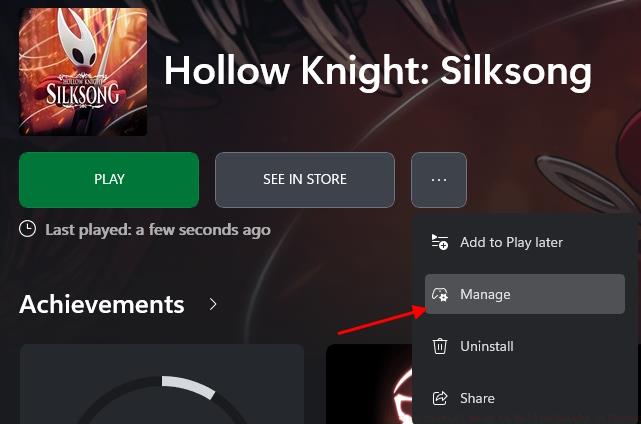
Steam Platform Backup Procedure:
Xbox PC Application Backup Method:
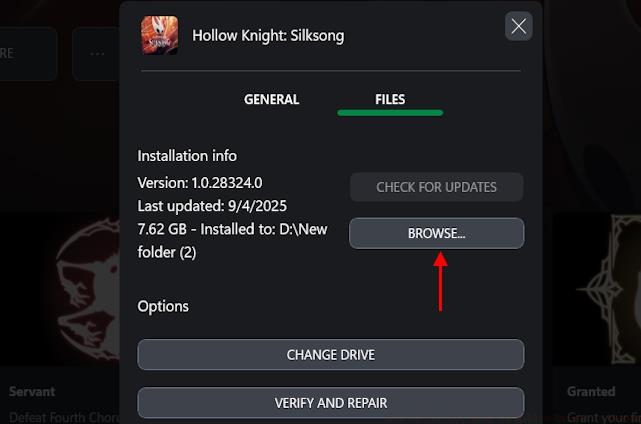
Manual Installation Process
Manual mod installation provides granular control over your Silksong modifications but demands meticulous file management. This approach typically delivers faster loading times since it eliminates intermediary software layers. Begin by downloading BepInEXPack, the essential framework that enables most Silksong mods to function properly.

Manual Installation Steps:
Common manual installation pitfalls include placing files in incorrect directories, forgetting dependency requirements, or overwriting critical game files. Always read mod documentation thoroughly before installation.
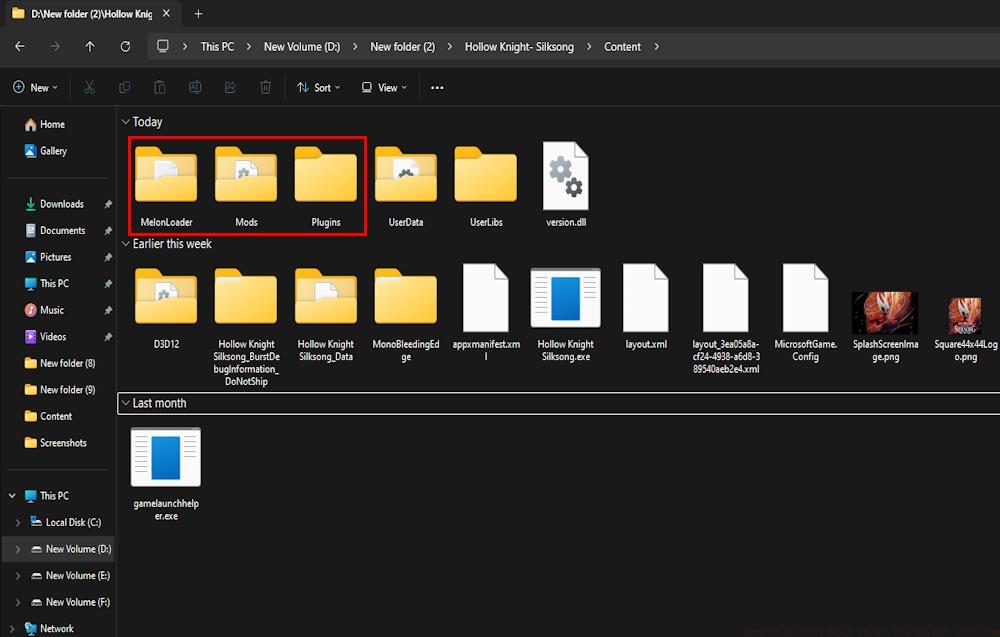
Thunderstore Mod Manager Setup
Thunderstore Mod Manager simplifies the modding process through automated installation, dependency resolution, and conflict management. This method significantly reduces technical barriers for newcomers while providing robust mod management capabilities.
Thunderstore Installation Procedure:
The profile system within Thunderstore allows you to maintain separate mod setups for different playstyles or challenge runs. This modular approach prevents conflicts when switching between extensively modded configurations and minimal quality-of-life setups.
Successful Silksong modding extends beyond initial installation to encompass ongoing management and optimization. Understanding mod load order, compatibility requirements, and performance impact ensures stable gameplay while maximizing customization potential.
Troubleshooting Common Installation Issues:
For players transitioning from other modding communities, the principles learned in our Complete Guide to game modification provide valuable cross-platform insights. The systematic approach to Weapons Unlock strategies similarly apply to managing Silksong mod dependencies.
Optimization Techniques for Modded Gameplay:
Advanced users should consider creating mod packs that bundle compatible modifications together. This approach streamlines the installation process for specific playstyles while ensuring stability through pre-tested combinations. The organizational skills developed through our Class Guide can be adapted to categorize Silksong mods by function and compatibility.
Remember that modding should enhance your Silksong experience, not complicate it. Start with essential quality-of-life modifications before experimenting with extensive gameplay overhauls. This progressive approach minimizes troubleshooting while building your modding expertise gradually.
Action Checklist
- Backup complete game files on both Steam and Xbox PC platforms
- Download and install BepInEXPack framework to root directory
- Choose installation method: manual for control or Thunderstore for convenience
- Verify mod compatibility and load order to prevent conflicts
- Test mod functionality and create restore points before adding new modifications
No reproduction without permission:Tsp Game Club » How to Install Mods in Hollow Knight Silksong Master Hollow Knight Silksong modding with comprehensive installation methods and essential safety precautions