
TL;DR
- Liking games boosts developer visibility and unlocks exclusive rewards and codes
- PC method involves browser navigation with clear visual confirmation indicators
- Mobile requires specific app interface knowledge with touch-optimized controls
- Console versions have unique controller-based navigation patterns to master
- Always verify like status and understand platform-specific reward mechanics
Engaging with Roblox games through the Like feature serves multiple strategic purposes beyond simple appreciation. This interaction directly influences game discovery algorithms, helping quality titles gain visibility in recommendation systems. Many developers implement reward-gating mechanics that require players to like their games before accessing special content, exclusive items, or redemption codes.
The platform’s recommendation engine heavily weights user engagement metrics, meaning your likes contribute to a game’s overall ranking and visibility. This creates a virtuous cycle where popular games become more discoverable, while developers receive valuable feedback about player preferences.
Each platform—PC, mobile, and console—presents the Like functionality in slightly different interface locations, though all maintain consistency within the main game detail page. Understanding these subtle differences ensures you can consistently support developers and claim rewards regardless of your access method.
The PC environment offers the most straightforward liking experience due to its comprehensive interface layout and clear visual hierarchy. Whether using the web browser version or dedicated desktop application, the process remains intuitive with minimal navigation complexity.
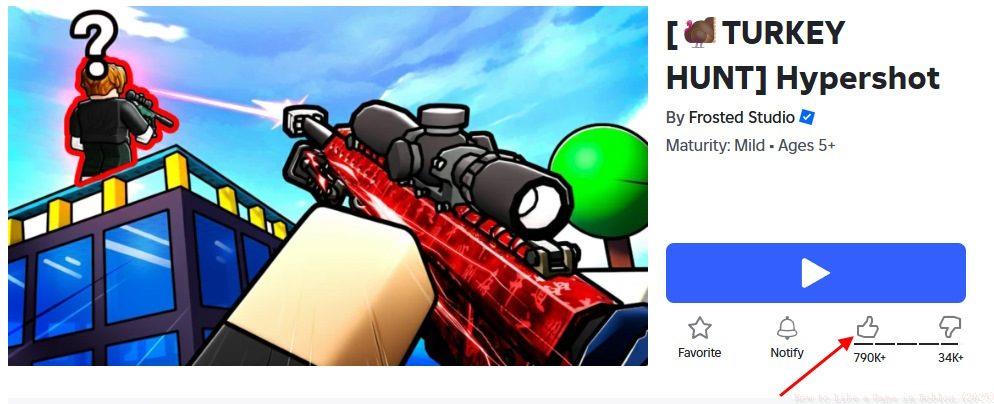
Browser Method Steps:
- Access the official Roblox website through your preferred browser
- Utilize the search functionality to locate your target game or select it from your personalized home feed
- Identify the distinctive thumbs-up icon positioned strategically beneath the prominent Play button
- Execute a single click on the Like button interface element
- Monitor for the crucial visual confirmation—the icon should transition to a solid black appearance indicating successful registration
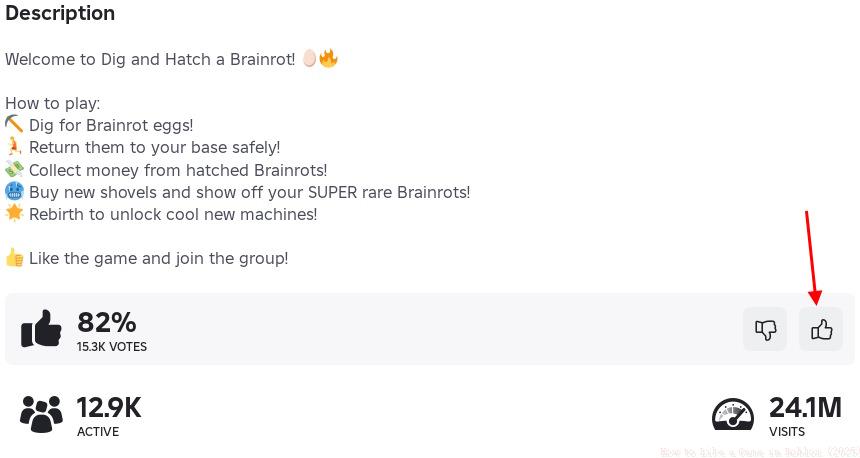
Desktop Application Variation: The standalone PC application mirrors the web interface nearly identically, though some users report slightly faster response times for like registration. Ensure you’re logged into the same account across platforms to maintain consistent engagement tracking.
Mobile platforms introduce touch-optimized interfaces that require slightly different navigation approaches compared to desktop environments. The compact screen real estate means interface elements may be repositioned, though core functionality remains consistent across device types.
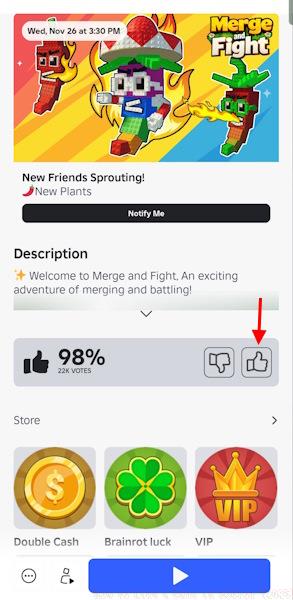
Mobile-Specific Process:
- Launch the official Roblox mobile application from your device’s home screen or app drawer
- Navigate to the Discover section or use the search bar to find your desired gaming experience
- Access the complete game details page by selecting the title from search results
- Scroll through the interface to locate the engagement buttons section
- Tap the thumbs-up symbol firmly—avoid light touches that might not register
- Watch for both color change and potential haptic feedback confirming your interaction
Platform Nuances: iOS and Android versions maintain visual consistency, though button placement may vary slightly between operating systems. Mobile users often benefit from faster loading times for like confirmation compared to web platforms.
Console interfaces present unique challenges due to controller-based navigation and television-optimized display layouts. The Like functionality remains accessible but requires understanding of console-specific menu structures and navigation patterns.
Console Navigation Strategy:
- Boot up the Roblox application on your Xbox or PlayStation system
- Use the directional pad or analog stick to browse games or access search functions
- Select your target game and wait for the full details page to load completely
- Navigate through interface tabs using controller buttons to locate the social engagement section
- Press the corresponding action button (typically A on Xbox, X on PlayStation) to activate the Like
- Verify success through both visual indicators and potential achievement notifications
Cross-Platform Considerations: Likes registered on console platforms sync across your entire account ecosystem. However, some game-specific rewards may have platform restrictions, so verify redemption requirements in the game description.
Mastering Roblox engagement requires understanding both the technical process and strategic implications of your interactions. These advanced techniques ensure maximum benefit from your liking activities.
Troubleshooting Common Problems:
- Like Not Registering: Refresh the page or restart the application, then attempt the process again
- Button Missing: Ensure you’re on the correct game details page, not a simplified listing view
- No Reward Unlock: Some games require additional steps beyond liking—check game-specific requirements
- Cross-Platform Discrepancies: Allow up to 5 minutes for like synchronization between platforms
Strategic Liking Approach: Focus your likes on games you genuinely enjoy and plan to revisit. This authentic engagement benefits both developers and the recommendation algorithm’s accuracy. For comprehensive gaming strategies, consult our Complete Guide to enhance your overall gameplay experience.
Understanding weapon systems can complement your social engagement strategies—explore our Weapons Unlock guide for related mechanics. Additionally, proper Class Guide selection can influence which games you might want to support through liking.
Action Checklist
- Verify you’re logged into correct Roblox account before liking
- Navigate to full game details page, not abbreviated listing view
- Execute platform-specific like process with confirmation verification
- Check for immediate reward unlocks or note requirements for future redemptions
- Allow 5-minute synchronization period for cross-platform like visibility
No reproduction without permission:Tsp Game Club » How to Like a Game in Roblox (2025) Master Roblox game liking across all platforms to unlock rewards and support developers effectively