
TL;DR
- Redeem codes in-game via VP section or through Riot’s official website
- Always verify code accuracy to avoid 24-hour soft bans from multiple failed attempts
- Free reward codes are available through official events, streams, and partnerships
- Expired codes cannot be redeemed but new ones are regularly released
- Physical and digital gift cards provide secure VP acquisition methods
Valorant Points (VP) serve as the essential premium currency required for acquiring cosmetic upgrades like weapon skins, character outfits, and other visual enhancements. These points can be obtained through multiple channels, with prepaid gift cards offering a convenient alternative to direct store purchases. Gift cards provide enhanced security and make excellent gifts for fellow players.
Acquiring Valorant cosmetics demands accumulating Valorant Points, the game’s exclusive premium currency system. Riot Games provides diverse VP acquisition methods, prominently featuring prepaid gift cards and digital codes. You can purchase these gift cards from authorized platforms using conventional payment methods. Following your gift card purchase, you’ll receive a unique alphanumeric code redeemable for VP credits. This comprehensive tutorial will demonstrate proper Valorant gift card and code redemption procedures.
Redeeming Valorant codes directly within the game client offers the most straightforward approach. Locate the code on your physical gift card packaging or within your email receipt if purchased digitally. Accuracy during code entry proves absolutely critical for successful redemption.
Ensure you transcribe the code exactly as displayed on the gift card or within the email communication. Multiple incorrect code submission attempts will trigger a temporary 24-hour soft ban restriction. This security measure means you must wait until the ban period concludes before attempting redemption again.
Now that we’ve covered the essential precautions, implement the following systematic steps to redeem gift codes in Valorant:
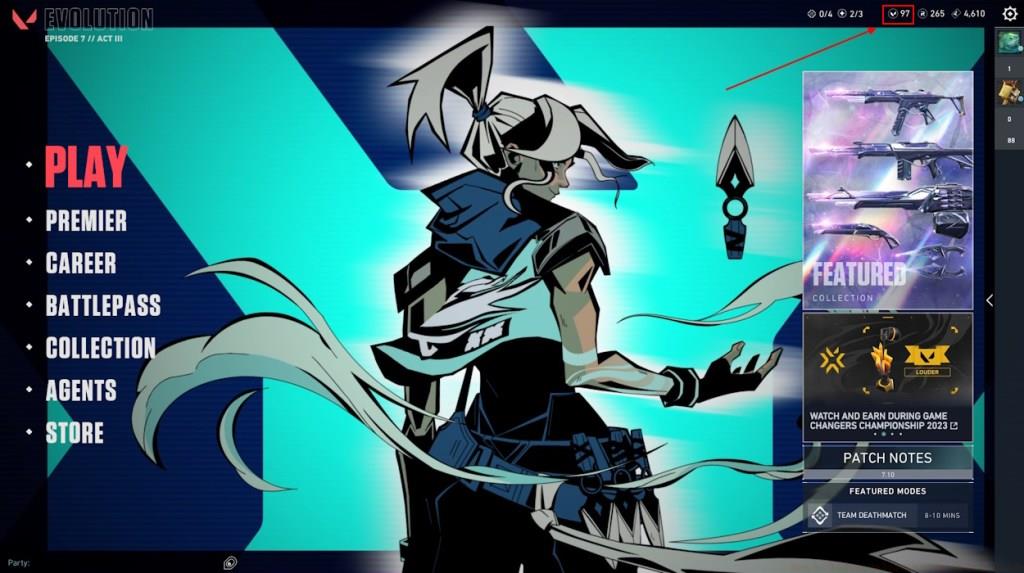
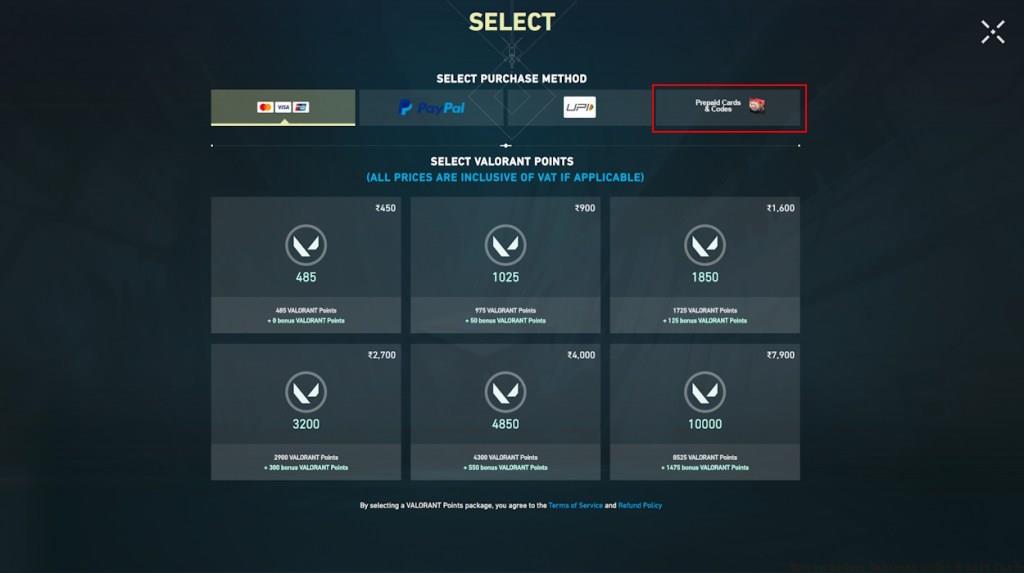
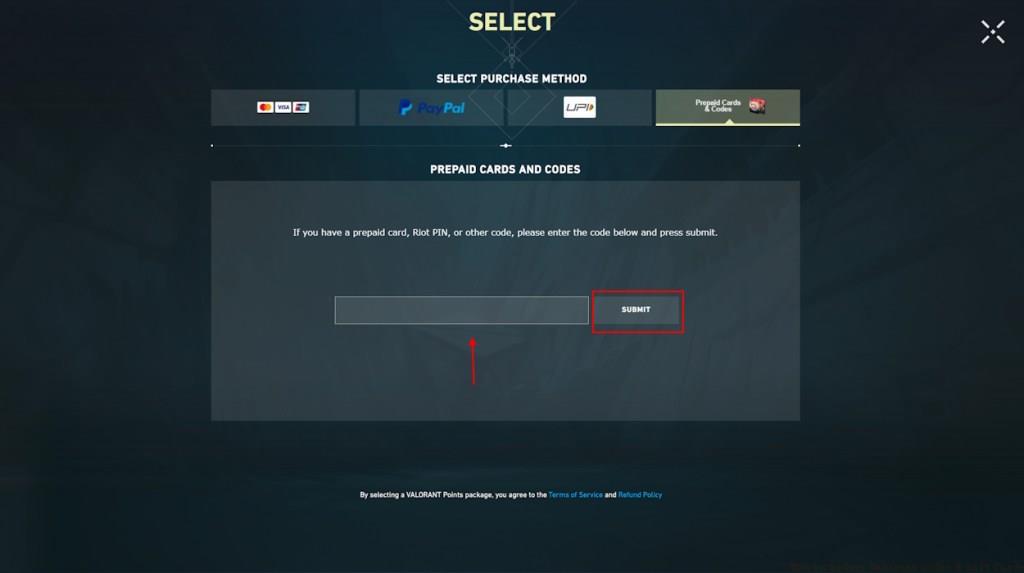
Pro Tip: Double-check each character before submission, paying special attention to easily confused characters like ‘0’ (zero) and ‘O’ (letter O). Most redemption errors occur from simple transcription mistakes rather than invalid codes.
For players experiencing in-game client issues or preferring browser-based solutions, Riot Games provides an official website redemption portal. This method synchronizes directly with your Valorant account and offers identical results to in-game redemption.
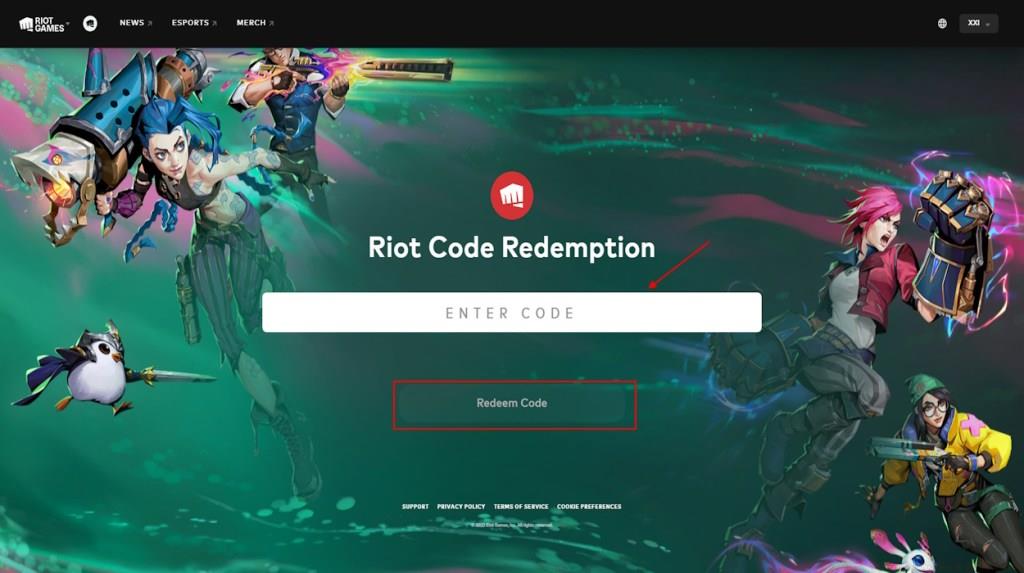
The web-based redemption process requires accessing your Riot Games account through their official redemption page. This approach proves particularly useful when the game client is undergoing maintenance or you’re away from your gaming setup. Website redemption typically processes within 5-10 minutes, after which points automatically appear in your Valorant account.
Advanced Insight: Website redemption sometimes processes faster than in-game methods during peak server hours, as it bypasses potential game client congestion. However, always ensure you’re logged into the correct Riot account to prevent accidental VP allocation to wrong accounts.
Beyond purchased gift cards, Valorant periodically releases free reward codes through various promotional channels. These codes typically provide cosmetic items like gun buddies, player cards, or small VP amounts as part of marketing initiatives.
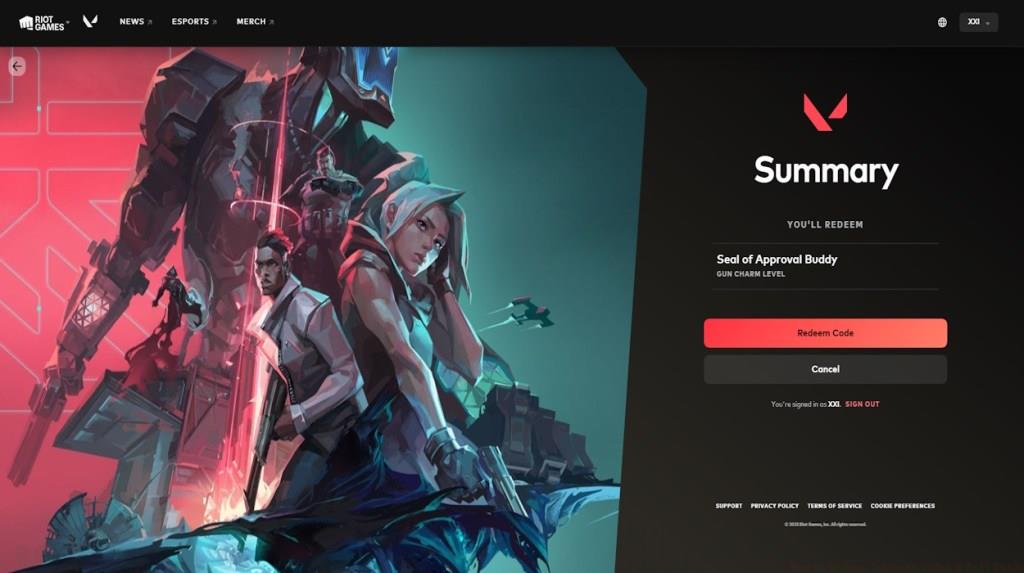
Free codes emerge from official Valorant events, partnered stream broadcasts, and collaborative promotions with other companies. These opportunities allow players to expand their cosmetic collections without financial investment.
Strategic Advice: Follow official Valorant social media accounts and enable notifications for partnered streamers to maximize free code acquisition. Most free codes have limited redemption windows, so immediate action is recommended upon discovery.
Understanding these weapon customization systems in other games can enhance your appreciation for Valorant’s cosmetic economy and redemption mechanics.
Valorant code redemption occasionally presents challenges that require systematic troubleshooting. Understanding common pitfalls and their solutions ensures smooth VP acquisition and cosmetic unlocks.
Expired Valorant redemption codes represent one of the most frequent issues players encounter. All codes feature specific validity periods, after which they become permanently unusable. Riot Games regularly issues new codes, so checking for current promotions typically resolves expiration problems.
Critical Prevention: Always redeem codes immediately upon receipt to avoid missing expiration deadlines. For comprehensive gaming system mastery, developing proficient redemption habits translates to smoother experiences across multiple game platforms.
When encountering redemption errors, first verify code validity through official channels. Regional restrictions sometimes apply, so ensure your code matches your account’s geographic location. Most importantly, maintain patience during server issues, as aggressive retrying can trigger protective bans.
Mastering these procedural systems builds foundational skills that enhance overall gaming competency beyond just Valorant.
Action Checklist
- Verify code source authenticity before purchase or redemption attempts
- Navigate to VP section in-game or access Riot’s redemption website
- Input code precisely with character-by-character verification
- Monitor official channels for free code releases and redeem immediately
- Troubleshoot systematically if errors occur, checking expiration and region compatibility
No reproduction without permission:Tsp Game Club » How to Redeem Valorant Codes & Gift Cards Complete guide to redeeming Valorant codes with expert tips and troubleshooting solutions