
TL;DR
- Access 7+ free private server links to avoid Robux costs while maintaining secure gameplay
- Create permanent private servers for 100 Robux with recurring monthly subscription management
- Utilize platform-agnostic setup methods through both browser and Roblox app interfaces
- Implement strategic mining operations free from exploiters and server overcrowding issues
- Evaluate whether private server investment aligns with your gameplay frequency and resource goals
The Forge development team has responded to community requests by implementing private server functionality, addressing critical player concerns about security and resource competition. If you’ve experienced frustration with exploiters disrupting your mining operations or hackers compromising your hard-earned ores, private servers provide the solution you’ve been seeking. While the fundamental setup process remains accessible across Roblox platforms, understanding the strategic advantages requires deeper insight into server mechanics and resource protection protocols.
Private servers in The Forge operate on a Robux-based economy, making the discovery of free access points particularly valuable for budget-conscious players. This comprehensive guide not only details the creation process but also examines the long-term strategic benefits of maintaining a private mining environment.
For players seeking immediate private server access without financial commitment, we’ve compiled currently active free server connections. These community-hosted options allow you to experience private server benefits while evaluating whether a personal server investment aligns with your gameplay patterns. Below you’ll find the verified working links along with host information for reliability assessment.
| Server Link | Host |
|---|---|
| Link 1 | UnoTwo |
| Link 2 | UnoTwo |
| Link 3 | UnoTwo |
| Link 4 | UnoTwo |
| Link 5 | UnoTwo |
| Link 6 | ABeast |
| Link 7 | ABeast |
Important Notice: Free servers may experience downtime due to subscription lapses or capacity limitations. If you encounter connection issues, please report them through community channels to help maintain current availability information.
Strategic tip: Bookmark multiple free server links as backups since popular servers frequently reach maximum player capacity during peak gaming hours. Consider coordinating with regular play partners to distribute across different servers for optimal resource access.
Establishing your dedicated mining operation in The Forge requires following precise configuration steps through either the Roblox website interface or mobile application. Both platforms provide identical functionality, though the visual layout may differ slightly between versions.
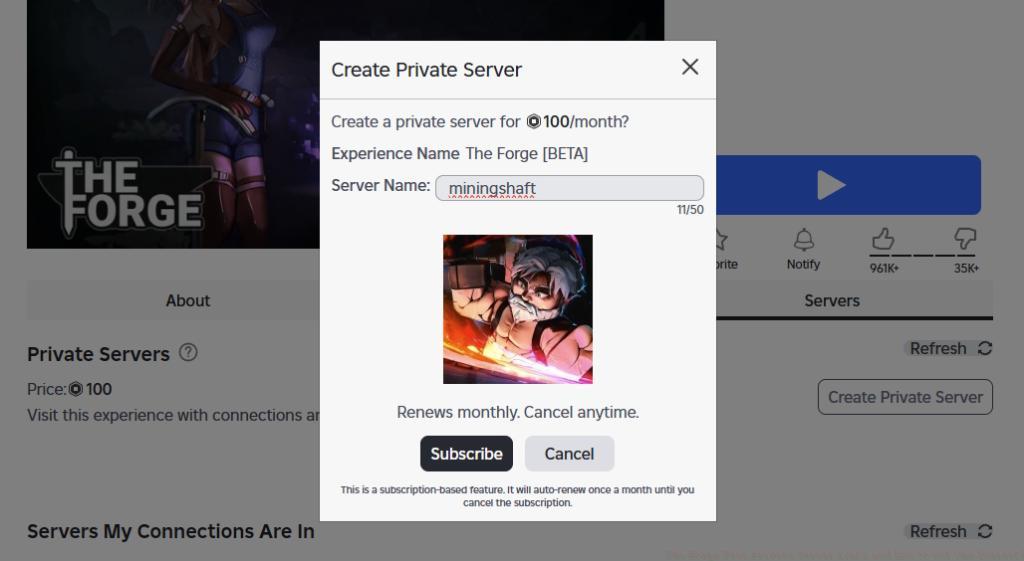
Navigate to the ‘Servers’ section within The Forge game page, then locate the Private Servers category. Click the prominently displayed ‘Create Private Server’ button to initiate the configuration sequence.
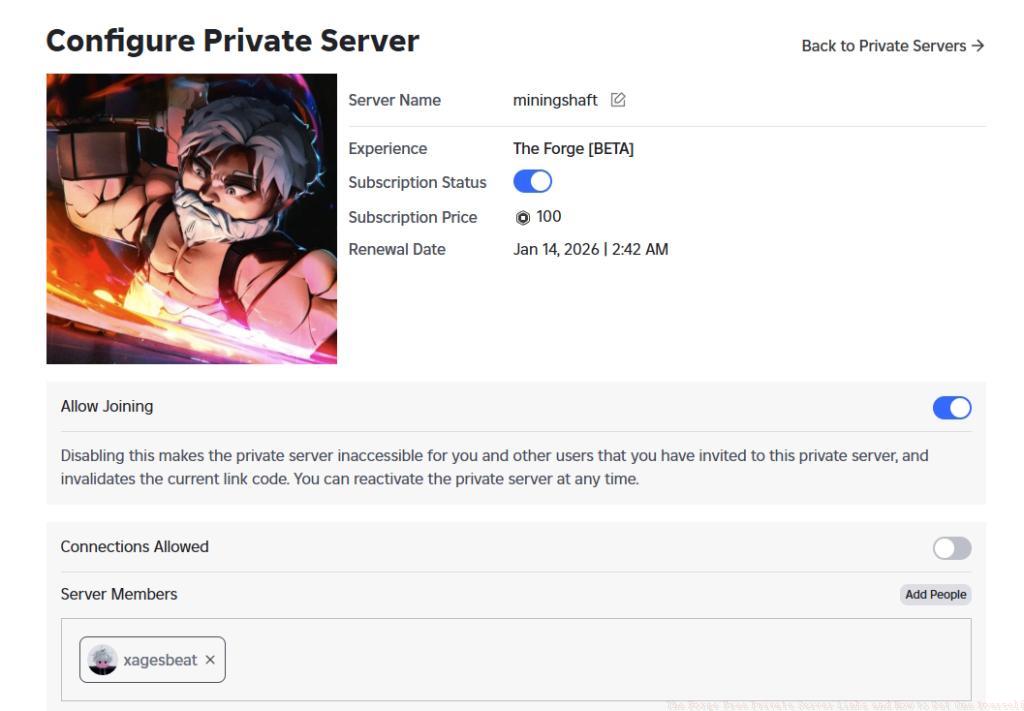
Within the configuration interface, assign a distinctive ‘Server Name‘ that will help friends identify your dedicated mining environment. Finalize the creation process by selecting the ‘Subscribe‘ confirmation button at the bottom of the dialog window.
The platform automatically deducts 100 Robux from your account balance upon server activation. This initial investment secures your private mining domain for the first operational period.
Critical awareness: Roblox implements automated monthly billing cycles for private server subscriptions. Maintain sufficient Robux reserves in your account if you plan continuous access to your personalized mining operation.
Pro tip: Set calendar reminders for subscription renewal dates and monitor your Robux balance weekly to avoid unexpected service interruptions during crucial mining sessions.
Once your private server is operational, maximizing its potential requires sophisticated management approaches. The friend invitation system allows you to curate your mining team carefully, ensuring cooperative gameplay with trusted partners rather than random public server participants.
Strategic server management involves establishing mining shifts and resource allocation protocols among your team members. This prevents resource conflicts and ensures optimal ore collection efficiency during extended play sessions.
Common configuration mistake: Players often forget to adjust server privacy settings after creation, potentially allowing unauthorized access. Always verify your server appears as ‘Private’ rather than ‘Friends’ or ‘Public’ to maintain security.
Advanced technique: Implement scheduled mining operations where team members focus on different ore types during designated time blocks, then pool resources for maximum progression efficiency.
Evaluating whether to invest in a private server requires honest assessment of your gameplay frequency and progression goals. Casual players who log in occasionally may find free server options sufficiently meet their needs, while dedicated miners will discover the investment quickly pays for itself through uninterrupted resource accumulation.
Players experiencing frequent disruptions from exploiters or those coordinating large-scale mining operations with friends will benefit most from private server ownership. The ability to control the gaming environment transforms the mining experience from stressful competition to methodical progression.
Consider your Battlefield 6 play patterns – if you frequently engage in extended Conquest matches, similar dedication to The Forge likely justifies the Robux expenditure. The security and control advantages often outweigh the financial cost for serious players.
For those still developing their mining strategies, our Class Guide provides complementary insights into role specialization that can enhance your private server efficiency.
Action Checklist
- Test free server links to evaluate private server benefits before financial commitment
- Verify Robux balance meets 100+ requirement for server creation
- Create private server through preferred platform (browser or app)
- Configure server name and privacy settings for optimal security
- Establish monthly subscription monitoring system to maintain service continuity
- Develop coordinated mining schedule with team members for resource optimization
No reproduction without permission:Tsp Game Club » The Forge Free Private Server Links and How to Get One Yourself Complete guide to accessing free private servers and creating your own secure mining environment in The Forge