A comprehensive guide to unlocking the Emerald Wave Electrician Backpack in ARC Raiders, including troubleshooting tips and strategic cosmetic use.
Introduction to the Emerald Wave Electrician Backpack
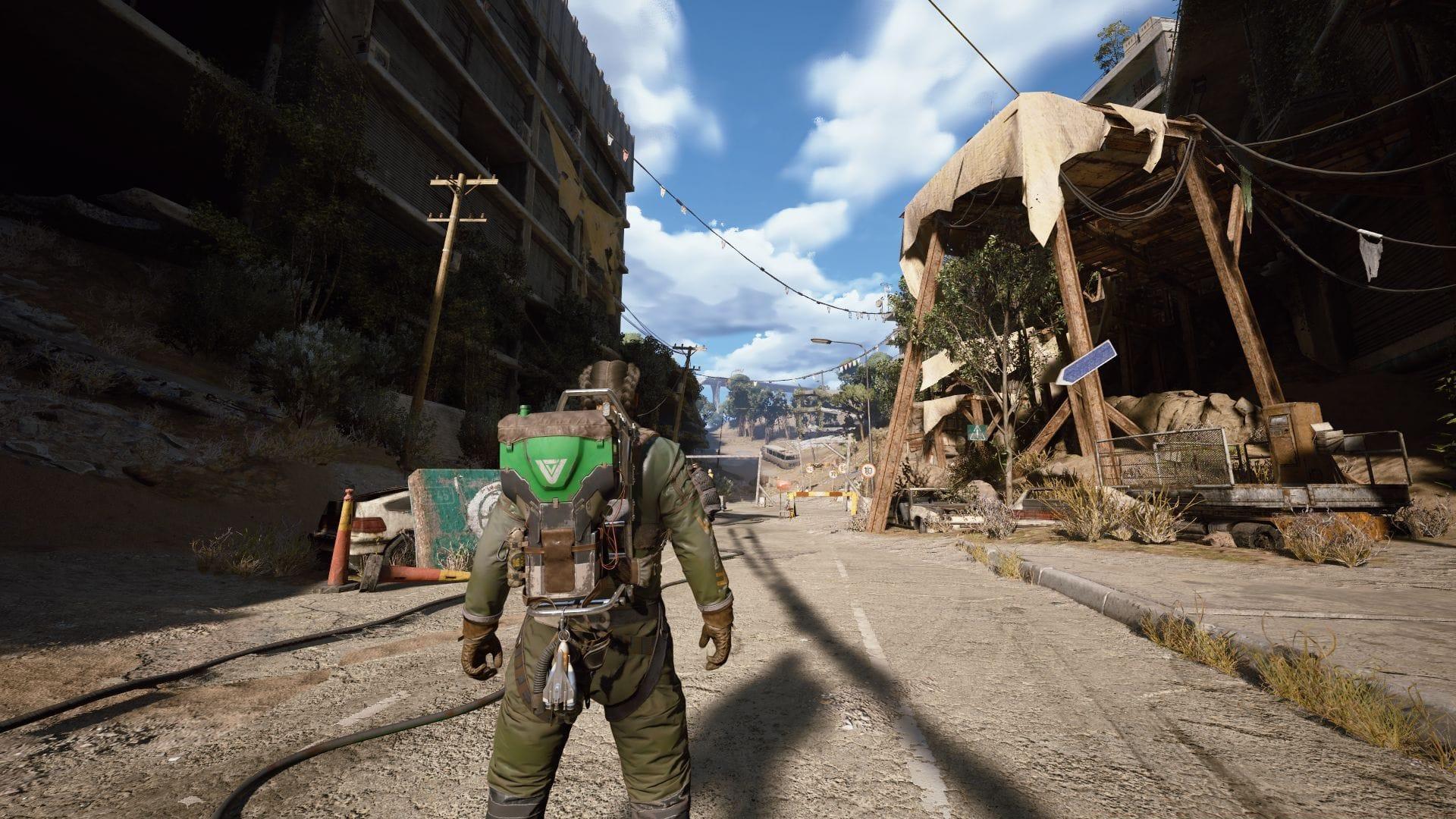
Showcase your style with the distinct Emerald Wave Electrician Backpack in the Rust Belt region. (Image via SK Gaming || Embark Studios)
The Emerald Wave Electrician Backpack represents a special cosmetic variant within ARC Raiders, offering a vibrant green reskin of the standard Electrician model. Unlike many in-game items, this backpack is available at zero cost, but securing it involves a specific cross-platform redemption process. Developers like Embark Studios frequently collaborate with hardware partners to distribute exclusive cosmetics, particularly around significant updates, providing players with unique ways to customize their Raiders and express faction loyalty.
Understanding the value of such items is key. In a game like ARC Raiders, where personalization enhances immersion and community engagement, free cosmetics serve as both rewards for dedicated players and marketing tools for new content launches. This particular item allows you to visibly align with ‘team green’ and stand out in the cooperative landscape of the upcoming Cold Snap update.
Step-by-Step: Redeeming via GeForce Experience
Follow this detailed sequence to secure your promotional code from the Nvidia platform. Ensure your GeForce Experience application is updated to the latest version to avoid compatibility issues.
Launch the GeForce App. You can find it in your system tray (near the clock), pin it from your Start Menu, or search for it directly.
Navigate to the Redeem section. This tab is typically located on the left-hand sidebar menu within the app interface.
Browse and select the ARC Raiders reward offer. A clear click on this tile will initiate the code generation process for the Emerald Wave Electrician Backpack.
Prepare for account verification. The app will redirect you to a secure browser page, prompting you to log into or select your associated gaming account (like Steam or Epic Games).
Complete the necessary security check. This often involves a CAPTCHA or two-factor authentication to confirm your identity.
Finalize the code generation. Click the Redeem button on the final screen. Your unique alphanumeric code for the backpack will be displayed. Copy this code immediately and save it in a text file; it will not be shown again.
Step-by-Step: Redeeming on the Embark Studios Site
Possessing the code is only half the battle. You must now activate it on the developer’s official platform to inject the item into your game inventory.
Access the Embark Studios redemption portal. Open your preferred web browser and go to the official Embark gift redemption page (typically found on their website or via the game’s official social media links).
Sign in using your preferred platform. This must be the same account you use to play ARC Raiders (e.g., Steam, Epic Games Store). Consistency here is crucial for successful delivery.
Input your code. Paste the exact code obtained from the Nvidia promotion into the designated field. Double-check for typos or extra spaces.
Click the final Redeem button. A confirmation message should appear, indicating the Emerald Wave Electrician Backpack has been added to your account. Allow up to 24 hours for the item to populate in your in-game inventory.
Upon successful redemption, the cosmetic is permanently bound to your account. You can equip it from your inventory screen the next time you launch ARC Raiders, ready to be flaunted in the Rust Belt.
Common Issues & Pro Tips
Even with clear instructions, players often encounter hurdles. Here’s how to overcome them and use your new gear strategically.
Common Mistakes & Solutions:
Error: “Code Already Used” or “Invalid Code.” Ensure you’re logged into the correct Embark account linked to your game. Clear your browser cache and cookies, then try again. If the problem persists, the code may be region-locked.
Error: Reward Not Found in GeForce App. This promotion may be geographically restricted. Using a VPN set to a supported region (like North America or Europe) can sometimes resolve this.
Item Not in Inventory After 24 Hours. Log out and back into your game account. If it’s still missing, contact Embark Studios support with your redemption confirmation screenshot.
Optimization & Advanced Tips:
Tactical Advantage: While purely cosmetic, the backpack’s bright green hue can be a deliberate choice. In the lush, overgrown areas of the Rust Belt, it offers marginally better camouflage than default dark colors, a small but appreciated edge for perceptive players.
Loadout Synergy: Pair the Emerald Wave Backpack with other green-tinted cosmetics or weapon skins to create a cohesive, faction-themed Raider. This visual signaling can help teammates quickly identify you in chaotic engagements.
Update Timing: Equip the backpack as soon as the Cold Snap update drops. Being among the first to showcase new, free cosmetics can generate positive social interactions and inquiries from other players, expanding your in-game network.