
TL;DR
- Optimize color settings with custom presets for enhanced target identification and minimap clarity
- Configure brightness at 60 to eliminate shadow campers while maintaining visual balance
- Implement advanced controller sensitivity settings for precise aim and movement control
- Customize audio profiles to detect enemy movements and positional cues effectively
- Apply pro-level optimization techniques for different Battlefield 6 game modes and scenarios
Transform your Battlefield 6 tactical awareness through strategic visual customization that gives you the edge in every engagement. With the official launch now live, properly configured accessibility options can dramatically improve your battlefield performance and reaction times.
Begin your optimization journey in the accessibility menu, where targeted adjustments create substantial competitive advantages during intense firefights. These visual enhancements provide critical information clarity when split-second decisions determine victory or defeat.
Access Graphics > Color Preset and select custom configuration for complete visual control. Implement this professional color scheme:
These intensified, saturated color profiles generate superior contrast against Battlefield 6 diverse environmental backdrops, ensuring critical combat intelligence stands out during high-pressure situations.
Adjust your display brightness to precisely 60 – this optimal setting neutralizes frustrating ambushes from shadowy positions. This calibrated 20% elevation from standard defaults reveals concealed opponents in dark areas while preserving detail in well-lit zones.
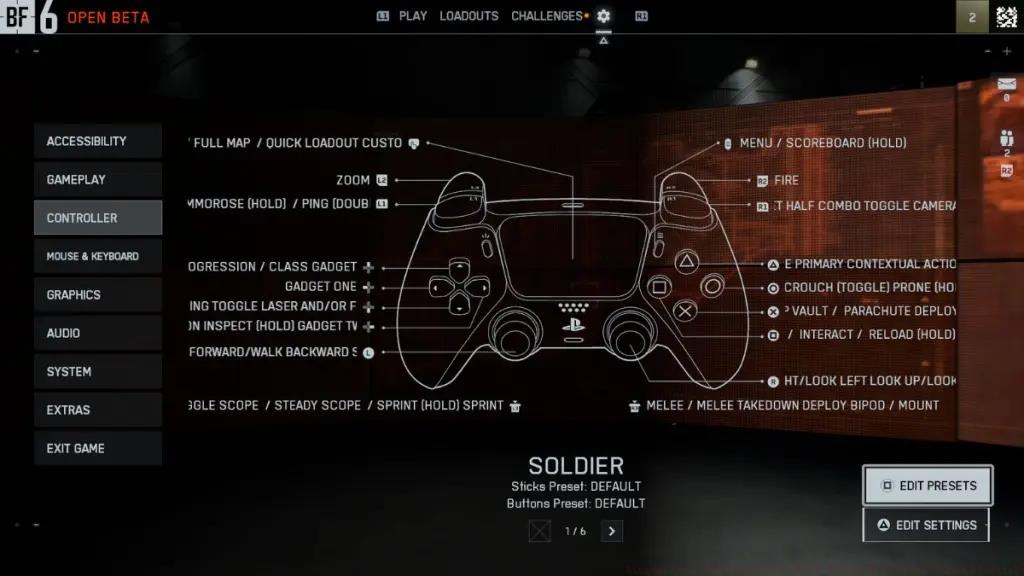
Advanced Visual Tip: For urban combat in maps like Pax Armata, consider reducing brightness to 55 to counter excessive glare from reflective surfaces while maintaining shadow penetration.
Mastering Battlefield 6 control mechanics requires precision tuning that aligns with your playstyle and reaction capabilities. Proper controller configuration separates casual players from competitive dominators.
Aim Sensitivity Configuration: Start with horizontal and vertical sensitivity at 35-40 for balanced target tracking. Gradually increase to 45-50 as your muscle memory develops. Higher sensitivity enables quicker reactions in close-quarters combat but requires more practice for precision.
Zoom Sensitivity Multiplier: Set ADS sensitivity to 0.85 for maintained accuracy when aiming down sights. This ensures your scoped precision remains consistent while allowing faster hip-fire turning.
Controller Dead Zones: Reduce thumbstick dead zones to 10-12% for more responsive input detection. Lower values provide quicker response times but may cause drift with worn controllers.
Vibration Settings: Enable trigger vibration only for tactile feedback without distracting controller shake. This provides confirmation of weapon firing while maintaining aim stability.

Advanced Movement Configuration: For Conquest mode specialists, increase soldier stick sensitivity to 60-65 for rapid position changes during large-scale engagements. Combine with a tactical controller layout for seamless crouch-sliding and prone transitions.
Common Mistake Avoidance: Many players max out sensitivity settings prematurely, resulting in inconsistent aim. Gradually increase by 5-point increments over several matches to build adaptive muscle memory.
Battlefield 6 audio engineering provides critical tactical intelligence when properly configured. Optimized sound profiles reveal enemy positions, incoming threats, and environmental cues that visual information alone cannot provide.
Sound Profile Selection: Choose ‘War Tapes’ audio preset for the most dynamic range and positional accuracy. This setting emphasizes footstep audio cues and weapon directionality, essential for detecting flanking maneuvers.
Dynamic Range Compression: For competitive play, select ‘Night Mode’ to compress audio dynamics, making quiet sounds like footsteps more audible without reducing explosive impact. This prevents audio spikes from overwhelming critical subtle cues.
Voice Chat Balance: Adjust voice chat volume to 70% to maintain clear squad communication without drowning out game audio cues. Position squad member volumes slightly higher than other players for prioritized tactical communication.
Advanced Audio Technique: Use stereo headphones rather than virtual surround sound for more precise left/right positioning. Battlefield 6 engine accurately renders positional audio in stereo, while virtual surround can create misleading directional cues.
Spatial Awareness: In NATO vs. Warsaw Pact scenarios, train your ear to distinguish between faction-specific weapon sounds and vehicle engines. This auditory identification provides split-second recognition advantages before visual confirmation.
Elevate your Battlefield 6 performance beyond basic settings with professional optimization techniques tailored for competitive advantage. These advanced strategies address specific gameplay scenarios and performance metrics.
Game Mode Specialization: For Assignments completion efficiency, create separate controller profiles for different mission types. Aggressive CQB assignments benefit from higher sensitivity (55-60), while long-range marksmanship Assignments perform better with lower sensitivity (30-35) and precision zoom settings.
Performance Monitoring: Track your accuracy statistics weekly using Battlefield 6 detailed stats screen. If your accuracy falls below 18%, consider reducing sensitivity by 5-point increments until consistency improves. Top players maintain 22-28% accuracy across weapon types.
Controller Hardware Optimization: Consider kontrol freeks or extended thumbsticks for enhanced precision in BF6. The additional leverage improves minute adjustment capability for long-range engagements while maintaining swift close-quarters responsiveness.
Environmental Adaptation: Adjust brightness settings based on map lighting conditions. Urban environments with artificial lighting perform best at 55 brightness, while outdoor daylight maps benefit from 65-70 brightness for shadow penetration without oversaturation.
Pro Player Technique: Top competitive players frequently switch between multiple controller configurations during a single gaming session. Develop 2-3 preset configurations for different playstyles and switch based on your team’s needs and the current match situation.
For comprehensive strategies beyond controller settings, explore our Complete Guide to master every aspect of Battlefield 6 gameplay mechanics and tactics.
Action Checklist
- Configure custom color preset with recommended values
- Set brightness to 60 and test shadow visibility
- Adjust controller sensitivity to 35-40 baseline
- Configure War Tapes audio preset and night mode compression
- Create specialized configurations for different game modes
- Weekly accuracy tracking and sensitivity refinement
No reproduction without permission:Tsp Game Club » Battlefield 6: Best PS5 & XBOX Settings Master Battlefield 6 controller settings with pro-tested configurations for PS5 and Xbox to dominate matches