
TL;DR
- Use all 8 current working codes for immediate rewards including CandyCane, Acorns, and cash boosts
- Follow precise redemption steps through the game’s code interface to avoid common input errors
- Monitor official social channels and join community servers for early access to new code releases
- Implement strategic zoo layouts and animal placement to maximize passive income generation
- Verify code status and troubleshoot redemption issues with systematic problem-solving approach
Latest Update: Fresh Build a Zoo codes added on December 25, 2025 – check expiration dates carefully
While Roblox features numerous simulation experiences, Build a Zoo stands apart as a dedicated animal management simulator that combines collection mechanics with strategic resource generation. As an avid zoo simulator enthusiast with hundreds of hours across similar titles, I’ve found Build a Zoo’s conveyor belt animal collection system particularly engaging for players who enjoy both casual gameplay and deeper strategic elements. The core gameplay revolves around acquiring adorable creatures that automatically generate currency simply by existing in your habitat, complemented by rare egg hatching mechanics that introduce exciting randomization elements. To accelerate your zoo development, we’ve compiled and verified all currently active promotional codes that provide valuable cash injections, special items, and enhanced eggs – essential tools for establishing server dominance with your animal empire.
- SANTASWORKS: Free CandyCane (NEW)
- SANTAGIFT25: Free Rewards (NEW)
- HOLIDAYFUN1: Free Rewards (NEW)
- TUESDAYFUN1: Free Rewards (NEW)
- CHRISTMAS12: Free Rewards (NEW)
- FIXTHEBUGS1: Free Rewards (NEW)
- ADMINABUSE1: 1 Cranberry (NEW)
- ACORN251204: 1 Acorn (NEW)
Pro Tip: Holiday-themed codes like SANTASWORKS and CHRISTMAS12 typically expire within 2-3 weeks after release, so prioritize redeeming these immediately. The ‘Free Rewards’ designation often includes randomized currency amounts ranging from 100-500 cash or common eggs, while specific items like CandyCane and Acorns serve as premium currency for exclusive purchases.
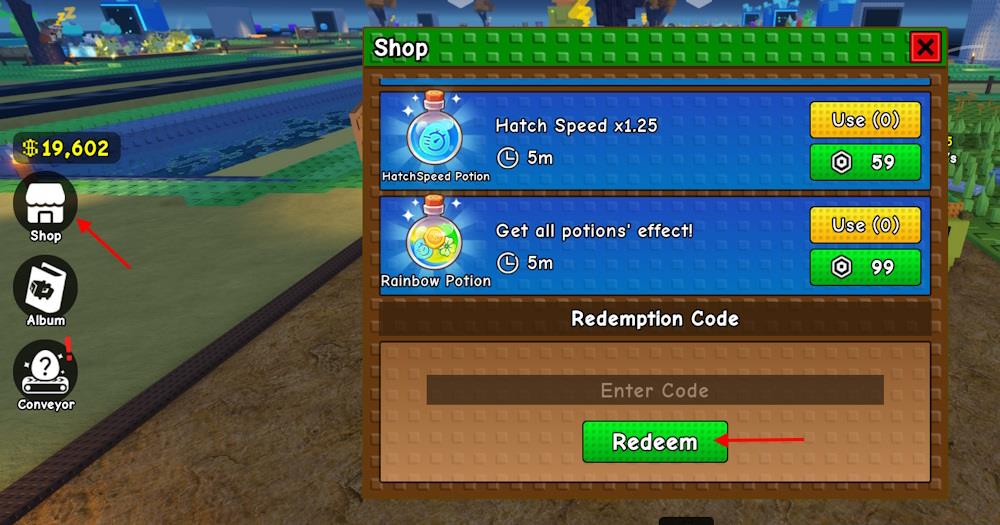
Redeeming codes in Build a Zoo requires precise navigation through the game’s interface. Begin by launching the game and locating the Twitter icon typically positioned on the left or right screen edge – this serves as the code redemption portal. Clicking this icon reveals a text input field where you must carefully type codes exactly as they appear, including proper capitalization and no extra spaces. After entering each code, press the redeem button and wait for the confirmation message indicating successful redemption.
Common Redemption Errors to Avoid: Many players encounter issues by mixing uppercase and lowercase letters incorrectly or adding accidental spacing before or after the code. Always double-check that you’ve copied the entire code sequence without omissions. Another frequent mistake involves attempting to redeem expired codes – if a code doesn’t work, first verify its current status before troubleshooting other potential issues.
Verification Protocol: After redeeming any code, immediately check your inventory and currency balance to confirm receipt of rewards. Some items like Acorns and CandyCane may appear in specialized sections of your inventory rather than with standard currency. If rewards don’t appear immediately, try relogging into the game as some items require a refresh to populate properly. For persistent issues, document the exact error message and compare it with known issues in community forums.
Understanding the game’s resource management systems can help contextualize how these code rewards integrate with your overall progression strategy and zoo development timeline.
Beyond the currently available codes, proactive players can employ several techniques to secure additional rewards and optimize their zoo management efficiency. The most reliable method involves monitoring the official Build a Zoo social media channels, particularly Twitter and Discord, where developers frequently release new codes during special events, milestones, or updates. Following these channels with notifications enabled ensures you receive immediate alerts when fresh codes become available.
Community Engagement Tactics: Join active Build a Zoo community servers and forums where players collaboratively share newly discovered codes. These communities often identify working codes hours or even days before they appear on major gaming sites. Additionally, participating in developer-hosted events frequently provides exclusive code opportunities not available through standard channels.
Resource Optimization Framework: Advanced players should focus on creating efficient zoo layouts that maximize passive income generation. Position high-value animals near the front of your conveyor system and strategically place habitat decorations that boost earnings multipliers. Understanding progression systems similar to those in other Roblox simulations can inform your decision-making regarding which code rewards provide the most significant advancement based on your current zoo development stage.
Proactive Monitoring Schedule: Dedicate specific times for checking code sources – typically Tuesday and Friday afternoons are common release windows. Maintain a personal tracking system for code expiration dates to ensure you never miss limited-time opportunities. Consider setting up a dedicated Discord channel or notification system that aggregates code announcements from multiple verified sources.
For players interested in broader strategic approaches, our class specialization guide offers transferable principles for optimizing your approach to resource management and progression planning.
When Build a Zoo codes fail to work, systematic troubleshooting typically resolves most issues. Begin by verifying the code’s current status through community resources or the game’s official announcements – codes frequently expire without warning, especially holiday-themed promotions. If the code is verified active, check your redemption history as most codes can only be claimed once per account. Attempting to redeem already-claimed codes will consistently generate error messages.
Common Problem Resolution Framework: If you receive a ‘Code Already Redeemed’ message, this indicates successful prior redemption. For ‘Invalid Code’ errors, meticulously recheck the spelling, capitalization, and ensure no extra spaces were inserted. Network connectivity issues can sometimes interfere with code validation – try switching servers or waiting a few minutes before reattempting. Browser-based players should ensure they’re using updated versions of Roblox with all plugins current.
Account-Specific Issues: Rarely, account restrictions or regional limitations may prevent code redemption. If multiple verification attempts fail, contact the game’s support team with specific details including the exact code, error message, and your account information. Document the precise time of attempted redemption to assist support staff in diagnosing potential system-wide issues.
Preventive Measures: To minimize future issues, create a dedicated document tracking code redemption dates and rewards received. This not only helps identify problematic codes but also provides valuable data for optimizing your reward collection strategy. Regular game updates sometimes temporarily disrupt code redemption systems – checking community forums during update periods can confirm whether issues are widespread or account-specific.
Advanced Consideration: Players managing multiple zoos should note that most codes apply across all zoos on an account, though some limited-time codes may have restrictions. Understanding these nuances separates casual players from strategic zoo management experts.
Action Checklist
- Redeem all 8 current codes immediately, prioritizing holiday-themed ones first
- Follow the Twitter icon redemption process with precise code entry and capitalization
- Verify reward receipt in inventory and implement efficient zoo layout for maximum income
- Join official Discord and enable notifications for immediate new code alerts
- Establish weekly code checking routine focusing on Tuesday/Friday release patterns
No reproduction without permission:Tsp Game Club » Build a Zoo Codes (December 2025) Master Build a Zoo with working codes, redemption strategies, and advanced zoo management techniques