
TL;DR
- Steam Replay 2025 provides detailed analytics of your gaming habits from January 1 to December 14, 2025
- Access through Steam desktop, mobile app, or direct links with specific requirements
- Viewing your recap automatically unlocks the exclusive Steam Replay 2025 badge
- Multiple sharing options available including full page sharing, highlights, and profile showcases
- Only online playtime with proper privacy settings counts toward your statistics
Whether you embrace them or approach with caution, annual gaming summaries deliver undeniable truth about your digital entertainment patterns. The 2025 Steam Replay has officially launched, offering a comprehensive look at your gaming journey throughout the year. Did you successfully reduce your backlog, or did you accumulate more premium titles destined for eternal postponement? This is the moment of reckoning for every Steam enthusiast. Our detailed walkthrough shows you how to locate your Steam Replay 2025 and secure the limited-edition profile badge.
Before we guide you through accessing your Steam Replay 2025, let’s clarify what this feature actually represents. Steam Replay, also known as Year in Review, operates similarly to Spotify Wrapped or Fortnite Wrapped analytics. The process is straightforward: if you’ve maintained consistent Steam usage, the system automatically compiles your gaming metrics.
Consequently, you’ll receive an annual summary detailing which titles captured your attention, the countless hours spent exploring virtual worlds, and how many Game Awards 2025 recognized titles you experienced. Here’s the complete breakdown of insights provided by your Steam recap:
- Your most frequently played games throughout 2025
- Detailed monthly time allocation analysis
- Longest consecutive gaming sessions and additional entertaining metrics
- A customizable social media-ready summary graphic
- The exclusive Steam Replay 2025 profile badge
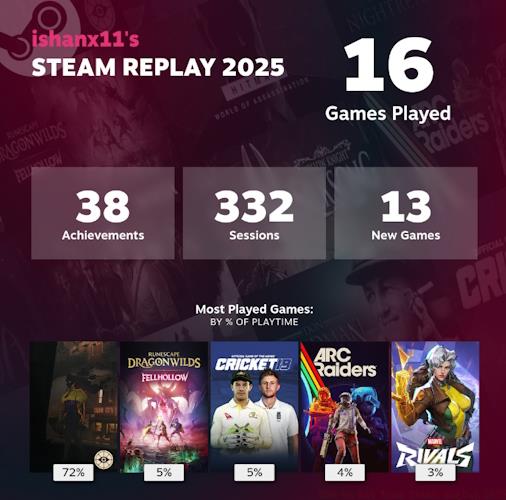
Now that you understand Steam Replay’s purpose, you’re probably eager to view your personalized 2025 summary. However, before proceeding, it’s crucial to understand Valve’s specific data collection parameters. The company exclusively tracks online gaming sessions on Steam. This means if you’ve configured privacy settings to hide game activity (set as private) or primarily play in offline mode, those sessions won’t contribute to your statistics. Additionally, Steam Replay 2025 only incorporates playtime recorded between January 1, 2025, through the final moments of December 14, 2025.
With those considerations addressed, here are the multiple pathways to access your 2025 Steam Replay:
- Desktop Application: Launch your Steam Client and navigate to the ‘Store’ section, where the Steam Replay banner prominently displays on the main page. Select the ‘Review your Year on Steam’ prompt to initiate your personalized recap.

- Mobile Application: If you receive a Steam notification, tapping it will redirect you directly to your recap page. Alternatively, open the Steam mobile application, press the ‘Store’ button, and from that interface, you can examine your Steam Replay 2025 data.
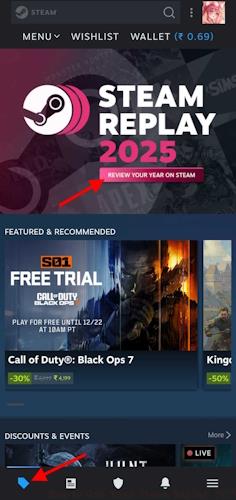
- Direct Web Link: Prefer immediate access? Simply use the dedicated Steam Replay URL provided here to navigate straight to your recap portal.
To acquire the exclusive Steam Replay badge for 2025, you must complete one thorough review of your annual summary. After examining your year in review analytics, proceed to the badges section within your profile interface, where the Steam Replay commemorative badge will be accessible. You can also prominently display this digital achievement on your public profile for community recognition.
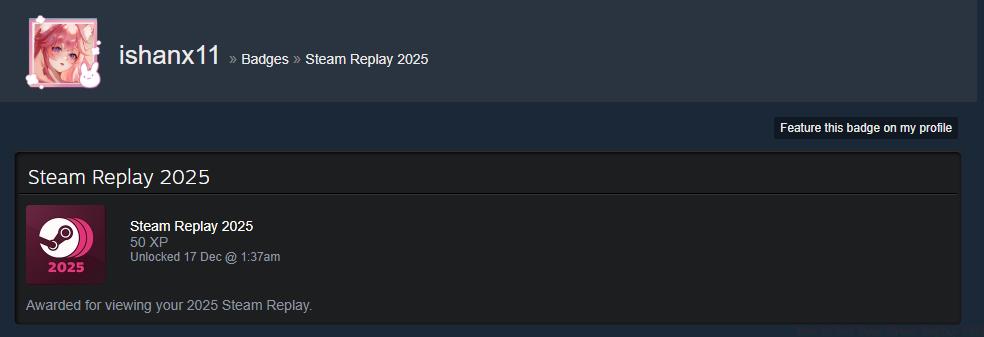
Pro Tip: The badge automatically unlocks upon your first complete viewing of the recap page. Ensure you scroll through all sections to trigger the unlock mechanism properly. Some users report needing to refresh their profile page if the badge doesn’t appear immediately after viewing their replay.
You can also distribute your ‘year in review’ findings with Steam friends or family members. Any adult participant within a family group can monitor children’s gaming activity without additional permissions. Beyond family settings, all Steam users need to manually initiate stat sharing. Here’s the comprehensive guide to sharing your Steam Replay 2025:
- Complete Replay Page: To share your comprehensive replay page, adjust the visibility setting to ‘friends only’ or ‘public’ on your review interface. You can also duplicate the replay URL and distribute it to any desired recipients.
- Highlight Sharing: If you prefer sharing condensed annual highlights, simply activate the Share function and save the summary graphic. You can also post directly to various social media platforms through integrated sharing options.
- Profile Exhibition: To feature your 2025 recap directly on your profile, access your profile settings and designate the replay as a showcase element.

Now that you’ve successfully examined your Steam Replay 2025 Wrap Up, remember to share your discoveries in the comments section below. Tell us about your most-played titles, your cumulative gaming duration, and whether you’ve experienced the Game of the Year 2025 selection.
When does Steam Replay 2025 become available?
Steam Replay 2025 is currently accessible, incorporating playtime data from January 1, 2025, through the concluding moments of December 14, 2025.
How can I view Steam Replay 2025?
Users can access their Steam Replay from the featured area within the ‘Store’ section on Steam.
When did Steam Replay 2025 launch?
Steam Replay commenced on December 17, 2025. You can review your summary immediately!
Action Checklist
- Verify your Steam privacy settings allow game activity tracking
- Access Steam Replay through desktop app, mobile app, or direct link
- Scroll through entire recap to unlock the exclusive 2025 badge
- Customize sharing preferences for full page, highlights, or profile showcase
- Display your new badge and share key statistics with gaming communities
No reproduction without permission:Tsp Game Club » How to Get Your Steam Replay 2025 Complete guide to accessing, understanding, and sharing your 2025 Steam gaming statistics and exclusive badge