
TL;DR
- EA FC 26 maintains identical minimum specs to FC 25 but with significant PC optimization improvements
- GTX 1050 Ti or RX 570 required for 720p/60fps, GTX 1660 or RX 5600 XT for 1080p smooth gameplay
- Actual game size around 55GB despite 100GB official storage requirement
- New DualSense support and dynamic resolution scaling enhance PC gaming experience
- 16GB RAM recommended over official 12GB specification for optimal performance
EA Sports has prioritized PC optimization for EA FC 26 following widespread performance complaints with FC 25. The previous installment suffered from inconsistent frame rates, visual glitches, and technical issues that forced budget system users to manually delete problematic configuration files before each session. This year’s development team has committed to extensive quality improvements for the PC platform, accompanied by detailed system specifications. Below we break down the complete hardware requirements and provide expert optimization guidance.
- For basic 720p gameplay at 60 FPS, the minimum requirement starts with GTX 1050 Ti graphics
- 1080p smooth performance demands GTX 1660 or AMD RX 5600 XT GPU capabilities
- The actual installation footprint will consume approximately 55 GB of storage space
EA FC 26 Minimum System Requirements
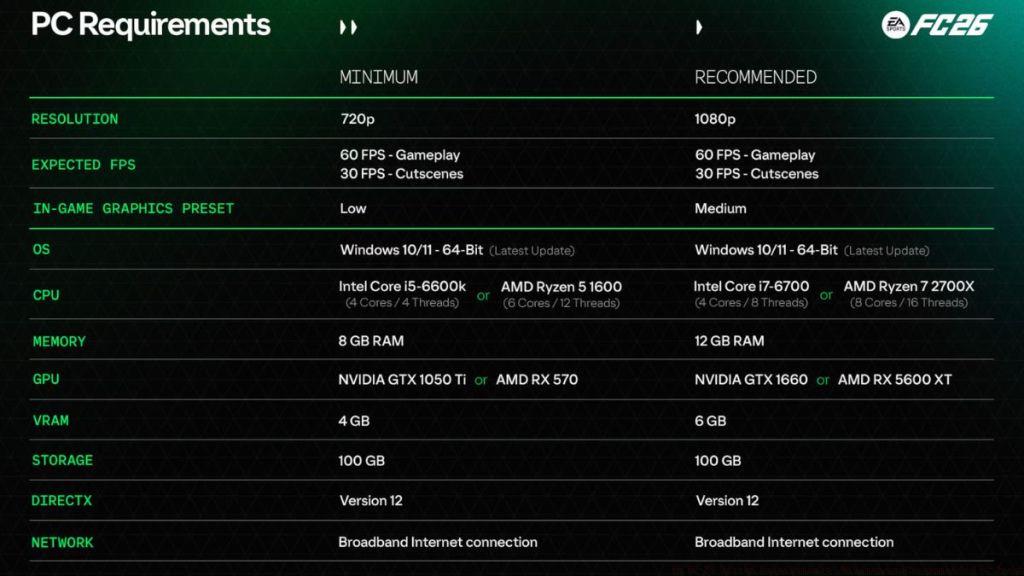
- OS: Windows 10/11 (64-bit, latest update)
- CPU: Intel Core i5-6600k or AMD Ryzen 5 1600
- Memory: 8 GB RAM
- GPU: NVIDIA GTX 1050 Ti or AMD RX 570 (4 GB VRAM)
- Storage: 100 GB
- DirectX: Version 12
- Graphics Preset: 720p, 60 FPS gameplay, Low Settings
The baseline specifications for EA FC 26 match last year’s FC 25 requirements exactly, suggesting improved optimization and stability. The GTX 1050 Ti remains viable for entry-level gaming, though limited to 720p resolution. While official documentation lists 100 GB storage allocation, the actual game installation typically occupies around 55 GB of disk space after compression and optimization.
Performance Insight: These minimum specs target 60 FPS consistency rather than visual fidelity. Players should expect basic graphics quality with potential frame rate dips during intensive match situations. For consistent performance, consider closing background applications to free up system resources.
EA FC 26 Recommended System Requirements
- OS: Windows 10/11 (64-bit, latest update)
- CPU: Intel Core i7-6700 or AMD Ryzen 7 2700X
- Memory: 12 GB RAM
- GPU: NVIDIA GTX 1660 or AMD RX 5600 XT (6 GB VRAM)
- Storage: 100 GB
- DirectX: Version 12
- Graphics Preset: 1080p, 60 FPS gameplay, Medium Settings
Achieving fluid gameplay at respectable visual quality demands either GTX 1660 or RX 5600 XT graphics processing. Both GPUs represent affordable mid-range options, making the performance barrier relatively accessible. However, we strongly advise upgrading to 16 GB system memory despite the official 12 GB specification, as modern gaming benefits significantly from additional RAM headroom.
Common Mistake: Many players underestimate the impact of system memory on sports game performance. Even with adequate GPU power, insufficient RAM can cause stuttering during scene transitions and crowd rendering. For optimal experience, prioritize RAM upgrades alongside GPU considerations when planning your gaming setup.
Beyond standard optimization techniques, EA has integrated comprehensive graphics customization options specifically for PC players. These settings enable precise performance tuning and include Dynamic Resolution Scaling technology that can be locked to specific frame rate targets. The development team has finally implemented full DualSense controller support for the PC edition, allowing haptic feedback and adaptive trigger functionality when connected via USB cable.
Optimization Tip: Enable Dynamic Resolution Scaling with a 60 FPS target for the most consistent gameplay experience. This feature automatically adjusts resolution to maintain your target frame rate during graphically demanding moments.
For players seeking to maximize their competitive advantage, proper system configuration is crucial. The enhanced PC version now supports detailed graphics adjustments that were previously unavailable, giving technical players finer control over their visual experience while maintaining performance standards similar to other competitive gaming titles.
This concludes our comprehensive analysis of EA FC 26 PC system requirements. Which gameplay mode are you most anticipating? Share your thoughts in the comments section below.
Action Checklist
- Verify your system meets minimum GTX 1050 Ti or RX 570 requirements
- Check available storage space – ensure 55GB free after installation
- Update graphics drivers to latest version for optimal compatibility
- Configure Dynamic Resolution Scaling with 60 FPS target in graphics settings
- Enable DualSense features via USB connection for enhanced controller feedback
No reproduction without permission:Tsp Game Club » EA FC 26 System Requirements: Minimum and Recommended PC Specs Complete EA FC 26 PC requirements guide with optimization tips and performance analysis