
TL;DR
- Map Editor transforms GTA 5 into creative sandbox with custom props, vehicles, and racetracks
- Installation requires Script Hook V, Script Hook V.NET, and NativeUI as foundational dependencies
- Proper file organization and lowercase ‘scripts’ folder creation are critical success factors
- Advanced features include community map imports and real-time object manipulation capabilities
- Performance monitoring and backup creation prevent data loss during complex editing sessions
While Grand Theft Auto V provides substantial customization through Director Mode, the Map Editor mod elevates creative possibilities exponentially. This powerful community-developed tool enables comprehensive world-building within Los Santos, allowing placement of custom assets including specialized vehicles, interactive NPCs, and complex racing circuits. Beyond basic object placement, you can import complete custom maps designed by other creators, transforming the familiar landscape into entirely new gaming experiences.
Important Notice: This instructional guide serves educational purposes only. Utilizing the Map Editor modification carries inherent risks including potential game data corruption and administrative actions from Rockstar Games. Exercise extreme caution and understand these consequences before proceeding.
The mod’s architecture supports real-time environment manipulation, letting you construct elaborate scenarios impossible through standard gameplay. From creating cinematic sequences to designing challenging obstacle courses, the toolset empowers creative expression beyond the original game design parameters.
Successfully implementing the GTA 5 Map Editor demands careful preparation with multiple third-party dependencies. The foundational requirements include Script Hook V (enabling native function access), Script Hook V.NET (providing .NET framework integration), and NativeUI (delivering enhanced interface components). These components create the technical infrastructure necessary for the Map Editor’s advanced functionality.
Acquire these critical files exclusively from verified sources before obtaining Guadmaz’s popular Map Editor modification. All components typically download as compressed archives, necessitating extraction before implementation. Validate file integrity through checksum verification when available to prevent installation failures.
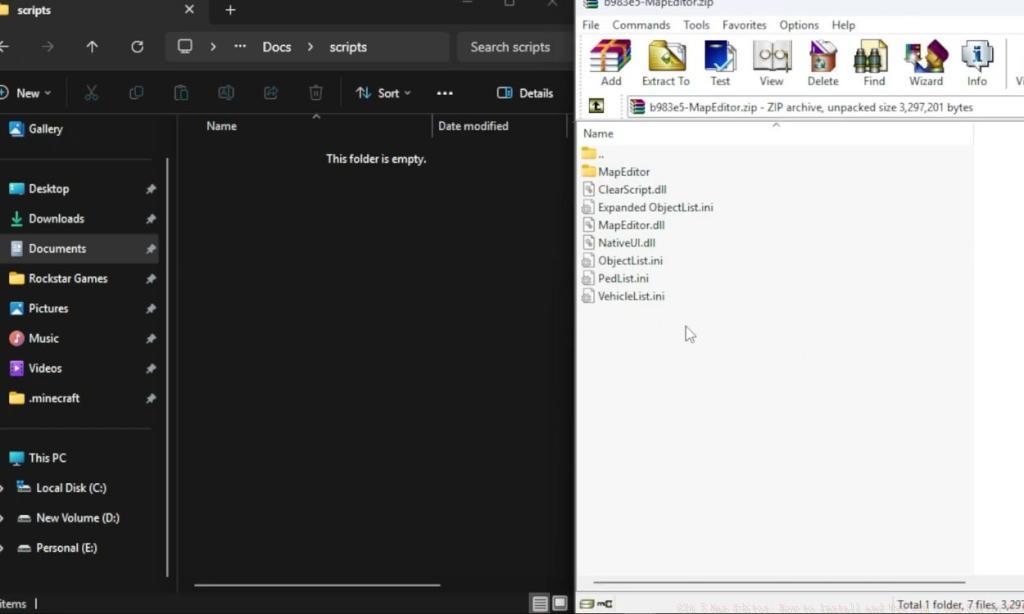
Common installation pitfalls include mismatched dependency versions and improper extraction techniques. Ensure all components maintain version compatibility, as outdated Script Hook V installations frequently cause game crashes during initialization sequences.
Execute this systematic installation methodology to ensure stable Map Editor operation. Begin by organizing all extracted modification files adjacent to your primary GTA 5 installation directory for streamlined access during the implementation phase.
- Navigate to your game’s root directory based on your distribution platform:
- Steam users typically find this at C:Program Files (x86)SteamsteamappscommonGrand Theft Auto V
- Epic Games Store installations generally reside at C:Program FilesEpic GamesGTAV
- Access the Script Hook V directory, proceed to the ‘Bin’ subfolder, and transfer all contained files directly into your main GTA V folder structure.
- Repeat this transfer process with the Script Hook V.NET folder contents, ensuring complete file migration to the game directory.
- Establish a new folder within the installation location specifically named ‘scripts’ using exclusively lowercase characters to maintain file system compatibility.
Critical installation success factors include verifying administrative permissions for file operations and disabling antivirus software temporarily during the transfer process to prevent false positive blocking of essential modification files.
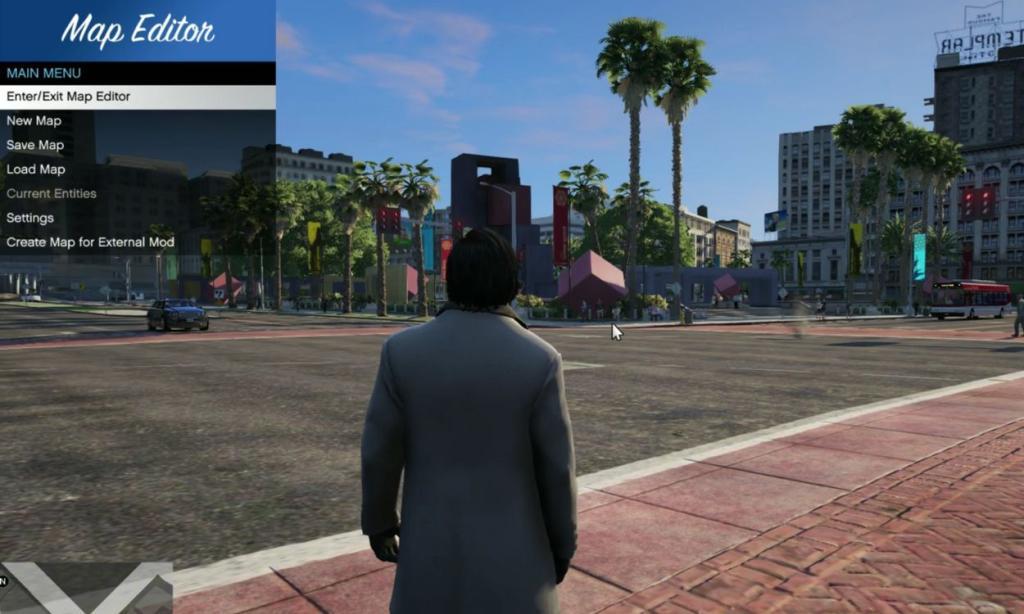
Post-installation validation involves launching the game and accessing the Map Editor interface through the designated hotkey combination. Successful initialization displays the modification’s menu system overlay during gameplay sessions.
Mastering the Map Editor interface unlocks sophisticated content creation capabilities. The radial menu system provides categorized access to object libraries, environmental modifiers, and save management functions. Efficient workflow practices include utilizing quick-select categories for frequently placed assets and mastering the coordinate precision system for exact object positioning.
Advanced creation strategies involve layering multiple object types to create complex interactive environments. Combine vehicle spawns with NPC placement and environmental objects to construct dynamic scenarios that respond to player interactions.
Performance optimization during extensive editing sessions requires monitoring system resource allocation. Complex scenes with high object density may necessitate reducing background processes or adjusting graphical settings to maintain stable frame rates throughout the creative process.
Community content integration represents one of the most powerful features. Download curated map files from established modding communities and import them through the Map Editor’s load function to experience professionally designed environments without manual construction efforts.
Essential safety practices include creating regular backup saves before implementing major modifications and testing new creations in isolated sessions before integrating them into your primary game world.
Action Checklist
- Verify system meets minimum specifications and create full game backup
- Download Script Hook V, Script Hook V.NET, NativeUI, and Map Editor files
- Extract all archives and organize files beside GTA 5 installation directory
- Transfer Script Hook V and Script Hook V.NET files to game folder
- Create lowercase ‘scripts’ folder and verify successful mod initialization
No reproduction without permission:Tsp Game Club » GTA 5 Map Editor: How to Install and Use GTA 5 Map Editor Mod Master GTA 5 Map Editor installation and usage with expert tips for custom content creation