
TL;DR
- Fortnite.GG provides unofficial Wrapped stats since Epic doesn’t offer official tracking
- Enable Public Game Stats in Account & Privacy settings before accessing your data
- Use Epic username, Xbox ID, or PlayStation ID depending on your primary platform
- Download shareable image containing comprehensive gameplay statistics and comparisons
- Check friends’ stats only if they’ve enabled public visibility in their privacy settings
Fortnite’s 2025 journey has been remarkable, beginning with Chapter 6’s introduction of the Oni Hunters faction and innovative Battle Royale mechanics. The gaming landscape expanded significantly with fresh modes including OG, Reload, and Blitz variants, creating unprecedented diversity within the Fortnite ecosystem. From nostalgic Chapter 2 Remix content to the massive Simpsons crossover event, Epic Games delivered premium entertainment that captivated millions of players worldwide through spectacular live events.
As the year concludes, many dedicated players seek comprehensive statistical insights about their gaming performance and time investment. While Epic Games doesn’t provide an official Fortnite Wrapped feature, the trusted companion platform Fortnite.GG continues its annual tradition of offering detailed performance wrap-ups. This third-party service fills the gap by providing the statistical retrospective that competitive players crave.
- Fortnite Wrapped 2025 delivers through Fortnite.GG’s specialized tracking system
- Essential privacy configuration required before data accessibility
- Downloadable visual summary captures your complete annual performance
Understanding your gameplay patterns can significantly enhance future performance. By analyzing your most successful seasons, preferred game modes, and combat efficiency, you can develop targeted improvement strategies for the coming year.
To retrieve your personalized Fortnite Wrapped statistics, navigate directly to the Fortnite.GG Wrapped portal or access it through their statistics navigation menu. The platform accommodates multiple identification methods—enter your primary Epic Games username, Xbox Live Gamertag, or PlayStation Network ID depending on which platform serves as your main Fortnite hub.
-
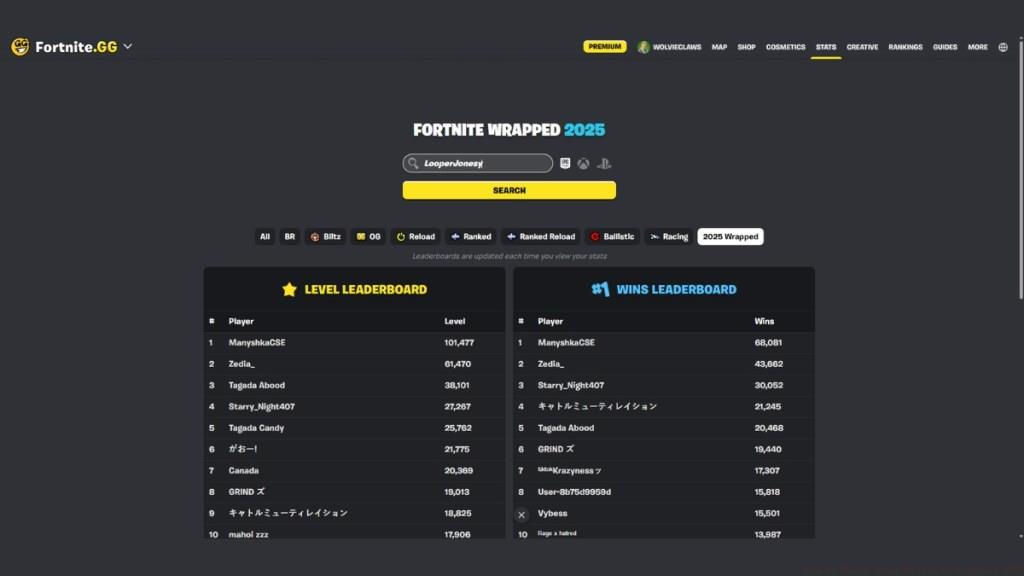
Image Credit: Beebom -
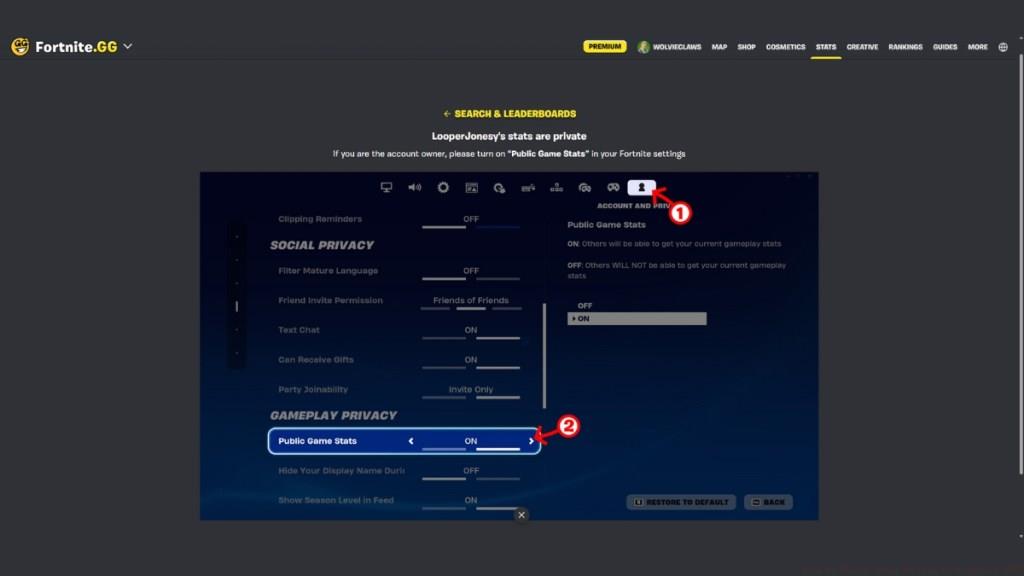
Image Credit: Beebom -
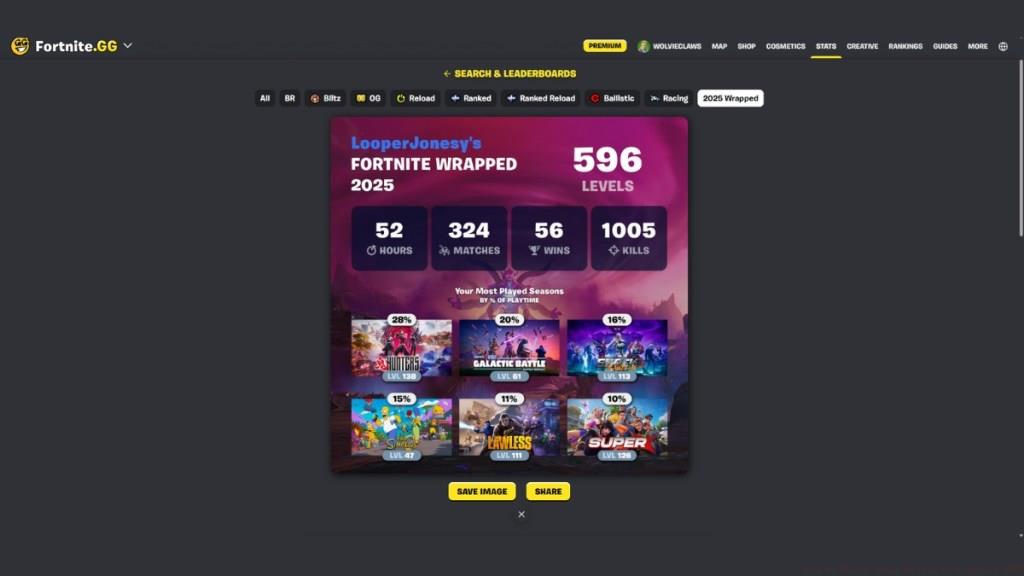
Image Credit: Beebom
Upon submitting your credentials, the system will either display your comprehensive statistics or prompt you to activate Public Game Stats within Fortnite. This privacy setting controls whether external services can access your gameplay data for statistical analysis and comparison purposes.
To configure this essential setting, access the Account and Privacy section within Fortnite’s settings menu. Under Gameplay Privacy options, locate the Public Game Stats toggle and switch it to the enabled position. Return to the Fortnite.GG website after making this change and re-enter your username to generate your Wrapped summary.
Pro Tip: If you play across multiple platforms, ensure you’re searching with the username associated with your primary account where you’ve accumulated the most playtime and achievements.
Once properly configured, Fortnite.GG generates a visually appealing statistical summary image containing your complete 2025 performance metrics. This comprehensive overview includes critical data points such as total account levels achieved, cumulative hours invested, matches completed, Victory Royales secured, and elimination counts.
The platform provides deep analytical insights by breaking down your seasonal participation through percentage-based playtime distribution. This reveals which chapters captured your attention most intensely and how your gameplay focus shifted throughout the year. Additionally, the service benchmarks your performance against community averages, providing context for your achievements relative to the broader player base.

Image Credit: Beebom
Beyond basic statistics, advanced players should pay attention to their win-to-match ratio and kills-per-game average. These metrics provide clearer indicators of skill progression than raw totals alone. The downloadable image format makes sharing your annual accomplishments across social platforms simple and visually engaging.
Understanding these statistics can help identify areas for improvement. For instance, if your seasonal breakdown shows inconsistent play patterns, you might consider developing more consistent gaming habits. If your performance metrics lag behind community averages in specific areas, you could focus training on those weaknesses.
Many players encounter accessibility challenges when first attempting to retrieve their Fortnite Wrapped data. The most frequent issue involves the Public Game Stats setting not being properly activated before visiting the Fortnite.GG website. Remember that privacy changes may take a few minutes to propagate through Epic’s systems.
Can you check Fortnite Wrapped in-game?
Unfortunately, Epic Games hasn’t integrated an official Wrapped feature directly into Fortnite’s interface. The company focuses development resources on core gameplay features rather than retrospective statistical tools.
Can I check my friend’s Fortnite Wrapped stats?
Yes, you can access friends’ Fortnite Wrapped statistics provided they’ve enabled the Public Game Stats option within their privacy configuration.
Common Resolution Steps:
- Verify Public Game Stats is enabled in Account & Privacy settings
- Ensure you’re using the exact username associated with your Epic account
- Check for platform-specific username variations if you play across multiple systems
- Allow several minutes for privacy setting changes to take effect
- Clear browser cache if the website displays outdated information
If you successfully retrieve your statistics, consider sharing your most impressive achievements in community discussions. Comparing Victory Royale counts and seasonal performance with fellow players can provide valuable insights and foster healthy competitive discussions about gameplay strategies and improvement techniques.
Action Checklist
- Enable Public Game Stats in Fortnite’s Account & Privacy settings
- Visit Fortnite.GG Wrapped portal through their stats navigation
- Enter exact Epic username, Xbox ID, or PlayStation ID
- Download and review your comprehensive statistics image
- Share notable achievements and compare with community averages
No reproduction without permission:Tsp Game Club » How to Check Your Fortnite Wrapped 2025 Complete guide to accessing your 2025 Fortnite Wrapped stats with privacy settings and troubleshooting tips