
TL;DR
- Garden expansion unlocks on three sides (left, right, back) with total cost of 2 billion Sheckles
- Back tier expansions feature cooldown timers (1-3 days) or Robux skip options
- Strategic expansion sequence maximizes planting space and cosmetic placement efficiency
- Advanced players should prioritize back expansions for optimal crop rotation and decoration
- Proper planning prevents wasted investments and ensures maximum gardening productivity
The recent Cosmetic update in Grow a Garden introduced a highly anticipated feature that transforms your gardening experience. Players can now significantly increase their cultivation area by expanding plot boundaries on three available sides, creating substantial new space for both agricultural and decorative purposes.
This expansion system primarily benefits veteran gardeners who have reached advanced stages of gameplay. If you’ve accumulated substantial Sheckles reserves and find your current plot completely occupied by premium plants, the expansion becomes an essential progression step. The additional territory not only accommodates more crops but also provides designated areas for the new cosmetic items introduced in the same update.
Strategic expansion planning is crucial since the front boundary remains fixed, requiring thoughtful arrangement of your expanded gardening space. The system unlocks progressively, with each purchased expansion revealing additional purchase opportunities.
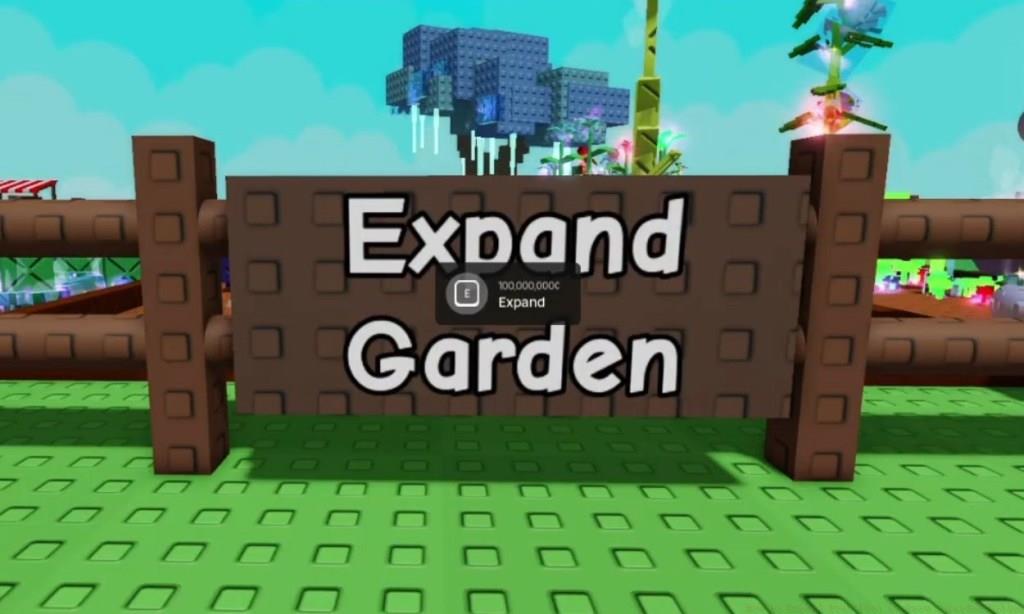
When you launch Grow a Garden following the Cosmetic update, you’ll immediately notice the distinctive Expand Garden signage positioned along your plot’s perimeter fencing. This visual indicator serves as your gateway to territorial growth within the game.
Execution Steps:
- Navigate to the central fence area where the expansion board is mounted
- Approach the sign to trigger the interactive prompt displaying expansion options
- Each side expansion requires a specific investment amount, with left and right expansions typically costing 100 million Sheckles each
- Initiate purchase by pressing and holding the E key until transaction completes
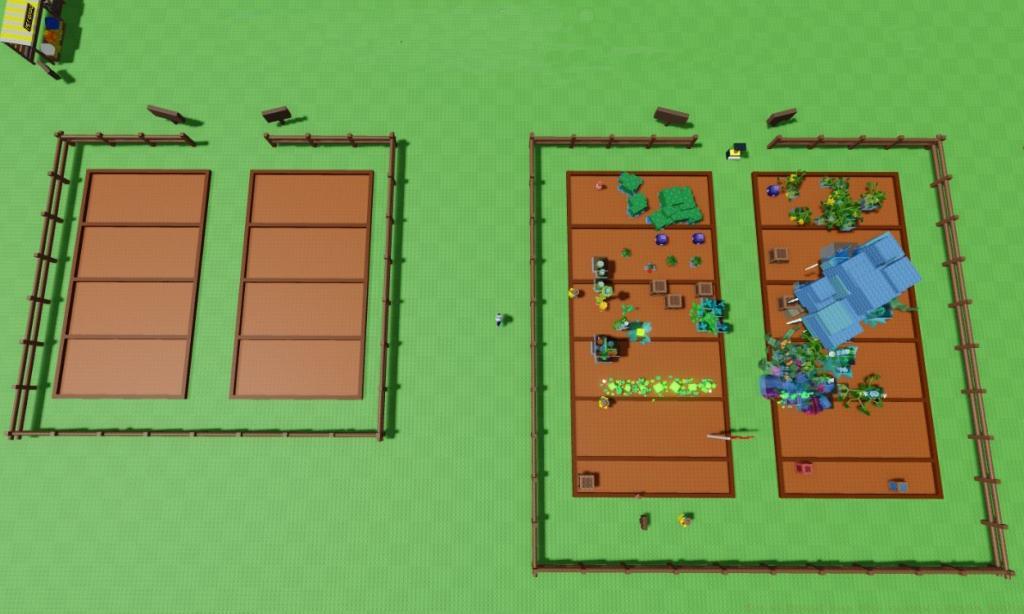
The expansion sequence follows a logical progression pattern. After acquiring one side expansion, the opposite side becomes available for purchase, followed eventually by the back tier expansions. This sequential unlocking mechanism ensures balanced garden development rather than haphazard expansion.
New players should note that substantial financial preparation is necessary before undertaking expansion projects. If your current Sheckles balance falls short of requirements, consult our Complete Guide for efficient currency accumulation strategies that can accelerate your expansion timeline.
| Expansion Options | Price (Sheckles) | Cooldown | Description |
|---|---|---|---|
| Left Side | 250,000,000 | Instantly available | Slightly increases plot width and boundary on the left side |
| Right Side | 250,000,000 | Instantly available | Slightly increases plot width and boundary on the right side |
| Back of the Garden (Tier 1) |
500,000,000 | 1 Day (or 199 Robux) | Adds one plot and increases the back boundary |
| Back of the Garden (Tier 2) |
1,000,000,000 | 3 Days (or 399 Robux) | Adds half a plot and increases back boundary |
The comprehensive investment for fully expanding your garden reaches exactly 2,000,000,000 Sheckles, representing one of the most substantial financial commitments in the game. The pricing structure demonstrates clear tier progression, with back expansions costing significantly more but offering greater spatial rewards.
Strategic Investment Approach: Begin with side expansions since they’re immediately accessible and provide instant planting benefits. The back tier expansions introduce time-based constraints, requiring either patience or additional Robux expenditure to bypass waiting periods.
Advanced players should coordinate their expansion purchases with crop harvesting cycles. Time your back tier acquisitions to coincide with major harvest periods, ensuring the new space becomes immediately productive rather than sitting vacant during cooldown intervals. For weapon optimization alongside garden expansion, our Weapons Unlock guide provides complementary progression strategies.
Optimization Strategies:
- Prioritize expansion sequence based on your current crop layout and future planting plans
- Coordinate cosmetic item placement with new boundary spaces to maximize aesthetic appeal
- Utilize the additional space for crop rotation, preventing soil depletion and maintaining yield quality
- Plan decorative item purchases around your expansion timeline to ensure proper placement opportunities
Common Pitfalls to Avoid:
- Don’t expand prematurely before establishing stable income streams – the investment is substantial
- Avoid purchasing back tier expansions during peak planting seasons if you cannot immediately utilize the space
- Never liquidate your entire Sheckles reserve for expansion; maintain operating capital for seeds and tools
- Resist the temptation to use Robux for cooldown skipping unless strategically justified by imminent harvesting opportunities
For players focusing on character development alongside territorial expansion, our Class Guide offers valuable insights into complementary progression paths. The expanded garden space particularly benefits specialized class builds that require diverse crop types for optimal performance.
Seasoned gardeners recommend mapping your expanded layout before purchasing. Use the comparison images to visualize spatial relationships and plan efficient walking paths between planting areas. The additional territory should enhance workflow, not create logistical challenges.
Efficiency Maximization: The additional plot space enables implementation of advanced gardening techniques like companion planting and staggered harvesting schedules. These methods can significantly increase your overall productivity and financial returns on the expansion investment.
Action Checklist
- Accumulate minimum 250 million Sheckles for initial side expansion
- Locate and interact with Expand Garden signage on plot perimeter
- Purchase left or right expansion using E key interaction
- Unlock and purchase opposite side expansion
- Plan back tier expansion around harvest cycles and cooldown periods
- Optimize expanded layout for crop rotation and cosmetic placement
No reproduction without permission:Tsp Game Club » How to Expand Your Plot in Grow a Garden Roblox Master garden expansion in Grow a Garden with strategic upgrades, cost analysis, and optimization tips