
TL;DR
- Access Discord Quests through User Settings and Gift Inventory to find the Doom collaboration
- Watch the entire Doom: The Dark Ages trailer completely to unlock the claim button
- Navigate to Profile Settings and Change Decoration to equip your new Shield Saw
- Complete the process within 2-3 minutes before the limited-time offer expires
- Combine with other Discord customization features for maximum visual impact
Discord has partnered with the highly anticipated Doom: The Dark Ages to offer gamers an exclusive visual upgrade through their Quests platform. This limited-time collaboration provides access to the iconic Shield Saw decoration that perfectly captures the game’s brutal medieval aesthetic. Unlike typical profile customizations, these promotional items become unavailable after the event period concludes, making timely acquisition essential for collectors and Doom enthusiasts alike.
The Shield Saw decoration represents more than just visual flair—it signals your early engagement with the Doom franchise and demonstrates your gaming credentials within Discord communities. Profile decorations have become increasingly significant in gaming circles, serving as conversation starters and status markers among fellow players.
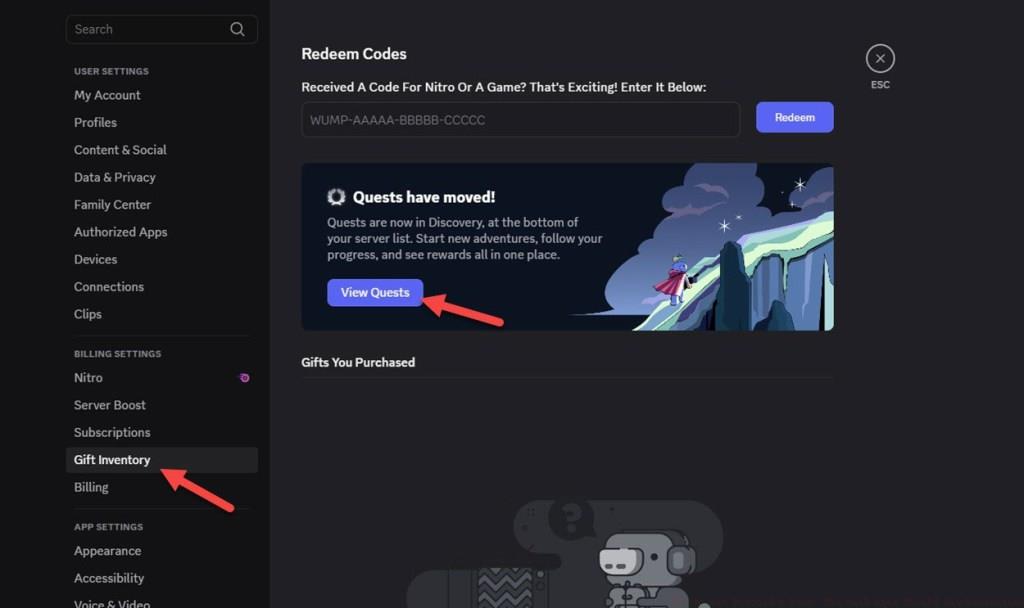
Discord Quests function as engagement-driven rewards systems where users complete specific actions to earn exclusive digital items. These collaborations typically run for 2-4 weeks, so immediate action ensures you don’t miss this free cosmetic enhancement. Similar to how weapon unlocks in modern shooters require specific achievements, Discord decorations reward platform participation.
Begin by launching Discord and ensuring you’re logged into your primary gaming account. Navigate to the bottom-left corner where you’ll find the User Settings icon—typically represented by a gear symbol adjacent to your username. This central hub contains all customization options and reward management features.
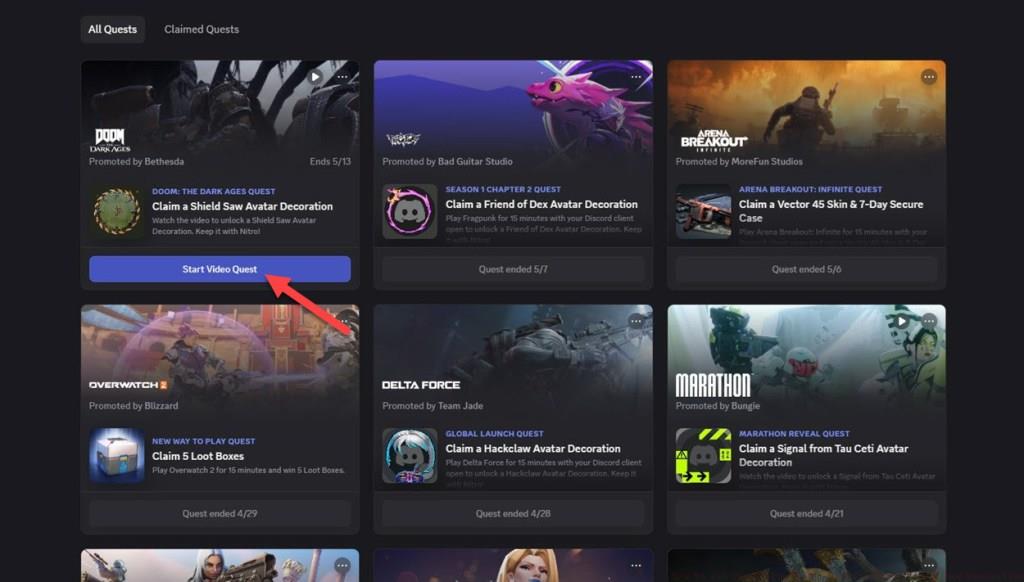
Within the Quests panel, locate the Doom: The Dark Ages promotion—it’s typically featured prominently during active collaboration periods. Initiate the video quest and prepare for the game’s latest trailer showcasing the medieval-inspired combat and environments that define this franchise evolution.
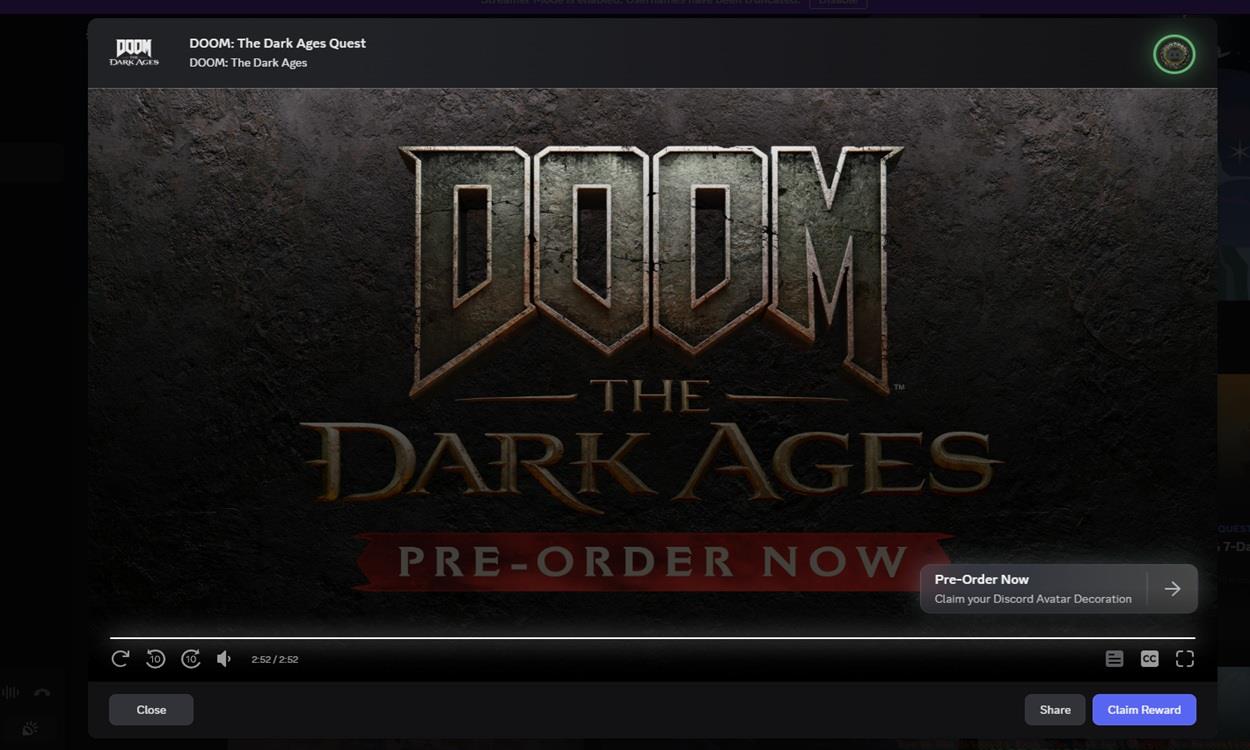
After the trailer concludes, the previously disabled Claim Reward button activates at the screen’s bottom section. Click to permanently add the Shield Saw decoration to your account inventory. The system may take 10-30 seconds to process, so avoid multiple clicks that could trigger errors.

With the Shield Saw decoration successfully claimed, proceed to profile customization to display your new asset. Return to User Settings and select the Profile section where decoration management options reside. The interface allows real-time previews of how decorations appear alongside your existing profile elements.
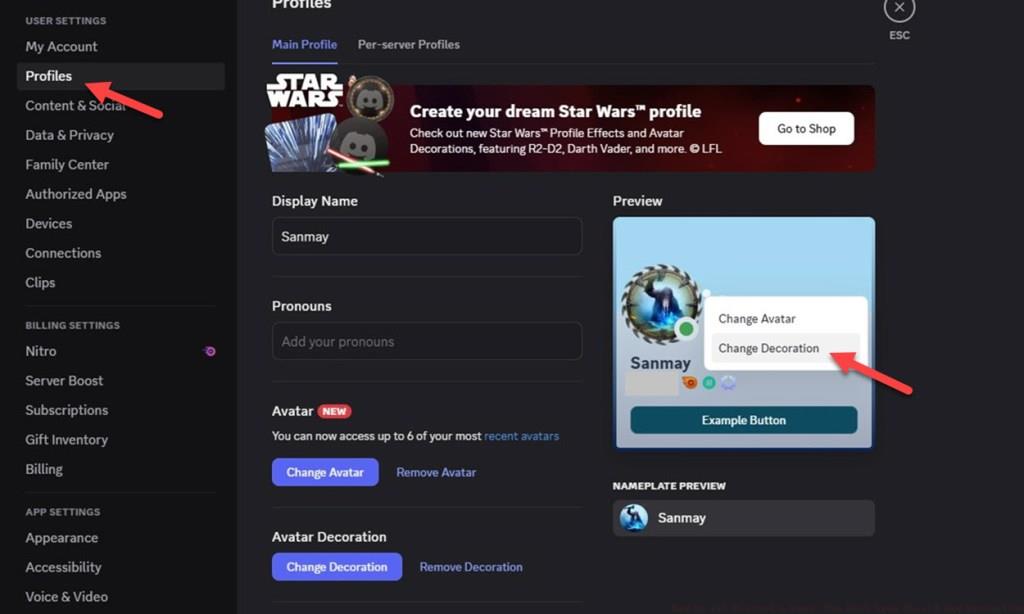
The Change Decoration menu displays all available profile customizations, with newly acquired items typically highlighted or positioned at the list’s beginning. Select the Shield Saw decoration and apply changes—the modification occurs instantly without requiring application restart. Consider combining your new decoration with complementary profile themes and banner images that enhance the medieval weapon aesthetic.
If the decoration doesn’t appear immediately, refresh the application or check your internet connection. Occasionally, Discord servers require 5-10 minutes to synchronize new inventory items across all platforms. Much like mastering class selections in tactical shooters, optimal Discord customization involves strategic combination of visual elements.
Maximize your Discord profile’s visual impact by strategically positioning the Shield Saw decoration alongside other customization elements. The decoration works particularly well with darker theme packages and medieval-inspired username styling. Avoid cluttering your profile with multiple competing decorations that diminish the Shield Saw’s distinctive appearance.
Common acquisition errors include prematurely closing the trailer or attempting to claim before video completion. Ensure the playback progress bar reaches 100% before proceeding—the system rigorously validates completion before enabling rewards. For optimal display, ensure your Discord client is updated to the latest version, as older builds sometimes struggle with new decoration assets.
Advanced users can coordinate server-specific profiles that display the Shield Saw decoration exclusively within gaming communities while maintaining professional appearances elsewhere. This selective display approach mirrors how experienced players utilize different gameplay strategies adapted to specific match contexts and team compositions.
The entire claiming and equipping process typically completes within 2-3 minutes when following proper procedure. Set aside minimal time to ensure you don’t rush through steps and potentially trigger system validation failures. Remember that these collaborations typically don’t offer second chances, so meticulous attention to each step proves essential.
Community showcases often feature creative implementations of the Shield Saw decoration—consider browsing gaming servers for inspiration before finalizing your profile setup. The decoration’s versatility allows it to complement various aesthetic approaches while maintaining its distinctive Doom franchise identity.
Action Checklist
- Launch Discord and navigate to User Settings > Gift Inventory > View Quests
- Locate and start the Doom: The Dark Ages video quest
- Watch the entire trailer without skipping to activate claim button
- Claim reward and navigate to Profile Settings > Change Decoration
- Select Shield Saw decoration and apply to profile
No reproduction without permission:Tsp Game Club » How to Get Discord x Doom: The Dark Ages Shield Saw Decoration Complete guide to claim and equip the exclusive Doom: The Dark Ages Shield Saw Discord decoration with pro tips