
TL;DR
- Connect your Marvel Rivals and Twitch accounts before July 11, 2025
- Watch eligible streams for exactly 4 hours during the event window
- Claim rewards from Twitch inventory then collect from in-game mailbox
- Verify stream has Drops enabled and maintain active viewing session
- Complete process before August 8, 2025 deadline to secure exclusive skin
Marvel Rivals continues to demonstrate exceptional generosity within the live-service gaming landscape, consistently providing premium cosmetic items through accessible community events. The Twitch Drops initiative has become a cornerstone of their seasonal content distribution, with each update featuring exclusive character skins available through timed viewing requirements. Season 3 introduces Hawkeye’s striking ‘Will of Galacta’ costume, drawing inspiration from cosmic entities within the Marvel universe. This limited-time opportunity requires strategic planning to ensure you don’t miss out on this visually impressive addition to your hero collection.
The Hawkeye ‘Will of Galacta’ skin represents one of the most sought-after cosmetic rewards in the current Twitch Drops rotation. Understanding the precise timing parameters is crucial for successful acquisition:
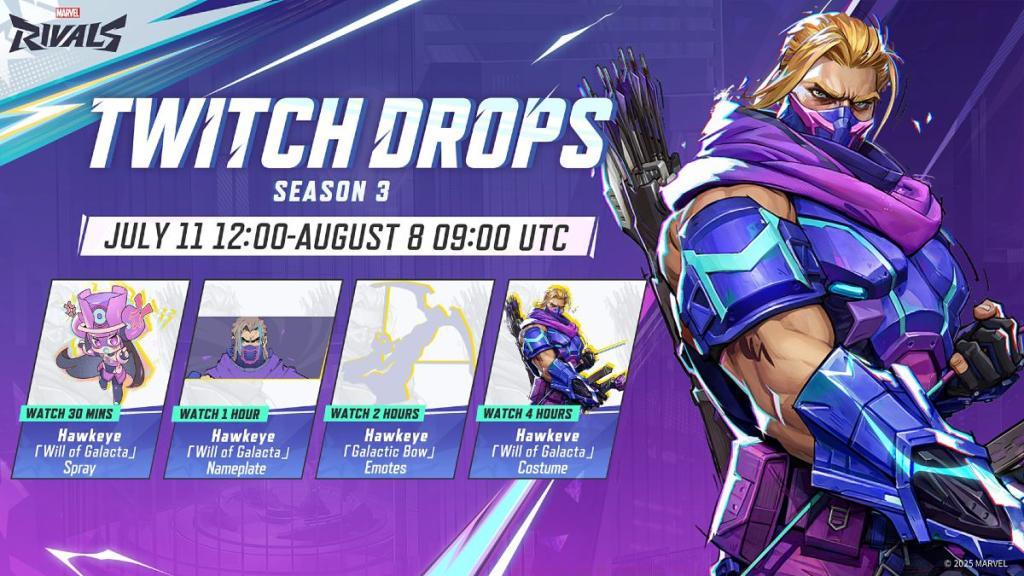
Successfully obtaining the Hawkeye Will of Galacta skin requires methodical execution of several interconnected steps. Begin by establishing the necessary account connections well before the event start date to avoid technical complications during peak participation periods. The verification process between platforms typically takes 2-3 minutes but can extend during high-traffic windows.
During the active event period, your primary objective involves accumulating four hours of verified viewing time on Twitch channels broadcasting Marvel Rivals content with Drops enabled. Strategic stream selection can significantly impact your viewing experience—prioritize channels with stable broadcast quality and consistent Marvel Rivals gameplay focus.
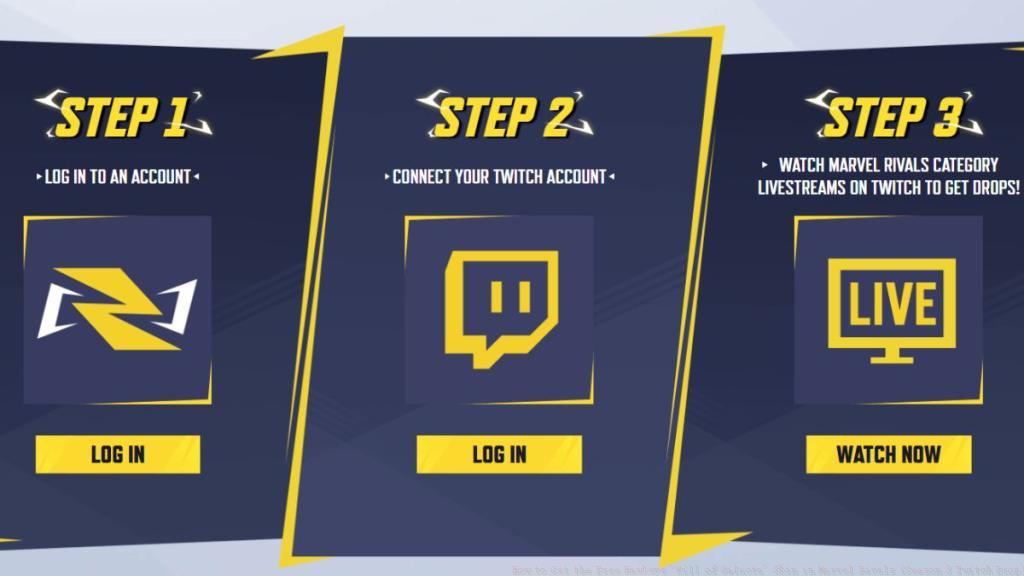
Follow this systematic approach to secure your rewards:
Maximize your efficiency while avoiding common pitfalls that frequently prevent players from securing their Twitch Drop rewards. Many participants mistakenly assume that any Marvel Rivals stream qualifies, when in reality only broadcasts with explicitly enabled Drops functionality contribute toward progression. Verify this status appears in the stream title or description before committing viewing time.
Implement these professional strategies to enhance your success rate:
Common technical issues include delayed progress tracking, which usually resolves within 15-30 minutes of continued viewing. If rewards don’t appear in your in-game mailbox immediately after claiming, allow up to one hour for system synchronization before submitting support tickets. For comprehensive gaming strategies beyond cosmetic acquisition, explore our Complete Guide to master similar reward systems across different titles.
Understanding weapon mechanics can enhance your overall gameplay experience; consider consulting our Weapons Unlock guide for parallel progression systems. Additionally, strategic class selection plays a vital role in competitive performance—our Class Guide provides valuable insights applicable to hero-based games like Marvel Rivals.
Action Checklist
- Verify Marvel Rivals and Twitch account connection status
- Identify verified Drops-enabled streams before July 11 start date
- Schedule four hours of viewing time between July 11-August 8
- Claim rewards from Twitch inventory within 24 hours of completion
- Collect final skin from Marvel Rivals in-game mailbox
No reproduction without permission:Tsp Game Club » How to Get the Free Hawkeye ‘Will of Galacta’ Skin in Marvel Rivals (Season 3 Twitch Drop) Complete guide to claiming Hawkeye's exclusive Will of Galacta skin through Marvel Rivals Season 3 Twitch Drops