
Complete guide to unlocking the free Gwishin Bastion skin in Overwatch 2 through PlayStation Plus exclusives
Understanding the Gwishin Bastion Bonus Pack
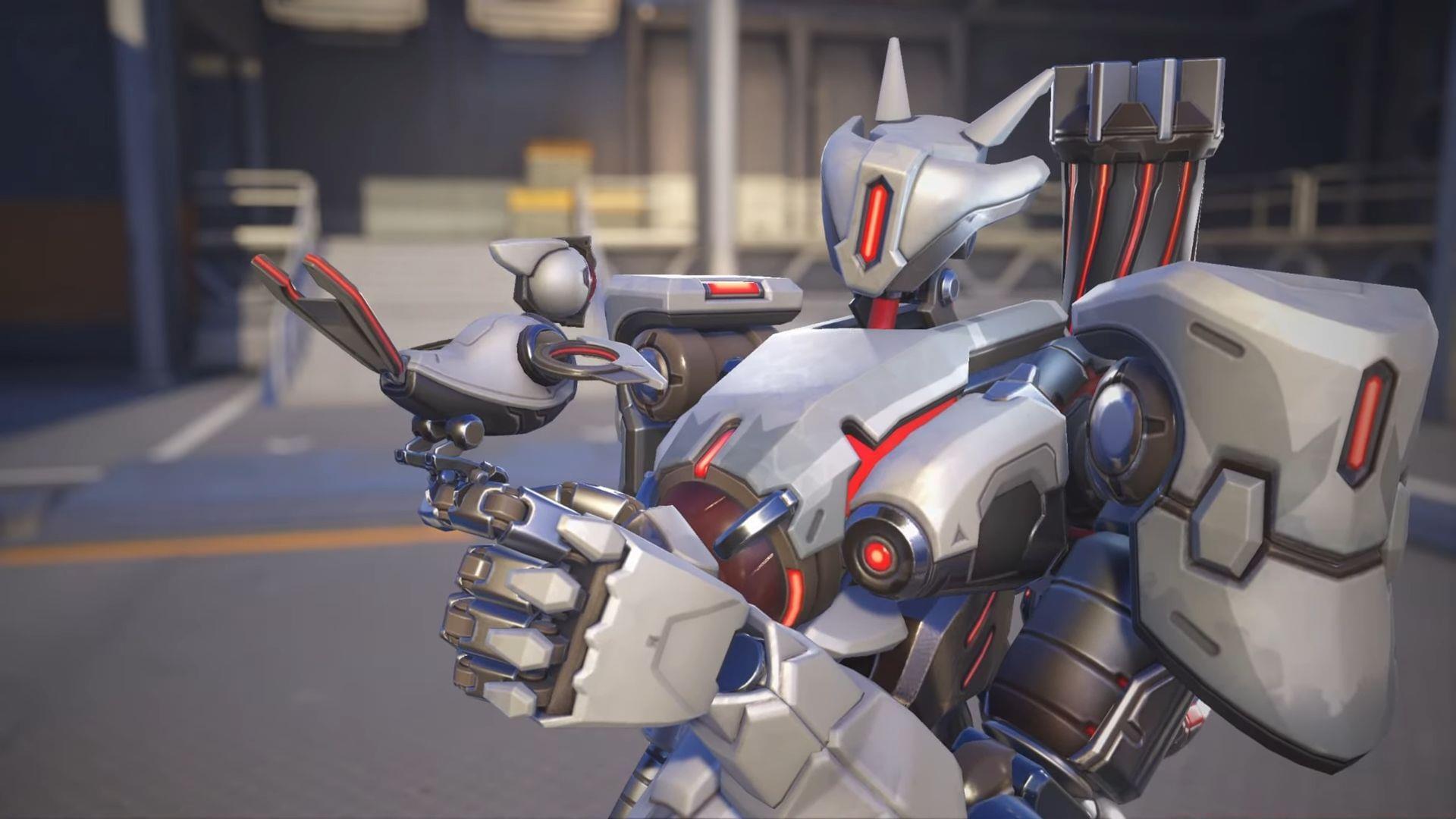
The Gwishin Bastion Bonus Pack in Overwatch 2 represents a significant value opportunity for dedicated players. This distinctive cosmetic bundle transforms Bastion’s appearance with unique visual effects and thematic elements that stand out during gameplay. Originally available exclusively through the in-game marketplace for premium Overwatch Coins, this skin now offers PlayStation enthusiasts a cost-free acquisition method.
What makes this offer particularly compelling is its platform-specific nature. The promotion remains accessible solely to PlayStation Network users who maintain an active PlayStation Plus membership. This strategic partnership between Blizzard Entertainment and Sony provides added incentive for console players to engage with Overwatch 2’s evolving content ecosystem while rewarding their platform loyalty.
PlayStation Plus Benefits for Overwatch 2 Players
PlayStation Plus serves as the gateway to numerous gaming advantages beyond simple multiplayer access. The subscription service operates through three distinct tiers—Essential, Extra, and Premium—each offering progressively expanded benefits. For Overwatch 2 enthusiasts, the Essential tier sufficiently unlocks the Gwishin Bastion cosmetic while providing the mandatory online connectivity the hero shooter demands.
Beyond cosmetic acquisitions, PS Plus subscribers gain access to monthly free games, exclusive discounts, and cloud storage capabilities. These complementary benefits enhance the overall value proposition, making the subscription worthwhile even for players primarily focused on Overwatch 2. The service essentially transforms from a necessity for online play into a comprehensive gaming enhancement platform.
Read more: Overwatch 2 Season 17: All Battle Pass skins revealed so far
Step-by-Step Redemption Process
Securing your Gwishin Bastion Bonus Pack requires careful navigation through PlayStation’s digital storefront. Follow this comprehensive guide to ensure successful acquisition:
- Power on your PlayStation 4 or PlayStation 5 console and authenticate using your primary account credentials.
- Access the PlayStation Store through the main system dashboard or quick menu options.
- Locate the PlayStation Plus section within the store interface—typically featured prominently in navigation menus.
- Select your current subscription level (Essential, Extra, or Premium) to verify active status.
- Return to the main store interface and utilize the search function to find ‘Overwatch 2’ specifically.
- Choose the game from search results to access its dedicated content page with available add-ons.
- Identify the Gwishin Bastion Bonus Pack tile among the downloadable content offerings.
- Initiate the redemption process—the content should display as free for eligible subscribers.
Following successful redemption, launch Overwatch 2 and navigate to the Heroes section. Select Bastion and browse available skins to locate and equip your newly acquired Gwishin appearance. The cosmetic should appear immediately in your inventory if the process completed correctly.
Advanced Tips and Common Issues
Several technical considerations can optimize your redemption experience. Ensure your PlayStation Network account properly links to your Blizzard Entertainment account through the official Overwatch 2 account management system. This connection facilitates seamless cosmetic synchronization between platforms and prevents potential inventory discrepancies.
If the bonus pack doesn’t appear as available or free, verify your PlayStation Plus subscription remains active and that you’re using the correct regional store. Sometimes restarting the game or console resolves synchronization delays. For persistent issues, contact PlayStation Support with specific error details rather than Blizzard customer service, as the promotion originates through Sony’s platform.
Remember that this cosmetic remains exclusive to PlayStation systems—it won’t transfer or appear when playing Overwatch 2 on PC, Xbox, or Nintendo Switch. The skin locks to the platform where redeemed, though cross-progression preserves other unlocked content across devices.
Check out: D.Va Mythic skin in Overwatch 2: All variants, price, and how to unlock
That covers everything essential about obtaining the Gwishin Bastion Bonus Pack in Overwatch 2 through PlayStation Plus promotional access. For additional gaming insights and regular updates, continue following Sportskeeda’s esports and gaming coverage.
No reproduction without permission:Tsp Game Club » How to get the Gwishin Bastion Bonus Pack in Overwatch 2 for free Complete guide to unlocking the free Gwishin Bastion skin in Overwatch 2 through PlayStation Plus exclusives