
TL;DR
- Epic Games Store now supports full game gifting functionality for paid titles and bundles
- Recipients must be Epic friends with 14-day acceptance window and automatic refunds for duplicates
- Advanced scheduling allows timed deliveries and personalized messages for special occasions
- Platform restrictions exclude free games, pre-purchases, subscriptions, and in-game currency
- Proper friend list management is crucial for successful game gifting transactions
Experiencing the joy of receiving an unexpected game from someone special creates memorable moments for any gaming enthusiast. While Steam pioneered this digital gifting experience years ago, Epic Games Store has now integrated a robust gifting framework that empowers users to share their favorite titles effortlessly. This comprehensive guide will walk you through every aspect of the platform’s gifting capabilities, ensuring you can surprise your gaming companions with confidence.
The Epic Games Store gifting feature represents a significant milestone in the platform’s evolution, providing users with flexible options to purchase and share games. To utilize this system effectively, both sender and recipient must maintain active Epic Games accounts and establish mutual friend connections. The gifting mechanism extends beyond basic game purchases to include comprehensive content sharing opportunities.
Can You Gift Games on the Epic Games Store?
Absolutely! Epic Games Store has fully implemented digital gifting capabilities, enabling seamless game purchases for friends and family members. The platform’s infrastructure now supports direct game transfers to individuals on your Epic friends list, creating new avenues for gaming community engagement. Beyond standard game titles, the gifting system accommodates various digital products that enhance the gaming experience.
- Paid games across all genres and price points
- Special editions including deluxe and collector’s versions
- Durable add-ons that provide permanent content enhancements
- Eligible bundles containing multiple games or complementary content packages
However, certain limitations apply to maintain platform integrity and prevent abuse. The system restricts gifting for free promotional games, pre-purchase offers, subscription services, and consumable in-game currency. These restrictions help ensure that gifting remains a premium feature for purchased content rather than a loophole for free item distribution.

How to Gift Games to a Friend on the Epic Games Store
Gifting games through Epic Games Store involves a streamlined process designed for user convenience. Whether you’re sending the latest AAA title or an indie gem, following these steps ensures successful delivery and recipient satisfaction. The system’s intuitive interface guides users through each phase, minimizing potential errors.
- Launch Epic Games Store and authenticate with your account credentials to access the full feature set.
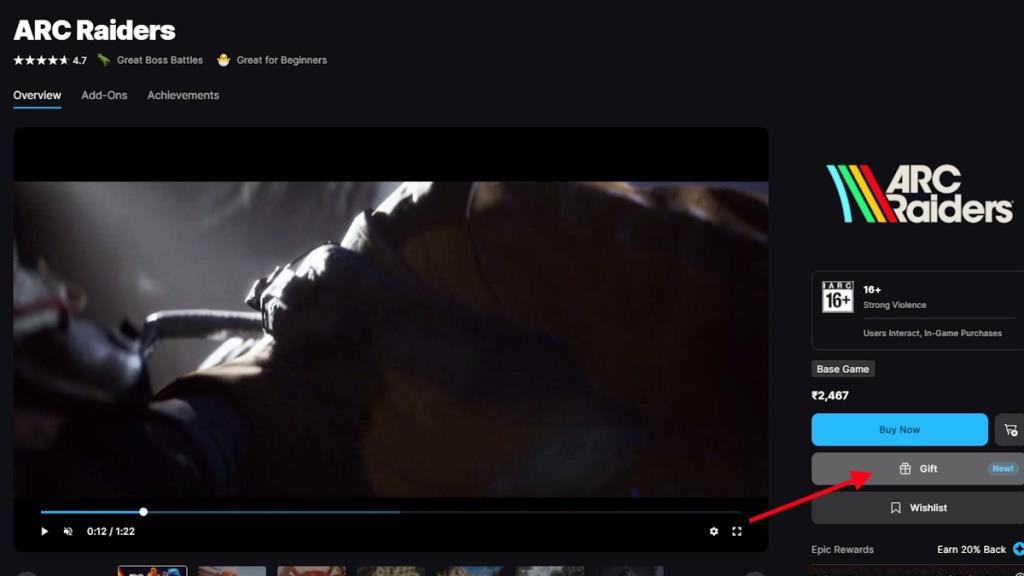
- Navigate to the desired game’s store page and select the Gift option prominently displayed on the right side panel.
- Search the name of your friend in the dedicated “Who’s it for?” section. Ensure the intended recipient appears on your Epic friends list beforehand.
- Compose a personalized message that will accompany the gift notification, adding emotional value to the transaction.
- Proceed to Checkout and complete the payment process following the on-screen instructions to finalize the gift transfer.
- Utilize the scheduling functionality to designate specific delivery dates for birthdays, holidays, or special occasions.
One frequently overlooked aspect involves friend list management. Before attempting to send gifts, verify that your intended recipient appears in your Epic friends list and that their privacy settings permit gift reception. Many failed gifting attempts stem from incomplete friend connections or mismatched account statuses.
The scheduling capability represents one of Epic Games Store’s most valuable gifting innovations. This feature allows you to purchase games immediately but delay delivery until meaningful dates, ensuring perfectly timed surprises. The system maintains purchased gifts in a pending state until the designated delivery date, then automatically processes the transfer without further intervention.
After gift transmission, recipients have a 14-day window to either accept or decline the offering. If the friend already possesses the game in their library, the system automatically rejects the gift and processes a full refund to the original payment method. Similarly, when recipients manually decline gifts, senders receive complete reimbursement through the same refund mechanism.
Professional gamers and content creators often utilize scheduled gifting for coordinated content releases or community events. By planning gift deliveries around specific dates, they can create synchronized gaming experiences that strengthen community bonds. This strategic approach transforms simple game gifting into powerful social engagement tools.
Common gifting mistakes include attempting to send region-locked games to incompatible territories, overlooking friend list requirements, or misunderstanding refund policies. To maximize success rates, always verify regional compatibility, confirm mutual friend status, and understand that refunds typically process within 3-5 business days, though timing may vary by payment provider.
For those exploring broader Battlefield strategies, understanding gifting mechanics becomes particularly valuable when coordinating squad purchases or team gaming sessions. The platform’s gifting system complements other social features, creating a comprehensive ecosystem for gaming communities.
Mastering Epic Games Store gifting requires attention to platform-specific nuances. Unlike some distribution services, Epic maintains stricter regional controls and friend verification processes. These measures help prevent fraudulent activities while ensuring legitimate gifts reach intended recipients promptly.
Action Checklist
- Verify friend connections and privacy settings before gifting attempts
- Select paid games or eligible bundles, avoiding restricted content categories
- Utilize scheduling features for timed deliveries around special occasions
- Monitor gift status and be prepared for automatic refunds if recipients already own games
- Coordinate with recipients for optimal acceptance timing within 14-day window
No reproduction without permission:Tsp Game Club » How to Gift a Game on Epic Games Store Complete guide to Epic Games Store gifting with scheduling, restrictions, and troubleshooting tips