
TL;DR
- End Portals require 12 frames and 12 Eyes of Ender arranged in specific 3×3 square formation
- Creative mode or commands are essential for portal frame acquisition in most game modes
- Manual activation via /fill command is necessary for some Minecraft versions
- Custom portals allow creative block substitutions while maintaining functionality
- Proper frame orientation and coordinate precision are critical for successful activation
The End Portal represents one of Minecraft’s most crucial dimensional gateways, serving as the exclusive passage to the End dimension where players confront the formidable Ender Dragon. Unlike the Nether portal that players can construct freely, End Portals present unique challenges that demand strategic planning and specific resources.

These mystical gateways naturally generate within Stronghold structures buried deep underground throughout the Overworld. Locating these hidden chambers requires both exploration skill and the strategic use of Eyes of Ender, which point toward the nearest Stronghold when thrown. This natural generation mechanic makes each portal discovery a unique adventure.
Manual Creation Limitations and Solutions
In survival, hardcore, spectator, and adventure modes, constructing an End Portal manually remains impossible due to game design restrictions. The portal frames themselves cannot be obtained through conventional gameplay in these modes, presenting a significant barrier for players seeking to create their own gateways. However, Minecraft’s creative mode and command functionality provide alternative pathways for ambitious builders.

Expert Tip: For survival players, locating natural Strongholds remains the only viable method to access the End dimension. The game typically generates multiple Strongholds per world, providing backup options if your initial portal becomes inaccessible or damaged.
Constructing a functional End Portal demands two critical components: twelve End Portal frames forming the structural foundation and twelve Eyes of Ender serving as the activation mechanism. Understanding how to acquire these items through various methods is essential for successful portal creation.
- 12 End Portal Frames
- 12 Eyes of Ender
The portal structure consists of a hollow square formation with three frames positioned on each of the four sides, creating a 3×3 empty space at the center that will transform into the dimensional gateway upon proper activation. This specific geometric configuration is non-negotiable for functionality.

Frame Acquisition Techniques
Obtaining End Portal frames requires either creative mode access or command utilization. Follow this systematic approach to secure these essential components:
- First, enable cheats in your world through world settings (Bedrock Edition) or LAN world options (Java Edition). This foundational step unlocks the necessary administrative capabilities.
- Access the settings via the pause menu and activate the “Allow Cheats” or “Activate Cheats” toggle to grant yourself command permissions.
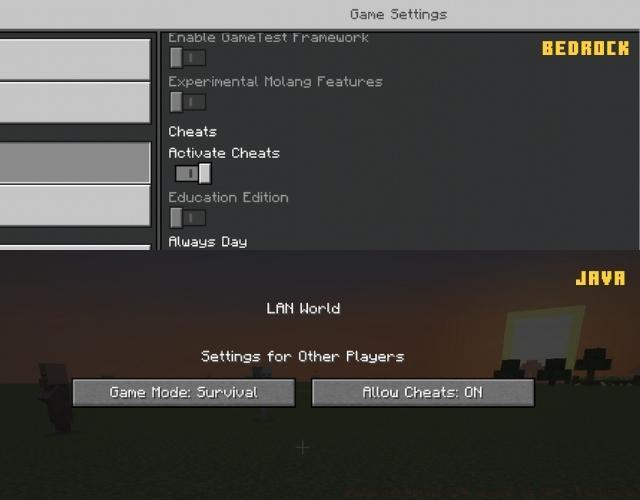
- Execute the game mode transition command: /gamemode creative to access creative inventory and items.
- Press your inventory key (typically “E”) to open the creative menu and locate End Portal frames in the decoration blocks section. A single frame suffices as they don’t deplete during placement.

- For older versions lacking creative inventory access, utilize these direct command alternatives:
/give @s minecraft:end_portal_frame
/give @s minecraft:ender_eye
Pro Strategy: Always collect Eyes of Ender simultaneously with frames to streamline the construction process. These can be crafted in any game mode using Ender Pearls and Blaze Powder, though creative mode acquisition saves significant resource gathering time.
With all necessary components secured, proceed with the meticulous portal assembly process. Precision in frame placement and orientation determines successful activation, making careful execution paramount.
- Begin by establishing two parallel rows of three End Portal frames each, maintaining a consistent three-block separation between the rows. This creates the foundation for your portal’s western and eastern sides.

- Construct two additional rows of three frames each, connecting perpendicularly to your initial rows to complete the square formation. Ensure these new rows maintain the same three-block gap configuration, creating the northern and southern sides.

- Activate each frame by right-clicking or using your secondary action key to insert Eyes of Ender into all twelve sockets. The frames should visibly display the glowing eyes when properly activated.


Common Pitfall: Frame orientation proves critical—ensure all frames face inward toward the portal’s center. Outward-facing frames will not activate properly regardless of eye placement. Double-check each frame’s directional alignment before proceeding to activation.
Advanced Technique: For decorative purposes without functional requirements, consider using partially-filled portals with fewer than twelve eyes. These create interesting visual effects while conserving valuable Eyes of Ender for other uses like Stronghold location.
Certain Minecraft versions require manual portal activation even with perfectly placed frames and eyes. This command-based approach ensures reliable dimensional gateway creation regardless of version-specific quirks or generation bugs.
- First, enable coordinate display in your world. Bedrock Edition users toggle this in world options, while Java Edition players simply press F3 to access the debug screen containing coordinate information.

- Navigate to one corner of your portal’s central empty area and document its precise coordinates (record as A B C values). Then move to the diagonally opposite corner and note those coordinates separately (as X Y Z values).

- Execute the dimensional gateway creation command: /fill A B C X Y Z minecraft:end_portal replacing the coordinate placeholders with your documented numerical values.
/fill A B C X Y Z minecraft:end_portal
Critical Safety Note: Always position yourself outside the portal area before executing the fill command. Activation from within the designated coordinates will instantly transport you to the End dimension, potentially stranding you without adequate preparation or resources.

Version Awareness: Minecraft Bedrock Edition typically requires this command activation more frequently than Java Edition. Test your portal naturally first, but have the coordinate method prepared as a reliable backup solution for stubborn portals.
The End Portal’s functional core resides in its dimensional gateway rather than the frame blocks themselves, enabling incredible creative freedom for custom designs. By substituting alternative blocks for the standard End Portal frames, builders can create unique aesthetic statements while maintaining full portal functionality.

Popular customization approaches include using themed blocks like Deepslate for ancient temple aesthetics, Nether bricks for infernal designs, or Purpur blocks for End-appropriate styling. The activation process remains identical regardless of frame materials, provided the structural dimensions and eye placement follow standard protocols.
Integration Strategy: Custom portals excel as centerpiece elements in elaborate builds, from wizard towers to high-tech laboratories. Consider surrounding your custom portal with complementary decorative blocks that enhance the dimensional theme while maintaining clear access pathways for practical use.
With these comprehensive techniques mastered, you possess the knowledge to create, activate, and customize End Portals for both practical gameplay and creative expression. The possibilities extend limited only by your imagination and available building materials.
Pro Design Tip: For map creators, custom portals provide excellent opportunity for themed adventure integration. Consider combining custom portal designs with command blocks to create unique activation rituals or puzzle elements that enhance player engagement before granting End access.
Action Checklist
- Enable cheats and access creative mode or commands
- Acquire 12 End Portal frames and 12 Eyes of Ender
- Construct square frame structure with 3-frame sides and 3-block gaps
- Insert Eyes of Ender into all frames, verifying inward orientation
- Activate portal naturally or via /fill command if needed
- Test portal functionality and implement custom designs
No reproduction without permission:Tsp Game Club » How to Make an End Portal in Minecraft Complete guide to creating, activating, and customizing End Portals in Minecraft with expert tips