
TL;DR
- The New Zealand trick leverages time zone differences to access Black Ops 7 up to 16 hours early
- PlayStation requires both website account changes and console time zone adjustments
- Xbox users must modify system location settings and reboot their consoles
- PC access only works through Xbox App, not Steam or Battle.net
- Always verify both account and system settings to ensure proper functionality
Call of Duty Black Ops 7 becomes available first in New Zealand due to the country’s position in the UTC+12 time zone, which places them significantly ahead of North American and European time zones. This geographical advantage creates an opportunity for players worldwide to access the game earlier by temporarily adjusting their platform settings. The technique, commonly referred to as the ‘New Zealand trick,’ has become a popular method among gaming communities seeking early access to major releases.
When implementing this strategy, it’s crucial to understand that different platforms handle regional verification differently. PlayStation and Xbox require coordinated changes between your online account and console settings, while PC access is limited exclusively to the Xbox app ecosystem. Steam and Battle.net purchases won’t benefit from this method due to their different regional validation systems.
Before beginning the process, ensure you have your account login credentials readily available and understand that this temporary region change may affect other gaming services until you revert the settings. Many players find the early access worth the brief inconvenience, gaining up to 16 hours of additional playtime depending on your original time zone.
To unlock Black Ops 7 early on PlayStation consoles, you’ll need to coordinate changes between your Call of Duty account and your PS4/PS5 system settings. This dual-verification approach ensures the game recognizes your regional status correctly across both platforms.
- Navigate to the official Call of Duty website using a web browser
- Authenticate using your PlayStation Network credentials
- Access the ‘Basic Info’ section within your account profile
- Modify your address details to reflect a New Zealand location (any valid NZ address will work)
- Confirm the modifications to update your account region
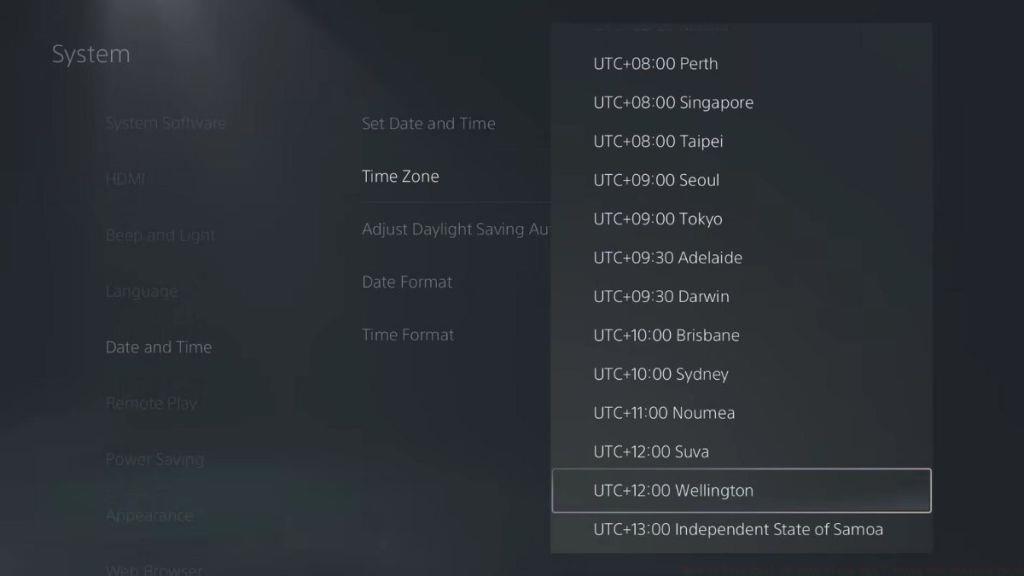
- Now power on your PlayStation console and enter the Settings menu
- Select the Date and Time options, then adjust your time zone to UTC+12:00 Wellington
- Restart your console to ensure all changes take effect properly
Pro Tip: After completing these steps, wait approximately 5-10 minutes before attempting to launch Black Ops 7. This allows sufficient time for the regional changes to propagate through all systems. If the game doesn’t appear available, try logging out and back into your PlayStation Network account to refresh the regional status.
Xbox consoles utilize a more integrated regional system that requires both console modifications and account updates. The process involves fewer steps than PlayStation but demands a complete system restart to implement the changes effectively.
- Access the main Settings interface on your Xbox console
- Navigate to the System category within the settings menu
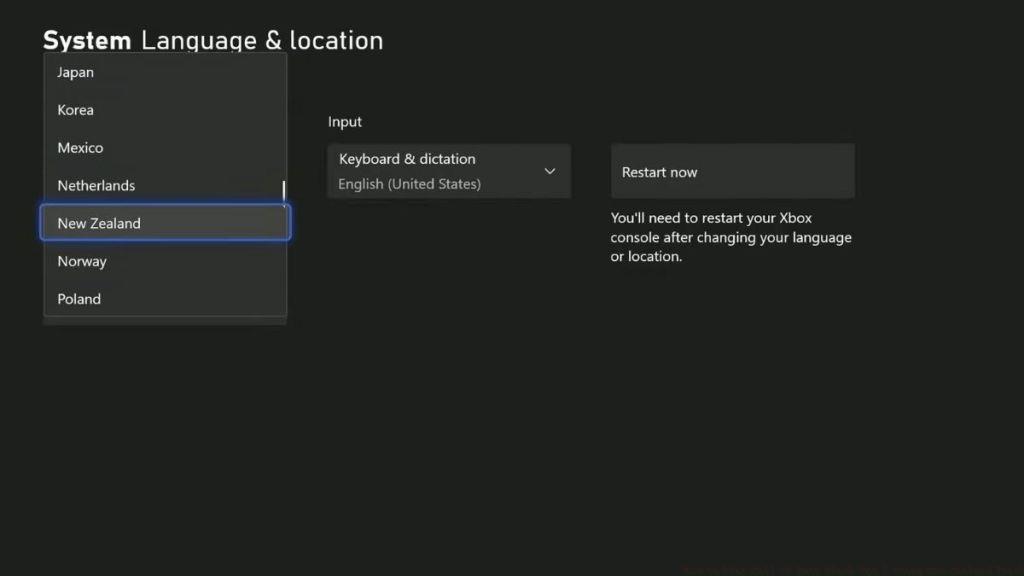
- Choose ‘Language and Location’ from the available options
- Update your current location setting to New Zealand
- Perform a full console restart to activate the regional modification
- Once rebooted, visit the official Call of Duty website
- Similar to the PlayStation procedure, adjust your Address information to a New Zealand-based location
- Finalize the process by saving your updated profile details
Common Mistake to Avoid: Many users forget the crucial console restart step, which prevents the regional changes from taking full effect. Always ensure your Xbox completely powers down and restarts before checking game availability. The restart ensures the new regional settings are fully integrated into the system’s operational parameters.
The New Zealand regional workaround on PC functions exclusively through the Xbox app ecosystem. If you purchased Black Ops 7 through Steam or Battle.net, this method will not provide early access due to their distinct regional validation protocols.
- Ensure the Xbox application is completely closed before beginning the process
- Visit the official Call of Duty portal and update your regional information in the ‘Basic Info’ section
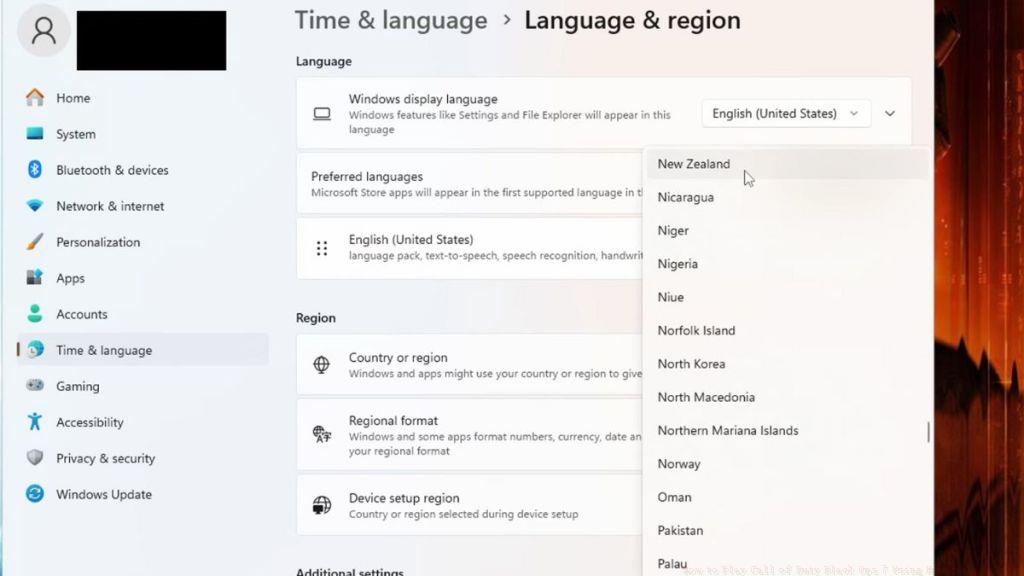
- Press the Windows key and type ‘Region Settings’ in the search field
- Modify your Windows location configuration to New Zealand
- Perform a full system restart to implement the regional adjustments
- After reboot, launch the Xbox application and authenticate with your credentials
- Black Ops 7 should now be accessible through your game library
Important Limitation: This technique only applies to Game Pass subscribers or those who purchased through the Microsoft Store. The regional synchronization between Windows and the Xbox app creates the early access opportunity, but this integration doesn’t extend to other PC gaming platforms.
Players occasionally encounter obstacles when implementing the New Zealand trick. Understanding these common problems and their solutions can save significant frustration and ensure successful early access.
Connection and Verification Issues: If Black Ops 7 doesn’t appear available after completing all steps, the most likely cause is incomplete regional synchronization. Double-check that both your platform account and system settings reflect New Zealand as your current region.
When can I start playing Black Ops 7 using the New Zealand trick?
By properly implementing the New Zealand regional adjustment, you can access Black Ops 7 immediately upon its New Zealand release time, typically gaining 12-16 hours of early access depending on your original time zone.
Does the New Zealand trick work on Battle.net or Steam?
No, the regional workaround exclusively functions through the Xbox app ecosystem on PC. Steam and Battle.net utilize different regional validation systems that don’t permit this type of geographical manipulation.
Advanced Optimization: For the smoothest experience, consider clearing your platform’s cache after making regional changes. On PlayStation, this involves powering down completely and unplugging for 30 seconds. On Xbox, hold the power button for 10 seconds during shutdown. These additional steps ensure clean implementation of the regional modifications.
Action Checklist
- Update Call of Duty website account with New Zealand address
- Modify console or system regional settings to New Zealand
- Perform complete system restart to activate changes
- Verify regional changes on both account and system levels
- Launch game through appropriate platform (Xbox app for PC)
No reproduction without permission:Tsp Game Club » How to Play Call of Duty Black Ops 7 Using New Zealand Trick Master the New Zealand trick to play Black Ops 7 early across PlayStation, Xbox, and PC platforms