
TL;DR
- Arc Raiders preloads are live now across all platforms with varying file sizes
- Pre-ordering any edition is mandatory before accessing preload functionality
- PC downloads range 27-33GB while console versions average 16-27GB
- Platform-specific steps ensure smooth preloading and immediate launch access
- Advanced troubleshooting tips prevent common download and installation issues
With Arc Raiders launching imminently, strategic preloading becomes essential for players eager to dive straight into the action. This extraction shooter combines intense looter-shooter mechanics with memorable PvP encounters, making early access particularly valuable for competitive players. Understanding the preload process ensures you’re raiding from minute one.
Preload Availability Status
Currently, Arc Raiders preload functionality is active across all supported platforms including PC, PlayStation 5, and Xbox Series X/S. This timing allows sufficient opportunity to download the complete game package before servers go live, eliminating day-one download delays that could put you behind other players.
Storage Space Requirements
The installation footprint varies significantly by platform. PC users should allocate 27-33GB of free space, with the exact size depending on your specific hardware configuration and additional language packs. Console players enjoy more optimized file sizes, with PlayStation 5 requiring approximately 16GB and Xbox Series X/S versions typically around 27GB. Always reserve 10-15% extra space for potential day-one patches.
Pre-Order Prerequisite
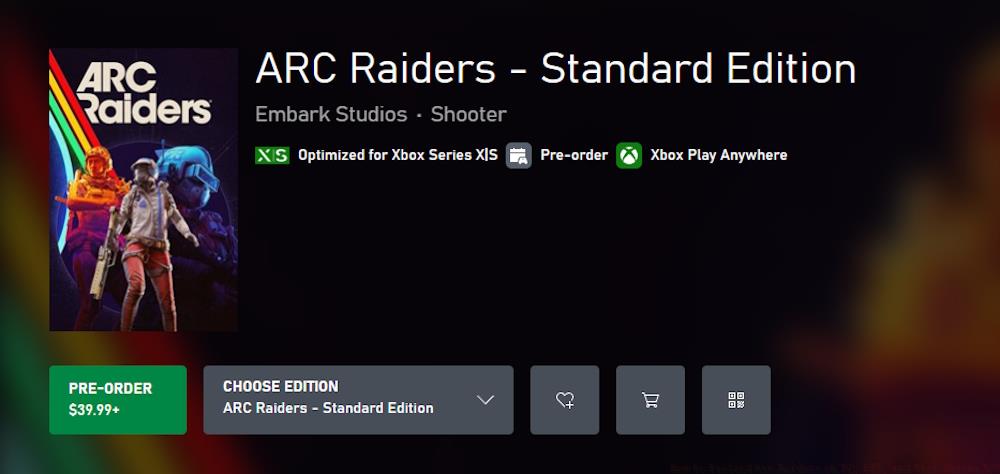
Accessing the preload feature requires purchasing any edition of Arc Raiders beforehand. This purchase-then-download sequence is consistent across all digital storefronts. Many players overlook that pre-order bonuses and early access periods often depend on completing this process correctly.
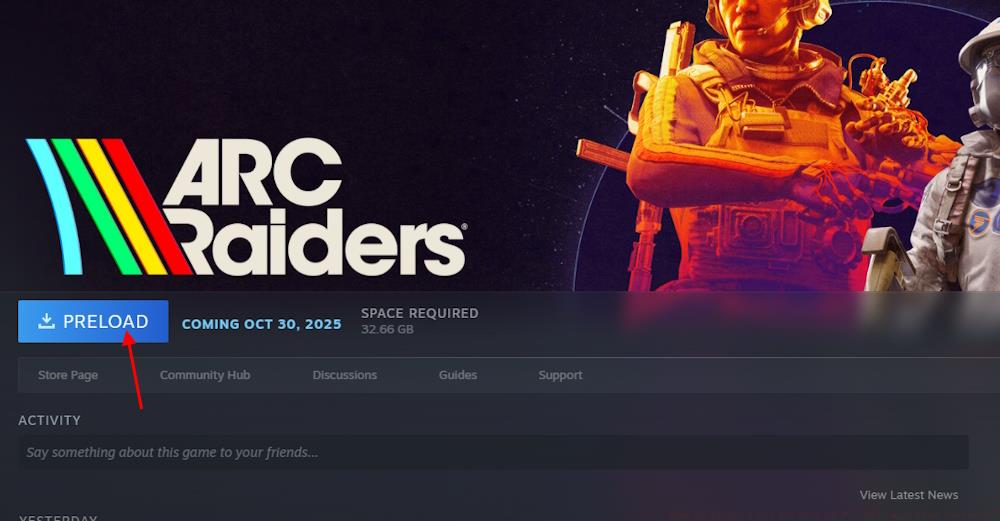
PC gamers have dual platform options for accessing Arc Raiders, each with slightly different interface workflows. Understanding these nuances prevents frustrating navigation issues that could delay your gameplay start.
Steam Preload Procedure
Begin by launching the Steam client and navigating to the Arc Raiders store page through search or direct link. After completing your pre-purchase transaction, the interface will dynamically update to display a prominent Preload option button. Click this to initiate the download sequence. Steam typically allocates download bandwidth efficiently, but you can manually adjust speed limits in Settings > Downloads if needed.
Epic Games Store Method
The Epic Games Store follows a similar pattern but with interface differences. Post-purchase, locate Arc Raiders in your library rather than the store page. The preload option appears as an install button beside the game title. Epic’s download manager provides less granular control than Steam but generally offers comparable speeds.
Common PC Download Issues
Many players encounter download stalls due to insufficient disk space allocation. Verify your target drive has at least 35GB free before starting. If the preload button doesn’t appear immediately, restart the client completely—this resolves most visibility issues. Network configuration problems can also interrupt large downloads, so ensure your firewall isn’t blocking the game client.
For those planning their loadout strategies, preloading ensures you can immediately begin testing weapon combinations rather than waiting through installation.
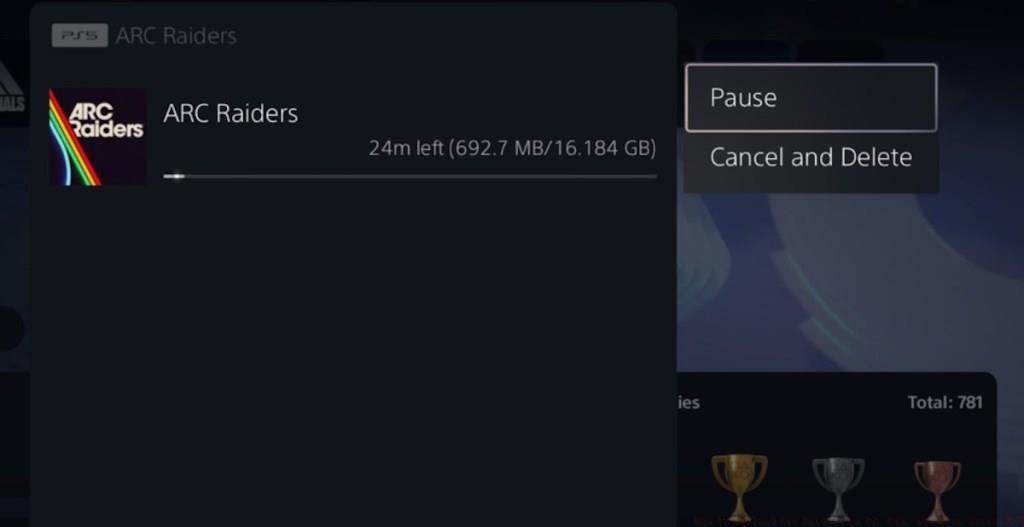
Console preloading offers streamlined experiences but has platform-specific considerations that affect download performance and storage management.
PlayStation 5 Installation Steps
On PS5, access the PlayStation Store either through the main menu or dedicated store icon. Search for Arc Raiders and complete your purchase. Following transaction confirmation, return to the game’s store page where you’ll find the download option. Alternatively, check your library’s purchased section if the option isn’t immediately visible on the store listing.
Xbox Series X/S Download Process
Xbox owners should navigate to the Microsoft Store via the dashboard or store tab. After purchasing Arc Raiders, the install button will replace the buy option. You can also initiate downloads remotely through the Xbox app on mobile devices, a unique advantage for planning ahead.
Console-Specific Optimization Tips
PS5 users benefit from placing their console in rest mode during downloads, as this often increases transfer speeds. Xbox Series X/S players should ensure quick resume is disabled for Arc Raiders initially, as this feature can sometimes conflict with first-time launches. Both platforms automatically manage storage allocation, but manually clearing cache beforehand can prevent installation errors.
Understanding these console workflows complements broader knowledge from our Complete Guide to next-generation gaming preparation.
Beyond basic downloading, several optimization techniques can significantly enhance your preload experience and ensure seamless transition to live gameplay.
Download Speed Maximization
Schedule your preload during off-peak hours (typically 1AM-6AM local time) when internet congestion is minimal. Wired connections consistently outperform Wi-Fi for large game files, reducing potential corruption risks during transfer.
Common Issue Resolution
If your preload appears complete but won’t launch, verify file integrity through platform-specific tools: Steam’s “Verify Integrity of Game Files” or PlayStation’s “Check for Update” function. These systems automatically detect and replace corrupted data segments without requiring full re-downloads.
Post-Download Preparation
Once the preload finishes, avoid moving or modifying the installation files. Some players mistakenly try to transfer the game between drives, which invalidates the preload and forces complete reinstallation. Instead, use this waiting period to research class selections and team composition strategies that will give you an early advantage.
Remember that preloaded games remain locked until the official launch time. Setting a calendar reminder for server activation ensures you don’t miss the opening moments when matchmaking is typically fastest and most balanced.
Action Checklist
- Verify platform-specific storage requirements (16-33GB depending on system)
- Complete Arc Raiders pre-order through your preferred storefront
- Navigate to game’s store page or library to locate preload option
- Initiate download during off-peak hours for optimal speed
- Verify file integrity post-download using platform tools
- Prepare for launch by researching class strategies and loadouts
No reproduction without permission:Tsp Game Club » How to Preload Arc Raiders on PC, PS5, and Xbox Series X/S Complete guide to preloading Arc Raiders with platform-specific steps, file sizes, and troubleshooting tips