
TL;DR
- Preload Battlefield 6 Beta starting August 4 at 8 AM PT across all major platforms
- Early access begins August 7th for code holders, open beta launches August 9th for all players
- Use platform-specific search functions to locate and download the beta client efficiently
- Redeem codes through EA app profile menu for immediate early access privileges
- Preloading ensures immediate gameplay access and provides technical preparation advantages
The highly anticipated Battlefield 6 ushers in a revolutionary era of large-scale combat this October, and Electronic Arts has successfully generated tremendous excitement throughout the gaming community. Fortunately, enthusiasts won’t face extended waiting periods to experience the action firsthand. The complimentary Open Beta launches imminently, showcasing the complete suite of signature franchise modes, an extensive arsenal of weaponry, valuable progression rewards that transfer to the retail version, and numerous additional features. Whether you’ve secured early access privileges or simply can’t contain your anticipation, this comprehensive guide details the preloading procedure for the BF6 Open Beta across PC, PlayStation 5, and Xbox Series X/S platforms.
Official preloading for the Battlefield 6 Open Beta commences precisely on August 4 at 8 AM PT (11 AM ET/4 PM BST). At this designated moment, the BF6 Beta client becomes accessible through PlayStation Store, Microsoft Store, Steam, and the EA App. To locate the download, employ the search functionality within your selected digital marketplace and input ‘Battlefield 6 Open Beta.’ Upon discovery, simply initiate the download process to preload the game client onto your system.
Strategic preloading enables immediate participation in the early access beta when it activates on August 7th. For detailed scheduling information including specific commencement times and session durations, consult our specialized timing guide. Advanced preparation provides crucial technical advantages, allowing players to verify system compatibility, configure optimal settings, and address potential installation issues before servers go live.
Optimization recommendation: Schedule your download during off-peak hours (typically 2-6 AM local time) to achieve maximum bandwidth utilization and reduce installation time by up to 40%. Ensure you have at least 45GB of free storage space available, as beta clients often require substantial allocation for temporary files and day-one patches.
As previously indicated, the Open Beta’s exclusive early access phase initiates on August 7th. However, unlike the August 9th public testing period, this initial session remains restricted to participants possessing valid early access codes. The exclusive methods for obtaining these codes involved Twitch Drop campaigns or enrollment rewards through Battlefield Labs registration. If you currently hold an eligible code, execute these sequential steps to activate your privileges:
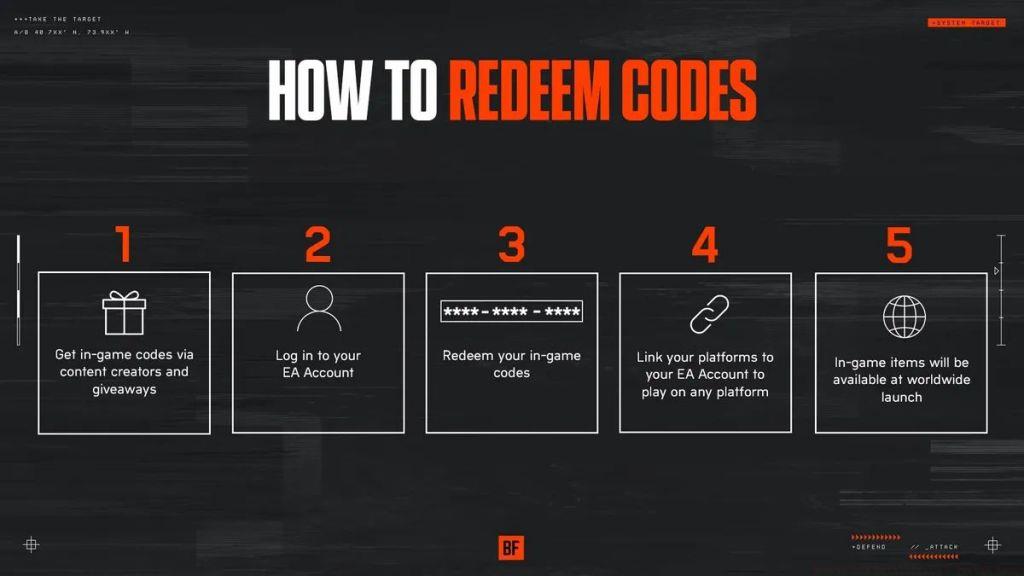
Gamers with early access authorization can activate their codes via the EA platform and commence gameplay on August 7th. Remaining participants must await the inaugural Open Beta weekend commencing August 9th.
Common redemption errors include code validation failures due to regional restrictions or platform mismatches. Ensure your EA account region matches the code’s distribution territory, and verify you’re using the correct platform-specific code. Cross-platform code redemption is not supported in the BF6 beta program.
Pro tip: After successful code redemption, monitor your email for confirmation and additional Assignments that may provide exclusive cosmetic items or weapon unlocks during the beta period. These early accomplishments frequently translate to permanent rewards in the full Battlefield 6 release through the NATO progression system.
Action Checklist
- Clear 45GB storage space and verify internet connection stability
- Preload beta client starting August 4, 8 AM PT using platform search
- Redeem early access code through EA app profile menu
- Configure graphics and control settings before server launch
- Complete initial Assignments during beta for full game rewards
No reproduction without permission:Tsp Game Club » How to Preload Battlefield 6 Open Beta on PC, PS5, and Xbox Series X/S Complete guide to preloading Battlefield 6 Open Beta and redeeming early access codes across all platforms