
TL;DR
- Simple Build automatically constructs pre-designed structures based on your camera direction
- The feature activates by default in Chapter 7 but can be disabled in Building settings
- Master directional building by understanding specific camera angle triggers
- Balance speed advantages against precision limitations in competitive scenarios
- Practice material farming and structure combinations for maximum effectiveness
Fortnite Chapter 7 introduces revolutionary gameplay enhancements that significantly accelerate combat pacing through improved movement systems, faster weapon reload mechanics, and specialized tools for construction-focused players. Among these innovations, Simple Build represents a fundamental shift in how players approach structural creation within the Battle Royale environment.
Epic Games has consistently implemented features to lower the skill barrier for building mechanics, previously introducing Simple Edit functionality that enabled rapid structure modifications through single-button pre-set selections. However, for players struggling with foundational construction principles and experiencing consistent elimination even in casual matches, the new Simple Build system provides substantial assistance in developing core building competencies.
What is Simple Build in Fortnite?
Simple Build constitutes an innovative configuration option within Fortnite’s Chapter 7 update that facilitates instant creation of pre-designed architectural formations. With simple directional input adjustments, players can rapidly erect sophisticated structures including 90-degree defensive towers and protective conical enclosures through minimal input commands. While sharing conceptual similarities with the Simple Edit feature, this new system sacrifices granular placement control for accelerated construction speed, which may prove disadvantageous during high-stakes close-quarters engagements.
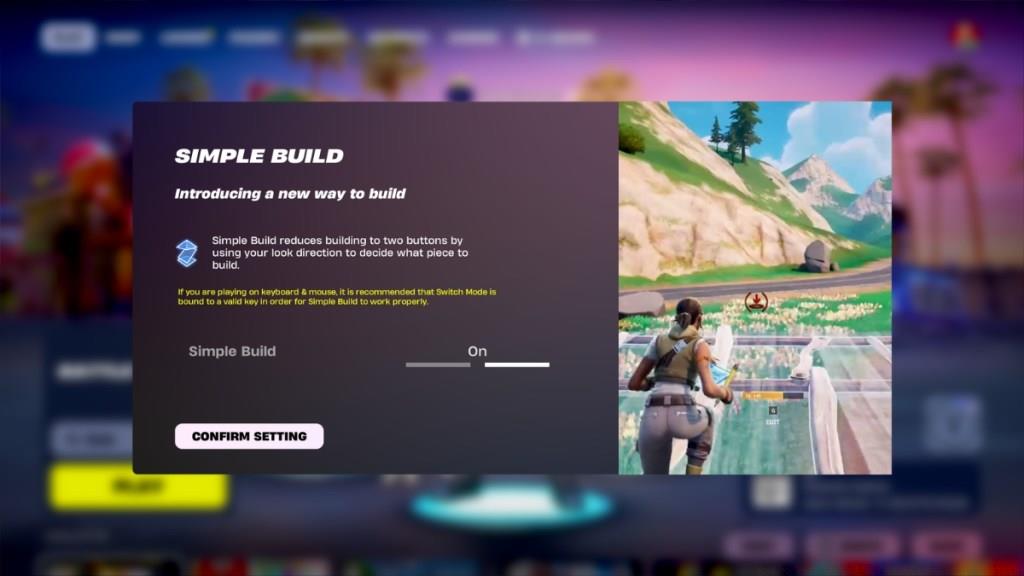
For veterans preferring traditional manual building methodologies or newcomers wishing to experiment with automated construction, understanding how to activate or deactivate this feature becomes essential knowledge. The system’s automated nature introduces both strategic advantages and tactical limitations that players must carefully consider based on their skill level and playstyle preferences.
How to Configure Simple Build Settings
Upon initial launch of Fortnite Chapter 7 Season 1, the Simple Build functionality automatically enables itself, presenting users with an introductory overlay explaining the feature’s capabilities and offering immediate configuration options. Many players inadvertently dismiss this prompt, resulting in unintended activation of the automated building system.
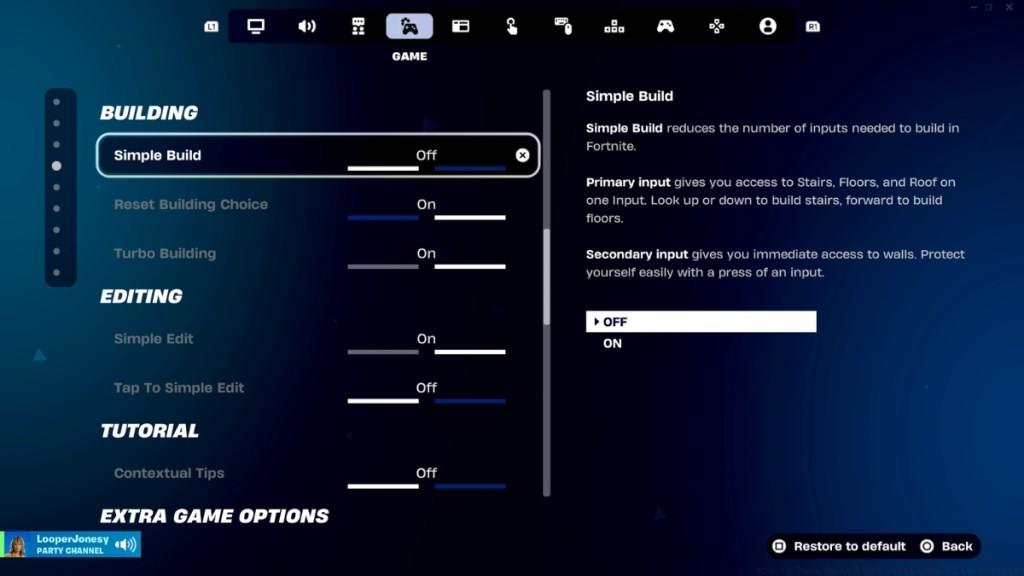
If you’ve accidentally closed the configuration window or wish to modify your Simple Build preferences after initial setup, follow this comprehensive navigation guide:
- Initiate Fortnite and access the main menu interface
- Select your profile avatar positioned in the upper-right corner, then choose Settings from the left navigation panel
- Proceed to Game Settings by clicking the controller icon featuring a cogwheel (fourth icon from the left on the menu bar)
- Within this section, either use cursor navigation to select Building from the left options list or scroll downward through available configuration categories
- Locate the primary Simple Build toggle option and utilize the directional arrows to activate or deactivate the functionality
- Confirm your selection by clicking Apply to permanently save your configuration preferences
Pro players should note that disabling Simple Build restores full manual control over structure placement, allowing for more sophisticated defensive formations and creative building techniques that the automated system cannot replicate. However, beginners may find the feature invaluable for developing fundamental spatial awareness and construction timing.
Mastering Simple Build Techniques
As previously established, Simple Build streamlines the creation of specific structural patterns including defensive 90s, protective boxes, and cone-based tunnel systems. To maximize effectiveness, begin by aggressively gathering construction materials through environmental harvesting across the game map.

Activate your construction interface using the designated Build input command. The system automatically generates structures based on your viewing perspective: forward-facing camera angles produce walls, downward views create floors, upward perspectives generate roofs or cones, and approximately 45-degree upward angles construct ramps. This directional building mechanism requires practice to master but significantly accelerates defensive response times.
Accumulate sufficient resources to create complex architectural formations while maintaining mobility and adjusting visual focus across multiple directions. During our practical testing in live matches, we observed a noticeable adaptation period required for proficient Simple Build utilization. Interestingly, traditional manual building methodologies proved more intuitive once players mastered key assignments and developed precision placement skills.
Common Beginner Mistakes to Avoid:
- Insufficient material collection before engaging in construction
- Over-reliance on automated building during high-pressure situations
- Failure to practice directional camera control for specific structure types
- Attempting complex builds without understanding the system’s limitations
- Neglecting to customize settings based on personal playstyle
Advanced Optimization Strategies:
- Combine Simple Build with manual editing for hybrid construction approaches
- Practice rapid material switching during building sequences
- Develop muscle memory for common defensive structure combinations
- Use the system for rapid initial protection followed by manual precision building
Now that you comprehend Simple Build’s operational principles and strategic applications, will you incorporate this feature into your Chapter 7 Battle Royale strategy? Share your experiences and techniques in the comments section below!
For players seeking to expand their tactical knowledge beyond building mechanics, our comprehensive Battlefield 6 guide offers comprehensive gameplay insights, while our weapons unlock guide provides essential armament progression strategies.
Action Checklist
- Access Game Settings through profile menu and controller icon
- Practice directional building with specific camera angles in a safe environment
- Farm 500+ materials before attempting complex automated structures
- Experiment with hybrid manual/automated building techniques
- Analyze building performance in replay mode to identify improvement areas
No reproduction without permission:Tsp Game Club » How to Turn On and Off Simple Build in Fortnite Master Fortnite's Simple Build feature with expert tips, strategic insights, and practical optimization techniques