
TL;DR
- Optimize graphics settings for 119fps at 1080p and 79fps at 4K on mid-range hardware
- Configure precision passing controls with Placement mode and Small pass lead for interception avoidance
- Maximize Heat Seeker Assist to 200% for dramatically improved tackling success rates
- Set auto-substitution strategically to keep star players on field during crucial moments
- Disable defensive motion response and configure RPO defense keys to eliminate explosive outside runs
Unlock the full potential of Madden 26 through expert configuration of controls, graphics, and gameplay systems. Transform your competitive performance with settings that deliver measurable advantages in online matches.
Elevate your Madden 26 experience beyond casual play with configurations that separate champions from average competitors. These aren’t superficial adjustments—they’re fundamental changes that determine whether you complete that game-winning touchdown pass or suffer a devastating interception. From visual optimization to advanced control schemes, we’ll revolutionize how you approach virtual football strategy.

Game Mechanics Revolution
This year’s installment introduces groundbreaking gameplay systems requiring meticulous configuration. The enhanced auto-substitution feature can unexpectedly bench your elite athletes during critical drives, while revamped coaching adjustments fundamentally alter how your squad counters opponent tactics. Default configurations frequently work against player success, generating missed opportunities and avoidable defeats.
Hidden Competitive Advantages
Madden 26’s complexity represents both its greatest strength and most significant challenge for unprepared competitors. You’ll discover deeply buried menu options that substantially impact victory rates, from heat seeker assist percentages to RPO defense configurations that decide whether you contain or surrender game-changing plays. Understanding these systems provides the edge that transforms close losses into consistent victories.
Your visual configuration directly influences reaction speed and competitive effectiveness. Here’s the ideal setup for seamless gameplay performance:

Performance Tip: These settings deliver 119fps average at 1080p and 79fps at 4K on mid-range hardware. The auto-detection often maxes everything out, causing unnecessary frame drops.
Visual Quality vs Performance Balance
Maintain Texture Quality and Shadow Quality at High settings for optimal visual-performance equilibrium. While Ultra presets provide impressive visual fidelity, the performance penalty doesn’t justify the minimal aesthetic improvement during actual competition. Every frame matters when executing split-second decisions in online matchups where reaction time determines success.

The High Resolution Circular DOF configuration warrants particular attention—it generates that cinematic depth-of-field effect seen in professional broadcasts, helping maintain focus on essential action while preserving smooth performance. This setting enhances visual clarity without compromising the responsive gameplay required for competitive success.
Frame Rate Optimization Strategies
Avoid the common mistake of relying on auto-detection settings, which typically maximize all visual options regardless of performance impact. Instead, manually configure each setting based on your hardware capabilities. Disable motion blur and reduce anti-aliasing if experiencing frame rate instability, as these features significantly impact rendering performance without providing competitive advantages.
Your control scheme determines execution speed under pressure. Begin with these foundational adjustments:
Precision Passing Mechanics
Configure Passing Type to Placement mode for maximum accuracy control. While Revamp Passing provides alternative arc trajectories, you can achieve identical high-pass results in Placement mode by holding LB/L1 during throwing motions.
Set Reticle Speed to 7 and Pass Lead to Small. This combination delivers precise ball placement control without sacrificing rapid decision-making capability. The Small pass lead setting enables throwing receivers away from defenders—an essential skill for interception prevention that separates elite quarterbacks from average performers.
Pro Strategy: Double-tap any receiver button for pump fakes. This simple technique freezes safeties and creates bigger windows for your actual target.
Defensive Control Mastery
The Heat Seeker Assist setting remains drastically underutilized by most competitors. Increase this to 200% (many players don’t recognize it extends beyond 100%). This generates a magnetic effect during tackle attempts, substantially improving success rates with secure tackles using A/X.
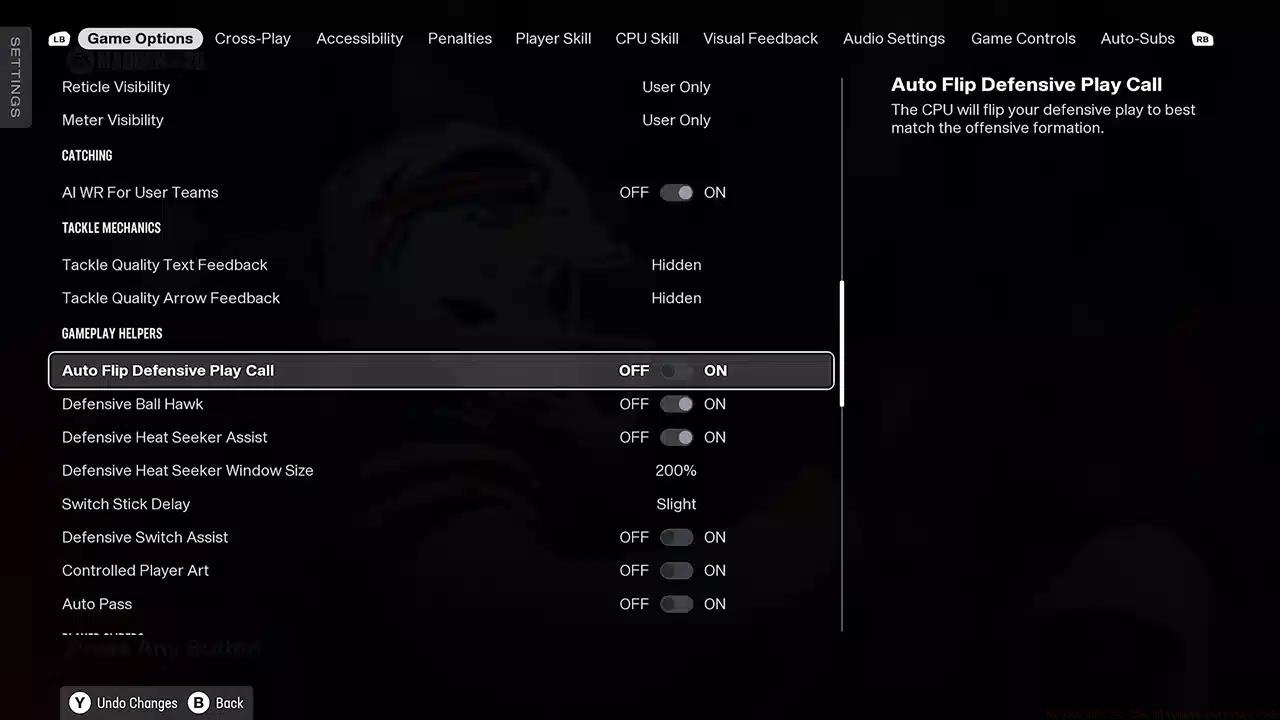
Configure Switch Stick Delay to Slight. This prevents unintended player switching when opponents snap the ball during pre-snap adjustments—a frequent cause of coverage breakdowns that surrender big plays.
Advanced Input Techniques
Master the timing of precision passing by practicing lead passes against various coverage schemes. The Small pass lead setting requires understanding defender positioning to properly place throws where only your receiver can make the catch. Combine this with pump fakes to manipulate defensive backs and create explosive play opportunities.

Madden 26’s updated wear and tear system can undermine your top performers if improperly configured. Here’s how to maintain strategic control:
Position-Specific Strategies
Quarterback: Always configure to Grind It Out. Your starting quarterback should never exit the field except for injuries. Backup quarterbacks introduce excessive risk during crucial game situations where consistency matters most.
Offensive Line: Grind It Out configuration again. Fresh legs provide minimal benefit if your protection collapses. Elite linemen maintain effectiveness longer than their stamina indicators might suggest.
Skill Positions: This configuration depends on roster depth. Teams with multiple quality receivers should utilize Keep Fresh for sustained speed advantages. Single-star teams should maintain Default or Grind It Out settings.
Team Building Tip: Set your favorite team strategically in Ultimate Team. You’ll receive that team’s playbooks for free, saving 3,000+ coins early in the season.
Wear and Tear Optimization
Reduce all Wear and Tear sliders to 40% while increasing Recovery Scale to 60%. This maintains your stars on the field longer while ensuring accelerated recovery between plays. Nobody wants to watch unfamiliar backup players during critical game moments when victory hangs in the balance.
Monitor fatigue indicators during games and adjust substitution settings based on opponent tempo. Against hurry-up offenses, consider more conservative substitution patterns to maintain defensive continuity and prevent exploitation of tired players.
The coaching menu contains game-altering settings most competitors overlook:
Defensive Scheme Optimization
Consistently disable Defensive Motion Response. When opponents motion receivers, automated adjustments can reposition your carefully placed pass rushers from effective lanes. Manual control consistently outperforms automation in strategic defensive positioning.
RPO and Option Defense
These four configurations work collectively to force plays inside where your support defenders await:
- Option Read Key: Conservative (focus on QB)
- Pitch Key: Aggressive (stop the pitch)
- RPO Defense: Conservative (QB focus)
- RPO Pass Key: Conservative (cover passes)
This setup directs all option plays and RPOs back toward your linebackers and safeties, eliminating the explosive outside runs that devastate defenses. This approach forces opponents into predictable inside running plays where your defensive strength typically resides.
Adjust these settings based on opponent tendencies. Against pass-heavy teams, consider more aggressive pass key settings, while run-focused opponents warrant increased attention to option and pitch defense configurations.
Critical Helper Settings
Defensive Ball Hawk: Maintain this ON. It automatically positions defenders for interception opportunities without requiring manual input, providing crucial assistance during complex passing situations.
Auto Flip Defensive Play Call: Deactivate this if you manually adjust your defense. Auto-flipping can disrupt carefully orchestrated blitz packages and coverage schemes.
Defensive Switch Assist: Enable this to prevent accidental switching to inappropriate players during critical moments. This maintains defensive integrity when rapid adjustments are required.
warning
The crossplay setting can be extremely glitchy. If you experience connection issues, disable crossplay through your console settings, not the in-game menu.
Strategic Game Management
Always select Kick first, Against Wind second during coin tosses. This strategy applies early pressure to opponents while establishing favorable late-game field position. You want possession with wind advantage during the fourth quarter for potential game-deciding field goals.
Competitive Accessibility
Don’t neglect the Accessibility menu. Enlarge Onfield Graphics enhances receiver icon visibility during challenging lighting conditions or adverse weather games. This seemingly minor adjustment can preserve crucial possessions during playoff scenarios where every advantage matters.
The enlarged icons prove particularly valuable during Snow or Rain games where natural visibility decreases. Every competitive edge becomes significant when games are determined by single possessions.
important
Madden 26 doesn’t support DLSS or FSR upscaling, so your hardware must handle native resolution rendering.
Consider colorblind settings even if you don’t have color vision deficiency, as these options can improve contrast and make player indicators more distinct during fast-paced action.
These configurations function synergistically, with each adjustment supporting others to create comprehensive competitive advantages. Begin with graphics and control settings for immediate improvement, then refine coaching adjustments as you develop strategic preferences.
Remember that different game modes may necessitate slight variations. Ultimate Team benefits from the favorite team playbook strategy, while Head-to-Head permits complete playbook customization regardless of your favorite team setting. The essential element involves understanding why each configuration matters rather than blindly copying setups.
As you develop your playstyle, you’ll naturally adapt these recommendations to match your preferences while preserving the competitive foundation they provide. While Madden 26 doesn’t require an SSD, loading times on traditional hard drives create substantial disadvantages. The 65GB installation size fits comfortably on modern solid-state drives, and faster loading translates to more practice time and reduced waiting.
Regularly revisit your settings as you advance in skill level. Configurations that work during early learning phases may require adjustment as you face more sophisticated opponents who exploit specific weaknesses in your setup.
Action Checklist
- Configure graphics settings to High for Texture and Shadow Quality, disable motion blur
- Set Passing Type to Placement, Reticle Speed to 7, Pass Lead to Small
- Increase Heat Seeker Assist to 200% and set Switch Stick Delay to Slight
- Configure auto-substitution: Grind It Out for QB/OL, position-based for skill players
- Disable Defensive Motion Response, set RPO/Option defense keys to Conservative
- Enable Enlarge Onfield Graphics in Accessibility settings for better visibility
No reproduction without permission:Tsp Game Club » Madden NFL 26: The Ultimate Settings Gude Master Madden 26's hidden settings to dominate online play with optimized graphics, controls, and strategic configurations