
Master Vindictus Defying Fate’s Photo Mode with expert controls, creative techniques, and sharing strategies
Understanding Photo Mode Fundamentals
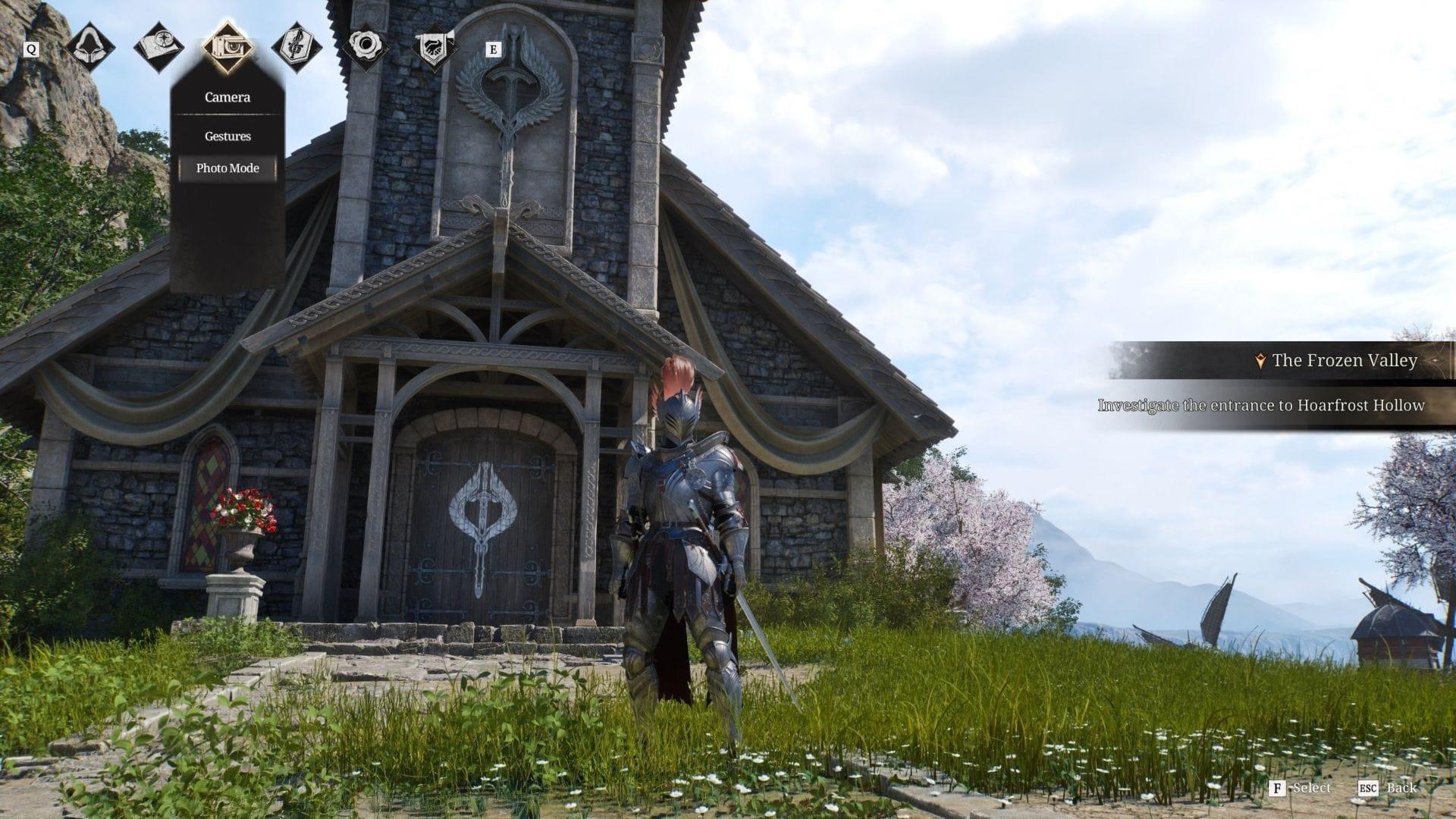
Vindictus Defying Fate’s Photo Mode transforms your gaming experience into a creative photography session, allowing you to capture stunning in-game moments with professional control. This powerful tool serves multiple purposes: preserving memorable gameplay sequences, documenting character progression, analyzing environmental details, and building a portfolio of shareable content. While intuitive for basic use, mastering its full potential requires understanding its comprehensive feature set.
Accessing the Photo Mode Interface: Begin by pressing the Escape key during gameplay to open the main menu. Locate the camera icon positioned third from the left along the top navigation bar. This icon serves as your gateway to the photography tools, presenting a dropdown menu where you’ll select “Photo Mode” to activate the specialized camera system.
Camera Navigation Mechanics: Once activated, Photo Mode provides complete camera freedom. Use your mouse to rotate the viewing angle in any direction, exploring perspectives impossible during normal gameplay. The camera responds to subtle movements, allowing precise framing of your desired composition.
Essential Control Mapping: Familiarize yourself with these key bindings for optimal control:
- Zoom In (C key): Brings your viewpoint closer to subjects for detailed shots
- Zoom Out (Z key): Pulls back for wider environmental captures
- Camera Reset (X key): Instantly returns to default camera position
- Free Camera (Tab key): Detaches camera from character for unrestricted movement
Advanced Photo Techniques and Composition
Creative Expression Through Emotes: Photo Mode becomes significantly more dynamic when combined with character emotes. Access your emote wheel while in photography mode to pose your character in various stances, from combat-ready positions to casual gestures. This integration allows you to create narrative-driven scenes that tell stories through single frames.
Advanced Composition Strategies: For professional-looking screenshots, consider these composition techniques:
- Rule of Thirds: Position key elements along imaginary grid lines for balanced composition
- Depth Layering: Use foreground, midground, and background elements to create dimension
- Leading Lines: Utilize environmental features to guide the viewer’s eye through the image
- Framing: Use arches, windows, or foliage to naturally frame your subject
UI Management for Clean Shots: The Q key serves as your clean canvas tool, temporarily removing all interface elements for pristine captures. Use this when you want the focus entirely on your character and environment without distracting HUD elements. Remember that UI removal is temporary and will reappear after capture or when pressing Q again.
Capture Execution: Press the F key to take your photograph. The game provides subtle visual feedback confirming the capture while maintaining your composed scene. For rapid shooting, you can take multiple consecutive shots without exiting Photo Mode, allowing you to experiment with slight variations in angle and composition.
Practical Limitations and Workarounds
Usage Restrictions Overview: Photo Mode operates within specific boundaries to maintain game integrity. Understanding these limitations prevents frustration and helps you plan your photography sessions effectively. The mode automatically disables during active combat sequences, preventing exploitation of the pause-like functionality during battles.
Narrative Sequence Considerations: During cutscenes, story interactions, and scripted sequences, Photo Mode remains unavailable. These moments are carefully choreographed by developers to deliver narrative impact without interruption. Plan to use Photo Mode during exploration phases, quiet moments, or after completing objective sequences.
Targeting System Behavior: If you have an enemy targeted when activating Photo Mode, the targeting reticle will automatically disengage. This prevents camera conflicts and ensures smooth operation. You’ll need to re-establish targeting after exiting photography mode if combat resumes.
Strategic Timing Tips: Maximize your photography opportunities by:
- Using calm moments between combat encounters
- Exploring hidden areas away from main story progression
- Capturing environmental details during puzzle sequences
- Planning shots during character customization sessions
Sharing and File Management
Screenshot Storage System: All photographs captured in Photo Mode automatically save as high-quality PNG files in your designated game library folder. The PNG format preserves image quality without compression artifacts, ensuring your screenshots maintain their visual fidelity. The filing system organizes captures by date, making recent shots easy to locate.
Community Gallery Integration: Vindictus Defying Fate provides a built-in gallery platform where you can upload your best photographs for community appreciation. This feature transforms your personal captures into shared artistic expressions, allowing other players to like, comment, and draw inspiration from your work.
Sharing Best Practices: When preparing screenshots for sharing, consider these professional tips:
- Edit images in external software for color correction and cropping
- Add descriptive titles and tags when uploading to galleries
- Share themed collections rather than individual random shots
- Participate in community photography challenges for visibility
- Credit inspiration from other photographers when applicable
Platform Expansion: Beyond the in-game gallery, your screenshots can be shared across social media platforms, gaming forums, and photography communities. The high-resolution PNG format ensures your images look professional regardless of where they’re displayed, from Discord servers to professional portfolio websites.
No reproduction without permission:Tsp Game Club » Vindictus Defying Fate: Photo Mode explained Master Vindictus Defying Fate's Photo Mode with expert controls, creative techniques, and sharing strategies