
TL;DR
- Battlefield REDSEC shares identical system requirements with BF6, offering excellent optimization for mid-range hardware
- Minimum specs target 1080p/30FPS while Ultra requirements deliver 4K/60FPS gaming
- Strategic graphics setting adjustments can significantly boost performance without visual compromise
- SSD installation provides the most noticeable improvement for texture loading and pop-in issues
- Modern security requirements like TPM 2.0 and Secure Boot are mandatory for Windows 11 compatibility
Battlefield REDSEC represents the explosive battle royale experience introduced shortly after BF6‘s debut. Teams can form duos or quads, deploying to Fort Lyndon for intense combat scenarios featuring fully destructible environments. Despite the massive scale of battles and environmental destruction, the game’s optimized engine ensures smooth performance across a wide range of PC configurations.
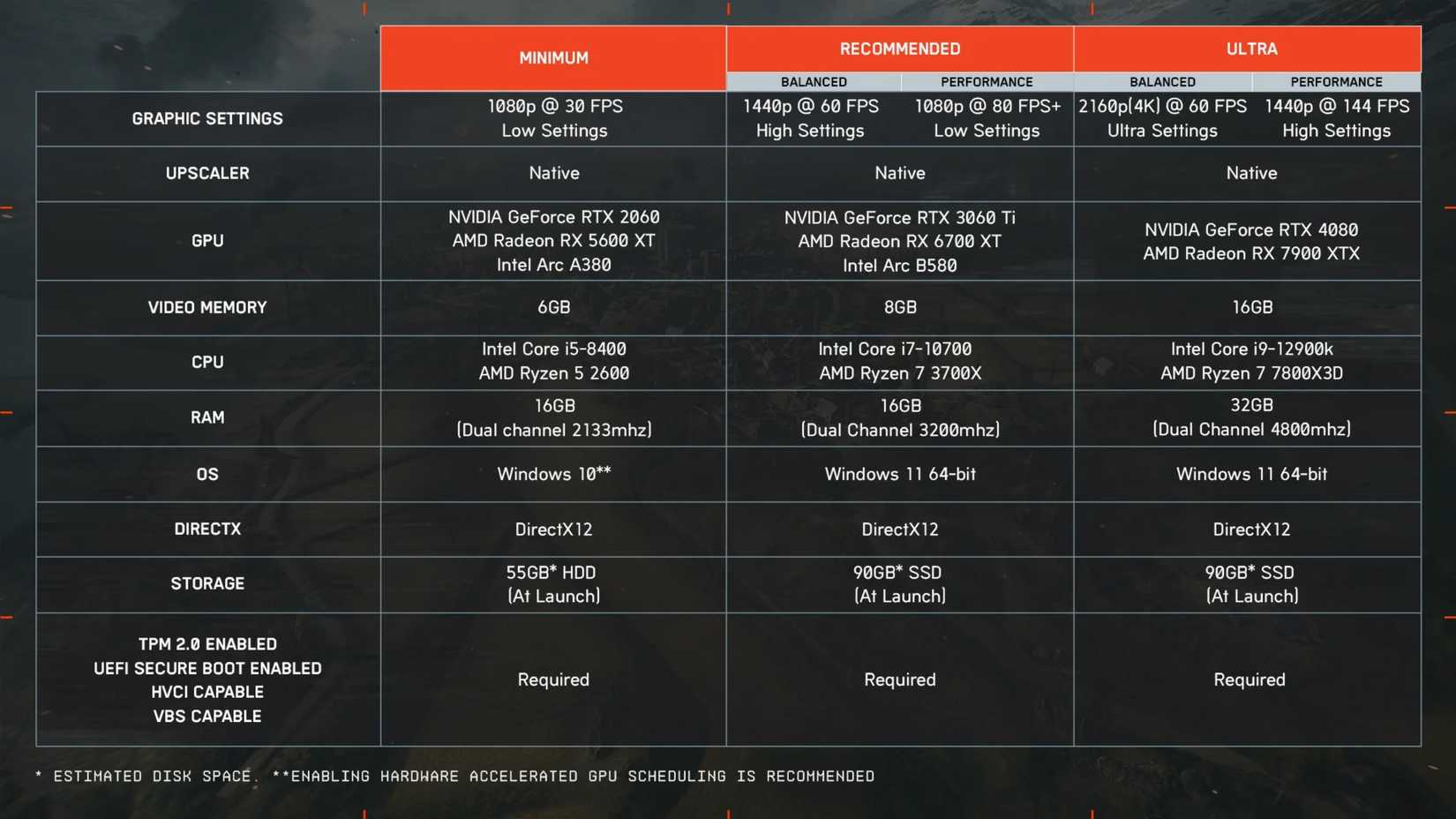
The system specifications for Battlefield REDSEC mirror those of the base Battlefield 6 game. As detailed in our comprehensive Battlefield 6 Complete Guide, the Frostbite engine demonstrates remarkable optimization efficiency, enabling mid-tier hardware configurations to maintain stable frame rates during graphically demanding engagements. This performance consistency extends fully to the BF6 battle royale mode (REDSEC).
Let’s dive into the detailed PC system specifications for Battlefield REDSEC to help you achieve optimal gaming performance.
|
PC Components |
Minimum PC Requirements |
Recommended PC Requirements |
Ultra PC Requirements |
|---|---|---|---|
|
Operating System (OS) |
Windows 10 |
Windows 11 64-bit |
|
|
Processor (CPU) |
Intel Core i5-8400 AMD Ryzen 5 2600 |
Intel Core i7-10700 AMD Ryzen 7 3700X |
Intel Core i9-12900K AMD Ryzen 7 7800X3D |
|
Graphics Card (GPU) |
NVIDIA GeForce RTX 2060 AMD Radeon RX 5600 XT Intel Arc A380 |
NVIDIA GeForce RTX 3060 Ti AMD Radeon RX 6700 XT Intel Arc B580 |
NVIDIA GeForce RTX 4080 AMD Radeon RX 7900 XTX |
|
System Memory (RAM) |
16GB (dual-channel, 2133 MHz) |
16GB (dual-channel, 3200 MHz) |
32GB (dual-channel, 4800 MHz) |
|
Video Memory (VRAM) |
6GB VRAM |
8GB VRAM |
16GB VRAM |
|
DirectX Version |
DirectX 12 |
||
|
Storage Requirement |
55GB (HDD) |
80GB (SSD) |
|
|
Expected Performance/Settings |
1080p @ 30 FPS Low graphics settings |
1440p @ 60 FPS High graphics settings (Balanced) |
2160p (4K) @ 60 FPS Ultra graphics settings (Balanced) |
|
1080p @ 80+ FPS Low graphics settings (Performance) |
1440p @ 144 FPS High graphics settings (Performance) |
||
|
Notes |
TPM 2.0 enabled, UEFI Secure Boot enabled, HVCI capable, VBS capable |
||
Performance Analysis: The requirements showcase excellent scalability across hardware generations. Minimum specifications target playable 1080p gaming at 30 FPS, while recommended hardware delivers smooth 1440p performance. The Ultra tier enables native 4K gaming at 60 FPS or high-refresh-rate 1440p experiences. Notice how RAM speed progression (2133MHz to 4800MHz) significantly impacts overall system responsiveness and frame timing consistency.
Graphics Settings Priority Guide: When adjusting settings for better performance, focus first on Shadow Quality and Ambient Occlusion – these typically offer the best performance-to-visual quality ratio. Post-processing effects like Motion Blur and Chromatic Aberration can be disabled with minimal visual impact but significant FPS gains.
Common Performance Pitfalls: Many players encounter texture popping and long-distance loading issues, particularly when using mechanical hard drives or systems meeting only minimum requirements. Upgrading to an SSD provides the most dramatic improvement for these specific issues. Additionally, ensure your system meets the modern security requirements including TPM 2.0 and UEFI Secure Boot for Windows 11 compatibility.
Advanced Optimization: For competitive players seeking maximum frame rates, consider disabling V-Sync and reducing Anti-Aliasing settings. The game’s balanced presets intelligently optimize settings based on your hardware capabilities, making them an excellent starting point for customization. For deeper gameplay strategies, check our BF6 Weapons Unlock Guide to maximize your combat effectiveness.
Cost-Effective Upgrade Path: If your system struggles with Battlefield REDSEC, prioritize these components in order: SSD storage upgrade, RAM speed optimization, then GPU replacement. Many users overlook that moving from HDD to SSD provides more noticeable improvement than moderate GPU upgrades for this specific game engine.
Component Selection Strategy: When building or upgrading specifically for BF6 and its battle royale mode, focus on balanced components rather than overspending on single elements. The game benefits significantly from fast storage and adequate system memory before requiring top-tier graphics cards.
Future-Proofing Considerations: Systems four to five years old should handle the game adequately, but consider that upcoming content updates may increase demands. For optimal class performance complementing your hardware, explore our BF6 Class Selection Guide to enhance your tactical options.
Performance Monitoring: Use in-game performance metrics to identify specific bottlenecks. If CPU utilization consistently hits 100% while GPU usage remains lower, consider processor upgrades before graphics card replacements.
Action Checklist
- Verify your system meets minimum TPM 2.0 and Secure Boot requirements for Windows 11 compatibility
- Install game on SSD to eliminate texture popping and loading issues
- Adjust shadow quality and ambient occlusion settings first for optimal performance gains
- Enable in-game performance metrics to identify specific hardware bottlenecks
- Test both balanced and performance graphics presets to establish baseline performance
- Monitor CPU/GPU utilization during intense combat to guide future upgrade decisions
No reproduction without permission:Tsp Game Club » Battlefield 6 REDSEC Battle Royale PC System Requirements Complete PC hardware guide for Battlefield REDSEC with optimization tips and performance analysis