
TL;DR
- Smoke grenades cost $300 and create 18-second vision-blocking screens for tactical advantage
- Use console commands like sv_cheats 1 and mp_maxmoney 60000 to create optimal training conditions
- Master basic smokes on beginner-friendly maps before progressing to complex lineups
- Configure specialized grenade crosshairs and practice binds for efficient repetition
- Learn map-specific smoke strategies for Mirage, Inferno, Dust2 and other competitive maps
This comprehensive guide delivers advanced techniques for mastering smoke grenade deployment in Counter-Strike 2. Proper smoke utilization represents one of the most critical tactical skills for gaining map control and creating strategic advantages during competitive matches.
We’ve systematically organized training methodologies, essential console configurations, and competitive map strategies to accelerate your smoke proficiency. The guide includes practical execution frameworks that translate directly to competitive success.
Within the CS2 community, smoke grenades are universally recognized as game-changing tactical tools. Priced at $300, these utilities activate upon landing and generate dense smoke screens lasting exactly 18 seconds – sufficient time to execute complex site takes or defensive holds.
Strategic smoke deployment creates temporary vision barriers that enable safe area transitions, obscure enemy sightlines, and facilitate strategic repositioning. The psychological impact of well-placed smokes cannot be overstated, as opponents must either risk pushing through unknown territory or wait for the smoke to dissipate.
For comprehensive grenade mechanics and advanced tactical applications, consult our detailed Complete Guide to battlefield utilities and their strategic implementations.
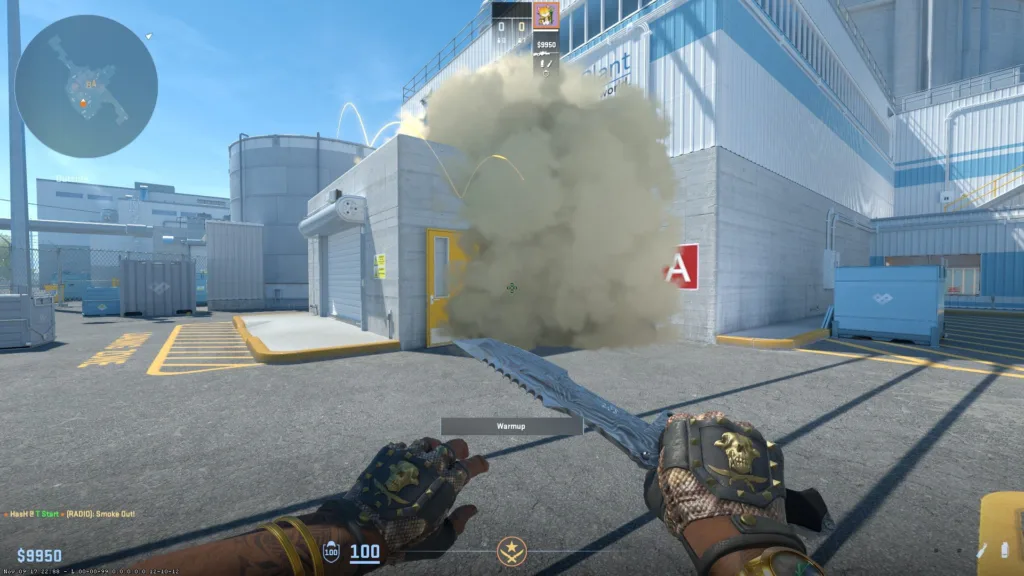
CS2 introduces two distinct methods for establishing practice environments. The integrated training mode provides immediate accessibility – navigate to “Play” in the main interface, then select “Training” from the top menu. Select your desired map and activate auxiliary functions from the upper-left panel. Note that even with this streamlined approach, console commands remain essential for advanced training configurations.
The traditional console-based approach maintains compatibility with legacy CS:GO workflows. First, verify console accessibility in settings by locating the “Enable developer console” option and setting it to “Yes“. Access the console by pressing the “~” key (typically located below ESC).
Proceed by opening the developer console and executing the command “map [map name]” – this initiates a custom server on your selected map. Immediately execute sv_cheats 1 to enable cheat commands, as this prerequisite unlocks the full training command suite.
Common setup errors include forgetting to activate sv_cheats, which renders most training commands non-functional. Advanced users should consider creating custom configuration files that automatically execute their preferred command sets upon map launch.
Once your custom server initializes, implement these critical console commands to optimize your training environment:
- sv_cheats 1 — enables cheat command functionality on the server (mandatory for all subsequent commands).
- mp_maxmoney 60000 — elevates maximum currency capacity to $60,000.
- mp_startmoney 60000 — provides $60,000 initial funding at round start.
- mp_buytime 1 — permits equipment purchases at any location and time during the round.
- sv_showimpacts 1 — displays bullet impact visualization for shot analysis and adjustment.
- sv_showimpacts_time 1 — configures duration for bullet impact visualization display.
- sv_infinite_ammo 1 — provides unlimited ammunition reserves for extended practice sessions.
- ammo_grenade_limit_total 5 — establishes maximum grenade carrying capacity at five total grenades.
- mp_roundtime 60 — extends round duration to 60 minutes for uninterrupted training.
- mp_freezetime 0 — eliminates initial round freeze period, enabling immediate movement.
- mp_warmup_end — terminates warmup phase immediately.
- god – grants invulnerability to facilitate focused grenade practice.
- sv_gravity – modifies gravitational physics for specialized trajectory experimentation.
- bot_add [T/CT][easy/normal/hard/expert] — deploys AI opponents to specified teams with configurable difficulty settings.
- bot_kick [name] — removes designated bots from the active match.
- mp_roundtime_defuse 60 — extends bomb defusal timer to 60 minutes.
- mp_respawn_on_death_ct/t 1 — enables immediate respawning for Counter-Terrorist or Terrorist factions respectively.
- sv_grenade_trajectory_time_spectator 15 — configures grenade trajectory visualization duration at 15 seconds for analysis.
Pro tip: Combine mp_roundtime 60 with mp_freezetime 0 for maximum training efficiency. The infinite ammunition command works synergistically with extended grenade limits to create ideal repetition-based learning conditions.
Strategic key binding significantly enhances training productivity and competitive performance. These configurations accelerate repetitive practice while building muscle memory for critical in-match actions.
- bind “Х” “noclip” – enables flight mode for rapid positioning and angle verification.
- bind “Х” “ent_fire smokegrenade_projectile kill; stopsound” – instantly clears active smoke screens for rapid repetition.
- bind “Х” “use weapon_flashbang” — flashbang quick-select binding.
- bind “Х” “use weapon_smokegrenade” — smoke grenade instant-access binding.
- bind “Х” “use weapon_hegrenade” — high-explosive grenade rapid deployment bind.
- bind “Х” “use weapon_molotov;use weapon_incgrenade” — incendiary/molotov quick-switch binding.
- bind “Х” “use weapon_decoy” — decoy grenade accessibility bind.
Advanced binding strategy: Create modifier key combinations (ALT+key) for secondary grenade functions. This approach maintains competitive bind integrity while adding training-specific functionality. For comprehensive equipment management strategies, explore our Weapons Unlock guide for advanced loadout optimization techniques.
With your training environment fully configured, implement this structured learning progression for systematic smoke grenade mastery. Foundational smokes establish the tactical framework necessary for advanced grenade lineups and complex tactical executions.
Beginner practitioners should initiate training on Mirage or Dust 2, as these maps provide optimal learning environments with abundant straightforward smoke opportunities and clear reference points.
Common execution errors include improper positioning alignment and incorrect landmark selection. These mistakes typically result in incomplete coverage or premature smoke dissipation, compromising tactical effectiveness.
The transition to competitive play represents the ultimate validation of training efficacy. Under match pressure, successful smoke deployment requires adaptive decision-making that responds to dynamic in-game situations and opponent positioning.
Advanced tactical application demands comprehensive understanding of spawn timings, rotation patterns, and common defensive setups. For role-specific tactical frameworks, consult our Class Guide for specialized positioning and utility usage strategies.
Progression recommendation: Master 3-5 critical smokes per map before expanding your repertoire. This focused approach builds reliable muscle memory for essential tactical executions.
Elite players frequently employ dedicated grenade crosshair configurations to enhance throwing precision. These specialized visual aids facilitate accurate alignment for complex trajectory-based smokes requiring pixel-perfect positioning.
Implement this console command sequence to configure your grenade crosshair system:
- alias «xhair» «cl_crosshairsize 1000000; bind l xxhair»
- alias «xxhair» «cl_crosshairsize 2.5; cl_crosshairgap -2.5; bind l xhair»
- bind Х «xhair»
Substitute X with your preferred activation key. Many professionals utilize rarely-used keys like ‘v’ or ‘k’ to avoid interference with primary combat binds.
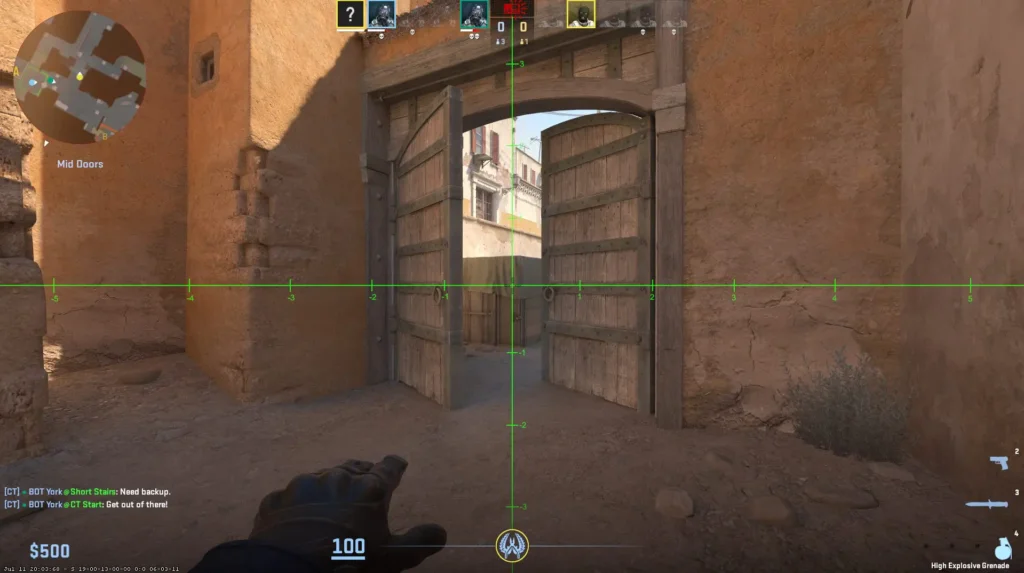
Practical application: Use the expanded crosshair for initial alignment, then toggle to your standard configuration for execution verification.
The main smokes on Mirage
Critical Mirage smokes include CT spawn to A site, mid to connector, and jungle to stairs. Each requires specific alignment techniques and understanding of bounce physics for consistent execution.
The main smokes on Inferno
Inferno’s architectural complexity demands precise banana control smokes and site-entry blocking utilities.
The main smokes on Dust2
Dust 2 fundamentals focus on cross-door smokes, mid-to-B tunnels, and long A control.
The main smokes on Ancient
Ancient’s verticality necessitates specialized smokes for temple control, mid area denial, and A site executes.
The main smokes on Nuke
Nuke’s multi-level design requires unique smokes for outside hut control, secret entry, and ramp coverage.
The main smokes on Anubis
Anubis presents distinctive smoke opportunities for mid control, connector blocks, and site execution setups.
The main smokes on Vertigo
Vertigo’s compact layout benefits from smokes that block CT spawn visibility and create safe site entry paths.
Consistent practice transforms theoretical knowledge into reliable competitive execution. The correlation between training repetition density and in-match performance consistency is well-established within competitive CS2.
Advanced tactical consideration: Learn counter-smokes that neutralize common defensive positions. This strategic layer elevates your tactical versatility beyond basic smoke executions.
Action Checklist
- Configure training environment using either built-in mode or console method with sv_cheats 1 enabled
- Implement essential console commands: mp_maxmoney 60000, mp_startmoney 60000, sv_infinite_ammo 1
- Set up key binds for noclip and smoke clearing functions
- Practice basic smokes on beginner-friendly maps (Mirage, Dust 2)
- Configure grenade crosshair and master toggle functionality
- Progress to advanced smokes and learn counter-smoke strategies
- Integrate smoke executions into competitive match scenarios
No reproduction without permission:Tsp Game Club » CS2 Practice Smoke Guide Master CS2 smoke grenades with advanced training techniques, console commands, and competitive map strategies