
TL;DR
- CS2’s Source 2 audio engine provides realistic 3D positioning but requires proper configuration
- Stereo headphones with HRTF enabled deliver superior directional accuracy
- External EQ software can boost critical footstep frequencies by 3-4 dB
- Wired studio-grade headphones outperform wireless for competitive play
- Regular audio training using Workshop maps significantly improves reaction times
In the high-stakes environment of Counter-Strike 2, auditory information processing separates elite competitors from average players. The milliseconds between detecting an enemy’s approach and their attack determine survival or elimination. Professional players consistently demonstrate how refined audio awareness transforms defensive positioning and offensive execution.
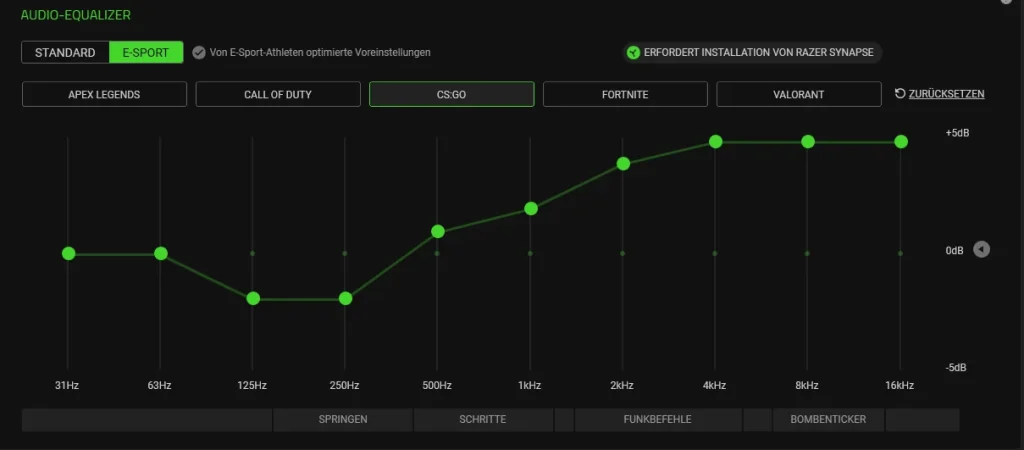
Footstep detection serves as your primary intelligence gathering mechanism, revealing enemy positioning, movement patterns, and tactical intentions. Unlike visual information which requires line of sight, audio cues penetrate walls, navigate multiple levels, and provide continuous situational awareness regardless of your current angle or position.
Let’s examine the strategic applications:
- Enemy Location: Footsteps communicate precise directional data about opponent movement paths. Are they advancing through short A corridors or stealthily navigating mid passages?
- Flanks and Pushes: Identify lurking threats early by detecting subtle audio shifts in movement cadence.
- 1vX Clutch Potential: During critical end-round scenarios, sound intelligence enables calculated pre-aiming and surprise counter-attacks based purely on auditory information processing.
- Mind Games: Advanced competitors employ audio deception tactics, simulating movement to misdirect attention before executing silent approaches.
However, these advantages depend entirely on your ability to accurately perceive those subtle movement indicators. Counter-Strike 2’s default audio configuration lacks competitive optimization, making systematic adjustment essential for performance enhancement.
If you frequently encounter unexpected eliminations from positions you believed were secure, the issue likely stems from auditory processing limitations rather than mechanical skill deficiencies. Let’s implement corrective measures.
Transitioning from CS:GO reveals significant audio system evolution powered by Valve’s Source 2 technological framework. These architectural modifications substantially influence how footstep indicators and directional audio function within the game environment.
Key technological advancements include:
- Higher-Quality Audio Files: Footstep acoustic signatures demonstrate enhanced clarity with improved spatial differentiation capabilities.
- Improved Sound Propagation: Audio now interacts dynamically with environmental surfaces, architectural angles, and physical objects. This means footsteps originating behind solid barriers or from elevated positions may present intentionally muffled or distant auditory characteristics.
- 3D Spatial Audio Support: Counter-Strike 2 implements sophisticated positional audio modeling that replicates real-world sound transmission physics.
The crucial distinction: while these innovations enhance immersive gameplay, they simultaneously introduce auditory complexity. CS:GO’s sound indicators often presented flat, predictable patterns, whereas CS2 delivers nuanced, directionally complex, and occasionally deceptive audio cues unless your configuration achieves precision calibration.
A major technological leap involves integration of HRTF (Head-Related Transfer Function) technology, which we’ll explore comprehensively. This advancement facilitates authentic simulation of human auditory directional perception, enabling precise differentiation between opponents moving on elevated surfaces versus those navigating your current level.
If you experience auditory disorientation following the transition from CS:GO to CS2, you’re navigating expected adaptation challenges. However, once you master the new audio architecture, the competitive advantage becomes substantial. Time to evolve and dominate.
Precisely configuring your Counter-Strike 2 in-game audio parameters represents the foundational step in optimizing footstep detection capabilities. While Valve provides competent baseline configurations, competitive audio performance demands specific adjustments tailored to auditory information processing requirements.
Master Volume and Game Sound
- Set Master Volume within 0.7 to 1.0 range – configurations below this threshold risk suppressing critical auditory details including distant movement indicators.
- Disable “Mute Game When in Background” – frequent alt-tab usage combined with this setting can interrupt incoming audio intelligence.
- Turn off “Play Audio When Game Window is Not Focused” when concentrating exclusively on CS2 – reduces potential system resource conflicts.
Audio Output Configuration (Stereo vs. Surround)
This configuration element proves critically important. Consistently select “Stereo Headphones” within your Audio Output Configuration unless utilizing speakers (previously established as suboptimal). Rationale explanation:
- Stereo configuration aligns with CS2’s HRTF operational mechanics.
- Surround sound implementations frequently obscure directional indicator clarity.
- Avoid all simulated surround audio formats (including “5.1” or “7.1”) through in-game settings – creates misleading spatial audio representations.
Audio Mix Preset – Which One to Choose?
Valve incorporates multiple audio mix presets engineered for various usage scenarios. Our professional recommendations:
- Utilize “Headphones” preset when available – specifically optimized for auditory clarity and directional accuracy.
- Alternative option: “Stereo Speakers” can function acceptably, though bass reduction via external EQ utilities becomes necessary.
- Never employ “TV” or “Laptop” presets – designed for casual entertainment consumption, not competitive performance optimization.
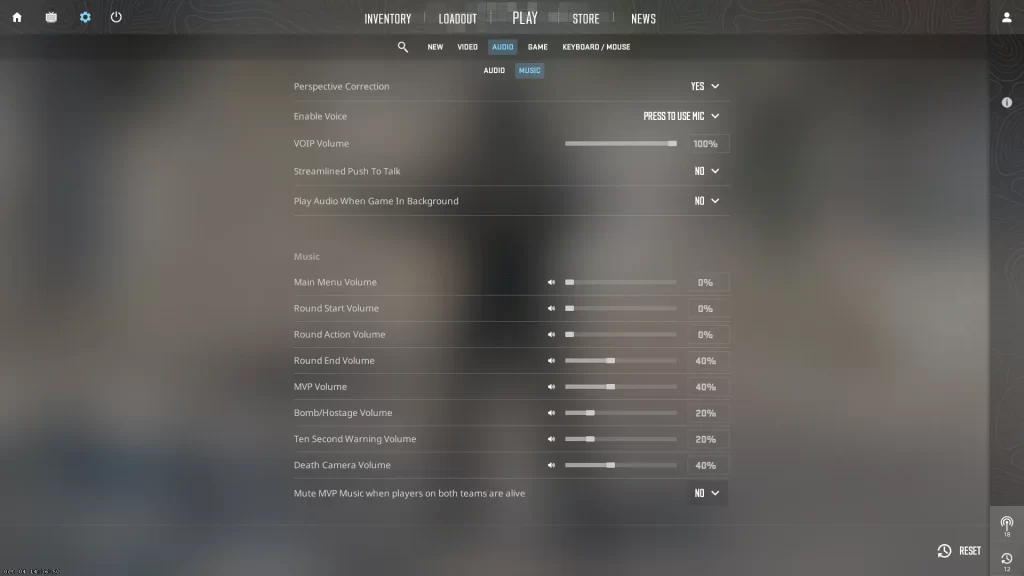
Supplementary Recommendation: Deactivate Music Volume or substantially reduce its intensity. Victory sequences, round initiation/conclusion music, and explosive device auditory indicators can all distract from subtle movement acoustic signatures. Every decibel matters.
Beyond Counter-Strike 2’s integrated audio settings, your operating system-level audio configuration can either enable or inhibit optimal footstep detection performance. Let’s implement precise system adjustment protocols.
Windows Sound Settings Optimization
Implementation procedure for Windows audio optimization:
- Right-click your sound icon > Sounds > Playback Devices
- Designate your headset > Properties
- Navigate to the Advanced tab
- Configure Default Format to 48000 Hz, 24-bit (or 44100 Hz, if 48k demonstrates instability)
- Deactivate all audio enhancement features
- Access the Spatial Sound tab and disable OFF any implementations including “Windows Sonic” or “Dolby Atmos”
These enhancement technologies frequently conflict with CS2’s audio architecture, resulting in echo artifacts, processing delays, or acoustically muddy audio reproduction.
Sound Card Enhancements or Audio Software
Employing dedicated sound processing hardware or audio interface systems (such as Schiit Fulla, Creative Sound Blaster, or high-quality onboard Realtek implementations with current driver versions) can enhance auditory clarity.
Alternative approach: implement audio processing software solutions including:
- Equalizer APO + Peace GUI
- SteelSeries GG + Sonar
- ASIO driver implementations for minimal latency (advanced user applications)
These technological tools facilitate precise equalization adjustment, noise gate control implementation, and channel balancing optimization – all contributing to enhanced footstep acoustic signature prominence.
Disabling Sound Enhancements That Harm Footstep Clarity
Most “enhancement” features – bass amplification, virtual surround simulation, loudness equalization – target cinematic or musical entertainment consumption, not competitive gaming performance.
Deactivation procedure:
- Launch Sound Settings
- Navigate to your headset > Properties
- Within Enhancements configuration panel, deselect all available options
- Apply modifications and restart CS2 application
Your auditory perception capabilities will demonstrate immediate improvement.
A high-performance audio reproduction system serves as your primary competitive advantage alongside mechanical shooting precision. Let’s examine critical selection criteria – and leading 2025 competitive gaming headset recommendations.
Wired vs. Wireless Gaming Headsets
For professional competitive gameplay:
- Wired audio systems provide absolute latency elimination, power supply consistency, and reliable quality maintenance.
- Wireless headset implementations including SteelSeries Arctis Nova Pro or Logitech G Pro X 2 demonstrate technological progression, though may experience occasional transmission delay or signal interference complications.
Unless prioritizing mobility convenience or maintaining cable-free workspace configurations, wired implementations consistently outperform wireless alternatives.
Top 5 Recommended Headsets for CS2 Players
- Audio-Technica ATH-AD700X – Open-back architectural design, exceptional soundstage reproduction, ideal for footstep acoustic signature detection.
- Sennheiser HD 560S – Balanced audio frequency profile, remarkable detail retrieval capabilities.
- HyperX Cloud II – Excellent midrange clarity reproduction, cost-effective performance solution.
- SteelSeries Arctis Nova Pro (Wired) – Premium feature integration, exceptional acoustic tuning performance.
- Beyerdynamic DT 990 Pro – Professional studio-grade audio reproduction, requires amplification support, outstanding for auditory awareness enhancement.
Critical reminder: Your audio reproduction hardware functions only as effectively as your configuration settings. Avoid simple connection and execution – implement systematic optimization.
Even with perfectly calibrated audio settings, your cognitive processing requires systematic training to accurately interpret auditory information – particularly during high-pressure competitive scenarios. Time to develop your auditory processing capabilities systematically.
CS2 Workshop Maps for Audio Practice
Custom Workshop implementations specifically engineered to evaluate directional and distance-based audio performance. Recommended training resources:
- “Footstep Trainer”
- “Sound Practice v2”
- “CS2 Audio Sound Map”
These specialized training environments simulate diverse combat scenarios, including opponents navigating elevated positions, moving behind structural barriers, or approaching from lateral directions.
Tips to Train Footstep Recognition
- Execute gameplay with visual input disabled – Concentrate exclusively on auditory indicator processing.
- Record and analyze match replays – Isolate specific instances where footstep detection failed.
- Incorporate low-volume background music during training sessions – Forces cognitive adaptation to isolate game audio from environmental distractions.
- Participate in Deathmatch modes with visual HUD elements disabled – Enhances ability to identify opponents through purely auditory means.
Increased systematic practice yields progressively refined sound-based reflexive responses. Footstep awareness development represents a trainable competitive skill – approach its cultivation with the same systematic methodology as aiming mechanics training.
In the high-stakes world of Counter-Strike 2, sound isn’t just background noise—it’s your most reliable source of tactical intelligence. While visual information requires line of sight, audio cues penetrate walls, travel around corners, and provide continuous enemy tracking without visual contact.
Footstep detection serves as your primary early warning system, providing multiple layers of actionable intelligence:
- Enemy Location: Pinpoint exact movement paths and positions through auditory triangulation.
- Flanks and Pushes: Identify lurkers and coordinated attacks by recognizing specific movement patterns and speed variations.
- 1vX Clutch Potential: Transform hopeless situations into winnable scenarios by leveraging superior audio positioning.
- Mind Games: Decipher between genuine pushes and audio bait designed to manipulate your positioning.
Advanced players develop what’s known as “audio literacy”—the ability to interpret not just presence but intention through sound alone.
Valve’s transition to Source 2 represents the most significant audio overhaul in Counter-Strike history. The new engine introduces physics-based sound propagation that realistically simulates how audio travels through different materials and environments.
The fundamental changes create both opportunity and complexity for competitive players:
- Higher-Quality Audio Files: Enhanced sample rates and bit depth deliver crisper, more distinct footstep signatures.
- Improved Sound Propagation: Audio now realistically interacts with environmental geometry, creating authentic occlusion and distance attenuation effects.
- 3D Spatial Audio Support: Advanced HRTF implementation enables precise vertical and horizontal positioning previously impossible in CS:GO.
Professional players typically require 15-20 hours of dedicated audio training to fully adapt to CS2’s nuanced sound environment.
Proper in-game audio configuration establishes the foundation for competitive auditory performance. These settings directly impact your ability to detect, process, and react to enemy movements.
Master Volume Optimization
- Set Master Volume between 0.7 to 1.0 – maintaining this range ensures distant footsteps remain audible without causing auditory fatigue during intense firefights.
- Disable “Mute Game When in Background” – essential for players who frequently alt-tab to maintain continuous audio monitoring.
- Turn off “Play Audio When Game Window is Not Focused” if you’re focusing solely on CS2 – prevents system-level audio conflicts that can mute critical cues.
Audio Output Configuration (Stereo vs. Surround)
This configuration decision significantly impacts your directional accuracy:
- Stereo matches how CS2’s HRTF works.
- Surround sound often muddies directional cues.
- Avoid any simulated surround (like “5.1” or “7.1”) through in-game settings — it’s misleading.
Audio Mix Preset – Which One to Choose?
Valve includes a few audio mix presets designed for different situations. Here’s what we recommend:
- Use “Headphones” preset if available — it’s optimized for clarity and directional sound.
- If not, “Stereo Speakers” can work, but reduce the bass via external EQ tools.
- Never use “TV” or “Laptop” presets — they’re built for casual use, not performance.
Strategic Audio Management: Completely disable Music Volume or reduce it to minimal levels. Victory sequences, round transitions, and bomb countdowns all compete for the same auditory bandwidth as movement detection.
HRTF technology represents the single most impactful audio enhancement for competitive CS2 play. It simulates how human ears naturally perceive directional audio through complex mathematical modeling of head and ear geometry.
Enabling HRTF (Head-Related Transfer Function)
When properly configured, HRTF delivers unprecedented spatial awareness capabilities:
- Distinguish between above vs. below
- Detect exact directions of footsteps, even at long range
- Improve positional awareness in complex maps
To enable HRTF:
- Go to Audio Settings
- Toggle “Enable HRTF” to ON
Adaptation Period: Approximately 3-5 hours of gameplay are typically required for your brain to fully adapt to HRTF’s unique audio signature.
Lowering Other Sound Sources (Gunfire, Music, etc.)
Gunshot audio naturally dominates the soundscape due to its high amplitude and transient characteristics.
Equalizer Tweaks and Frequency Isolation
Footsteps typically live in the 2kHz – 5kHz range, depending on surface and player movement. Boosting these frequencies with an external EQ (like Equalizer APO or SteelSeries Sonar) can help footsteps pop.
Recommended EQ settings for footsteps:
| Frequency | Adjustment |
|---|---|
| 60Hz | -3 dB |
| 120Hz | -2 dB |
| 1kHz | 0 dB |
| 3kHz | +3 dB |
| 5kHz | +4 dB |
| 8kHz | +2 dB |
Equalizer Application Strategy: Apply these settings gradually, testing each adjustment in actual gameplay to ensure optimal clarity without introducing distortion artifacts.
Windows audio configuration frequently introduces processing that conflicts with CS2’s native audio engine. These system-level optimizations are essential for maintaining audio integrity.
Windows Sound Settings Optimization
Here’s how to configure Windows audio for CS2:
- Right-click your sound icon > Sounds > Playback Devices
- Select your headset > Properties
- Go to the Advanced tab
- Set Default Format to 48000 Hz, 24-bit (or 44100 Hz, if 48k isn’t stable)
- Disable all audio enhancements
- Go to the Spatial Sound tab and turn OFF anything like “Windows Sonic” or “Dolby Atmos”
These enhancements often conflict with CS2’s engine, leading to echo, delay, or muddy audio.
Sound Card Enhancements or Audio Software
Using a dedicated sound card or audio interface (like a Schiit Fulla, Creative Sound Blaster, or even onboard Realtek with good drivers) can add clarity.
Alternatively, you can use audio software like:
- Equalizer APO + Peace GUI
- SteelSeries GG + Sonar
- ASIO drivers for low latency (advanced users)
Disabling Sound Enhancements That Harm Footstep Clarity
Most “enhancements” — bass boost, virtual surround, loudness equalization — are meant for movies or music, not competitive gaming.
To disable:
- Open Sound Settings
- Go to your headset > Properties
- Under Enhancements, uncheck everything
- Apply and restart CS2
A quality headset serves as your primary audio capture device, transforming raw game data into actionable intelligence.
Wired vs. Wireless Gaming Headsets
For competitive play:
- Wired headsets offer zero latency, no battery issues, and consistent quality.
- Wireless headsets like the SteelSeries Arctis Nova Pro or Logitech G Pro X 2 are improving, but can have occasional delay or interference.
Unless you’re a fan of mobility or have a clutter-free setup, wired > wireless every time.
Top 5 Recommended Headsets for CS2 Players
- Audio-Technica ATH-AD700X – Open-back, incredible soundstage, perfect for footsteps.
- Sennheiser HD 560S – Balanced audio profile, amazing detail retrieval.
- HyperX Cloud II – Great midrange clarity, budget-friendly.
- SteelSeries Arctis Nova Pro (Wired) – Premium features, excellent tuning.
- Beyerdynamic DT 990 Pro – Studio-grade sound, requires amp, brilliant for audio awareness.
Professional Audio Training: Develop your auditory processing skills through structured practice sessions using custom workshop maps designed specifically for audio development.
Common Configuration Error: Stacking multiple enhancement layers typically degrades audio quality through phase cancellation and processing artifacts rather than improving clarity.
In the competitive arena of Counter-Strike 2 (CS2), sound intelligence separates elite players from casual competitors. Every subtle footstep contains critical data about enemy positioning, movement patterns, and tactical intentions that can determine round outcomes.
Footstep detection serves as the foundation of advanced game sense development. These audio cues reveal enemy locations with precision, allowing you to anticipate rotations, detect flanks, and make informed tactical decisions without visual confirmation.
Strategic advantages include:
- Positional Intelligence: Determine exact enemy movement paths, whether they’re pushing short A or lurking through mid connectors.
- Flank Prevention: Identify lurkers attempting sneaky plays by detecting subtle directional shifts in their footsteps.
- Clutch Performance: Gain critical advantages in 1vX situations by hearing enemy positioning before visual contact occurs.
- Psychological Warfare: Recognize when skilled opponents use fake running sounds to bait your attention before switching to silent movement.
Professional players consistently demonstrate that footstep awareness contributes significantly to round victories. The difference between hearing footsteps and truly understanding them lies in proper audio configuration.
Valve’s transition to Source 2 technology represents a fundamental overhaul of CS2’s audio architecture compared to CS:GO. The new system incorporates sophisticated sound propagation physics that dramatically affect how you perceive enemy movement.
Key technical improvements include:
- Enhanced Audio Quality: Higher-resolution footstep samples with improved spatial differentiation capabilities.
- Advanced Sound Propagation: Audio now interacts dynamically with environmental surfaces, creating realistic muffling effects when enemies move behind walls or on different floor levels.
- 3D Spatial Audio Processing: Advanced positional modeling that mimics real-world sound travel through different materials and spaces.
The implementation of HRTF (Head-Related Transfer Function) technology represents the most significant competitive advantage. This system simulates how human ears naturally perceive directional sound, enabling precise vertical and horizontal localization.
Understanding these technical changes is crucial because CS2’s audio behaves fundamentally differently than CS:GO. The increased complexity demands precise configuration to avoid audio confusion that can cost you critical rounds.
Configuring CS2’s built-in audio settings provides the essential foundation for competitive footstep detection. These configurations work in harmony with CS2’s audio engine rather than fighting against its natural behavior.
Master Volume and Game Sound Optimization
- Set Master Volume between 0.8 to 1.0 – lower settings can obscure distant footsteps and subtle movement cues.
- Disable “Mute Game When in Background” – this prevents audio interruption during alt-tab transitions.
- Disable “Play Audio When Game Window is Not Focused” when focusing exclusively on CS2 – minimizes system resource conflicts.
Audio Output Configuration Strategy
Selecting the correct audio output configuration is critical for accurate directional audio perception.
- Stereo configuration aligns perfectly with CS2’s HRTF processing system.
- Surround sound emulation typically creates artificial spatial processing that conflicts with the game’s native audio engine.
- Avoid simulated surround sound processing (including “5.1” or “7.1” modes) – these often generate misleading directional cues.
Audio Mix Preset Selection Guide
- Use “Headphones” preset when available – specifically optimized for clarity and directional accuracy.
- If unavailable, “Stereo Speakers” can serve as an alternative, though external EQ adjustment becomes necessary to reduce excessive bass frequencies.
- Avoid “TV” or “Laptop” presets – designed for casual entertainment rather than competitive performance.
Additional optimization: Completely disable Music Volume or significantly reduce it. Round transition music and victory themes can mask critical footstep information during gameplay transitions.
Windows Sound Settings Configuration
Proper Windows audio configuration ensures your operating system doesn’t interfere with CS2’s sophisticated sound processing.
- Right-click your sound icon > Sounds > Playback Devices
- Select your headset > Properties
- Navigate to the Advanced tab
- Configure Default Format to 48000 Hz, 24-bit (or 44100 Hz if stability issues occur with 48k)
- Disable all audio enhancement features
- Access the Spatial Sound tab and deactivate all options including “Windows Sonic” or “Dolby Atmos”
External Audio Software Integration
Utilizing dedicated audio processing tools can provide that extra competitive edge that separates professional players from amateurs.
- Equalizer APO + Peace GUI
- SteelSeries GG + Sonar
- ASIO drivers for latency reduction (recommended for experienced users)
Professional Equalizer Configuration
Footstep audio primarily occupies the 2kHz – 5kHz frequency spectrum, varying based on surface materials and movement velocity.
Recommended EQ settings for footsteps:
| Frequency | Adjustment |
|---|---|
| 60Hz | -3 dB |
| 120Hz | -2 dB |
| 1kHz | 0 dB |
| 3kHz | +3 dB |
| 5kHz | +4 dB |
| 8kHz | +2 dB |
Strategic boosting approach: Focus on clarity enhancement rather than volume maximization. Excessive boosting creates audio distortion that can obscure rather than clarify footstep information.
Wired vs. Wireless Headset Analysis
For competitive performance optimization:
- Wired connectivity delivers zero audio latency, eliminates battery concerns, and ensures consistent audio quality throughout extended gaming sessions.
- Wireless technology in headsets like the SteelSeries Arctis Nova Pro or Logitech G Pro X 2 continues to improve, though occasional signal delay or interference can still occur during critical gameplay moments.
Unless mobility requirements or workspace organization priorities dictate otherwise, wired connections outperform wireless for competitive CS2 play.
Top Professional Headset Recommendations
- Audio-Technica ATH-AD700X – Open-back design, exceptional soundstage width, ideal for footstep detection accuracy.
- Sennheiser HD 560S – Balanced audio profile, superior detail retrieval capabilities.
- HyperX Cloud II – Excellent midrange clarity, budget-conscious performance.
- SteelSeries Arctis Nova Pro (Wired) – Premium feature set, excellent tuning precision.
- Beyerdynamic DT 990 Pro – Studio-grade audio quality, requires amplification, outstanding for audio awareness development.
Critical reminder: Your headset’s performance depends entirely on proper configuration. Don’t settle for plug-and-play functionality – implement strategic optimization.
Professional Audio Processing Tools
Equalizer APO represents a lightweight, cost-free audio processing solution that enables deep-level sound customization. When integrated with Peace GUI, the combination becomes exceptionally user-friendly while maintaining powerful processing capabilities.
Implementation Process:
- Acquire Equalizer APO and Peace GUI software packages
- Designate your headset as the target device for EQ application
- Apply specialized profiles like the footstep-focused equalization configuration discussed previously.
- Activate preamp control functionality, implement noise filtering protocols, and configure frequency tuning parameters.
Performance benefits:
- You achieve footstep frequency isolation
- You minimize explosion boominess effects
- You enhance directional accuracy through mid-high frequency tone amplification.
This advanced configuration approach has gained popularity among streamers, semi-professional competitors, and dedicated ranked grinders. Once experienced, the enhanced audio performance becomes indispensable.
CS2 Workshop Maps for Audio Skill Development
Specialized custom Workshop maps designed specifically for directional and distance-based audio training. Recommended options:
- “Footstep Trainer”
- “Sound Practice v2”
- “CS2 Audio Sound Map”
Advanced Footstep Recognition Training Techniques
- Practice with Eyes Closed – Develop pure audio cue recognition capabilities.
- Record and Analyze Gameplay Sessions – Identify specific moments where footstep detection failed.
- Utilize Low Volume Background Music – Force cognitive audio isolation skill development.
- Play Deathmatch with Visual HUD Disabled – Enhance enemy detection through audio perception alone.
The frequency and consistency of your audio training directly correlates with the sharpness of your sound-based reaction times. Footstep awareness represents a trainable skill – develop it with the same systematic approach as aim training routines.
Common Audio Configuration Errors
Typical mistakes include:
- Applying excessive frequency boosting across multiple ranges simultaneously.
- Layering multiple third-party enhancement solutions alongside game settings.
- Maximizing every available setting “just in case” – often creates performance degradation rather than enhancement.
Team Communication Audio Management
Frequent voice communication can completely obscure critical footstep information during gameplay.
Strategic communication protocols:
- Implement Push-to-Talk functionality – Essential for competitive play.
- Execute Efficient Communication Practices – Brief, precise callouts only.
- Mute excessively loud teammates during critical rounds – Particularly important during clutch situations.
Additionally, microphone audio leakage can create significant focus disruption. Ensure proper acoustic isolation between your microphone and headset audio output.
Advanced troubleshooting: If you experience intermittent footstep audio loss, potential causes include conflicting audio software (Razer Synapse, Nahimic, etc.), audio bugs from frequent alt-tab behavior, or corrupted game file issues.
| Feature | CS2 | Valorant | Call of Duty |
|---|---|---|---|
| Engine | Source 2 | Unreal Engine 4 | IW/Infinity Engine |
| HRTF Support | Native, strong | Built-in, less accurate | Yes, but more cinematic |
| Audio Clarity | High with tuning | Good out of the box | Loud, bass-heavy |
| Footstep Range | Realistic, distance-sensitive | Shorter audible distance | Variable, more dramatic |
| Customization | Very flexible | Limited | Medium |
CS2’s audio system emphasizes realistic sound behavior, which creates both challenges and opportunities for competitive players.
Action Checklist
- Configure in-game audio to Stereo Headphones with HRTF enabled
- Disable Windows audio enhancements and spatial sound features
- Install and configure Equalizer APO with footstep frequency profile
- Practice footstep detection using specialized Workshop maps for 20 minutes daily
- Monitor audio performance and restart game if detection issues emerge
- Configure in-game audio to stereo headphones with HRTF enabled
- Disable all Windows sound enhancements and spatial audio processing
- Apply recommended EQ settings using external audio software
- Practice with audio-specific workshop maps for 30 minutes daily
- Configure in-game audio settings: Enable HRTF, select Stereo Headphones output, set master volume 0.8-1.0
- Install and configure Equalizer APO with Peace GUI for frequency tuning
- Create autoexec.cfg file with audio optimization commands
- Download and practice with CS2 Workshop audio training maps
- Test configuration in deathmatch mode with visual HUD disabled
- Implement push-to-talk and optimize team communication protocols
No reproduction without permission:Tsp Game Club » CS2 Sound Settings: Hear Footsteps Better