
TL;DR
- Access public lobbies through Casual mode or create private sessions with custom IDs for exclusive play
- Master cabinet matchmaking with 30-second join windows and strategic forfeit timing
- Leverage Riot’s social ecosystem for seamless friend integration and team coordination
- Optimize your play sessions with advanced queue management and regional server selection
- Utilize interactive lobby features including parkour zones and direct player challenges
Riot Games has engineered 2XKO’s lobby system to deliver one of the most immersive social experiences in modern fighting games. The platform combines visual polish with functional depth, creating spaces where players can interact, practice movement mechanics, and transition seamlessly into competitive matches. However, this richness comes with complexity that often overwhelms newcomers navigating their initial sessions.
Before diving into ranked queues or casual matches to explore 2XKO’s diverse roster, you must first understand the fundamental lobby architecture. This guide breaks down both public and private access methods with professional insights to maximize your gaming efficiency.
Pro Tip: Spend your first 15 minutes in practice mode familiarizing yourself with basic controls before entering public lobbies. This prevents frustrating early experiences against seasoned opponents.
Public lobbies serve as 2XKO’s social hubs, gathering players from your geographic region for spontaneous matches, movement practice in parkour zones, and community interaction. These spaces replicate arcade environments where cabinets become portals to competitive encounters.
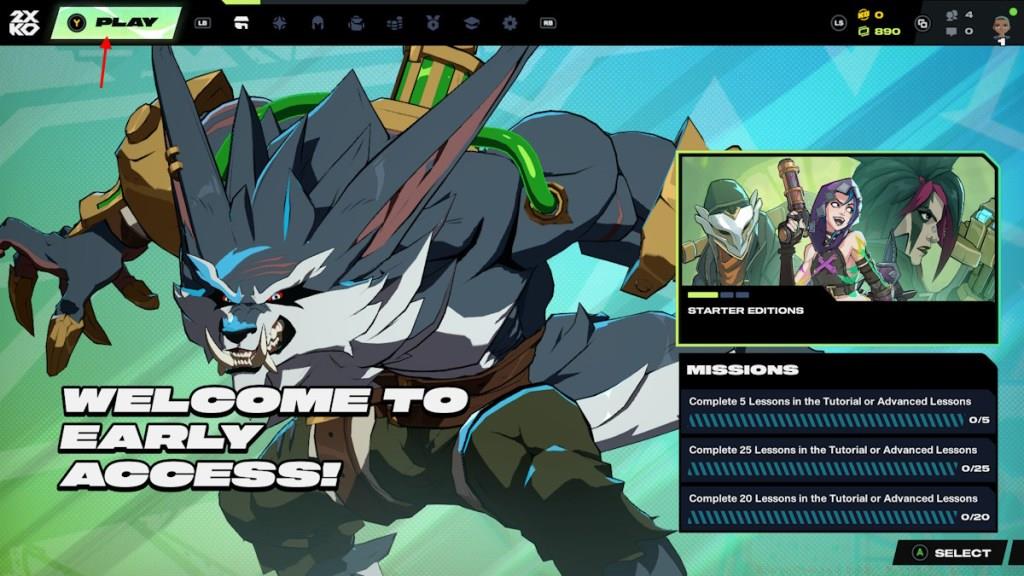
To enter a public lobby, navigate from the main menu by selecting the prominent Play button. This transitions you to the Mode Select interface where you should choose Casual mode specifically designed for low-pressure matchmaking. Confirm your selection with another Play click to instantiate connection to regional public servers.
Common Mistake: Many beginners accidentally select Training mode instead of Casual, wondering why they can’t find opponents. Always verify you’re in the correct queue category.
Regional server assignment automatically optimizes ping and match quality, but you can manually switch regions if experiencing connectivity issues. Public lobbies typically host 20-50 players simultaneously, creating vibrant communities where you can spectate matches, challenge specific players, or join random queues.
When you prefer curated gaming sessions away from public queues, 2XKO’s private lobby system provides exclusive spaces for friends, training partners, or tournament organizers. This feature enables complete control over your match environment and opponent selection.
Initiate private lobby creation from the main menu’s Play button, then immediately navigate to the Private tab instead of Casual mode. Here you’ll find a text field for entering your custom lobby identifier—choose something memorable but not easily guessed by strangers.
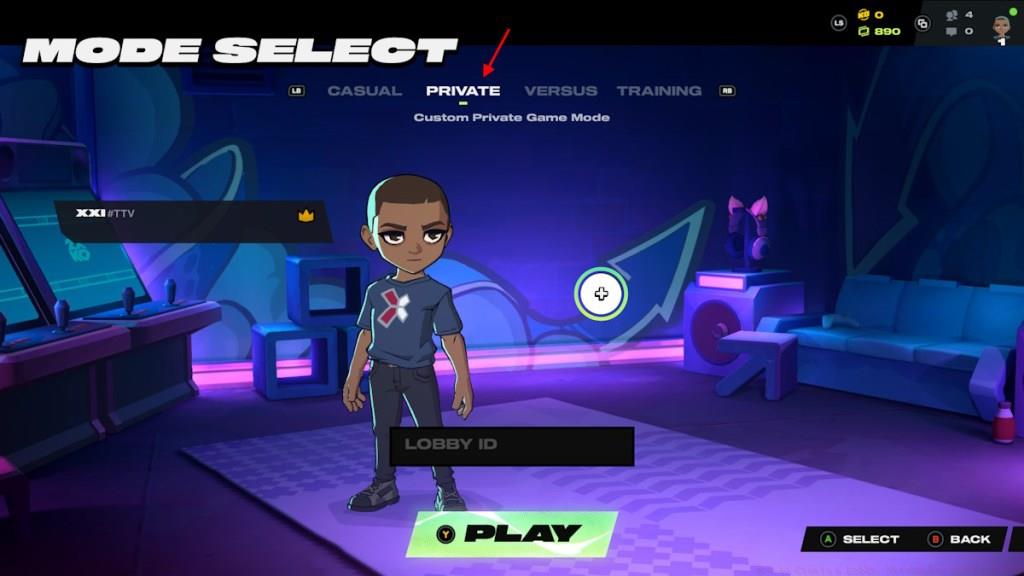
Share this exact lobby ID with intended participants, who must input it in their own Private tab before clicking Play. The system then assembles everyone into your dedicated 2XKO session where you control match parameters and participant permissions.
Security Recommendation: Avoid using personal information or common phrases as lobby IDs. Incorporate numbers and mix cases to prevent unauthorized entry attempts.
Private lobbies support up to 8 players simultaneously with options for rotating matches, team configurations, and custom rule sets. This makes them ideal for organized practice sessions or casual play with consistent groups.
2XKO’s matchmaking ecosystem offers multiple pathways to competitive play, each with distinct advantages for different player goals. Understanding these options strategically positions you for optimal match quality and skill development.
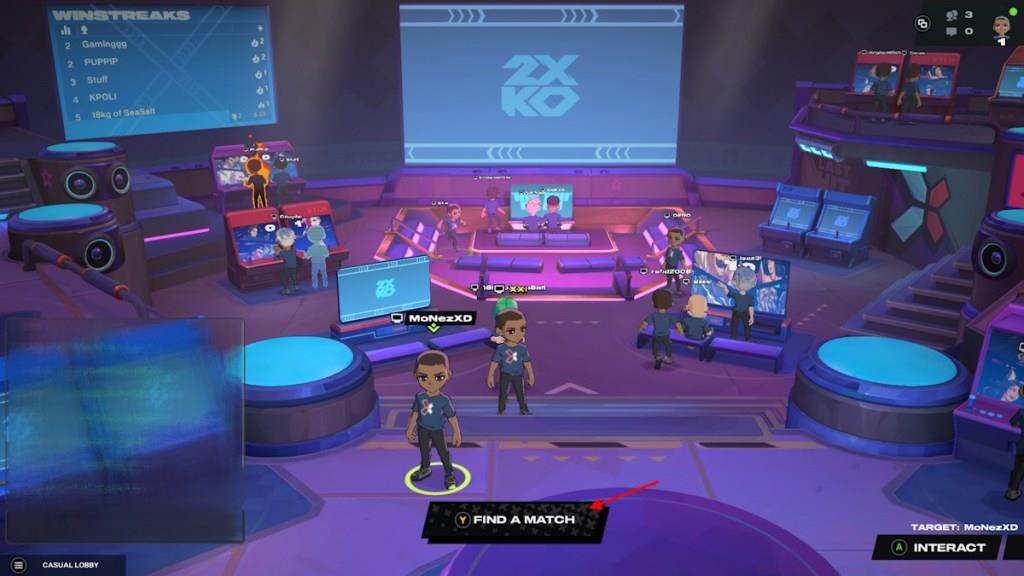
To enter random matchmaking queues, you must first be inside a public lobby. Locate and select the Find a Match button prominently displayed in the interface. Activation begins the search for opponents with similar skill ratings and connection quality.
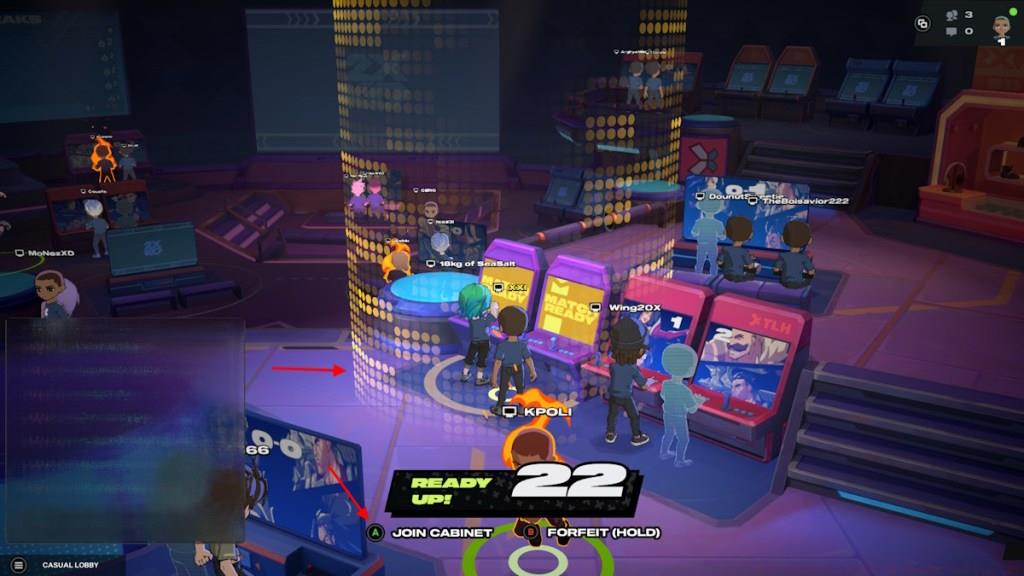
When the system locates a suitable opponent, visual and auditory cues alert you—a cabinet emerges with distinctive yellow highlighting and an unmistakable activation sound. Approach this cabinet and press Join Cabinet to initiate the match sequence.
Crucial Timing: You have exactly 30 seconds to join after match discovery. Missing this window returns you to queue and may impact your matchmaking rating.
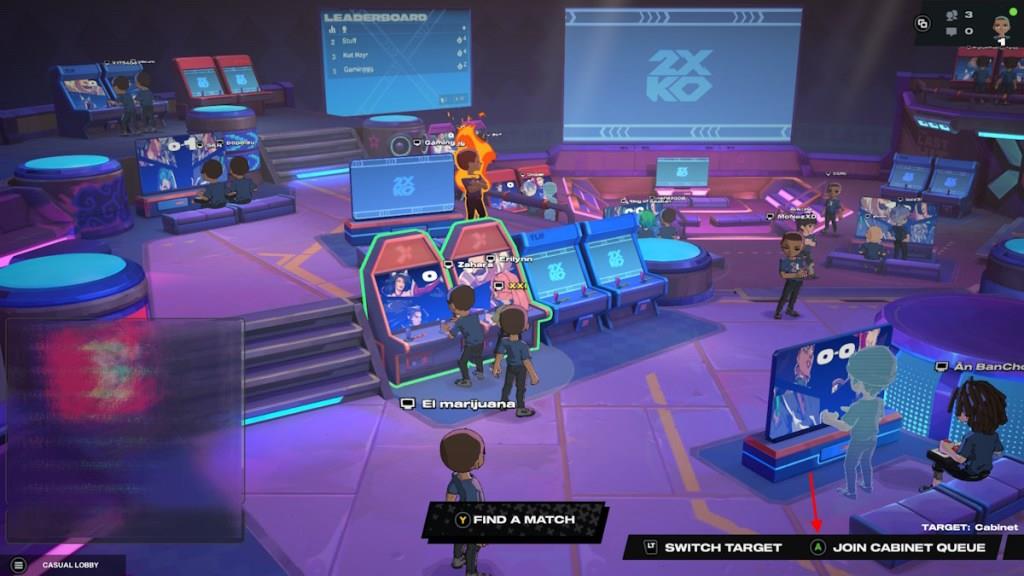
For immediate queue cancellation, hold the Forfeit button. This functionality proves valuable when you need to adjust settings, take breaks, or respond to interruptions without penalty.
Advanced players often combine matchmaking with direct challenges—using public lobbies to scout opponents then issuing personalized match invitations for more controlled competition.
2XKO integrates deeply with Riot’s social infrastructure, enabling sophisticated friend management beyond simple lobby invites. This ecosystem connects your gaming experience across Riot’s titles while maintaining 2XKO-specific functionality.
The foundation of social play begins with Riot ID management—your universal identifier across all Riot games. This consists of your chosen name and tagline separated by a hashtag (e.g., PlayerName#NA1).
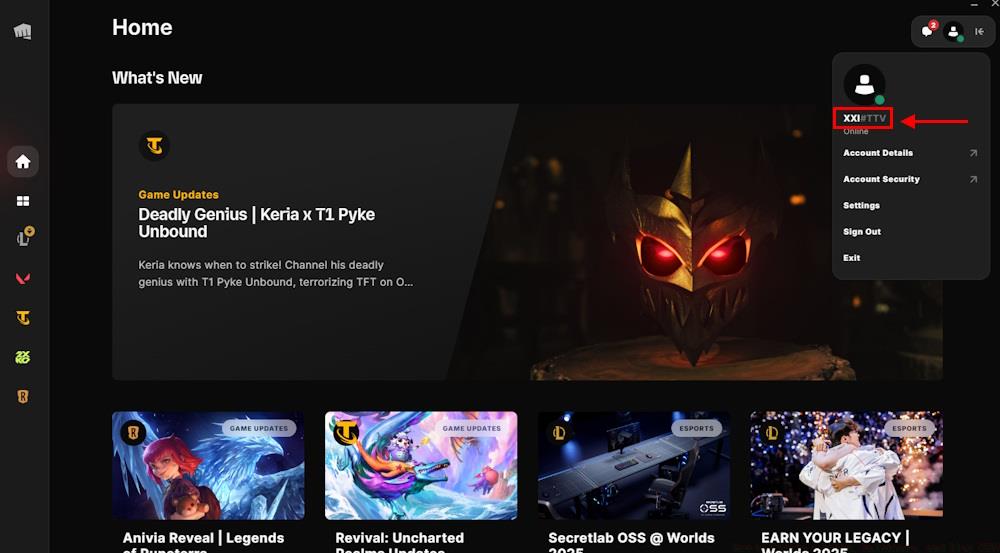
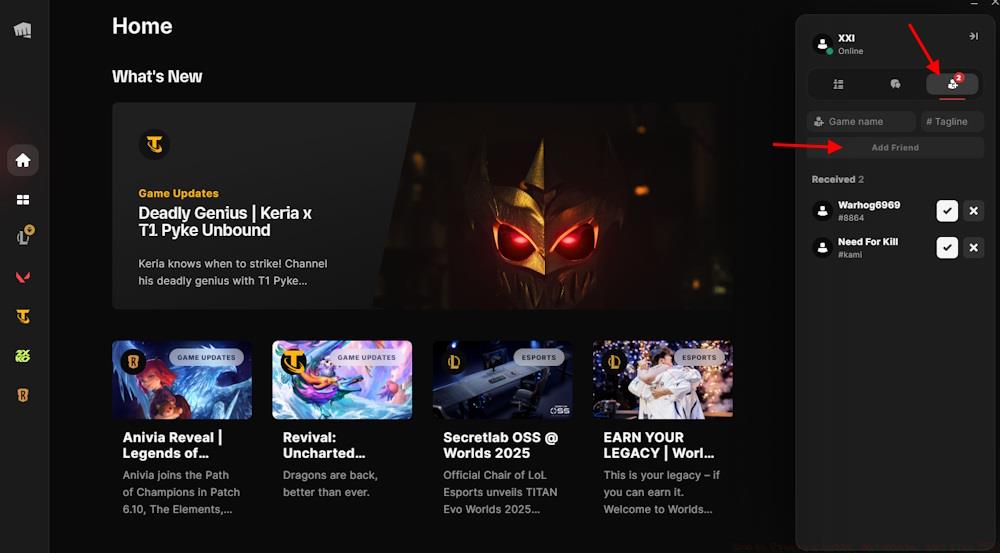
To add friends, access the social panel through the Riot Client or in-game interface. Input their complete Riot ID including both name and tag components for accurate identification.
Cross-Platform Consideration: While 2XKO currently focuses on specific platforms, your Riot ID maintains connectivity across available systems, future-proofing your social network.
Once friends are connected, you can invite them directly to private lobbies, form permanent teams for ranked play, or coordinate practice sessions with shared goals. The system tracks your collective progress and provides tools for analyzing team performance.
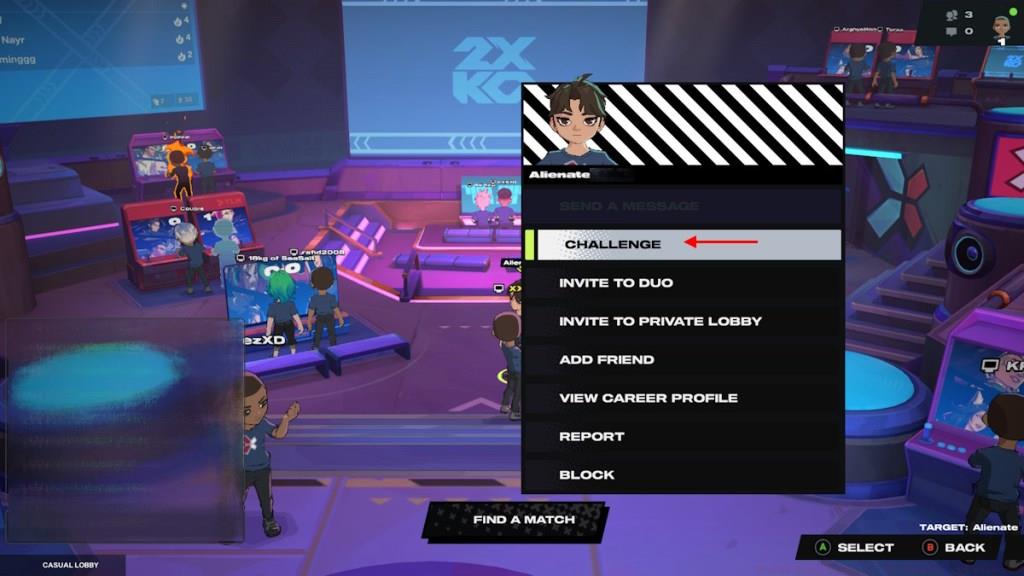
For tournament organizers or content creators, the private lobby system offers spectator slots, match recording options, and custom rule configurations unavailable in public queues.
Action Checklist
- Navigate to Play → Casual mode for public lobby access
- Create private lobby with secure custom ID and share with friends
- Practice cabinet matchmaking with 30-second response timing
- Configure Riot ID and build friend list for social features
- Master forfeit timing and queue management strategies
- Utilize spectator mode and direct challenges for advanced play
No reproduction without permission:Tsp Game Club » How to Create a Lobby, Matchmake, and Play 2XKO Master 2XKO's lobby system with expert strategies for matchmaking, private sessions, and competitive play