
TL;DR
- Link EA and Twitch accounts before October 28 to qualify for RedSec Drops
- Watch eligible Battlefield 6 streams for 1-4 hours to unlock cosmetic rewards
- All earned items transfer between Battle Royale and Multiplayer modes
- Complete all four rewards requires 10 total hours of watchtime
- Event runs from October 28 to November 4 with specific time windows
Electronic Arts is celebrating the debut of Battlefield 6’s dedicated battle royale experience, Battlefield RedSec, with an exclusive Twitch Drops campaign. This limited-time event marks the franchise’s return to BR gameplay since 2019’s Firestorm mode, featuring enhanced mechanics and dedicated support. The free-to-play RedSec title represents a strategic expansion of the Battlefield universe into competitive last-player-standing territory.
During the launch week celebration, viewers can acquire cosmetic enhancements that function across both Battlefield RedSec and traditional Battlefield 6 Multiplayer modes. This cross-mode functionality ensures your earned items maintain value regardless of your preferred gameplay style.
- Battlefield 6 RedSec Twitch Drop rewards are exclusively available during the game’s initial launch period
- Participants must complete account verification between Twitch and EA platforms prior to viewing
- Four distinct cosmetic packages are obtainable through cumulative watchtime milestones
The integration between streaming platforms and in-game rewards creates an engaging community experience while providing tangible benefits for dedicated fans. Understanding the specific requirements and timing is crucial for maximizing your reward acquisition during this limited availability window.
Successfully claiming Battlefield RedSec Twitch Drops begins with establishing a secure connection between your gaming and streaming accounts. This foundational step ensures proper tracking of your watchtime progress and seamless delivery of earned items to your inventory.
The initial requirement involves linking your EA and Twitch accounts through the official verification portal. Once authenticated, you’ll need to identify streams with Drops enabled to accumulate progress toward reward thresholds. Follow this systematic approach to configure your accounts correctly:
- Navigate to the official Twitch Linking portal on EA’s authentication website
- Sign into your Twitch profile using your existing credentials and select ‘Authorize’
- Authenticate with your EA account details to finalize the cross-platform connection
- Locate Battlefield RedSec broadcasts displaying the ‘Drops Enabled’ indicator
- Maintain stream viewing for the designated duration requirements
- After fulfilling watchtime obligations, collect rewards from your Drops inventory
- Launch Battlefield RedSec to activate items, making them accessible in both game modes
Account linking typically requires 5-10 minutes to complete, but we recommend performing this setup at least 24 hours before the event begins to avoid potential authentication delays during peak periods.
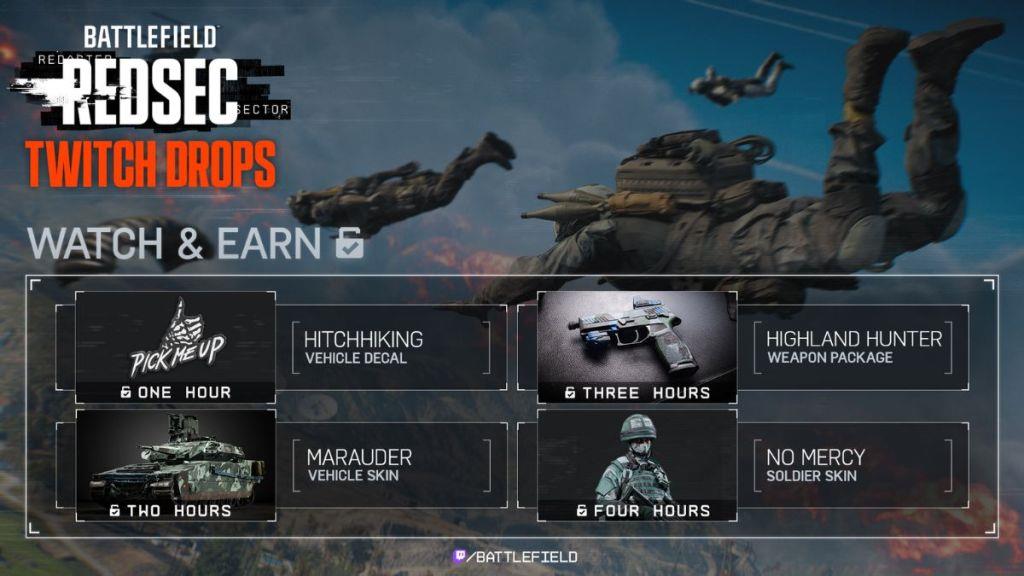
The Battlefield 6 RedSec Twitch Drops campaign activates beginning October 28 at 8 AM Pacific Time, concluding November 4 at 11:59 PM PT. Four exclusive cosmetic packages are available through progressive viewing commitments, each requiring specific cumulative watchtime thresholds.
- ‘Hitchhiking’ Vehicle Decal: Unlocked after 60 minutes of viewing eligible content
- ‘Marauder’ Vehicle Skin: Requires 120 total minutes of watchtime accumulation
- ‘Highland Hunter’ Weapon Package: Granted upon reaching 180 minutes of qualified streaming
- ‘No Mercy’ Soldier Skin: Awarded after completing 240 minutes of viewing
Strategic viewing approaches can optimize your reward acquisition efficiency. The ‘Highland Hunter’ Weapon Package integrates seamlessly with various BF6 weapon loadouts, providing visual customization for your preferred armaments. Similarly, the ‘No Mercy’ Soldier Skin complements different BF6 class specializations, enhancing your operator’s appearance across gameplay sessions.
Pro tip: Watchtime accumulates progressively across multiple sessions, allowing you to spread your viewing over several days rather than requiring continuous streaming marathons.
Maximizing your Battlefield RedSec Twitch Drop rewards requires strategic planning beyond basic account setup. Many participants encounter preventable obstacles that delay or prevent reward acquisition, making awareness of these pitfalls valuable for ensuring successful participation.
Stream Selection Strategy: Prioritize channels with stable connections and consistent Battlefield RedSec gameplay. Larger official streams often provide reliable Drops tracking, while smaller creators may offer more interactive viewing experiences.
- Verify stream title includes “Drops Enabled” or check for the official Twitch tag
- Monitor your Drops inventory progress through Twitch’s dedicated menu section
- Ensure audio remains active, as muted streams may not register viewing progress
- Avoid frequent tab switching, as some browsers may pause progress tracking
Common Authentication Errors: If rewards don’t appear in-game after meeting requirements, first confirm your EA account linkage status. Common resolution steps include re-authenticating accounts, clearing browser cache, or allowing 24-48 hours for system propagation.
Remember that all cosmetic items earned through this program maintain permanent availability once unlocked, providing lasting value beyond the limited-time acquisition window. The complete reward set requires 10 cumulative hours of viewing, making early participation advisable to avoid last-minute rush periods.
Action Checklist
- Link EA and Twitch accounts through official portal
- Verify account connection status before October 28
- Identify eligible streams with Drops Enabled tags
- Accumulate watchtime progressively across multiple sessions
- Claim items from Twitch inventory and activate in-game
No reproduction without permission:Tsp Game Club » How to Get Battlefield 6 RedSec Twitch Drops Complete guide to earning Battlefield 6 RedSec Twitch Drops with account linking and watchtime strategies