
TL;DR
- Blade’s Will of Galacta skin available free via Twitch Drops from September 11 to October 10, 2025
- Requires 4 hours of viewing eligible streams after linking Marvel Rivals and Twitch accounts
- Use background viewing and verified streamer lists to maximize efficiency
- Check in-game inbox for rewards and verify account connections beforehand
- Multiple timezone conversions provided for global accessibility
Marvel Rivals Season 4 introduces an exciting opportunity for players to acquire premium cosmetics without spending any currency. The centerpiece of this initiative is Blade’s distinctive Will of Galacta outfit, obtainable exclusively through the Twitch Drops program. This seasonal event follows a structured timeline with specific requirements that, when understood properly, ensure successful acquisition of all available rewards.
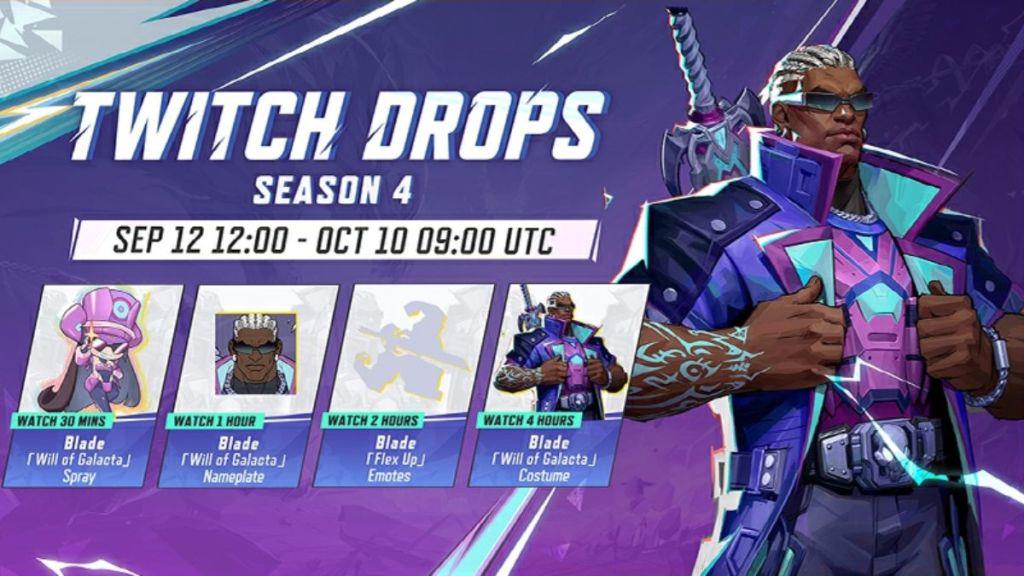
The Twitch Drops campaign for Season 4 operates within a precisely defined window. Commencing on September 11, 2025, at 5:00 AM PT (8:00 AM ET/2:00 PM UTC), the event continues through October 10, 2025, at 2:00 AM PT (5:00 AM ET/9:00 AM UTC). This nearly month-long duration provides ample opportunity for participation, though strategic planning enhances the experience significantly.
Season 4’s reward structure focuses primarily on the Daywalker, Blade, featuring his visually striking Will of Galacta cosmetic set. This ensemble represents one of the more distinctive visual upgrades available for the lethal Duelist character, making it particularly desirable for mains and collectors alike. Understanding the complete game mechanics can help appreciate how such cosmetics integrate with gameplay.
Successfully obtaining the Will of Galacta skin requires methodical progression through several clearly defined stages. The initial and most critical step involves establishing the necessary account connections between your gaming profile and streaming platform.
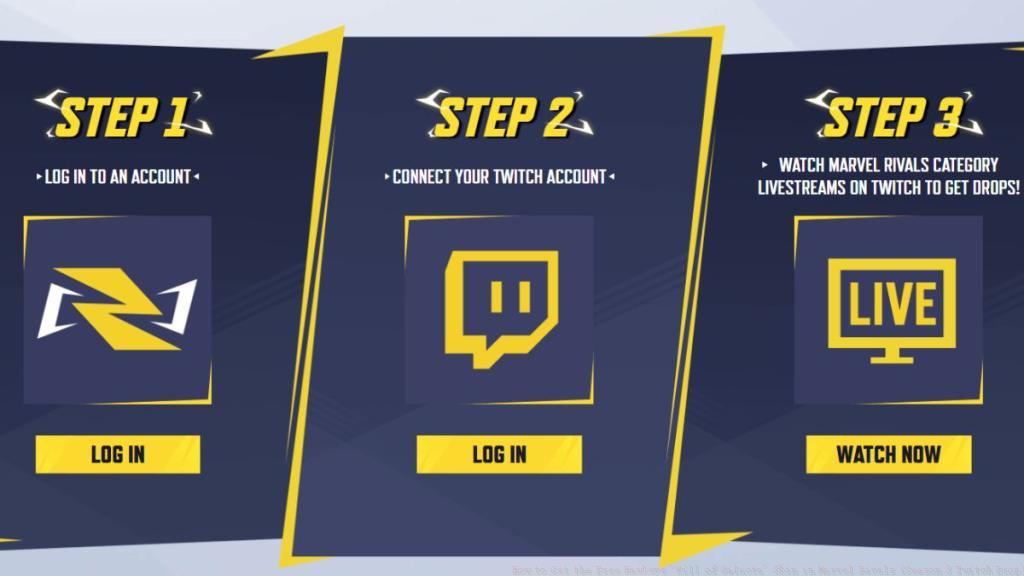
Begin by navigating to the official Marvel Rivals Twitch Drops portal through your preferred browser. Authenticate using your game credentials, then locate the account linkage interface. Select the option to connect your Twitch account, which will redirect you to Twitch’s authorization platform. Grant the necessary permissions to establish the integration between services.
Once accounts are successfully synchronized, identify Twitch channels broadcasting Marvel Rivals content with Drops enabled. The viewing requirement mandates four cumulative hours of watch time across eligible streams. Progress tracking occurs in real-time, with notification prompts appearing when thresholds are achieved.
After fulfilling the viewing obligation, the redemption phase commences. Access your in-game inbox within Marvel Rivals to find the Will of Galacta skin awaiting claim. This process mirrors similar reward systems found in other tactical shooters, though each game implements unique unlock methodologies for their cosmetic items.
Optimizing your Twitch Drops acquisition involves several advanced techniques that streamline the process while minimizing active engagement requirements. For maximum efficiency, identify verified streamers who maintain consistent Marvel Rivals broadcasts throughout the event period.
Background viewing represents one of the most effective approaches for busy players. By maintaining an active stream in a background tab with audio muted (but not volume set to zero), you can accumulate watch time while attending to other responsibilities. However, ensure periodic checks to confirm stream stability and Drop eligibility status.
Common complications include account synchronization failures and progress tracking discrepancies. Pre-emptively verify connection status by checking both your Marvel Rivals account page and Twitch connections settings. If viewing time fails to register, disconnect and reconnect accounts, then resume watching from a fresh session.
Always confirm successful skin acquisition by inspecting your in-game inventory immediately after claiming. If the Will of Galacta cosmetic fails to appear, revisit the Drops inventory on Twitch to ensure all claim steps were completed. Understanding these character-specific systems helps contextualize how cosmetic unlocks function across different hero shooters.
Action Checklist
- Verify Marvel Rivals and Twitch account connection status
- Identify eligible Twitch streams with Drops enabled
- Accumulate 4 hours watch time across sessions
- Claim reward from Twitch Drops inventory when eligible
- Check in-game inbox and confirm skin appearance in inventory
No reproduction without permission:Tsp Game Club » How to Get Free Blade Will of Galacta Skin in Marvel Rivals (Season 4 Twitch Drop) Complete guide to claiming Blade's Will of Galacta skin through Season 4 Twitch Drops with optimization strategies