
A comprehensive guide to unlocking the Crimson Wing outfit in Stellar Blade with update 1.011, including patch details, acquisition steps, and content analysis.
Introduction to the Crimson Wing Outfit
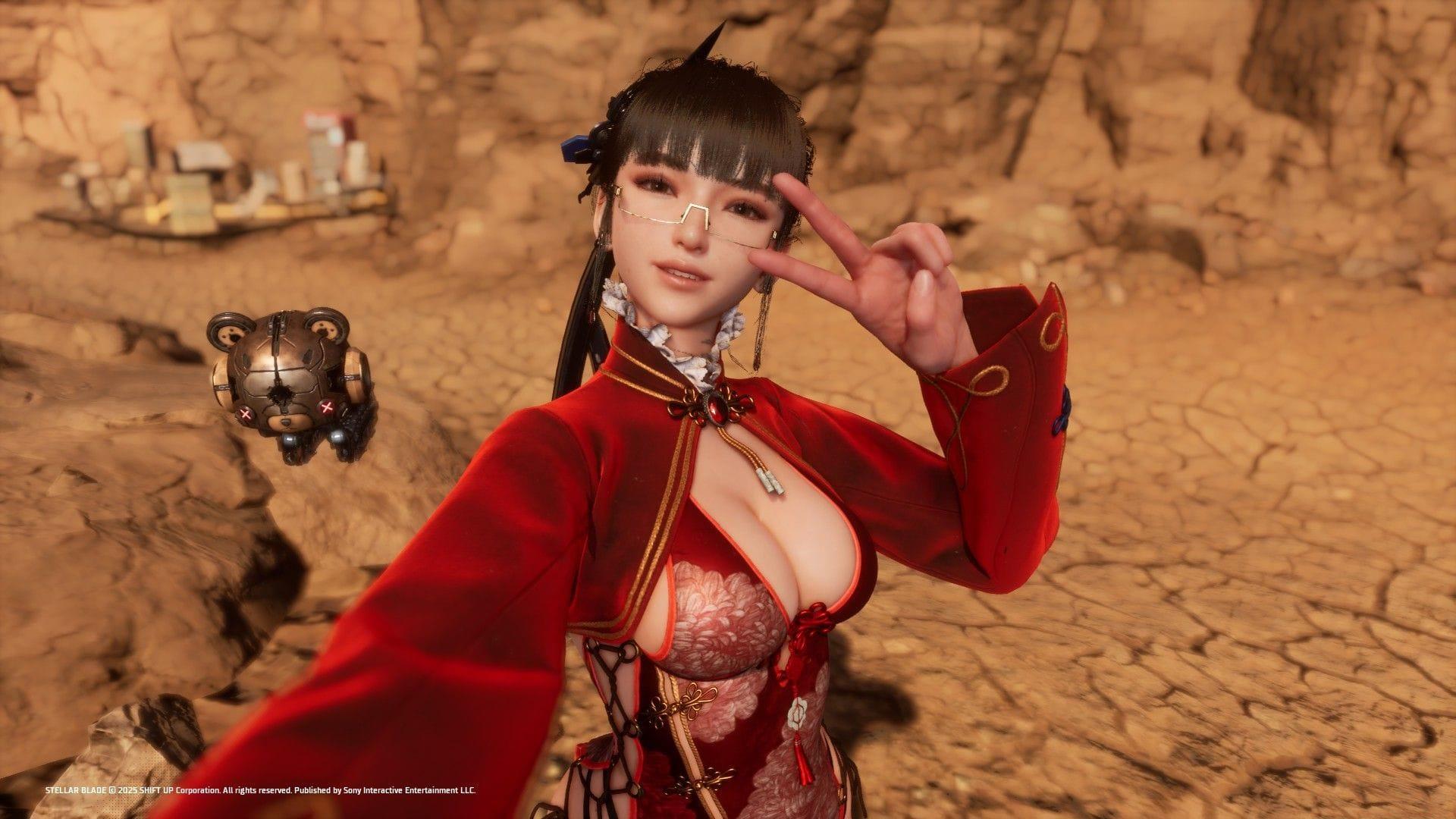
The Crimson Wing represents a significant addition to Stellar Blade‘s cosmetic roster, arriving as part of the substantial June 2025 content drop. This outfit is classified as a three-star ranked exterior within Eve’s Nano Suits collection, denoting its high-quality visual design and polish. Unlike many cosmetic unlocks that are tied to specific story milestones, hidden exploration, or challenging boss defeats, Crimson Wing adopts a player-friendly acquisition method: a straightforward game update.
From a design perspective, it stands out for its clean, refined aesthetics. The suit features a cohesive color scheme and intricate detailing that feels both futuristic and functional, avoiding the overly busy elements found in some other nano suits. For completionists aiming to secure every available outfit, this one is particularly noteworthy because missing it requires no extra in-game effort beyond maintaining your game version.
Step-by-Step Acquisition Guide
Obtaining the Crimson Wing is refreshingly simple, but proper preparation is key to a smooth process. Follow these steps precisely to add it to your wardrobe.
Step 1: Pre-Update System Check
Before initiating the download, verify two critical system conditions. First, ensure your PlayStation 5 or PC has a stable connection to the internet. Second, and most importantly, confirm you have at least 40 GB of free storage space. The update file itself is approximately 37.4GB, but additional overhead is required for installation. Attempting the update with insufficient space is a common error that will cause the process to fail.
Step 2: Download and Install Update 1.011
Navigate to your game library, select Stellar Blade, and check for updates. If automatic updates are disabled, manually trigger the search. Download and install version 1.011. The time this takes will depend entirely on your internet download speed.
Step 3: Locate the Outfit In-Game
Once the update is installed, launch the game. Access the wardrobe or outfit customization menu, typically found at a safe house or via the inventory screen. Browse to Eve’s Nano Suits section. The Crimson Wing should now be present in the list, available for immediate equipping without any cost or additional unlock conditions.
Deep Dive into Update 1.011 Content
The Crimson Wing is just the tip of the iceberg for the June 11, 2025, update. Version 1.011 is a major content expansion packed with new features that enhance replayability, customization, and accessibility.
- 25 New Outfits: Crimson Wing is included in a batch of 25 fresh nano suits. This suggests a wide variety of new styles for players to collect and mix-and-match.
- New Boss Fight – Mann: A significant gameplay addition. Mann, Orcal’s personal bodyguard, becomes available only after completing your first playthrough. This provides a new endgame challenge for veteran players.
- 9 New Accessories: These items allow for finer-grained character customization, letting you personalize Eve’s appearance beyond the core outfits.
- Enhanced Photo Mode: A substantial upgrade for screenshot enthusiasts. It adds 3 new facial expressions, 4 poses, 6 adjustable lights for perfect scene illumination, and support for saving custom presets.
- 3 New BGM Tracks: The soundtrack expands with “Lullaby of Secret,” “Just Fine,” and “Blur,” adding new atmospheric music to the game’s world.
- Expanded Language Support: Now includes synchronized Chinese lip-sync and makes the Japanese voiceover available across all global regions, improving the experience for international players.
- Gameplay Settings: Adds practical quality-of-life options like DualSense controller button mapping for personalized controls and an optional toggle to prevent fall damage in certain scenarios.
Pro Tips & Common Mistakes to Avoid
To ensure a seamless experience acquiring the Crimson Wing and enjoying the new update, keep these advanced tips and pitfalls in mind.
Optimization Tip: Manage Your Storage Proactively
37.4GB is a large patch. If you’re close to your storage limit, consider uninstalling other games or media you’re not actively using *before* starting the download. This prevents the console from pausing the update due to space constraints mid-way, which can sometimes corrupt the download data.
Common Mistake: Not Verifying the Update Version
After installation, don’t assume it worked. From the game’s main menu or system dashboard, check that the version number now reads 1.011. If it doesn’t, the outfit won’t appear. Re-run the update check if the version is incorrect.
Collection Strategy: The Update is Mandatory for All New Content
Remember, the Crimson Wing and the 24 other outfits are not separate downloads. They are all contained within update 1.011. You cannot pick and choose; installing the patch grants access to the entire suite of new cosmetics, the boss fight, and all other features simultaneously. Plan your playtime accordingly if you intend to engage with all the new content.
For Completionists: Since the outfit requires no in-game effort, it’s considered ‘free’ for your collection log. Prioritize downloading this update before any potential future patches to ensure your catalog remains complete without any missed opportunities.
No reproduction without permission:Tsp Game Club » Stellar Blade: How to get Crimson Wing A comprehensive guide to unlocking the Crimson Wing outfit in Stellar Blade with update 1.011, including patch details, acquisition steps, and content analysis.