
TL;DR
- War Tapes delivers cinematic immersion but may reduce competitive audio precision
- Default Mix offers the most balanced approach for multiplayer gameplay versatility
- High Dynamics provides superior enemy detection with quality headphones
- Night Mode is essential for low-volume play without sacrificing tactical awareness
- Audio mix choice directly impacts your ability to locate enemies and react faster
Mastering audio configuration in Battlefield 6 provides a decisive tactical advantage that separates casual players from competitive contenders. The game’s sophisticated sound engine processes directional cues with remarkable precision, allowing skilled operators to identify enemy positions through auditory information alone. War Tapes, alongside the complete spectrum of Audio Mix options, fundamentally transforms how combat sounds are rendered, affecting everything from distant footsteps to explosive detonations. Selecting the optimal setting dramatically enhances your situational awareness and targeting accuracy throughout intense BF6 engagements.
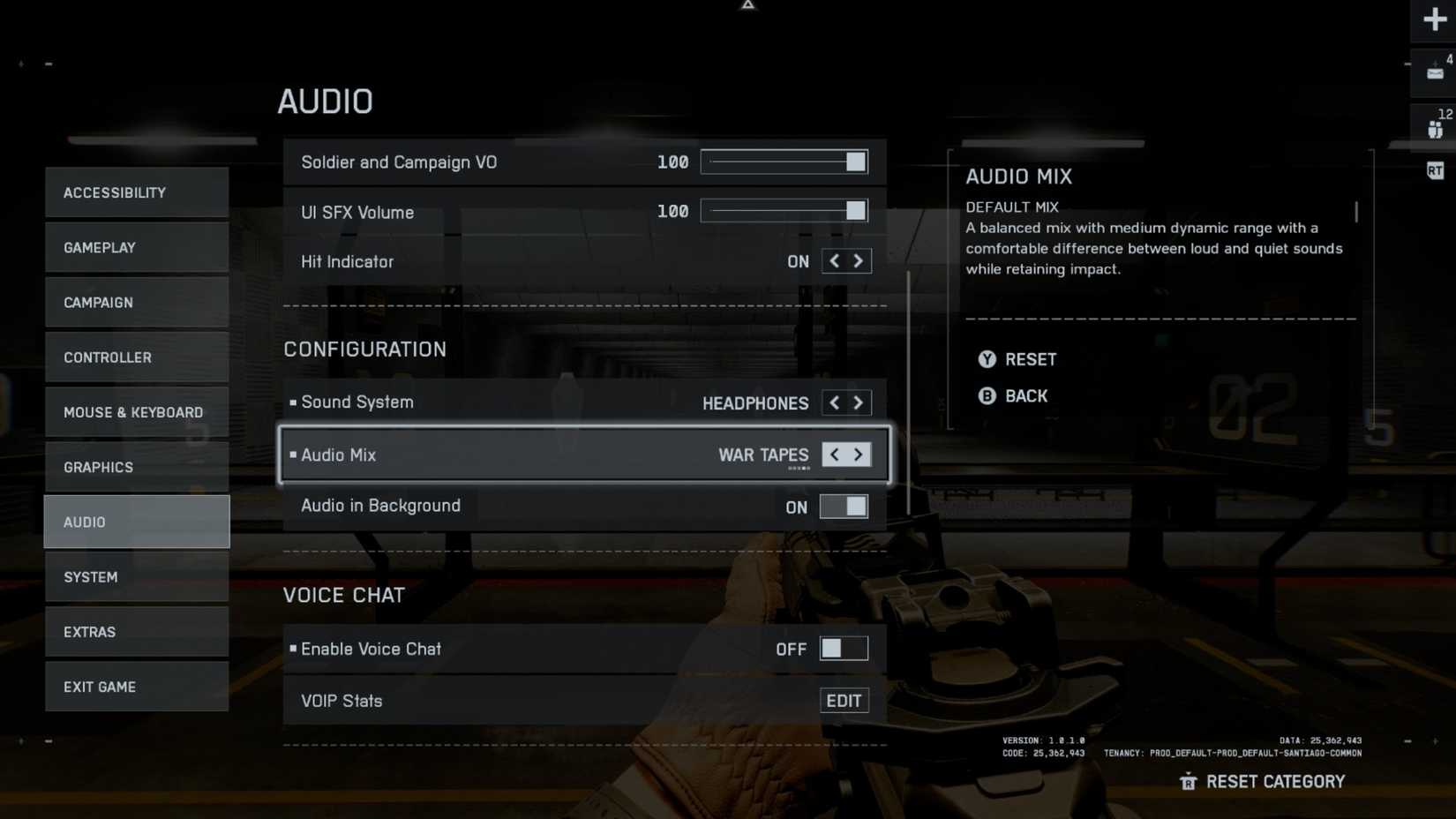
Battlefield 6 features five distinct audio mix presets, each engineered to emphasize different sonic characteristics for specific gameplay scenarios. These configurations alter dynamic range—the contrast between quiet ambient sounds and loud explosive events—directly influencing your ability to detect subtle enemy movements amid chaotic firefights. Understanding these audio profiles enables you to customize your auditory experience based on your playstyle, audio equipment, and current game mode. Unlike visual settings that primarily affect aesthetics, audio mix choices deliver tangible performance benefits that can significantly improve your kill-death ratio.
Strategic audio configuration represents one of the most overlooked yet impactful optimization opportunities for BF6 players. Many competitors focus solely on visual settings while neglecting the critical intelligence provided by proper sound staging. This comprehensive breakdown examines each audio mix’s technical properties and practical applications, ensuring you maximize your auditory advantage across all Conquest, Breakthrough, and other multiplayer scenarios.
|
Battlefield 6 Audio Mix |
Audio Mix Description |
Why Should You Use It |
|---|---|---|
|
Default Mix |
Engineered for balanced audio reproduction with moderate dynamic contrast, this preset maintains clear differentiation between subtle environmental cues and explosive combat sounds while preserving auditory impact. |
Perfect for Conquest and Breakthrough game modes where players frequently transition between infantry combat and vehicle warfare. This versatile configuration performs exceptionally well across both headphone and speaker setups, making it the recommended starting point for most BF6 operators. |
|
High Dynamics |
Creates the most pronounced separation between quiet and loud audio elements, specifically designed for high-volume playback on premium audio systems. |
When equipped with quality headphones, this audio profile delivers superior enemy detection across virtually all gameplay modes. It enhances contrast between subtle sounds like enemy footsteps and weapon reloading against background explosions. Primarily optimized for headphone use but can function with certain high-end speaker configurations. |
|
Night Mode |
Utilizes compressed dynamic ranges with attenuated bass frequencies, engineered specifically for low-volume listening situations. |
Essential for players operating Battlefield 6 on speaker systems who need to reduce loud sound peaks while maintaining critical tactical audio information like enemy movement and gunfire positioning. |
|
War Tapes |
Delivers an uncompromising, aggressive audio character that combines restricted dynamic ranges with intentional harmonic distortion for cinematic impact. |
Produces a powerful, bass-enhanced soundscape that maximizes auditory intensity. Particularly effective for BF6 single-player campaign immersion. Excellent compatibility with headphones featuring advanced 3D spatial audio processing. |
|
War Tapes V.A.L. |
War Tapes V.A.L. (Very Aggressive Listening) intensifies the core War Tapes foundation by amplifying overall volume levels and increasing sonic aggression across all frequency bands. |
An enhanced iteration of the standard War Tapes that preserves the distinctive audio signature while significantly boosting output volume. Optimized primarily for surround sound system configurations. |
Beyond the basic descriptions, each audio mix interacts uniquely with Battlefield 6‘s advanced sound propagation system. The Default Mix provides the most reliable balance for competitive multiplayer, as it doesn’t artificially enhance or suppress any specific frequency ranges that could misrepresent enemy distance or direction. Many professional BF6 competitors prefer this setting specifically because it delivers the most accurate spatial representation of in-game events.
High Dynamics demands superior audio equipment to reveal its full potential. On budget headphones or speakers, the enhanced dynamic range can actually obscure subtle audio cues rather than highlight them. This setting works best with open-back headphones that provide natural sound staging and precise imaging capabilities.
Night Mode serves a dual purpose beyond quiet gaming sessions. Competitive players often utilize this setting during extended gameplay to reduce auditory fatigue while maintaining critical tactical awareness. The compressed dynamic range ensures that footsteps and reload sounds remain audible even when reducing overall volume to accommodate environmental considerations.
War Tapes and its V.A.L. variant prioritize cinematic immersion over competitive precision. The intentional distortion and limited dynamic range can mask subtle directional cues that indicate enemy positioning, making them better suited for immersive single-player experiences rather than tactical multiplayer engagements.
Elite Battlefield 6 competitors typically avoid War Tapes configurations during serious multiplayer sessions precisely because the audio processing obscures critical tactical information. The artificial bass enhancement and distortion, while cinematically impressive, can blur directional cues that indicate whether enemies approach from your left or right flank. Instead, most professional players configure High Dynamics with quality open-back headphones, as this combination provides the clearest auditory picture of battlefield developments.
Common Audio Configuration Errors: Many players mistakenly believe that louder, more aggressive audio profiles like War Tapes V.A.L. will improve their enemy detection. In reality, these settings often overwhelm subtle audio cues with excessive bass and compression, actually reducing your ability to pinpoint enemy locations accurately. Another frequent mistake involves using Night Mode with high-quality headphones—this unnecessarily compresses the dynamic range that premium headphones are capable of reproducing.
For optimal performance across different Assignments and game modes, consider creating custom audio profiles. If you frequently switch between Conquest multiplayer and single-player campaign, maintain separate settings for each experience. The cinematic quality of War Tapes enhances narrative immersion, while the precision of High Dynamics or Default Mix delivers competitive advantages.
Your audio equipment should directly influence your mix selection. Budget headphones typically benefit from Default Mix, while premium headphones unlock the potential of High Dynamics. Speaker users should typically choose between Default Mix and Night Mode based on their volume constraints and environmental considerations.
Remember that audio configuration represents just one component of your overall BF6 performance optimization. For comprehensive gameplay enhancement, consult our Complete Guide to master all aspects of your combat effectiveness. Additionally, optimizing your Weapons Unlock strategies and perfecting your Class Guide selections will further improve your battlefield dominance.
Action Checklist
- Start with Default Mix for balanced multiplayer performance across all game modes
- Test High Dynamics with quality headphones for superior enemy detection
- Configure Night Mode when gaming at low volumes or in shared spaces
- Reserve War Tapes for single-player campaign immersion sessions
- Avoid using aggressive audio mixes like War Tapes V.A.L. for competitive multiplayer
No reproduction without permission:Tsp Game Club » Battlefield 6: War Tapes Audo Mix, Explained (Which One to Pick) Master Battlefield 6 audio settings to gain competitive edge with optimal War Tapes and mix configurations