
TL;DR
- Medium settings with DLSS provide optimal balance for high-end PCs (70+ FPS)
- Budget PCs achieve 60+ FPS using Very Low settings with FSR upscaling
- Frame generation significantly boosts performance on compatible hardware
- Steam Deck requires specific optimization for handheld gaming experience
- Proper upscaling selection is crucial for maintaining visual quality while maximizing FPS
Jagex’s surprise release of RuneScape Dragonwilds brings the cooperative survival crafting experience to PC platforms, featuring the mysterious ruins of Ashenfall. Many players encountered unexpected performance hurdles with this shadow drop launch, creating confusion around optimal configuration. Our comprehensive testing across multiple hardware configurations reveals the definitive settings for both desktop and handheld gaming.
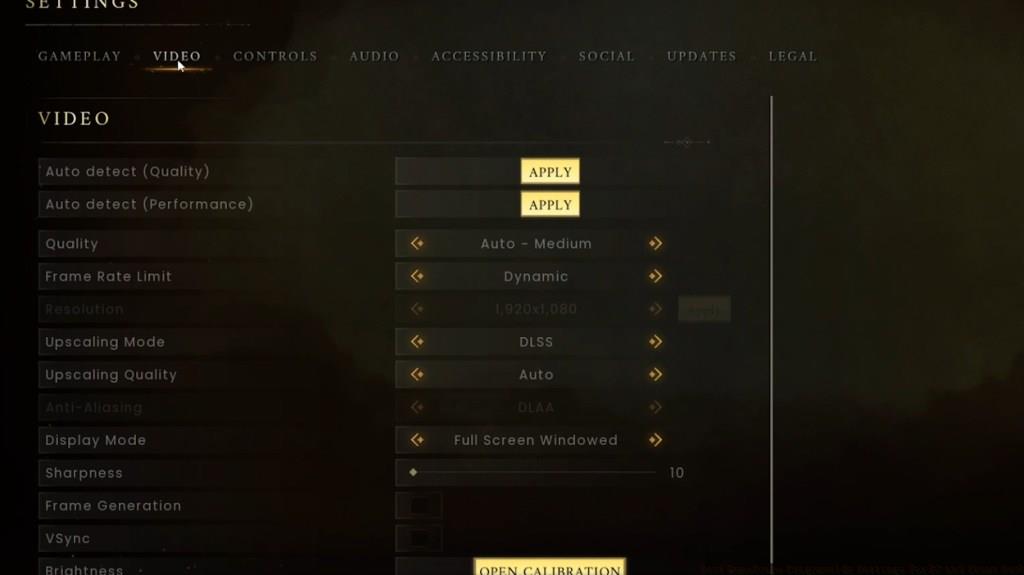
Performance optimization requires understanding how different settings impact both frame rates and visual fidelity. Many players mistakenly prioritize maximum graphics quality, unaware that strategic compromises can dramatically improve smoothness without sacrificing essential visual elements.
Before diving into detailed configuration analysis, here’s the essential settings checklist for optimal PC performance:
Achieving maximum FPS requires avoiding High or Epic quality presets in RuneScape Dragonwilds. Our testing utilized two distinct hardware configurations to establish performance benchmarks. The high-end setup featured a Ryzen 9 7900X processor paired with NVIDIA’s RTX 4060 graphics card. Using Medium settings combined with DLSS upscaling technology delivered exceptional visual quality while maintaining consistent 70 fps performance. Reducing quality further compromises environmental detail that significantly enhances immersion.
Conversely, our budget testing platform employed a Ryzen 5 3600 CPU with NVIDIA GTX 1650 Super graphics. This configuration demanded performance prioritization over visual fidelity. We implemented Very Low quality settings with FSR upscaling, selecting Quality mode for upscaling and FXAA for anti-aliasing. Enabling frame generation provided substantial performance improvements, resulting in stable 60+ fps during gameplay and exceeding 100 fps during less demanding scenes.
Advanced optimization involves understanding your hardware’s specific bottlenecks. GPU-bound systems benefit from resolution scaling, while CPU-limited configurations require reducing draw distance and shadow quality. Monitoring performance metrics helps identify whether your system needs additional adjustments beyond the recommended settings.
Handheld gaming introduces unique performance considerations for RuneScape Dragonwilds. The Steam Deck’s integrated hardware requires specialized settings to balance performance, battery life, and visual quality. Our testing reveals optimal configurations that maintain playable frame rates while preserving the game’s visual identity.
For Steam Deck optimization, begin with Medium settings at 1280×800 resolution. Enable FSR upscaling with Quality preset and limit frame rate to 40 FPS for consistent performance. These settings provide approximately 3-4 hours of battery life while maintaining visual clarity on the smaller screen.
Control scheme optimization significantly enhances the handheld experience. Customize button mappings for quick access to crafting menus and inventory management. Adjust sensitivity settings to accommodate the thumbstick controls, which differ significantly from mouse input for precise movement and interaction.
Thermal management becomes crucial during extended handheld sessions. Ensure proper ventilation and consider using performance profiles that balance temperature management with consistent frame delivery. Sudden performance drops often indicate thermal throttling rather than configuration issues.
Beyond basic settings, several advanced techniques can further improve your Dragonwilds experience. Understanding upscaling technologies is fundamental – DLSS excels on NVIDIA hardware while FSR provides cross-platform compatibility. Each technology has distinct performance characteristics and image quality trade-offs.
Frame generation technology represents a game-changing performance booster for compatible systems. This feature creates intermediate frames between rendered ones, effectively doubling perceived smoothness. However, it introduces slight input latency, making it less ideal for competitive gameplay scenarios.
Performance monitoring tools help identify specific bottlenecks. Track GPU utilization, CPU usage, and memory consumption to determine which components require settings adjustments. Systems with limited VRAM benefit from reduced texture quality, while CPU-bound configurations should lower entity density and shadow resolution.
Common optimization mistakes include unnecessarily maxing out settings that provide minimal visual improvement, ignoring driver updates, and overlooking background application management. Regular driver maintenance and closing resource-intensive background applications can provide immediate performance gains without changing in-game settings.
Action Checklist
- Assess your hardware capabilities and identify potential bottlenecks
- Apply platform-specific baseline settings (PC or Steam Deck)
- Configure upscaling technology based on your graphics card
- Test performance in different game environments and adjust accordingly
- Fine-tune advanced settings for your specific hardware configuration
No reproduction without permission:Tsp Game Club » Best RuneScape Dragonwilds Settings for PC and Steam Deck Optimize RuneScape Dragonwilds performance with tested settings for PC and Steam Deck gaming