
TL;DR
- Create private co-op servers with customizable world settings and password protection
- Join friends seamlessly through the Friends tab with automatic session detection
- Public community sessions offer matchmaking but lack private server customization
- Optimize performance by adjusting graphics and managing player limits effectively
- Use strategic team coordination to maximize dungeon clearing efficiency
The highly anticipated RuneScape Dragonwilds has officially launched in early access, bringing robust cooperative gameplay to the classic RuneScape experience. As someone who has extensively tested multiplayer functionality across various gaming platforms, I immediately recognized Dragonwilds’ well-implemented co-op system as a standout feature. While the basic mechanics are straightforward, many players encounter challenges when first navigating the party creation and joining processes.
RuneScape Dragonwilds incorporates a sophisticated co-op mode that enables players to adventure together through challenging dungeons and dangerous wilderness areas. This collaborative approach transforms the traditional solo RPG experience into a shared journey where teamwork becomes essential for success.
Understanding these multiplayer systems is crucial whether you’re seeking assistance in difficult vaults or simply wanting to share the adventure with companions. The game’s co-op implementation provides both private sessions for controlled gameplay and public options for spontaneous team-ups.
Before embarking on cooperative adventures in RuneScape Dragonwilds, establishing a properly configured server is your first critical step. This process determines not only who can join your session but also the specific gameplay parameters that will shape your multiplayer experience.
Begin by accessing the Create World interface through the Play option on the main menu screen. This central hub serves as your gateway to both single-player and multiplayer content, with clear visual indicators distinguishing between game modes.
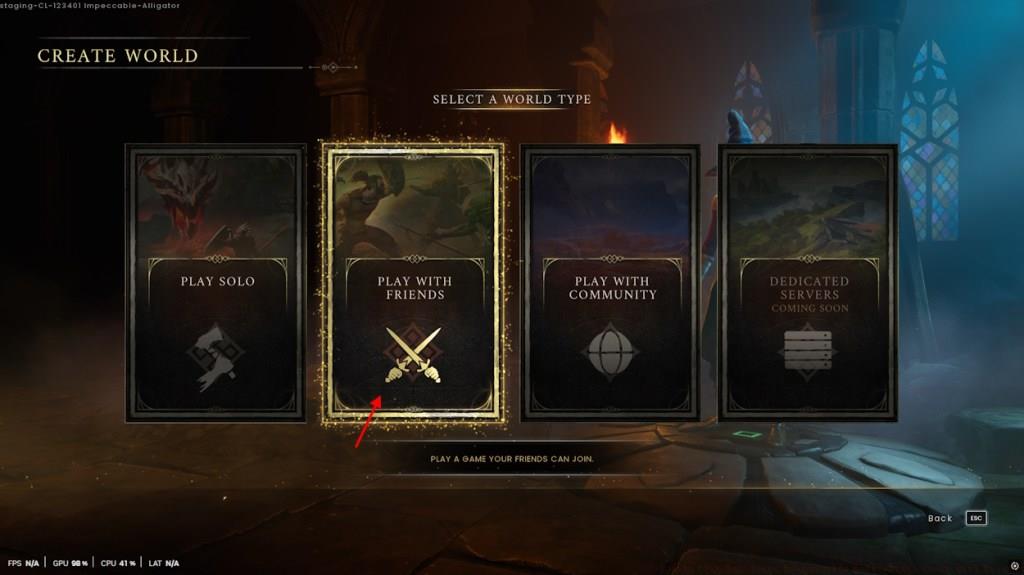
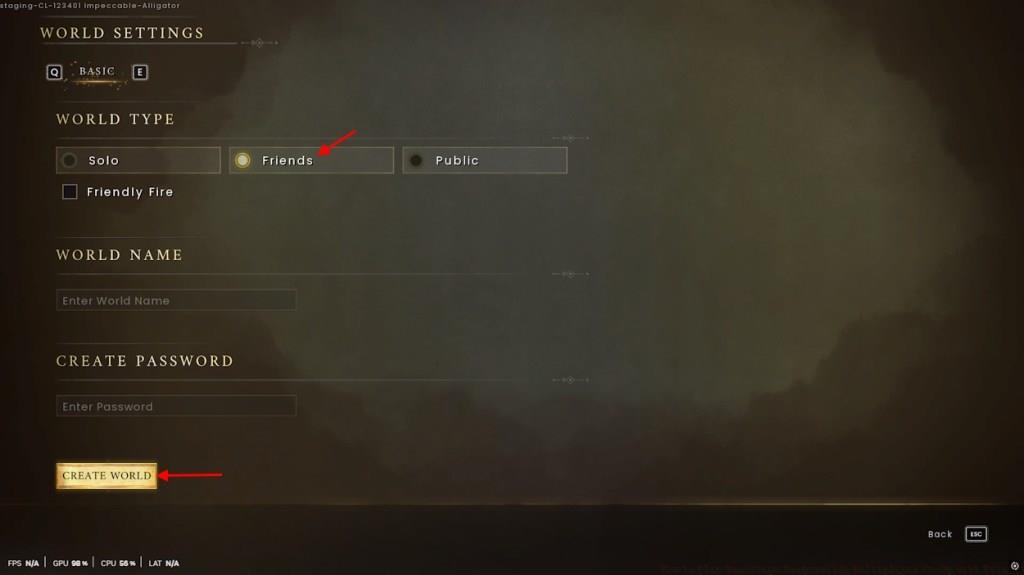
Pro Configuration Tip: When naming your server, include identifiers like region or purpose (e.g., “EU-DungeonFarm”) to help friends quickly identify your session’s purpose. Additionally, consider setting player limits based on your intended activities – smaller groups for focused dungeon runs, larger for open-world exploration.
Many new hosts overlook the friendly fire toggle, which can dramatically impact gameplay dynamics. For cooperative PvE focused sessions, disabling friendly fire prevents accidental teammate damage during intense combat scenarios.
Connecting to an existing Dragonwilds co-op session requires understanding the game’s social connectivity systems. The Friends tab within the Worlds menu serves as your primary gateway to active multiplayer sessions, displaying all available joinable games from players on your friends list.
RuneScape Dragonwilds streamlines the joining process through intuitive interface design. Available sessions automatically populate with relevant information including host name, player count, and world settings.
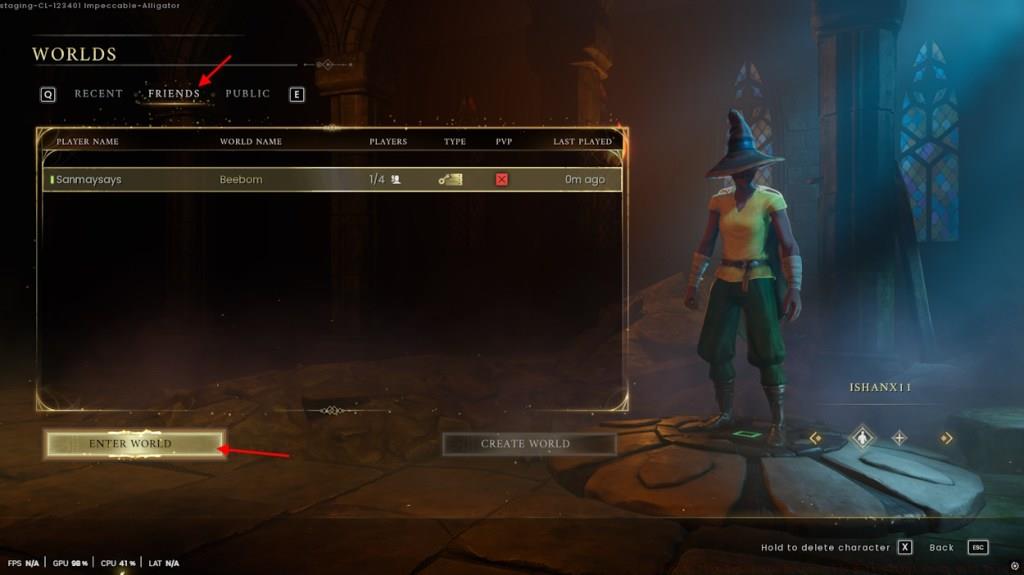
Connection Best Practices: Ensure you and your friend are playing the same game version to prevent compatibility issues. If a session doesn’t appear, have the host double-check their privacy settings and ensure the world is properly active.
Password-protected sessions require the exact passphrase entered during world creation. The game doesn’t provide password recovery options, so coordinate with your host through external communication channels if needed.
Common joining issues typically relate to network configurations or firewall settings. For persistent connection problems, verify that RuneScape Dragonwilds has appropriate permissions in your security software.
Beyond private sessions with friends, RuneScape Dragonwilds offers community co-op opportunities through public matchmaking systems. These options provide accessibility for players seeking immediate multiplayer engagement without pre-arranged groups.
Public community sessions function differently from private servers, offering automatic matchmaking with random players but lacking customizable world settings. This trade-off between convenience and control defines the public co-op experience.
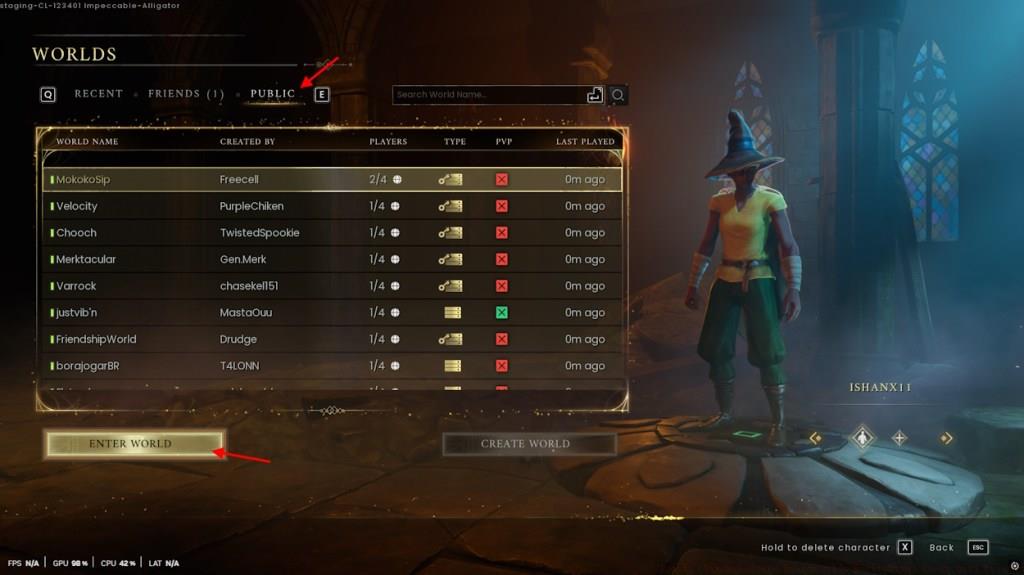
Safety Considerations: When joining public sessions, exercise caution with personal information and in-game valuables. While most community interactions are positive, maintaining situational awareness enhances your overall experience.
Public co-op sessions typically have fixed player limits and standardized rulesets. Understanding these parameters beforehand helps set appropriate expectations for gameplay dynamics and potential limitations.
The matchmaking system prioritizes connection quality and level proximity when forming groups. This intelligent pairing increases the likelihood of balanced and stable multiplayer sessions.
Maximizing your Dragonwilds co-op experience extends beyond basic connection mechanics. Implementing strategic approaches to team composition and resource management significantly enhances both enjoyment and efficiency.
Performance Optimization: For hosts with limited hardware capabilities, reducing graphical settings can improve server stability and decrease latency for all connected players.
Effective team coordination begins with role assignment – designate players for tanking, damage dealing, and support functions based on character builds and player preferences.
Communication represents the foundation of successful co-op gameplay. Utilize in-game text chat or external voice communication platforms to coordinate tactics during challenging encounters.
Resource distribution strategies prevent unnecessary competition among party members. Establish loot rules early and consider implementing rotation systems for rare resource nodes.
When exploring our Complete Guide to modern multiplayer gaming, you’ll discover additional techniques applicable to Dragonwilds co-op sessions.
Advanced players should explore specialized team compositions that leverage class synergies. Certain character combinations can dramatically increase clearing speed and survival rates in dangerous areas.
Action Checklist
- Access Create World menu from main screen and select Play With Friends
- Configure server name, password protection, and player limits according to your needs
- Navigate to Friends tab in Worlds menu to join existing sessions
- Optimize graphics settings for improved multiplayer performance
- Establish communication channels and role assignments for coordinated gameplay
No reproduction without permission:Tsp Game Club » How to Play RuneScape Dragonwilds Multiplayer Co-Op with Friends Master RuneScape Dragonwilds multiplayer setup with comprehensive co-op guides and expert tips