
TL;DR
- Link EA and Twitch accounts before watching eligible Battlefield 6 streams
- Twitch Drops available during launch week with exclusive cosmetic rewards
- Watch streams with Drops enabled for specified duration to earn codes
- Weapon packages and soldier skins provide tactical advantages in Conquest mode
- Advanced strategies include multi-stream monitoring and account verification checks
Battlefield 6 Twitch Drops represent a limited-time promotional campaign exclusively available during the game’s initial launch period. These special rewards provide players with unique cosmetic items that enhance both visual appeal and gameplay functionality within EA’s latest military shooter. The program operates through a partnership between Electronic Arts and Twitch, allowing viewers to earn in-game content simply by watching designated Battlefield 6 livestreams.
The timing window for these Drops typically spans the first seven days following Battlefield 6’s official release, creating urgency for players who want to secure these exclusive items. Unlike standard unlockables earned through gameplay progression, Twitch Drops offer cosmetic enhancements that cannot be obtained through traditional Battlefield 6 progression systems. This makes participation particularly valuable for completionists and players seeking to maximize their cosmetic collection.
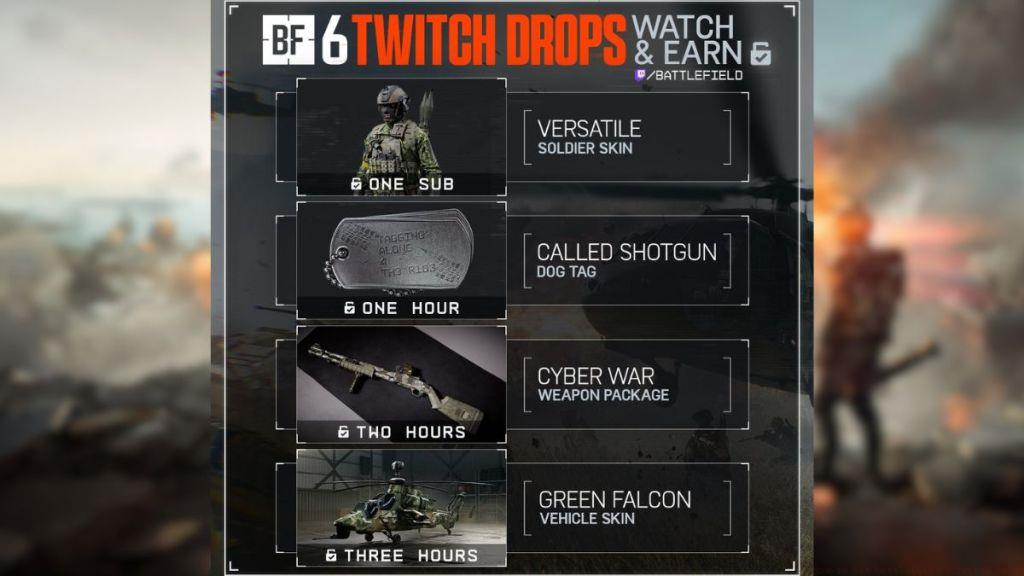
From a strategic perspective, these cosmetic rewards can provide subtle tactical advantages in various game modes. The soldier skins, for instance, may offer improved camouflage in specific environments, while weapon packages often include visual customizations that help with weapon identification during intense firefights.
The foundation of claiming Battlefield 6 Twitch Drops begins with properly connecting your gaming and streaming accounts. This crucial first step ensures that your viewing activity gets properly tracked and attributed to your game profile. The account linking process requires careful attention to detail to avoid common authentication issues.
Begin by navigating to EA’s official Twitch account linking portal through their website. You’ll need to authenticate both your Twitch credentials and your EA account information during this process. The system requires explicit authorization from both platforms to establish the necessary data sharing permissions for Drop tracking.
Many players encounter difficulties during the account verification phase, particularly if they have multiple EA accounts or outdated Twitch authentication tokens. It’s essential to verify that your primary EA account—the one containing your Battlefield 6 game license—is the account you’re linking. Mismatched accounts represent the most common reason for failed Drop claims.
After successfully linking accounts, your next objective involves identifying eligible Battlefield 6 streams. Look for channels that explicitly display “Drops Enabled” in their title or stream information. The viewing duration requirement varies but typically ranges from 30 minutes to 2 hours of continuous watching.
Seasoned Battlefield 6 players often employ sophisticated strategies to maximize their Twitch Drop acquisition efficiency. One effective approach involves monitoring multiple eligible streams simultaneously, though this requires careful management to ensure viewing time gets properly counted across channels.
When selecting streams for Drop farming, prioritize channels with stable broadcast quality and consistent viewer counts. Larger streamers typically have more reliable Drop integration, but smaller creators may offer less competition for limited reward pools. The key is identifying streams where the “Drops Enabled” indicator remains active throughout your viewing session.
Common technical issues include expired authentication tokens, regional restrictions affecting Drop eligibility, and streamer-side configuration problems. If you’re not seeing progress after 30 minutes of watching an eligible stream, first refresh the stream page and check if the Drops enabled notification reappears. Many players mistakenly assume their viewing time counts when the streamer has temporarily disabled Drops or encountered technical issues.
Advanced optimization involves scheduling your viewing during peak Battlefield 6 gameplay hours when more streamers have Drops activated. Evening hours in North American and European time zones typically offer the highest concentration of eligible streams. For players focused on BF6 weapon customization, timing your Drop farming around weapon-specific streaming events can yield specialized cosmetic enhancements.
Another pro strategy involves preparing your BF6 class loadouts in advance to immediately utilize new cosmetic items upon acquisition. This forward planning ensures you can integrate Twitch Drop rewards directly into your established gameplay strategies.
The Battlefield 6 Twitch Drop program features two primary reward categories: specialized weapon packages and exclusive soldier skins. Each category offers distinct advantages that enhance both your visual presentation and tactical effectiveness on the battlefield.
Weapon packages typically include custom camouflage patterns, unique attachment skins, and specialized visual effects that make your firearms stand out during intense combat scenarios. These cosmetic enhancements prove particularly valuable in Conquest mode where weapon identification and personalization contribute to team coordination and individual performance.
The soldier skins available through Twitch Drops often incorporate thematic elements tied to Battlefield 6’s narrative, including potential NATO-inspired designs or specialized combat gear. These skins not only change your character’s appearance but may also provide subtle tactical advantages in specific environments and lighting conditions.
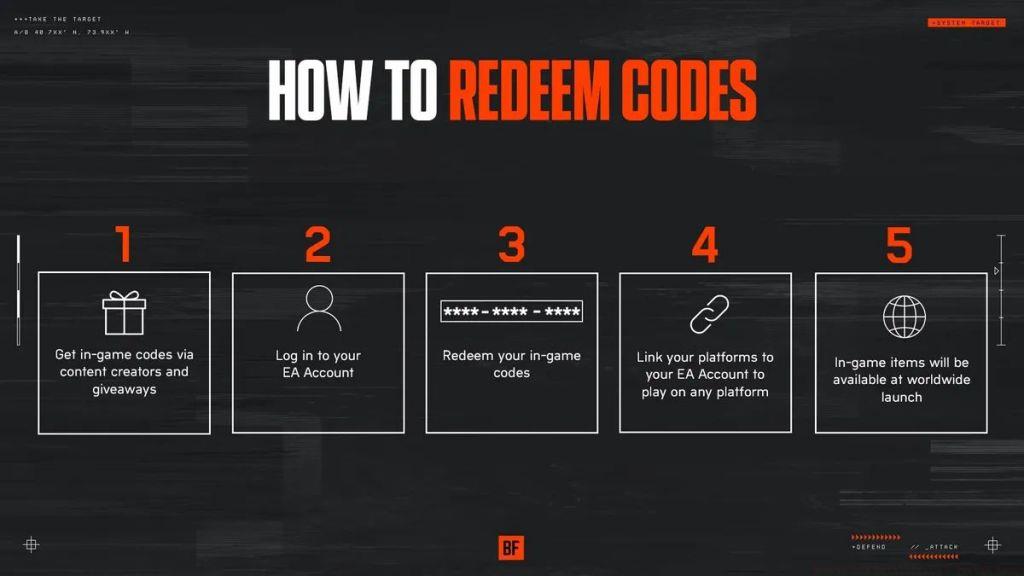
When you receive your Drop code, redemption occurs through EA’s official code redemption portal or directly within Battlefield 6’s menu system. The unlocked items immediately become available in your customization options without requiring additional gameplay achievements or Assignments completion.
Strategic application of these cosmetic items involves matching your soldier skin to prevalent map environments and selecting weapon camo that provides visual distinction without compromising concealment. In the chaotic battles of Conquest mode, these visual customizations can help squad members quickly identify each other during complex engagements.
For players engaged in the Pax Armata narrative elements, certain Twitch Drop rewards may feature thematic connections to the game’s storyline, providing additional immersion value beyond their cosmetic appeal.
Action Checklist
- Link EA and Twitch accounts through official portal
- Verify account linkage and authentication status
- Identify eligible streams with ‘Drops Enabled’ indicator
- Watch designated stream for required duration (30min-2hr)
- Claim code from Twitch inventory and redeem through EA
- Apply cosmetic items to appropriate weapons and soldier loadouts
No reproduction without permission:Tsp Game Club » How to Get Battlefield 6 Twitch Drops Complete guide to claiming Battlefield 6 Twitch Drops with account linking, reward strategies, and troubleshooting tips