
TL;DR
- Higher Effect Detail and Shader Detail settings significantly improve visibility through Molotov fire
- Low settings force risky close positioning and increase vulnerability to enemy fire
- Balance visibility advantages with FPS performance based on your hardware capabilities
- Use strategic positioning to maximize vision while maintaining safety from enemy attacks
- Advanced players can leverage Molotov vision for both offensive pushes and defensive holds
Have you ever been eliminated through a Molotov’s flames without identifying your attacker’s location? While you perceive the incendiary device as an impenetrable fire barrier, opponents somehow maintain clear shooting lines. This visibility disparity stems from critical graphics configuration choices that dramatically affect what you can see through the burning area.
When executing defensive holds or offensive pushes, every grenade in your arsenal serves tactical purposes, yet Molotovs excel at area denial and flushing enemies from entrenched positions. These incendiary tools also provide valuable seconds to regroup during enemy assaults, allowing weapon reloads and strategic repositioning. While conventional wisdom suggests minimal visibility through fire and smoke effects, strategic settings adjustments can reveal surprising visual clarity.
Important performance consideration: Players operating lower-specification systems with already compromised frame rates at minimal settings may need alternative survival approaches rather than relying on visual penetration through Molotov effects.
Mastering Molotov Visibility
Comparative screenshot analysis demonstrates identical Molotov deployments with strikingly different visibility outcomes. In both scenarios, an opponent occupies space behind the burning area, yet remains detectable only in the first visual example.
The initial configuration permits clear identification of enemies emerging from covered positions, while the secondary setup demands either extreme visual strain or completely blind firing through obscuring effects. The determining factor? Strategic graphics configuration.
Molotov’s primary visual obstruction stems from its combined fire animation and dense black smoke particles radiating outward from the ignition point. These elements substantially compromise visual penetration capability. Simultaneously, CS:GO’s aging game engine contains inherent imperfections and longstanding visual bugs that remain unaddressed, creating opportunities for visibility enhancement through specific configuration adjustments.
CS:GO Settings to see through Molly
The superior visibility screenshot utilizes “Effect Detail” and “Shader Detail” parameters configured at ‘High’ presets. The compromised visibility example employs minimum values (‘Low’). These comparisons yield two critical conclusions regarding visual penetration through Molotov effects:
- Minimal graphics configurations necessitate dangerously close proximity to burning Molotovs to achieve even marginal visibility behind them. Only at these risky distances does the obstructive black smoke partially dissipate. This positioning dramatically increases vulnerability to enemy suppressive fire through the diminished smoke density.
- Elevated Effects and Shaders settings provide definitively superior visual clarity through Molotov flames. However, players must complement this advantage with intelligent positioning to avoid becoming easy targets.
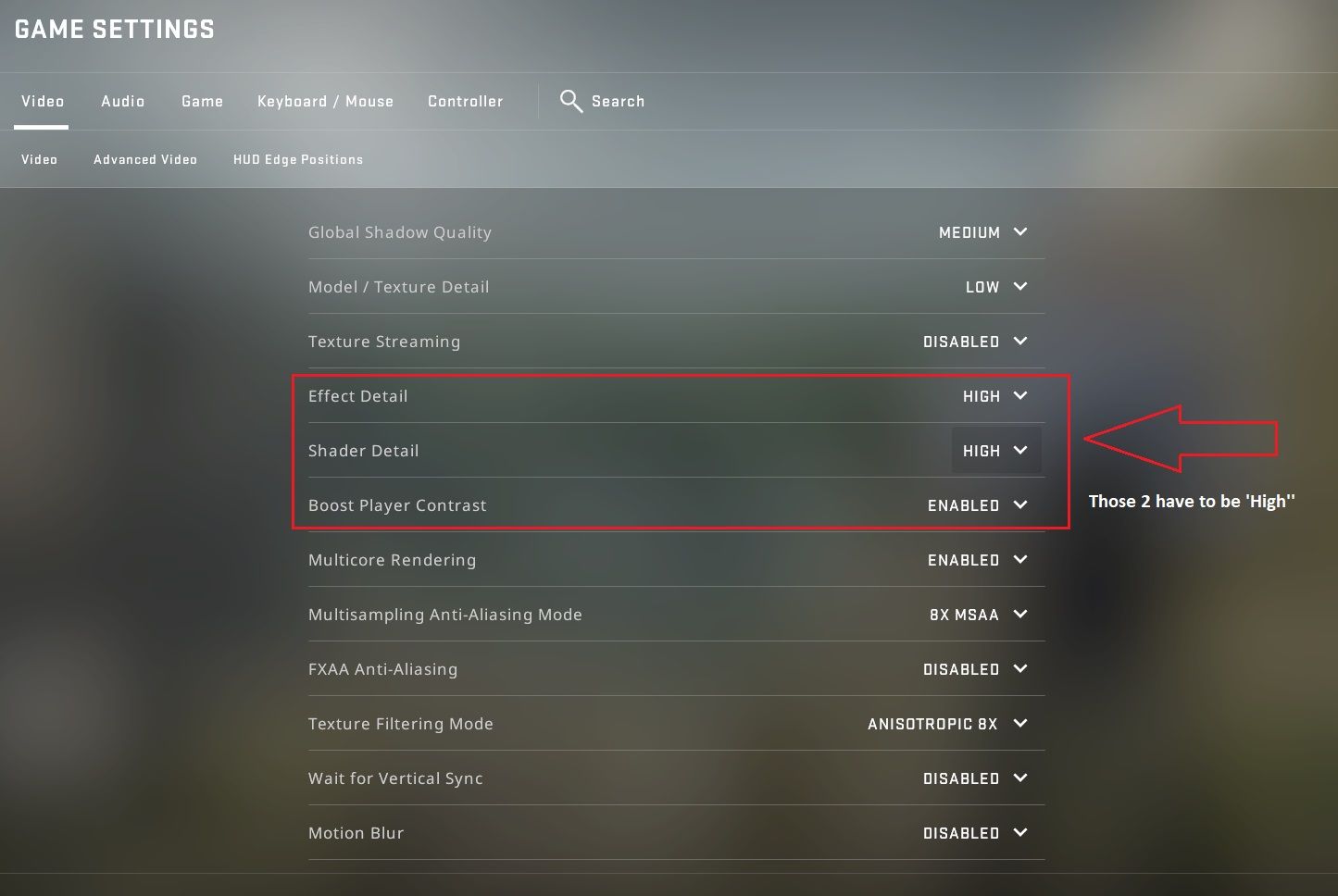
Advanced optimization strategy: Consider configuring Effect Detail at ‘High’ while maintaining Shader Detail at ‘Medium’ for balanced performance and visibility. This hybrid approach often provides 85-90% of the visual benefit with significantly reduced performance impact compared to dual-high settings.
Unfortunately, Valve’s implementation creates unequal competitive conditions across hardware specifications. Players with superior graphics processing units and overall system performance inherently gain visual advantages in Molotov engagement scenarios.
Strategic positioning becomes critical when leveraging improved Molotov visibility. Instead of standing directly in the open, position yourself where you maintain visual lines through the fire while utilizing cover protection. Angle your perspective to maximize what you can see while minimizing your exposure to potential threats.
Common tactical error: Many players discover improved visibility capabilities but then remain stationary, making themselves predictable targets. Instead, use quick peeks and position shifts to gather information while maintaining defensive security. For comprehensive gameplay improvement, explore our Complete Guide to master all aspects of competitive FPS mechanics.
Increase your rank, win rate, and KDA in CS:GO
Sign up at Scope.gg, analyze your matches, learn mistakes, fix them and win more.
Action Checklist
- Configure Effect Detail and Shader Detail to High for maximum visibility
- Test visibility on community Molotov training maps
- Practice safe positioning angles that provide visual lines through fire while maintaining cover
- Adjust settings based on FPS performance impact
- Incorporate Molotov vision tactics into your competitive gameplay
No reproduction without permission:Tsp Game Club » How to see trough Molotov in CS:GO? Guide by SCOPE.GG Master CS:GO visibility through Molotov fire with optimal graphics settings and tactical positioning strategies