
Complete guide to unlock the exclusive Doom Slayer Verdant skin via Nvidia GeForce rewards before June 14, 2025 deadline
Understanding the Verdant Skin Exclusive
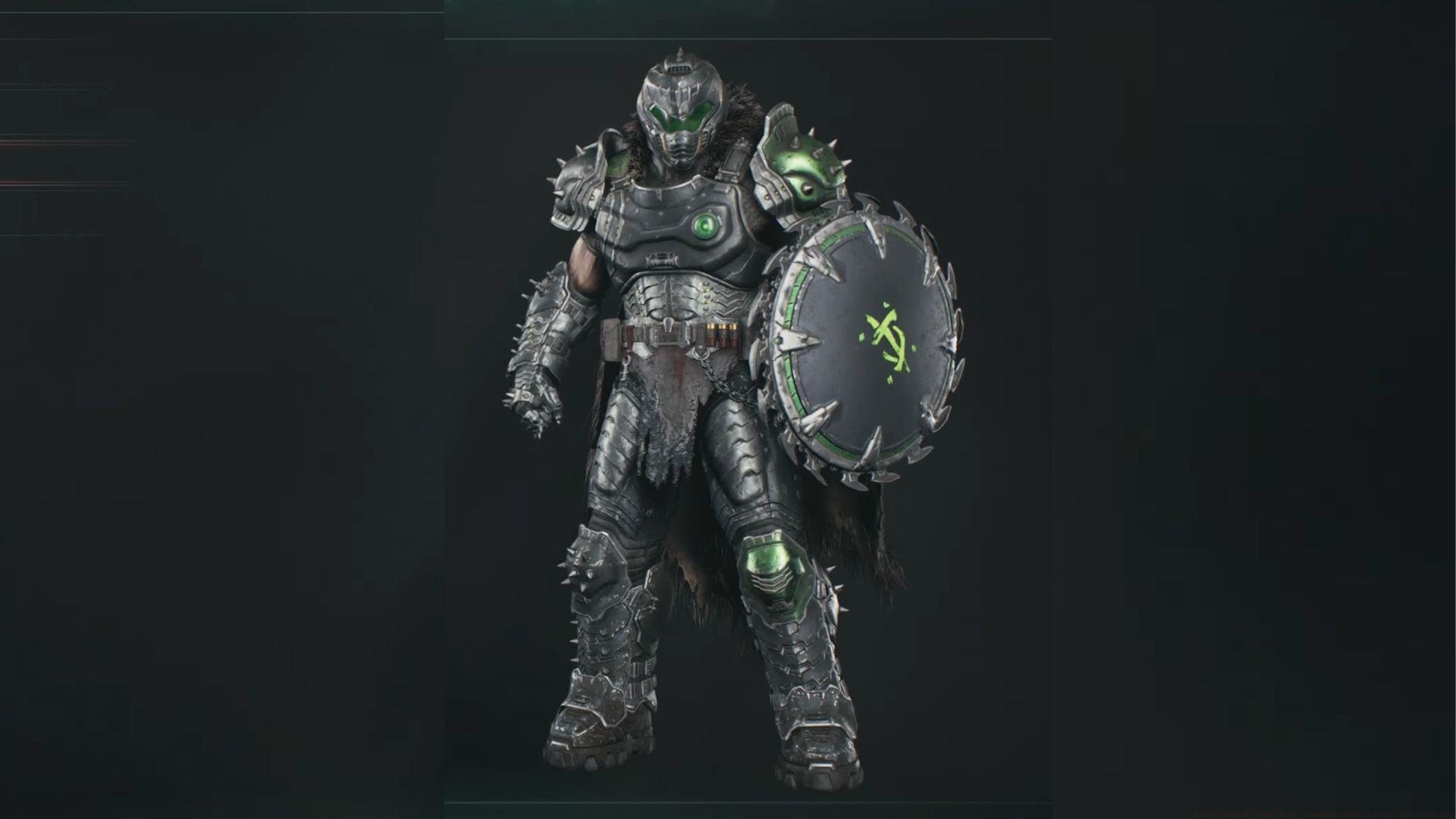
The Doom Slayer Verdant skin in Doom: The Dark Ages represents a premium cosmetic enhancement exclusively available through the Nvidia GeForce rewards program. This medieval-inspired armor set dramatically transforms the Slayer’s appearance with intricate detailing, including a flowing cape and formidable spiked shoulder plates that perfectly complement the game’s dark ages aesthetic.
Unlike standard unlockable skins earned through campaign progression, the Verdant variant offers a distinctive visual upgrade that sets your character apart. The emerald-green coloration combined with metallic accents creates a striking presence on the battlefield, making it one of the most sought-after cosmetic items in the game’s current lineup.
Platform Compatibility Note: This exclusive skin supports cross-platform functionality, meaning once redeemed through your Bethesda account, it becomes accessible on Xbox Series X|S, PlayStation 5, and PC versions of the game. However, proper account synchronization between your gaming platform and Bethesda.net is essential for successful activation.
Step-by-Step Redemption Process
Claiming your exclusive Verdant skin requires navigating two separate account systems. Follow this comprehensive guide carefully to ensure successful redemption:
- Account Verification Phase: Begin by creating an Nvidia account or accessing the existing Nvidia account portal to verify your GeForce rewards enrollment status. Ensure your account information is current and properly validated.
- Application Setup: Download and install the official Nvidia app on your preferred device. This application serves as the gateway to accessing GeForce-exclusive content and promotions.
- Authentication Process: Launch the Nvidia application and select the login option positioned at the top right corner of the interface. Authenticate using your established Nvidia account credentials to proceed.
- Reward Navigation: Access the Redeem section located within the left navigation panel. Browse available promotions until you locate the specific DOOM: The Dark Ages GeForce Reward offering.
- Bethesda Integration: Navigate to Bethesda.net and authenticate your account using the sign-in function at the top right corner. Establish a new account if you haven’t previously registered with Bethesda’s platform.
- Code Application: Once successfully signed into your Bethesda profile, access your account dashboard and select the Redeem Code functionality. Input the unique promotion code generated through the Nvidia application.
- Game Activation: Launch your preferred gaming platform and access Doom: The Dark Ages. Authenticate using your Bethesda.net credentials when prompted during the initial startup sequence.
- Inventory Verification: The Doom Slayer Verdant skin will automatically populate within your cosmetic inventory upon successful redemption. Navigate to the character customization menu to equip your new medieval armor set.
Pro Tip: Complete the redemption process during off-peak hours to avoid potential server congestion issues that sometimes affect both Nvidia and Bethesda platforms during high-traffic periods.
Platform-Specific Requirements & Troubleshooting
While the Verdant skin maintains cross-platform compatibility, different systems require specific preparation to ensure seamless integration:
Console Configuration: Xbox and PlayStation users must verify their platform accounts are properly linked to their Bethesda.net profile through the official account management settings. This connection is crucial for cross-platform cosmetic synchronization and often requires manual verification through the Bethesda website.
Common Redemption Challenges: Many users encounter issues during the code redemption phase. If your Bethesda code redemption fails, first confirm you’re logged into the correct region-specific Bethesda site that matches your game version. Additionally, ensure any browser extensions or ad blockers are temporarily disabled, as they can interfere with the redemption process.
Account Linking Solutions: Should you experience problems with platform-Bethesda account synchronization, navigate to the Bethesda account management portal and manually unlink then relink your gaming profiles. This refresh technique resolves most connectivity issues between the different systems.
Verification Protocol: After completing the redemption process, allow up to 24 hours for the skin to appear in your inventory. If it remains missing beyond this period, contact Bethesda support with your redemption confirmation email and transaction details for manual verification and resolution.
Advanced Tips & Important Considerations
Maximize your Verdant skin acquisition and usage with these strategic insights:
Deadline Awareness: This exclusive promotional opportunity concludes permanently on June 14, 2025. Unlike recurring game events, GeForce rewards typically don’t receive extensions or reappear in future promotions, making timely action essential for securing this cosmetic item.
Skin Management Strategy: Once successfully redeemed, the Verdant skin becomes a permanent addition to your Doom: The Dark Ages inventory across all linked platforms. You can freely switch between the Verdant armor and other unlocked skins through the game’s customization interface without affecting your progress or statistics.
Future Availability Outlook: Historical patterns with similar GeForce exclusives suggest limited-time promotional skins rarely become available through alternative acquisition methods later. Players interested in completing their cosmetic collection should prioritize obtaining the Verdant variant before the expiration date.
Cross-Save Compatibility: The skin maintains synchronization across platforms through Bethesda’s account system. If you play Doom: The Dark Ages on multiple devices, your Verdant skin customization will remain consistent regardless of which platform you access the game from, provided proper account linking is maintained.
Also read: How to get Prince St Pizza Ranger Doom Slayer skin in Doom The Dark Ages
This comprehensive guide ensures you successfully secure the exclusive Doom Slayer Verdant skin while avoiding common pitfalls in the redemption process.
Expand Your Doom: The Dark Ages Knowledge:
- 10 best tips for beginners in Doom: The Dark Ages
- Is Doom The Dark Ages coming to PS4 and Xbox One?
- Doom The Dark Ages review: Rip and Tear until it is done
- DOOM The Dark Ages PC system requirements revealed
- All Doom games in chronological order
- Will Doom The Dark Ages be available on Xbox Game Pass?
- Doom The Dark Ages crashing on PC error: Possible reasons and fixes
No reproduction without permission:Tsp Game Club » How to unlock Doom Slayer Verdant skin in Doom: The Dark Ages Complete guide to unlock the exclusive Doom Slayer Verdant skin via Nvidia GeForce rewards before June 14, 2025 deadline