
TL;DR
- Full-size keyboards offer complete functionality but consume significant desk space
- TKL and 75% layouts provide excellent balance between features and compactness
- 60% and smaller layouts require function layers but maximize mouse space
- Consider your numeric input needs, available desk space, and willingness to learn new layouts
- Most enthusiasts own multiple keyboard sizes for different use cases and preferences
Keyboard dimensions vary dramatically across the market spectrum, ranging from expansive full-size configurations to ultra-compact 40% designs that prioritize minimalism. Understanding the various naming conventions is essential for making informed purchasing decisions and selecting the optimal layout for your specific requirements.
Manufacturers employ multiple classification systems to denote keyboard proportions. The percentage method references full-size layouts as 100%, with compact variants like 96% or 60% indicating their relative size reduction. Similarly, key count designations such as “104-key” or “87-key” provide precise numerical specifications. The term “compact” broadly applies to keyboards spanning 60-75% size ranges, while specific terms like “TKL”, “Planck”, and “1800” describe highly specific layout types with distinct characteristics.
Common confusion arises because multiple descriptors may accurately characterize the same keyboard model. For instance, a tenkeyless design might be correctly identified as TKL, 80%, or 87-key depending on the manufacturer’s preference and market positioning.
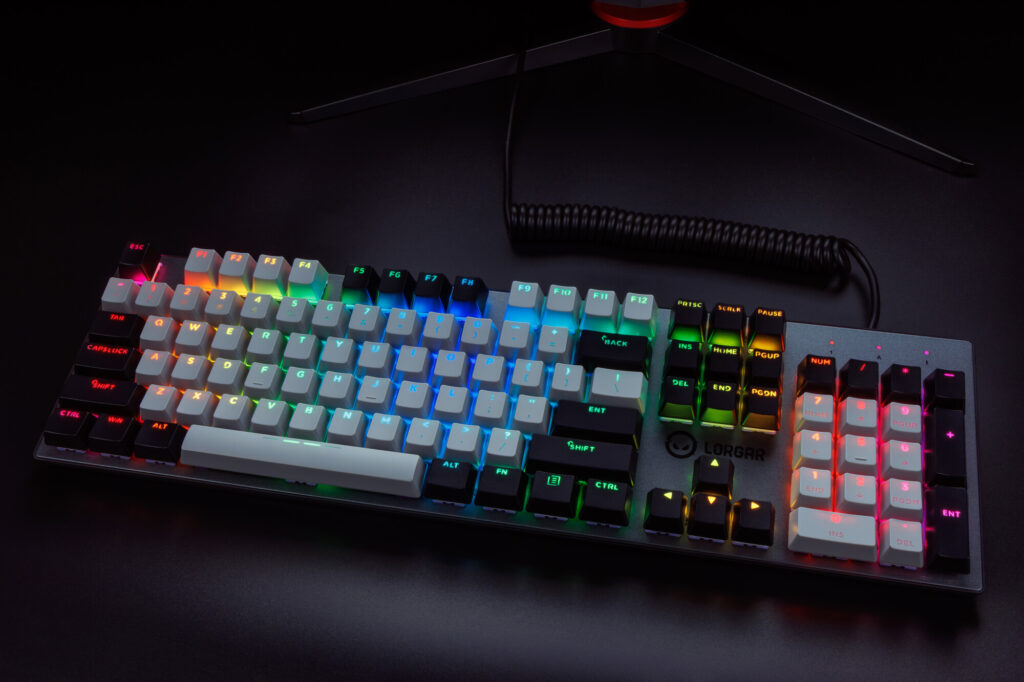
The conventional full-size keyboard represents the baseline configuration that most computer users immediately visualize. Frequently designated as 100% keyboards, these layouts have maintained their fundamental design principles since becoming standardized in the 1980s. A typical full-size keyboard incorporates approximately 104 keys, encompassing a comprehensive QWERTY arrangement complete with number row, modifier keys (Shift, Control, Alt), dedicated function key row, navigation cluster featuring arrow keys, and integrated numeric keypad.
Full-size keyboards deliver exceptional versatility, making them appropriate for virtually any computing task. The segregated numpad proves invaluable for data entry professionals, financial analysts, and anyone regularly working with numerical information. All keys maintain their traditional positioning, ensuring immediate familiarity for users transitioning from standard office keyboards.
The primary disadvantage of full-size keyboards involves their substantial physical footprint. They consume considerable desk real estate, but the more significant concern involves ergonomic positioning. The extended width forces mouse placement further right than recommended by occupational health guidelines, potentially causing shoulder strain and related musculoskeletal issues during extended usage sessions.
Despite space considerations, full-size keyboards remain popular because they eliminate learning curves associated with function layers. They represent an excellent choice for users who prefer direct access to every key without memorizing complex key combinations. However, if your numeric keypad usage is infrequent and you prioritize workspace conservation, transitioning to a more compact keyboard format likely aligns better with your needs.
The 96% keyboard format has experienced renewed popularity among users requiring numeric input capabilities while seeking moderately reduced dimensions. This layout eliminates the separate navigation section containing six buttons typically positioned above arrow keys, consolidating four essential navigation functions into the top function row following F12.
This configuration originally debuted as the “1800” layout, named after the keyboard model that pioneered this form factor starting in 1989. It emerged as a practical solution for installation in standard 19-inch server racks and other environments where width reduction provides operational advantages.
Alternative designation as “100-key” keyboards references their typical key count, contrasting with 104-106 keys on full-size models and 87 keys on TKL designs. While sharing similar width dimensions with tenkeyless keyboards, 96% layouts accommodate users who depend on numeric keypads while offering space savings over traditional full-size keyboards.
Practical tip: When transitioning from full-size to 96%, allow a brief adjustment period for the condensed navigation cluster, which typically requires developing new muscle memory for key locations.

Tenkeyless keyboard configurations have significantly contributed to the widespread adoption of mechanical keyboards. As the name explicitly indicates, these designs omit the numeric keypad (traditionally containing ten keys) found on standard 104-key models. This design approach reduces keyboard length while preserving all other essential keys from conventional layouts.
Standard TKL layouts typically incorporate between 87-88 keys depending on manufacturer specifications, hence the alternative “87-key” designation. All remaining keys maintain their expected positions: alphanumeric section, function row, and navigation cluster. The sole omission involves the dedicated numeric input section.
The most substantial advantage involves dimensional economy compared to full-size keyboards. The informal “80%” terminology effectively communicates the liberated workspace, particularly beneficial for users with constrained desk areas or those pursuing minimalist aesthetics. The reduced physical footprint also enhances portability, making TKL keyboards particularly popular among professionals requiring mobile setups. Tenkeyless designs additionally offer ergonomic benefits by enabling closer keyboard-mouse positioning, thereby minimizing shoulder stress during prolonged computer use.
However, two distinct user categories will likely find TKL keyboards unsatisfactory. First, professionals who regularly work with numerical data and have developed proficiency with numpad data entry. While possible to input numbers using the top number row, this method proves slower and less intuitive for intensive numeric work. Second, gaming enthusiasts who utilize numpads for specific in-game functions, particularly flight controls in titles like GTA 5, may experience functionality limitations without dedicated numeric keys.
The 75% keyboard layout represents the largest format within the compact category, appealing to users seeking dimensions smaller than TKL while retaining function keys and arrow cluster. These configurations typically feature approximately 83 keys (hence the “83-key” alternative name). This configuration preserves most functionality available on full-size keyboards while occupying significantly reduced desktop space.
This layout achieves its condensed form factor by compressing the tenkeyless design. The function row typically moves closer to the number row, eliminating the conventional spacing between these sections. Navigation keys reposition into a consolidated area on the keyboard’s right side, often adopting unconventional arrangements. The overall design demonstrates superior space efficiency while maintaining dedicated arrow keys and function row accessibility.
The 75% keyboard strikes an optimal balance between functionality and compactness, offering nearly all TKL keyboard keys within dimensions approaching 60% layout sizes. Interestingly, standard laptop keyboards closely approximate 75% layouts, though manufacturers frequently implement proprietary key count variations, whereas desktop 75% keyboards maintain greater standardization.
Common mistake: Underestimating the adaptation period required for the condensed layout, particularly the navigation cluster which often features non-standard key sizing that complicates keycap replacement for customization projects.
Despite these potential limitations, 75% keyboards have cultivated substantial following within keyboard enthusiast communities.
Progressing further toward the compact spectrum extremity, the 65% layout (alternatively called “68-key” due to typical key count) represents a further condensed iteration of the 75% design. It maintains alphanumeric keys, arrow keys, and partial navigation cluster (Page Up, Page Down, Home, End). However, function keys F1-F12 become accessible exclusively through function layers activated via designated modifier keys.
The principal attraction of 65% keyboards involves their exceptional space efficiency. They consume substantially less area compared to larger layouts, including 75% designs, making them ideal for space-constrained environments or minimalist aesthetic preferences. The elimination of one vertical row compared to 75% layouts contributes significantly to their streamlined appearance.
Optimization tip: Program frequently used function key combinations to easily accessible layers to minimize workflow disruption during the transition period.
The 60% layout represents the practical limit of compact keyboard design for mainstream users. These configurations typically contain just 61 keys, having eliminated the function row, navigation cluster, and dedicated arrow keys. Only fundamental components remain: alphanumeric section and modifier keys.
Minimalism advocates enthusiastically endorse 60% keyboards for their space-saving characteristics. Beyond aesthetic considerations and workspace decluttering benefits, compact keyboards provide expanded mouse movement area – particularly valued by FPS gamers utilizing low sensitivity configurations (who typically require minimal keys for primary gameplay functions).
Despite their extremely reduced dimensions, 60% layouts maintain comprehensive functionality through secondary key mapping layers. By depressing a special function key (typically positioned where Caps Lock resides on full-size keyboards) while pressing additional keys, users access alternative functions. For example, while engaging the function key, WASD keys can function as arrow keys. This approach may prove acceptable for certain users, though individuals performing extensive text editing may strongly prefer at minimum 65% layouts where arrow keys maintain physical presence.
This layering methodology enables 60% layouts to incorporate extensive feature sets within devices substantially smaller than full-size keyboards.
However, this functionality comes with an adaptation period. Users accustomed to larger keyboards may instinctively reach for non-existent keys. The transition also involves reprogramming muscle memory from individual key presses to key combination execution.
Naturally, 60% keyboards offer exceptional portability (combining compact dimensions and reduced weight), particularly in wireless implementations. Manufacturers sometimes include protective travel cases for users wishing to transport their mechanical keyboards.
But the 60% keyboard’s venture into extreme minimalism isn’t without compromises. Users who genuinely depend on function keys, arrow clusters, or navigation controls during daily workflows will likely experience frustration with persistent function layer usage. For specialized software applications, especially in domains like video production or 3D modeling where keyboard shortcuts are essential, this layout may introduce unnecessary workflow complications.
The keyboard market extends beyond conventional layouts, though exploring these alternatives requires considerable typing courage. These designs push the boundaries of minimalism, ergonomic innovation, and typing habit adaptation through unconventional design approaches.
The 40% keyboard epitomizes extreme compactness. Most ultra-minimalist implementations contain merely 40-50 keys, removing all but absolutely essential components. Users must execute multiple key combinations concurrently to access numbers, symbols, and navigation functions. While initially intimidating, proponents contend that once mastered, 40% layouts facilitate exceptionally efficient typing with minimal finger travel. Additionally, as the smallest substantially functional keyboard format, 40% designs have gained popularity among DIY enthusiasts who fabricate custom printed circuit boards, select individual switches and keycaps, and occasionally 3D-print custom enclosures for truly personalized keyboard solutions.
Ortholinear keyboards represent another unconventional alternative. Featuring keys arranged in perfect vertical and horizontal grids, this represents a fundamental departure from the staggered key alignment inherited from typewriter heritage. Advocates of this configuration argue that maintaining staggered key patterns for computer keyboards lacks justification and suggest that grid alignment reduces finger travel distance while maintaining hands at more natural angles. The adaptation period can prove challenging, as matrix-style key placement necessitates muscle memory retraining. Incidentally, the combination of ortholinear layout and 40% dimensions in a single device constitutes the “Planck” keyboard.
Split keyboards constitute another departure from traditional design paradigms. As the terminology implies, these comprise two independent halves positionable separately. Superior ergonomic design promotes more natural shoulder width and wrist angles, thereby reducing repetitive strain injury risks. Split configurations can manifest in any dimension from 100% behemoths to compact 40% implementations.
Most exotic layouts primarily target keyboard enthusiasts and individuals seeking to enhance their typing experience or address specific ergonomic concerns. However, for casual users these designs represent extreme solutions that remain impractical for most real-world applications, though such products occupy the vanguard of keyboard innovation and deliver performance exceeding conventional alternatives. While unsuitable for everyone, these unique layouts can provide the most customized and potentially ergonomic typing experience available to those willing to invest time mastering unconventional layouts.
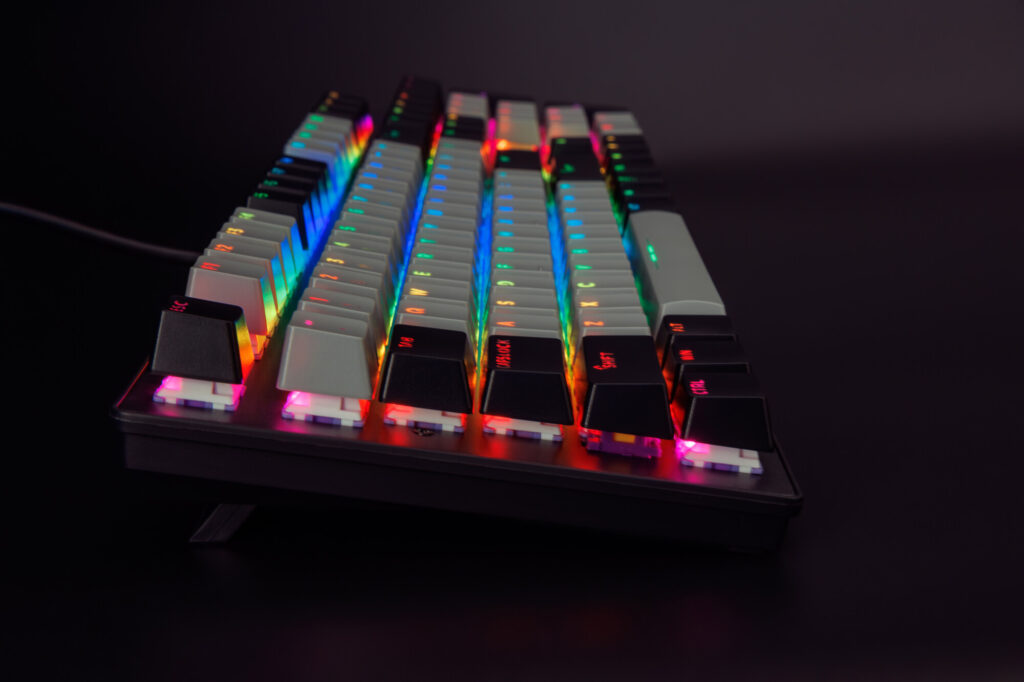
Selecting the appropriate keyboard size involves careful consideration of multiple personal factors. The reality of keyboard selection acknowledges that no universal solution exists – the optimal choice depends entirely on individual circumstances, workflows, and physical constraints.
Critical assessment should encompass available desk dimensions, typing methodology, and specific functional requirements. How frequently do you utilize the numeric keypad? What is your willingness to learn new key combinations for routine tasks? What portability requirements, if any, must your keyboard fulfill?
Consequently, most keyboard enthusiasts maintain multiple keyboards of varying sizes for different applications and preferences. The market offers extensive options addressing diverse needs, making experimentation and personal evaluation the most reliable approach to identifying your ideal configuration.
The ultimate objective involves acquiring a keyboard that delivers comfort, enhances productivity, and complements your workspace aesthetics. Whether selecting full-size, 60%, or intermediate layouts, the correct choice will enhance your daily computing experience, making it more enjoyable and efficient.
The transition to 75% keyboards presents immediate spatial challenges that require deliberate adaptation. New users often experience initial discomfort with condensed key spacing and unconventional navigation cluster arrangements, which typically demands 2-4 weeks of consistent use to build new muscle memory. The function row typically moves directly adjacent to number keys, eliminating traditional spacing and creating a denser typing surface.
Customization enthusiasts face additional hurdles with 75% layouts due to non-standard key sizes. Finding compatible keycap sets requires careful research, as many standard sets lack the specialized 1.75u Shift keys and compact navigation keys these designs require. However, this layout has cultivated a dedicated enthusiast community who appreciate its optimal balance between functionality and footprint reduction.
Pro tip: Prioritize keyboards with programmable firmware to remap awkwardly positioned keys during your adjustment period.
Venturing further into compact territory, the 65% layout (frequently called 68-key) represents a significant departure from traditional keyboard design. This compact iteration of the 75% format preserves alphanumeric keys, dedicated arrow keys, and partial navigation functions (Page Up/Down, Home, End) while relocating function keys F1-F12 to secondary layers accessed via function modifiers.
The compelling advantage of 65% keyboards lies in their remarkable space efficiency. They consume approximately 30% less desk real estate than 75% layouts, making them ideal for minimalist workstation configurations or gaming setups where mouse movement space is prioritized.
However, this increased compactness introduces substantial workflow compromises. The absence of physical function keys significantly impacts users who regularly utilize F-key shortcuts in applications like Excel, coding IDEs, or design software. While accessible through function layers, the additional keystroke requirement can slow down established workflows by 15-25% initially.
Common mistake: Underestimating the impact of missing function keys on productivity software. Optimization tip: Create custom key mappings that place your most-used F-key functions on more accessible layers.
Representing the practical limit of keyboard minimalism for mainstream users, 60% layouts typically feature just 61 keys by eliminating the function row, navigation cluster, and dedicated arrow keys. This leaves only the core alphanumeric section and modifier keys, creating the most compact layout that remains fully functional through intelligent layering.
Minimalism advocates enthusiastically endorse 60% keyboards for their aesthetic appeal and clutter reduction benefits. Beyond visual cleanliness, the reduced footprint provides substantial mouse movement area—particularly valuable for FPS gamers employing low sensitivity settings who rarely require extensive key arrays.
Despite their dramatically reduced physical presence, 60% keyboards maintain complete functionality through sophisticated layer systems. Typically, a function key (often replacing Caps Lock) transforms other keys into secondary functions; for example, WASD becomes arrow keys when combined with the function modifier.
This layering approach enables comprehensive feature sets within devices roughly 40% smaller than full-size keyboards. However, mastery demands significant retraining investment, typically requiring 3-6 weeks of consistent use to overcome muscle memory from larger layouts.
The portability benefits of 60% keyboards are undeniable, especially in wireless configurations. Many manufacturers include travel cases, catering to users who prefer maintaining their preferred mechanical keyboard experience during mobility.
Critical consideration: Professionals in video editing, 3D modeling, or software development may find the constant layer switching creates unnecessarily complex workflows.
The keyboard market extends far beyond conventional layouts, though exploring these depths requires considerable typing courage. These designs push minimalism, ergonomics, and typing habit adaptation to their absolute limits with truly unconventional configurations.
The 40% keyboard embodies extreme compactness, typically featuring just 40-50 keys that strip away everything except absolute essentials.
Users must execute multiple key combinations to access numbers, symbols, and navigation functions. While initially intimidating, enthusiasts contend that once mastered, 40% layouts enable exceptionally efficient typing with minimal finger travel. As the smallest practically functional keyboard size, 40% has become the preferred platform for DIY builders who design custom PCBs, select switches and keycaps, and often 3D-print unique cases for complete customization.
Ortholinear keyboards represent another unconventional alternative, featuring keys arranged in perfect vertical and horizontal grids rather than traditional staggered layouts. Proponents argue this configuration reduces finger travel distance by approximately 20% and maintains hands at more natural angles, though the learning curve proves substantial as grid alignment demands complete muscle memory retraining. The combination of ortholinear layout with 40% size in a single device is recognized as the “Planck” keyboard within enthusiast circles.
Split keyboards constitute another radical departure from conventional design, consisting of two separate halves that can be positioned independently. This ergonomic approach promotes more natural shoulder width and wrist angles, significantly reducing repetitive strain injury (RSI) risk during extended typing sessions. Split designs are available in various sizes ranging from full-size configurations to ultra-compact 40% versions.
These exotic layouts primarily target keyboard enthusiasts and individuals seeking to enhance their typing experience or address specific ergonomic concerns. While excessively radical for most casual users in practical scenarios, these products represent the cutting edge of keyboard innovation and deliver performance exceeding conventional alternatives. While unsuitable for everyone, these unique configurations provide the most personalized and potentially ergonomic typing experience for those willing to dedicate time to mastering new layouts. For comprehensive guidance on optimizing your Class Guide in Battlefield 6, understanding your keyboard’s capabilities becomes crucial for optimal gameplay performance.
Navigating keyboard terminology requires understanding multiple naming conventions that describe the same physical layouts. The percentage system compares sizes relative to full-size keyboards, where 100% represents the complete traditional layout. Alternative designations include key counts like ‘104-key’ or ’87-key’ models, though these numerical references aren’t universally applied across all layout types.
Manufacturers often use descriptive terms such as ‘Compact’ for 60-75% ranges, while specific names like ‘TKL’, ‘Planck’, and ‘1800’ refer to specific design implementations. This multiplicity of naming conventions means you’ll encounter various descriptions for identical keyboard configurations in the marketplace.
Common mistake: Assuming standardized naming across brands. Research shows manufacturers use different terminology for similar layouts, requiring careful comparison of physical dimensions rather than relying solely on product names when making purchasing decisions.
Full-size keyboards represent the traditional benchmark in keyboard design, featuring approximately 104 keys in a comprehensive layout. This configuration includes the standard QWERTY alphanumeric section, dedicated function row (F1-F12), navigation cluster with arrow keys, and separate numeric keypad. The QWERTY layout itself originated from typewriter engineering constraints in the 19th century, optimized to prevent mechanical jamming rather than for ergonomic efficiency.
These keyboards excel in data-intensive workflows where numerical input dominates, such as accounting, spreadsheet management, and financial analysis applications.
The primary ergonomic concern involves shoulder strain from extended mouse reach. Studies indicate optimal mouse placement should position the device within 15-20 centimeters of keyboard edge, a distance frequently exceeded by full-size layouts.
Optimization tip: Position the keyboard slightly left of center to reduce rightward mouse distance, potentially decreasing repetitive strain injury risk by up to 30% according to workplace ergonomics research.
The 96% keyboard format delivers numerical functionality in a condensed footprint, typically featuring around 100 keys. This design eliminates redundant navigation buttons while preserving the essential numeric keypad, making it ideal for financial professionals and data analysts who require frequent number entry but have limited desk space.
Originally developed as the ‘1800’ layout for server rack compatibility in 1989, this configuration has experienced renewed popularity in modern workspace environments.
Space optimization analysis reveals 96% keyboards provide approximately 15-20% width reduction compared to full-size models while maintaining 95% of functionality for most business applications.
Tenkeyless (TKL) keyboards eliminate the numeric keypad while retaining all other standard keys, typically featuring 87-88 keys depending on manufacturer implementation. The 80% width reduction compared to full-size models creates significant desk space benefits for users with constrained workspace or minimalist preferences.
Portability represents a significant advantage for mobile professionals, with TKL keyboards being approximately 25% lighter and requiring 30% less bag space than their full-size counterparts.
Ergonomic research demonstrates that eliminating the numpad reduces shoulder abduction angles during mouse use, potentially decreasing musculoskeletal disorder risk factors.
Common limitation: Numerical data professionals experience 15-20% input speed reduction when transitioning from dedicated numpad to number row usage patterns.
The 75% layout represents the optimal balance between functionality and space efficiency for most professional users. Typically featuring around 83 keys, these keyboards preserve dedicated arrow keys and function rows while eliminating redundant spacing between key groups.
These designs closely mirror standard laptop keyboard layouts while offering superior customization options for desktop environments. The condensed navigation cluster placement requires initial adaptation but typically becomes intuitive within 2-3 weeks of regular use.
Customization challenge: Non-standard key sizes require specialized keycap sets, increasing customization costs by approximately 40% compared to standard layout keyboards.
Enthusiast community data indicates 75% keyboards represent the most popular compact layout among mechanical keyboard users, accounting for nearly 35% of enthusiast purchases according to recent market surveys.
65% layouts, frequently called 68-key keyboards, eliminate the function row while preserving arrow keys and essential navigation controls. This configuration delivers maximum space efficiency for users prioritizing minimalist aesthetics and mouse movement area.
Function layer implementation requires pressing a modifier key (typically FN) combined with number row keys to access F1-F12 functionality.
The vertical space reduction compared to 75% layouts provides approximately 25% more usable desk area for mouse-intensive applications like graphic design and FPS gaming.
Keycap compatibility issues affect approximately 60% of 65% keyboard models due to non-standard right shift key sizes and unusual bottom row configurations.
60% layouts represent the practical extreme of keyboard minimalism, featuring approximately 61 keys while eliminating function rows, navigation clusters, and dedicated arrow keys.
Gaming performance benefits include expanded mouse movement area, particularly valuable for low-sensitivity FPS players who require substantial desk space for broad arm movements.
Travel-friendly characteristics make these keyboards ideal for mobile setups, with wireless models offering exceptional portability and battery life spanning 2-4 weeks with typical usage patterns.
Specialized software limitations affect video editing, 3D modeling, and CAD applications where extensive keyboard shortcuts rely on function keys and navigation clusters.
Learning curve assessment: Most users require 3-4 weeks to achieve previous productivity levels when transitioning from larger keyboard layouts.
40% keyboards push compactness to its functional limits, featuring between 40-50 keys and requiring extensive function layer usage for basic operations.
Ortholinear designs feature grid-aligned key placement, eliminating the traditional staggered row layout inherited from mechanical typewriters. Proponents claim 15-20% reduction in finger travel distance compared to standard layouts.
Split keyboard ergonomics allow independent adjustment of each half, promoting more natural shoulder and wrist positioning that can reduce repetitive strain injury risks by up to 40% according to ergonomic studies.
The Planck keyboard combines ortholinear layout with 40% size, representing one of the most radical departures from conventional keyboard design principles.
Practical consideration: These specialized layouts typically require 6-8 weeks of consistent use to achieve previous typing speeds and accuracy levels.
Selecting the optimal keyboard size involves evaluating multiple personal and environmental factors beyond simple preference. Key considerations include available desk dimensions, primary use cases, portability requirements, and willingness to adapt to new input methodologies.
Workflow assessment should quantify your numerical input requirements, function key usage frequency, and navigation pattern preferences.
Space planning requires measuring your workspace and considering peripheral placement, with optimal configurations allowing 30-40cm of clear space for mouse movement.
Future-proofing considerations include assessing potential workflow changes, software requirements evolution, and multi-device compatibility needs across your computing ecosystem.
Action Checklist
- Measure your available desk space and determine maximum keyboard dimensions
- Document your numeric keypad usage frequency and specific applications
- Identify essential keys for your daily workflow and prioritize dedicated access
- Test different size layouts at retail locations or through enthusiast communities
- Research keycap compatibility for non-standard layouts before purchasing
- Allocate 1-2 weeks adaptation period when transitioning to smaller layouts
- Evaluate your daily function key usage frequency before considering 65% or smaller layouts
- Test different compact layouts using keyboard testing software before purchase
- Create custom key mappings for your most-used functions during the first week
- Practice layer navigation for 15-20 minutes daily during the first month
- Measure your desk space and calculate optimal keyboard dimensions for comfortable mouse placement
- Document your daily key usage patterns, focusing on function keys, navigation cluster, and numpad utilization frequency
- Test different layouts using keyboard try-before-you-buy programs or retail return policies
- Create a priority list of must-have keys versus negotiable functions
- Research keycap compatibility for your preferred layout to avoid customization limitations
No reproduction without permission:Tsp Game Club » Keyboard Sizes Find your perfect fit: Balance functionality, space, and typing style effortlessly.