
TL;DR
- Disable steering assist immediately for maximum speed and drift control
- Test both camera modes on familiar tracks to determine optimal visibility
- Configure all settings before online matches as in-race changes are disabled
- Adjust steering sensitivity based on track complexity and personal preference
- Customize HUD elements to reduce clutter while maintaining critical information
Transform your Sonic Racing CrossWorlds performance through strategic settings configuration that separates casual players from competitive champions. While the game delivers exceptional out-of-box racing action, mastering the customization options unlocks your true potential on every track.
Before implementing any performance optimizations, understanding the settings interface structure is crucial. Many competitors overlook this fundamental step, jumping directly into online matches with suboptimal configurations that hinder their racing capabilities.
From the main menu, navigate to the Extras section and scroll downward to locate the Options menu. This centralized hub provides access to all customization features that dramatically impact your racing performance. Critical reminder: these settings cannot be modified during active online competitions, so complete your configuration during pre-race preparation.
Sonic Racing: CrossWorlds on X: “Professional racers optimize settings before every major tournament session for consistent performance.”
The camera configuration in Sonic Racing CrossWorlds presents two distinct visual experiences that significantly influence your racing precision and situational awareness.
Dynamic camera mode delivers an immersive, cinematic perspective that locks you into the action with impressive visual effects. This viewpoint provides thrilling close-up racing moments perfect for casual gameplay and visual enjoyment. However, competitive racers typically prefer the standard camera for its consistent, predictable viewpoint that enables better cornering precision and opponent tracking.
Conduct comparative testing of both camera perspectives on your most familiar track to immediately recognize the performance differences. Your ideal configuration might contradict initial expectations based on actual racing results.
Advanced racing tip: The standard camera provides approximately 15% better visibility on complex tracks with multiple elevation changes and tight corner sequences. This expanded field of view enables earlier braking point recognition and improved line selection through technical sections.
Here’s the most impactful performance modification: immediately disable steering assist functionality. While this safety feature prevents wall collisions and stabilizes inexperienced drivers, it severely restricts your maximum velocity potential and drifting capabilities.
Steering assist fundamentally limits your ability to master the game’s advanced driving mechanics. You’ll sacrifice optimal drift lines and precision cornering techniques that distinguish intermediate racers from elite competitors. Yes, initial sessions without assist may include more barrier contact, but the velocity gains from perfected drifting techniques far outweigh occasional impacts.

Professional technique: Master the ‘drift boost chain’ by disabling steering assist, which allows consecutive drift boosts without velocity interruption. This advanced maneuver can shave seconds off lap times on tracks with multiple corner sequences. Practice this technique in time trial mode before implementing in competitive matches.
Common mistake avoidance: Many players re-enable steering assist after initial difficulties. Commit to at least five practice sessions without assist to develop muscle memory. The transition period typically lasts 2-3 hours of gameplay before significant improvement appears.
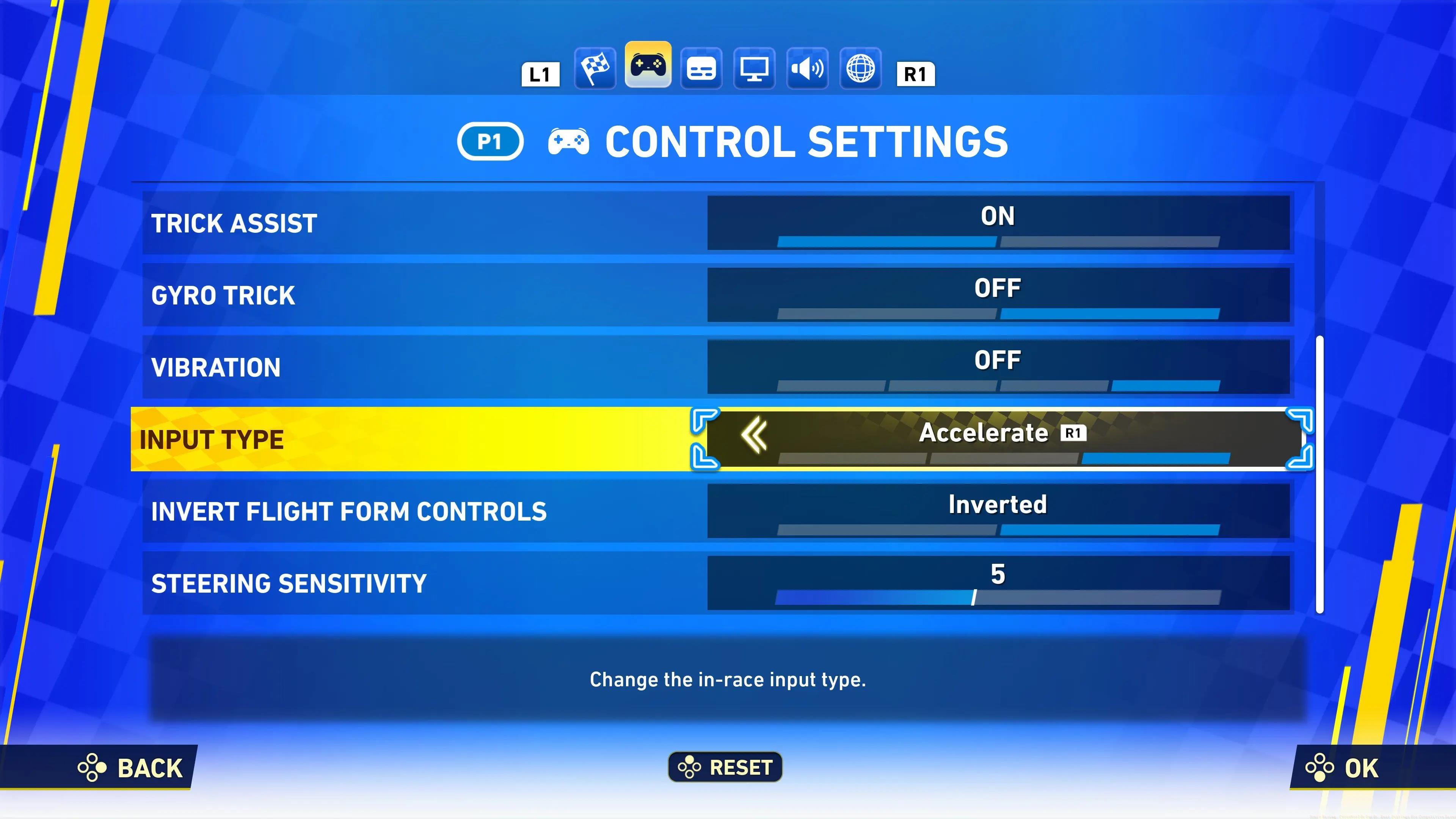
Beyond basic settings, Sonic Racing CrossWorlds offers extensive control customization for players seeking competitive advantages through personalized configurations.
Button remapping allows you to position critical functions like drift and boost on more accessible inputs. Many professional players assign drift to shoulder buttons for simultaneous acceleration and drifting capability. This configuration enables more responsive corner entries and exit acceleration.

Advanced technique: Create custom control schemes for specific track types. Technical courses with frequent corners benefit from different configurations than high-speed oval tracks. Save multiple control profiles for quick switching between race types.
For players using the complete Class Guide approach to gaming optimization, consider how control preferences might translate across different racing titles and genres for consistent performance.
Haptic feedback and controller vibration provide critical tactile information during races, but require careful configuration to avoid distraction while maintaining essential performance cues.
Adjust vibration intensity based on your controller type and personal preference. Strong vibration can enhance immersion but may reduce precision during delicate steering adjustments. Many competitive players reduce vibration to 30-50% intensity to maintain tactile feedback without compromising control accuracy.
Advanced configuration: Customize vibration patterns to signal specific events like drift readiness, boost availability, or incoming attacks. This tactile signaling system can improve reaction times by providing non-visual performance indicators.
Common mistake: Complete vibration disablement removes valuable feedback about track surface changes and collision warnings. Maintain at least minimal vibration to preserve these important racing cues.
Steering sensitivity represents one of the most personalized settings in Sonic Racing CrossWorlds, requiring careful adjustment based on individual reaction times and track characteristics.
Higher sensitivity settings provide quicker response to input commands, beneficial for technical tracks with rapid direction changes. Lower sensitivity offers more precise control for high-speed sections where oversteering can cause significant time loss. Most professional players utilize sensitivity between 65-80% depending on their controller type and racing style.

Advanced technique: Adjust sensitivity based on specific character attributes. Lighter characters typically benefit from higher sensitivity for quick directional changes, while heavier characters perform better with moderate sensitivity for stability maintenance.
Similar to weapon handling in our Weapons Unlock guide, steering sensitivity requires experimentation to find your personal optimal configuration. Document your sensitivity settings for different track types to establish consistent performance baselines.
The heads-up display in Sonic Racing CrossWorlds provides critical race information, but customizable elements allow you to reduce visual clutter while maintaining essential data.
Minimize non-essential HUD elements like player names and cosmetic indicators to focus on position, lap timing, and item inventory. This cleaned interface reduces distraction during intense racing moments while preserving strategic information. Many top competitors use minimal HUD configurations for maximum track visibility.
Advanced configuration: Position critical HUD elements in your natural sight line rather than default locations. Speed and boost indicators should reside where your vision naturally rests during straight sections for quick reference without track attention loss.
Display calibration: Adjust brightness and contrast settings to improve visibility on different track environments. Night courses and brightly lit arenas require different display configurations for optimal racing lines and obstacle identification.
Combining all optimized settings creates a synergistic configuration that maximizes your Sonic Racing CrossWorlds performance across various racing conditions and competition types.
Implement settings progressively rather than simultaneously. Begin with steering assist disablement and camera selection, then advance to sensitivity tuning and control customization. This staged approach allows you to isolate the impact of each modification and adjust accordingly.
Performance testing protocol: After each settings adjustment, complete three time trial laps on a familiar track to establish performance baselines. Compare results against previous configurations to validate improvements or identify regression.
For comprehensive gaming optimization similar to our Complete Guide methodology, maintain a settings journal documenting configurations and their performance outcomes. This systematic approach accelerates your mastery curve and establishes reproducible competitive advantages.
Final professional insight: Revisit your settings monthly as your skills evolve. Configurations that worked during intermediate development may require adjustment as you advance to expert racing techniques and competition levels.
Action Checklist
- Navigate to Options via Extras menu and disable steering assist
- Test both camera modes on Emerald Circuit track for 3 laps each
- Adjust steering sensitivity to 70% and practice drift techniques
- Customize HUD elements to minimize clutter while keeping essential data
- Create and save specialized control schemes for technical vs speed tracks
No reproduction without permission:Tsp Game Club » Sonic Racing: CrossWorlds Guide: Best Settings for Competitive Races Master Sonic Racing CrossWorlds with pro camera, control, and sensitivity settings for competitive advantage